Capture a reproducible incident
Write down the timestamp and timezone, calling and called identities, direction, devices and exact symptom. Identify whether the problem affects one endpoint, one site, one destination or every call. Those boundaries guide the next check.
Choose the right branch
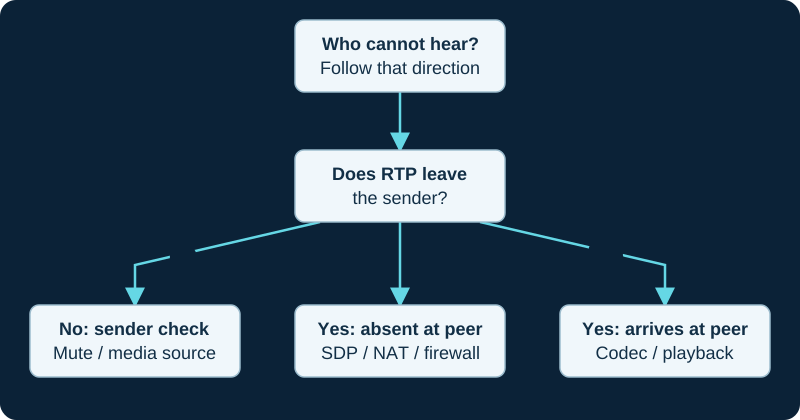
A phone that cannot register needs an identity and reachability investigation. A phone that registers but cannot call needs request, permission and routing checks. A call that connects with missing or distorted sound needs a media-path investigation. A call reaching the wrong person needs destination and schedule review.
Start with a known-working internal call if possible, then change one variable: endpoint, site or destination. Do not change NAT, codecs and dialplan simultaneously. You need to know which change affected the result.
Prove electrical loss before treating a phone as rebooting
For a phone that repeatedly boots, powers briefly or disappears when PoE load changes, follow the IP-phone power-cycle diagnostic. It distinguishes phone uptime from link, VLAN, DHCP, provisioning and SIP recovery, then correlates the exact switch port with detection, classification, allocation, draw, budget and controller faults before any broad power change.
Resolve endpoint matching before inbound routing
For an Asterisk warning that an inbound PJSIP request could not be identified, the endpoint-matching diagnosis starts with one rejected message and the loaded identifier order. It keeps identification separate from registration, digest authentication, DID routing and media, and requires a negative test before accepting a broader match.
Prove ARI application ownership before debugging call logic
When a channel reaches Stasis() and immediately returns, the ARI Stasis registration guide separates HTTP reachability, ARI authorization, WebSocket upgrade, exact application registration, STASISSTATUS and application behavior. It does not treat a running process or successful REST request as proof that the named application owns the channel.
Trace missing or duplicate ARI events through the control plane
When ARI events disappear, repeat or move to another client, use the event-delivery diagnostic. It separates application registration, resource scope, subscribeAll, event filters, one active WebSocket owner, raw delivery, client parsing and downstream idempotency.
Trace an ARI dynamic object through Sorcery
When a dynamic configuration object is absent, rejected, stale or functionally ineffective, use the ARI push-configuration diagnostic. It keeps exact object identity, ARI authorization, Sorcery mapping, persistence wizard, cache state, related-object order and the final PJSIP behavior independently observable.
Preserve evidence safely
Use read-only status information and a narrowly scoped trace first. Logs and captures can contain credentials, identities and conversation content. Restrict access, redact shared extracts and remove temporary diagnostic logging when the investigation ends.
After a repair, repeat the failed scenario and a small set of surrounding workflows. Successful registration alone is not enough: verify two-way audio, hangup and any transfer behavior involved in the original report.
Prove softphone capture before changing the network
When only the softphone user's speech is missing, the microphone diagnostic checks operating-system permission and local capture before following SDP and outbound RTP. It keeps a connected headset, registration, call answer and received audio from standing in for an active microphone path.
Trace mobile wake-up before changing call media
A mobile softphone that rings only while open usually requires an evidence chain across registration ownership, push enrollment, notification-service delivery, app wake-up and the retained INVITE. The background ringing diagnostic keeps those stages separate from later alert, answer and RTP failures.
Trace a repeated SIP authentication challenge as a sequence
The new Asterisk PJSIP 401/407 diagnosis first distinguishes a normal challenge from a loop, then follows the selected auth object, realm, algorithm, credential material, authorized retry and final result. It keeps registration and INVITE exchanges separate and avoids rotating a working secret before the object and realm are known.
Separate transport generation, binding and selection
When a PJSIP transport edit appears ignored, the refreshed Asterisk transport diagnostic separates the saved platform setting, generated configuration, loaded object, local listener, endpoint or registration selection and actual message path. It checks local bind conflicts and the restart boundary before changing credentials, NAT or firewall policy.
Preserve the active audio route across device changes
When a softphone rings or talks through the wrong speaker, headset or microphone, the audio-device diagnostic separates connected hardware, operating-system defaults, per-app routing, client selection, browser permission and the call's active path. It keeps a working system sound or paired Bluetooth label from standing in for the route actually used by the call.
Trace Local-channel data through answer and optimization
When a variable, Dial() option or CDR field appears to vanish after answer, the Local-channel data diagnosis maps both Local halves, the exact read and write moments, inheritance depth, pre-dial placement and optimization events. It does not use /n unless a named behavior must remain on the Local pair.
Trace a stale BLF through its subscription
The Asterisk BLF update diagnosis follows one failed transition through provider state, loaded hint and context, watcher, SUBSCRIBE response, NOTIFY body and phone mapping. It keeps a working lamp separate from registration, routing and queue evidence.
Trace a taskprocessor high-water warning before changing limits
The Asterisk taskprocessor overload diagnosis follows the named queue, producer, consumer, depth, service time and recovery. It separates queue ownership from PJSIP admission control and does not treat a larger water mark or a restart as a root-cause fix.
Follow FreePBX media through both generated call legs
For a FreePBX PJSIP call that connects with one-way or no audio, the focused media investigation follows the final offer and answer, observed RTP, generated and loaded objects, direct-media topology and each NAT or media control separately.
A pickup code rings busy, fails or finds no call
Use the FreePBX call-pickup investigation to distinguish general group pickup, directed pickup, ring-group pickup and BLF behavior, then correlate the request with the target channel while it is still ringing.
A transfer disconnects, returns or reaches the wrong destination
Use the FreePBX transfer investigation to distinguish blind, attended, BLF, SIP REFER and feature-code paths, then correlate permissions, context, consultation channels and the final bridge.
A device is replaced or registration exceeds Max Contacts
Follow the FreePBX PJSIP max-contacts investigation across managed intent, generated configuration, loaded AoR contacts, NAT source changes and actual dial behavior.
A PJSIP request leaves on the wrong transport
Use the Asterisk transport-selection diagnostic to prove the request URI, DNS target, explicit or implicit object, connection reuse and proxy owner before changing transport order or restarting.
A registered trunk's inbound call uses the wrong endpoint
Use the registration return-path diagnostic to prove Contact, returned line token, endpoint selection, context and called extension as separate steps.
Call drops when a PJSIP session refresh is due
Use the Asterisk refresh-drop diagnostic to prove the negotiated interval, named refresher, failed re-INVITE or UPDATE and releasing component on the exact leg.
Softphone registration disappears after a network change
The network-change diagnostic separates operating-system path events, stale SIP flows, keepalive evidence, replacement registration, registrar contacts, push state and the later call path.
Asterisk receives a digit but the far IVR ignores or doubles it
Use the PJSIP DTMF mismatch diagnostic to correlate ingress receipt, bridge ownership, egress representation and application timing. It keeps RFC 4733 payload mappings, SIP INFO and in-band audio separate on both call legs.
Asterisk early media or PRACK fails
Use the Asterisk PJSIP early-media diagnostic to trace 180 or 183, 100rel, PRACK, SDP and early RTP before changing endpoint policy.
Asterisk PJSIP advertises or uses the wrong media address
Use the focused diagnostic to compare final SDP, loaded transport and endpoint controls, both RTP directions, direct media and proxy ownership before changing NAT settings.
Small SIP messages work but a large UDP request fails
Use the large-message UDP diagnostic to correlate complete message size, selected transport, effective path MTU, IP fragments, intermediary behavior and the final SIP transaction before changing codecs or firewall policy.
Asterisk WebRTC registers but the call is silent
Use the Asterisk WebRTC no-audio diagnostic to separate HTTPS, WSS and SIP success from final SDP, the selected ICE pair, DTLS-SRTP, protected packet flow and browser playback.
Trace a silent IP-button press by action path
When a fixed button produces no call or alert, use the IP-button diagnostic to separate gesture and input detection, standalone endpoint versus smart-relay host, loaded action, SIP answer and audio, multicast receivers, platform or API delivery, supervision and responder acknowledgement.
Trace an unprocessed Asterisk call file without duplicating the job
Use the call-file diagnostic to verify the loaded watcher, effective spool path, atomic same-filesystem rename, modification time, parser, channel attempt and answered action before resubmitting an unknown job.
Trace an AMI originate without blind retries
Use the AMI Originate diagnostic to separate authorization, action acceptance, event visibility, first-leg outcome and downstream dialplan behavior before repeating an ambiguous request.
An ARI-originated channel never reaches the application
Use the Stasis registration diagnostic to separate HTTP creation or origination from the exact application's WebSocket registration and StasisStart. The ARI origination guide defines the IDs and lifecycle gates to capture before any retry.
External Media exists but the audio is absent or wrong
Use the ARI External Media diagnostic to trace driver selection, Stasis ownership, bridge membership, fixed format, outbound destination and inbound return tuple before changing codecs or firewall policy.
ARI channel will not stay in a bridge
Use the ARI bridge diagnostic to separate missing resources, Stasis ownership, membership events, bridge type and media topology from codec or firewall guesses.
Zoom Phone BYOC-P trunk is down or calls fail
Use the BYOC-P diagnostic to trace one call through carrier service, the customer SBC, cluster-specific network and certificate state, Zoom routing objects, E.164 number assignment and negotiated media.
Trace Linphone XML through restart and overwrite semantics
When Linphone fetches a provisioning document but a setting remains stale or returns, use the remote-provisioning diagnostic to prove URL selection, restart-time retrieval, XML input, key support, overwrite behavior and one-time versus repeated application.
Trace a Zoiper call that stops reaching a backgrounded client
Use the Zoiper background incoming-call diagnostic to distinguish an application or operating-system reachability issue from registration expiry, NAT lifetime, Push Proxy wake-up, registrar contact selection and a later media problem.
Trace a 3CX mobile push subscription across an extended absence
Use the 3CX mobile push-expiry diagnostic to separate PBX-version lifetime, last client connection, subscription state, PBX-to-push reachability, device notification controls, re-enrollment and the later call path.
Trace a Genesys Cloud BYOC call across platform and routing boundaries
Use the Genesys Cloud BYOC diagnostic to follow one call through Voice platform, regional peers, directional transport, inbound organization identity, Number Plan Site, carrier response and negotiated media.
Trace an Orange Business Talk failure through its ordered access and trunk
Use the Orange Business Talk diagnostic to follow one call through the selected access type, customer SBC or PBX, certificate state, SIP peers, ordered Voice Channels, country-specific number policy, Orange response and negotiated media.
Trace a Wi-Fi voice interruption across one roam
Use the Wi-Fi phone roaming diagnostic to line up old and new BSSID, client and network roaming decisions, authentication, VLAN and IP continuity, RF conditions and RTP loss before changing AP power or fast-roam policy.
Trace an ACS Direct Routing failure through retirement and application boundaries
Use the Azure Communication Services Direct Routing diagnostic to follow transition eligibility, SBC identity, TLS, SBC-originated OPTIONS, route pattern, bounded failover, carrier result, application event and media.
Trace a quiet or missing horn-speaker page
Use the IP horn-speaker diagnostic to separate source audio, SIP or multicast delivery, receiver selection, PoE, satellite sharing, loaded processing, aiming and site acoustics before raising volume.
ARI prompt is queued, stuck or silent
Use the ARI playback diagnostic to distinguish missing media, wrong scope, Stasis ownership, an existing media queue, control-state races and endpoint audio.
FreePBX hold music is silent or wrong
Use the FreePBX Music on Hold guide and the paired diagnostic to trace category precedence, runtime class, source process, media ownership and audible result.
CCAI Platform BYOC call fails or has no audio
The CCAI Platform BYOC diagnostic follows one call through instance activation, unique SIP FQDN, directional authentication, route and metadata selection, signaling, media and transfer ownership.
Browser softphone gets an INVITE but does not ring
Use the browser no-ring diagnostic to separate WSS and registration, INVITE delivery, visible call state, autoplay policy, user activation, answer and remote conversation audio.
Trace a DECT repeater that associates but still fails
Use the DECT repeater coverage and call diagnostic to separate compatibility and association from region, overlap, topology, local relay capacity, base registration, routing and media.
FreePBX contact is missing or stale
Use the Contact Manager guide and focused diagnostic to separate the authoritative record, override, group membership, viewer permission and consumer delivery.
A ported number still reaches the old carrier
Use the ported-number diagnostic to separate the order milestone from range-holder routing, originating-network propagation, new-carrier ingress, PBX matching and final answer. Keep the former path until the agreed acceptance set is complete.
Trace FreePBX prompt language from the channel to the selected file
When a prompt is missing, mixed or in the wrong language, use the FreePBX prompt-language diagnostic. It keeps Sound Languages pack inventory, call-flow language selection, Asterisk fallback, file format, playback and audible result separate.
Trace a Custom Destination from selection through return
The Custom Destination diagnostic follows one call through the selecting module, saved target, generated destination, loaded context and direct-transfer or subroutine stack before changing custom code or downstream routes.
Asterisk AGI script fails or hangs
Freeze one call and separate dialplan reachability, local process launch or FastAGI connection, AGI dialogue, external dependency, hangup cleanup and the post-AGI branch. Capture AGISTATUS only after return and avoid blind retries while a process or connection may still be active.
A SIP-trunk 911 address or callback is wrong
Follow the location-to-call-path diagnostic across direct dialing, route and trunk selection, registered or dispatchable location, callback identity, provider validation and notification without making an uncoordinated emergency call.
MicroSIP registers but calling or audio fails
Use the MicroSIP diagnostic to trace the active account, dial-plan output, SIP response, Via and Contact, SDP and RTP, protection policy, session refresh and Windows audio devices without applying a generic NAT or codec fix.
Trace a room video bar by media path
Use the video-bar camera and room-audio diagnostic to separate session and device selection from privacy, BYOD transport, camera capture, microphone transmit, speaker output, displays, content and network service before resetting the room.
Trace a FreePBX conference that waits, rejects or has no audio
Use the FreePBX conference diagnostic to follow one caller through entry routing, PIN and role, marked-user lifecycle, live ConfBridge state, participant media and bridge mixing before changing room-wide settings.
Trace a FreePBX queue caller's wait, announcements and exit
Use the queue caller diagnostic to follow one call through admission, music and announcements, live eligibility, exit reason and failover without treating a long wait as a network fault or staffing result by itself.
Trace a FreePBX Announcement from route to final destination
Use the Announcement diagnostic when callers hear the wrong recording, cannot repeat or skip, return to the wrong IVR or reach the wrong next destination. It preserves shared recordings and separates answer state, digit receipt, IVR context and downstream routing.
Trace FreePBX voicemail from route to authenticated retrieval
Use the FreePBX voicemail diagnostic when callers reach the wrong mailbox or greeting, a message is missing or silent, or the owner cannot retrieve it. It separates the managed destination, mailbox context, recording result, stored message and retrieval authorization.
Trace a FreePBX dial-by-name search and return path
Use the FreePBX Directory diagnostic when callers cannot find a name, select the wrong person or return repeatedly to an IVR. It follows one call through the Directory entry, DTMF match, announcement, dial target and invalid branch.
Trace a FreePBX Misc Application from code to destination
When a custom internal code is absent, collides or reaches the wrong target, use the feature-code diagnostic with the Misc Applications guide. Preserve phone digits, enabled record, collision, loaded match, destination and permission boundary in order.
Trace a FreePBX blacklist miss or false positive
When a blocked caller still rings or a legitimate caller is rejected, use the FreePBX blacklist diagnostic. It preserves received number and presentation, inbound route, loaded hook, match result, destination and mutation timeline instead of treating the saved row as runtime proof.
Reconcile a failed or partial FreePBX Bulk Handler import
When a Bulk Handler import fails, partly completes or changes the wrong records, use the bounded diagnostic. It preserves the literal artifact, installed schema, full validation detail, update scope, per-row result, Apply Config and owning module instead of blindly replaying the file.
Separate certificate renewal from service activation
For a FreePBX Let's Encrypt failure or stale served certificate, use the renewal investigation. It now versions the Certificate Manager module and keeps issuance, stored object, default selection, proxy or web binding, PJSIP reload and client-observed serial separate.
Contain a restored FreePBX system that reaches production
When a recovery target unexpectedly registers a live trunk or routes real calls, use the restored-PBX diagnostic. It separates registration, IP authorization, inbound delivery, routing and automation while preserving evidence and the production recovery path.
Find the active owner of wrong or rejected FreePBX caller ID
Use the refreshed FreePBX outbound caller-ID diagnostic to prove the selected route and trunk, resolve identity precedence, inspect the outbound INVITE and place carrier authorization after the PBX boundary.
Trace missing, repeated or apparently misordered CEL events
Use the Asterisk CEL diagnostic to separate event selection, per-channel ordering, backend delivery, storage and downstream import before changing collection or deleting records.
Trace a missing, incomplete or misattributed Asterisk queue log
Use the Asterisk queue-log diagnostic to separate Queue admission, logger policy, file or realtime storage, event identity, rotation and downstream reporting before changing queue behavior.
Trace a FreePBX UCP login or feature-access failure
Use the FreePBX User Management and UCP diagnostic to separate account existence, authentication, UCP Allow Login, group inheritance, feature scope, templates, saved layout and web sessions before resetting credentials or widening access.
Trace a FreePBX calendar event that does not match or routes incorrectly
Use the FreePBX Calendar diagnostic to follow one event through remote retrieval, timezone and recurrence, group policy, consumer semantics, generated state and the actual branch.
Find why voicemail or the wrong ring-group member answered
Use the FreePBX ring-group answer-race diagnostic to follow member branches, remote answer supervision, confirmation, timers, cancellation and the final bridge.
Find why Groundwire or Acrobits rings the wrong device
Use the Acrobits device-lifecycle diagnostic when a duplicate, wrong or removed handset reacts to an incoming call. It preserves registration ownership, token cleanup and push progress as separate evidence.
Trace a received FreePBX fax that is missing from email or UCP
Use the FreePBX post-receipt fax diagnostic after ReceiveFAX completes to follow recipient mapping, attachment conversion, local storage, quota, UCP visibility and email delivery.
Find why peoplefone offline fallback did not route the call
Use the peoplefone fallback diagnostic to correlate registration expiry, provider line state, the offline role, number filtering and the alternate call leg.
Find why an A&A number rings an old device and the PBX
Trace provider registrations, SIP-to-server delivery, inherited DDI targets, Also Ring branches, answer and cancellation with the A&A duplicate-ringing diagnostic.
Trace a display speaker by content object and trigger
Use the IP display-speaker screen diagnostic when audio works but the panel is dark, stale, unreadable or shows the wrong content. It separates power and local rendering from slide, screen, event, priority, API, time and physical-visibility owners.
Trace a missing or misrouted FreePBX Callback
Use the FreePBX Callback diagnostic to follow one attempt through the inbound trigger, chosen number, generated object, originated leg, outbound route, answer and final destination.
Find why PortSIP ONE rings only while open
Trace one missed mobile call through version, token, push request, platform delivery, wake-up, new registration and the replacement INVITE with the PortSIP ONE mobile diagnostic.
Find why Bria Mobile rings only while open
Follow one Bria call across Push Service enrollment, registration mode, Contact routing, APNs or FCM, wake-up tunnel, SIP timing and later media with the Bria mobile background-call diagnostic.
Trace Snom M400 roaming through radio and registration
Use the Snom M400 dual-cell roaming diagnostic to distinguish weak synchronization and failed handover from SIP registration replacement, PBX contact policy, call capacity and media.
Find why a registered Zen trunk call has no audio
Follow registration, dialog establishment, SDP, Zen’s documented media ranges, both RTP directions and G.711 decoding with the Zen SIP trunk no-audio diagnostic.
Find why SureVoIP did not try the next destination
Trace the configured order, first-destination response, timeout trigger and next attempt with the SureVoIP inbound destination diagnostic.
Fix a missing, wrong or stale FreePBX caller name
Use the FreePBX caller-name workflow to follow one number through route selection, lookup, optional AstDB cache, channel identity and the phone display.
Trace a missing or mistimed FreePBX Wake Up Call
Follow one reminder through timezone, stored epoch, generated call file, Asterisk spool processing, attempts, answer, prompt and confirmation with the focused diagnostic.
Trace a Poly Rove B4 roaming or audio failure
Use the Poly Rove B4 roaming diagnostic to separate RSSI and cell identity, synchronization chain, DECT handover, SIP state, codec capacity and two-way media.
Trace an Asterisk Gosub that does not return or owns the wrong channel
Use the Gosub diagnostic to follow one invocation through its loaded target, stack frame, arguments, branch, Return() and caller- or callee-channel effect.
Trace a missing, duplicate or slow Asterisk hangup handler
Use the Asterisk hangup-handler diagnostic to follow one channel through push, stack order, run, return, teardown timing, final cause and downstream records.
Trace an Asterisk post-bridge continuation failure
Use the Asterisk after-bridge diagnostic to follow one channel from configured destination through bridge entry, exit, survival and the first executed priority.
Trace a Sangoma Phone login loop before SIP registration
Use the Sangoma Phone login diagnostic to follow one installed or browser client through supported release, PBX readiness, RTAPI reachability, certificate, WSS, user authorization and session creation.
Find why one Magrathea resilience destination receives no calls
Trace the number, nominated pool, provider health probes, pool membership, new-call selection and PBX route with the Magrathea SIP Resilience diagnostic.
Diagnose missing, early or late Asterisk talking events
Follow the Asterisk TALK_DETECT workflow from one channel and its media frames through threshold crossings, audiohook order and the selected AMI or ARI consumer.
Trace a wrong or failed FreePBX Misc Destination
Follow the FreePBX Misc Destination workflow from the selecting module and stable destination ID through exact digits, generated handoff, loaded match and final route or feature owner.
Diagnose missing FreePBX queue priority or wrong caller order
Follow the FreePBX Queue Priorities workflow from the selecting route through inherited QUEUE_PRIO, queue admission, member offers and the final outcome.
Find why an NFON backup PBX receives no calls
Trace the ordered mode, trunk set, endpoint readiness, number route, provider selection and PBX route with the NFON SIP Trunk Flexx diagnostic.
Diagnose an Asterisk channel count or bypassed local limit
Follow the channel-group workflow from loaded key and selected owner through created legs, count timing, decision, transfer and teardown.
Trace a menu prompt that plays but ignores the caller digit
Use the Asterisk BackGround diagnostic to follow one key from channel reception through playback options, destination context, extension matching, timeout and the first executed priority.
Trace a FreePBX API token or GraphQL failure
Use the FreePBX API diagnostic to follow one sanitized request through TLS, application identity, grant, token, scope, active schema and resolver outcome.
Trace a PJSIP multi-contact ring failure
Use the PJSIP_DIAL_CONTACTS diagnostic when one registered device—or none—rings for an endpoint expected to reach multiple contacts.
Trace a PJSIP media-offer override that did not take effect
Use the PJSIP_MEDIA_OFFER diagnostic when a codec stays in the offer, another codec is selected, the call is rejected or media fails after a refresh.
Trace an empty or unexpected PJSIP URI component
Use the PJSIP_PARSE_URI diagnostic when a user, host, port or URI parameter is blank, zero, minus one or different from the expected value.
Trace a missing hold event or unexpected peer behavior
Use the HOLD_INTERCEPT diagnostic when AMI or ARI sees no event, a consumer acts on the wrong channel, or the peer does not enter or leave the intended hold state.
Find why SIP DNS failover did not try the next target
Trace the configured URI, NAPTR, SRV, target addresses, cached state, selected transport, response or timeout and new transaction with the Voip Unlimited DNS diagnostic.
Find why a Baresip account loads but registration or audio fails
Follow the selected config path, module load set, account User-Agent, REGISTER transaction, SDP, RTP and audio endpoints with the Baresip diagnostic.
Trace an Asterisk fax application that fails or selects the wrong mode
Follow the loaded res_fax stack, application channel, FAXOPT values, file access, T.38 or audio path and final result with the Asterisk fax diagnostic.
Investigate empty or misleading Asterisk RTCP statistics
Trace the exact PJSIP owner, stream, RTCP reporter, bridge topology, raw counters and audible symptom with the Asterisk RTCP diagnostic.
Diagnose an empty or mis-scoped Asterisk response header
Trace the release, module, answered callee, uppercase U() handler, response name and instance with the Asterisk PJSIP response-header diagnostic.
Find why an answered fax call never becomes T.38
Trace the initial call, re-INVITE, SDP answer, UDPTL path, ECM and received document with the T38Fax T.38 diagnostic.
Diagnose an empty or wrong Asterisk PJSIP contact lookup
Trace the endpoint, AoR association, contact lifecycle, complete identifier and selected field with the focused Asterisk diagnostic.
Diagnose an empty or wrong Asterisk PJSIP endpoint lookup
Trace function support, the loaded endpoint, exact channel owner, inbound identification, selected field and resolved session behavior with the focused Asterisk diagnostic.
Diagnose an ignored Asterisk PJSIP DTMF override
Trace function support, channel ownership, endpoint policy, runtime mode, protocol event, bridge direction and IVR result with the focused Asterisk diagnostic.
Diagnose a missing ARI transfer event or stalled REFER
Trace version support, endpoint permission, channel timing, WebSocket delivery, REFER correlation, application action, NOTIFY state and final bridge with the focused Asterisk diagnostic.
Diagnose an empty or misplaced Asterisk From parameter
Trace release support, explicit parameter type, callee pre-dial ownership, emitted SIP and intermediary behavior with the focused PJSIP diagnostic.
Diagnose a missing, rejected or ignored PJSIP NOTIFY
Trace release support, loaded content, target mode, endpoint or dialog state, arbitrary-URI configuration, emitted request, SIP response and independent action evidence with the focused Asterisk diagnostic.
Diagnose an ineffective PJSIPRegister or PJSIPUnregister action
Trace release support, AMI permission, exact object name, action response, SIP exchange, Registry event and fresh detail state with the focused runtime-control diagnostic.
Trace Linphone encryption and ZRTP state before changing policy
When a Linphone call is unencrypted, fails under required protection or shows a changed ZRTP SAS, use the focused diagnostic to inspect policy, offer and answer, selected media protection and peer verification without forcing a downgrade or marking an unchecked token valid.
Trace a missing or duplicated inheritable PJSIP header
Use the Asterisk inheritable-header diagnostic to test branch support, source-channel state, callee creation, per-leg mutation, the emitted request and intermediary handling.
Diagnose a rejected PJSIP refresh or post-refresh media loss
Use the Asterisk session-refresh diagnostic to trace channel ownership, re-INVITE or UPDATE, offer-answer collision, SDP result and RTP.
Diagnose an empty or incomplete Asterisk PJSIP header list
Trace release support, loaded module, INVITE scope, current channel, prefix and repeated instances with the focused PJSIP diagnostic.
Diagnose PJSIP hold passthrough and wrong MOH ownership
Use the focused Asterisk diagnostic when hold is not signaled to the peer, local music is unexpected, remote silence appears or media does not resume.
Trace Linphone ICE and relay selection before swapping servers
When a Linphone call lacks candidates, fails checks or never selects an expected relay, use the focused diagnostic to follow effective NatPolicy, discovery, authentication, allocation, SDP, selected pair and RTP in order.
Trace the first final response when PJSIPHangup looks wrong
Use the focused diagnostic when an intended rejection becomes 200, a different final code or an unexpected cause. It checks version, channel, timing and transaction evidence before a bounded correction.
Diagnose an empty or wrong Asterisk PJSIP channel value
Use the channel URI and address diagnostic to prove technology, leg, timing, selector and direction before changing SIP configuration.
Diagnose an empty or wrong Asterisk PJSIP RTP value
Use the RTP address, secure and hold diagnostic to prove channel, stream and timing before changing media configuration.
Find where a LoopUp secure trunk fails
Trace regional DNS, TCP, customer certificate, LoopUp chain, mutual TLS, SIP, SDP security descriptions and SRTP packets with the LoopUp secure-trunk diagnostic.
Trace a Linphone background call from token to media
When Linphone rings only while open, use the focused diagnostic to separate account push parameters, registrar binding, proxy action, platform delivery, app wake, refreshed registration, INVITE, call interface and media.
Diagnose PJSIP MessageSend routing and delivery claims
Use the Asterisk MessageSend diagnostic to separate destination parsing, endpoint and contact selection, Request-URI, header precedence, handler status, SIP response and endpoint presentation.
Diagnose missing or overbroad Asterisk LOG_GROUP output
Use the LOG_GROUP diagnostic when a named channel group hides expected dialplan lines or exposes unrelated ones.
Diagnose a wrong or dropped FreePBX Dynamic Route
Use the Dynamic Routes diagnostic to locate the first mismatch across module state, input, substitution, lookup, exact match and fallback.
Find where FreePBX Set CallerID was skipped or replaced
Use the Set CallerID diagnostic to locate the first mismatch among selection, generated and loaded state, channel identity, downstream policy and provider presentation.
Trace wireless-headset controls and mute state
Use the wireless-headset control diagnostic to locate the first mismatch among physical control, radio or adapter, host, vendor service, softphone state and remote audio.
Find a SIPTRUNK registration or IP-authentication mismatch
Use the SIPTRUNK mode-mismatch diagnostic to align the portal mode, REGISTER or public-source evidence, inbound destination, PBX route and failover result.
Diagnose a Blink Reject that stops other phones or voicemail
Use the Blink inbound-disposition diagnostic to map Reject, Busy or Escape to the actual SIP response, fork cancellations and final caller treatment.
Diagnose SIP.US gateway, secondary-trunk or inbound failover failure
Use the SIP.US failover diagnostic to distinguish current gateway selection, registration or IP authentication, Contact reachability, DID assignment and PSTN treatment.
Diagnose a rejected Bulk Solutions 911 or wrong 922 address safely
Use the Bulk Solutions 911 and 922 diagnostic to verify number provisioning, address, trunk path, caller identity and provider readback before any locally authorized live operator test.
Diagnose restored FreePBX 17 custom Macro failures
Use the FreePBX 17 custom-macro diagnostic to locate the first failure among archive content, loaded includes, removed Macro support, Gosub targets, variable scope, return behavior and downstream routing.
Find why a Flowroute inbound failover route was not tried
Use the Flowroute inbound-failover diagnostic to verify route relationships, destination type, provider edge, first failure, next attempt and restoration.
Find why DIDWW did not try the next trunk-group member
Use the DIDWW trunk-group diagnostic to separate assignment, priority, weight, timeout, rerouting-code, capacity, CDR and PBX evidence.
Diagnose a missing Asterisk frame without hiding it
Follow the FRAME_TRACE diagnostic across version, dialplan execution, channel leg, RX or TX viewpoint, filter and logger state before considering any controlled frame suppression.
Trace lock waits and incorrect shared state
Use the Asterisk lock diagnostic to separate mutex contention, name mismatch, nested ordering, unprotected access, failed updates and caller treatment.
Trace missing, blank, stale or deleted AstDB keys
Use the Asterisk AstDB diagnostic to separate namespace errors, blank values, destructive reads, concurrent writes, wrong-node evidence and restore gaps.
Trace Twilio termination silence or 403 Forbidden
Use the Twilio termination diagnostic to separate trunk-domain identification, DNS reachability, ACL, credentials, number format, caller identity and account policy.
Trace a SessionTalk push call from PBX to direct media
Use the SessionTalk push diagnostic when foreground calls work but a background call does not wake, present, answer or complete with two-way media.
Find why a SIPStation DID does not reach FreePBX
Use the SIPStation inbound diagnostic to separate registration mode, provider delivery order, configured failover, firewall receipt, inbound-route matching and media.
Trace an Asterisk time condition that selects the wrong branch
Use the GotoIfTime diagnostic to separate upstream routing, channel clock, timezone, timespec fields, primitive behavior, fall-through, targets and downstream handling.
Trace an Asterisk variable missing on a child leg
Use the channel-variable diagnostic to separate wrong owner, late write, inheritance depth, Gosub shadowing, master lifetime and explicit cross-channel reads.
Trace an Asterisk exception handler that does not run
Use the Asterisk exception diagnostic to separate wrong event class, context scope, local special-handler precedence, missing e and overwritten status evidence.
Trace a wrong Asterisk dialplan lookup or repeated side effect
Use the dialplan lookup diagnostic to separate branch availability, exact target, Return data, arguments, evaluation timing and downstream outcome.
Diagnose choppy Asterisk audio without blind buffer tuning
The Asterisk jitter-buffer diagnostic separates affected direction, RTP ownership, effective policy, packet evidence, added delay and endpoint processing.
Diagnose empty, partial or noisy Asterisk PJSIP History
The PJSIP History diagnostic checks module state, capture timing, retained entries, filter grammar and call-leg identity before drawing a signaling conclusion.
Diagnose missing, stale or excessive Asterisk metrics
The Asterisk Prometheus diagnostic separates branch support, module state, HTTP path, authentication, provider families, scrape timing, labels and cardinality.
Diagnose empty, failed or slow Asterisk ODBC lookups
The Asterisk func_odbc diagnostic separates module, DSN, connection, query, result and call-path timing evidence.
Diagnose Asterisk ODBC writes that vanish or duplicate
The ODBC mutation diagnostic follows one change through statement execution, transaction selection, commit or rollback, teardown and retry.
Diagnose missing or stale PJSIP Realtime objects
The PJSIP Realtime diagnostic finds the first divergence across Sorcery, source order, connector, schema, row, cache and PJSIP runtime state.
Diagnose missing, duplicated or late Asterisk periodic hooks
The periodic-hook diagnostic follows module, creation, ID, owner, async execution, playback, media and teardown in order.
Diagnose Asterisk silence or noise waits that stall or advance early
The silence and noise diagnostic follows loaded application, channel, frames, units, iterations, timeout, status and downstream routing in order.
Diagnose Asterisk condition waits that time out or return early
The WaitForCondition diagnostic follows installed contract, loaded expression, deferral, state owner, writer, truth, timing, status and downstream routing in order.
Diagnose Asterisk epoch waits that return PAST, fail or fire at the wrong time
The WaitUntil diagnostic follows installed contract, loaded epoch, conversion, clock, channel lifetime, timeout, status and downstream action in order.
Diagnose Dial that returns early, reports a surprising status or never answers
The Asterisk Dial diagnostic follows loaded invocation, created legs, signaling, answer, bridge, result and continuation in order.
Diagnose Originate success with a missing call or second leg
The Asterisk Originate diagnostic separates loaded arguments, sync or async return, first-channel answer, destination entry and any later Dial outcome.
Diagnose Bridge failure, loops, missing targets and missing media
The Asterisk Bridge diagnostic follows two live channels through lookup, answer, membership, exit and two-way media.
Diagnose BridgeWait entertainment and BridgeAdd failure
The Asterisk holding-bridge diagnostic follows handles, roles, answer, entertainment, target lookup and membership.
Diagnose accepted AMI bridge actions with wrong membership
The AMI bridge diagnostic follows authorization, correlation, identities, events and media.
Diagnose an accepted AMI transfer with the wrong call result
The AMI transfer diagnostic follows authorization, action contract, live identities, dialplan entry, target and media.
Diagnose CancelAtxfer failure or the wrong resumed call
The CancelAtxfer diagnostic follows action availability, abort configuration, transfer phase, re-bridging and media.
Diagnose a disappearing or unoptimized Asterisk Local channel
The Local optimization diagnostic follows modifiers, manager evidence, event correlation, final topology and media.
Diagnose missing, stale or mis-correlated AMI channel snapshots
The AMI channel snapshot diagnostic follows version support, list boundaries, live identity, topology and media.
Diagnose missing, delayed or duplicated AMI events
The AMI event-delivery diagnostic follows permissions, masks, filters, transport, parsing and storage.
Diagnose missing, duplicated or misleading AMI UserEvent telemetry
The AMI UserEvent diagnostic traces the producer, USER delivery controls, raw event, storage and outcome.
Diagnose missing, stale or wrong AMI device state
The AMI device-state diagnostic traces version support, EntityID, caching, list completion, provider ownership, hint aggregation and the endpoint outcome.
Diagnose missing, stale or wrong AMI presence state
The AMI presence-state diagnostic traces provider ownership, direct query, bounded list, event scope, hint mapping, subscription and the final consumer.
Diagnose missing, stale or wrong AMI extension state
The AMI extension-state diagnostic traces one Exten-and-Context pair from providers and hint through list completion, live event and subscriber outcome.
Diagnose missing, stale or wrong AMI dialplan extensions
The AMI dialplan diagnostic traces one exact key across source, loaded state, manager transaction, match selection, execution and call outcome.
Diagnose missing, stale or wrong AMI configuration updates
The AMI configuration diagnostic finds the first divergence across file scope, ordered operations, ownership, reload, runtime and outcome.
Diagnose a loaded Asterisk module with a missing capability
The module capability diagnostic traces package, load, registration, configuration and behavior without reaching first for refresh.
Diagnose a missing or denied Asterisk AMI action
The AMI missing-action diagnostic follows one action through session identity, user-visible inventory, server registry, support, authorization and outcome.
Diagnose AMI login and dropped sessions
The AMI login diagnostic traces protected reachability, framing, plain or MD5 authentication, event selection and termination.
Diagnose VoIPstudio Desktop from online state to two-way media
Use the VoIPstudio Desktop diagnostic to separate application login, endpoint registration, call authorization, device selection, network tests and each RTP direction.
Diagnose a registered VoIP Much trunk beyond the green state
Use the VoIP Much trunk diagnostic to separate source blocking, registration cadence, number routing, channel scope, signaling, SDP and both RTP directions.
Trace a passing FreePBX destination test to the actual archive
Use the FreePBX missing-artifact diagnostic to separate job execution, local creation, handler invocation, remote object placement, retention and retrieval.
Diagnose missing or stale AMI core evidence
Use the Asterisk AMI core-query diagnostic to separate wrong node, session, framing, permissions, response correlation, parser and cache faults.
Diagnose missing or incomplete AMI queue snapshots
Use the Asterisk AMI queue diagnostic to separate target, session, permissions, filters, response correlation, completion, parser and cache faults.
Diagnose a registered VoIPline trunk beyond the green state
Use the VoIPline trunk diagnostic to separate mode, interconnect, identity, routing, channel, SDP and media failures.
Diagnose Webex App after the phone service connects
Use the Webex App diagnostic to locate the first failure across assigned service, registration, entitlement, address or number, call control, devices and media.
Trace a missing or stale FreePBX Asterisk Info report
Use the Asterisk Info discrepancy diagnostic to isolate module, dependency, query, transform, observation time and loaded-object state before reloading or restarting a working PBX.
Trace a stale or contradictory FreePBX dashboard card
Use the FreePBX dashboard diagnostic to isolate module, hook provider, collector, cache, clock, unit and runtime source before restarting services or changing a working call path.
Trace a GDS3712 call, video or unlock failure
Use the GDS3712 diagnostic to isolate power, network, SIP, endpoint video, control request, relay, lock, input and event evidence before resetting or rewiring the station.
Diagnose a Voip Unlimited DDI that fails after registration
Use the inbound-DDI workflow to find the first missing provider assignment, port, alias, attempt, edge receipt, identity, route or destination.
Diagnose missing, stale or inverted AMI mailbox results
Use the Asterisk AMI mailbox diagnostic to trace target, context, permissions, raw field semantics, storage freshness, parsing and cache behavior.
Diagnose incomplete AMI voicemail-user results
The AMI voicemail-user diagnostic traces module ownership, permissions, framing, identity and parsing.
Diagnose AMI voicemail refresh and MWI control
The AMI MWI control diagnostic traces one request without conflating acceptance, storage, subscription, delivery or phone display.
Diagnose missing or stale ConfBridge list data
The ConfBridge list diagnostic traces node, module, permission, room identity, framing, filters and parser state.
Diagnose accepted ConfBridge controls that appear ineffective
The ConfBridge control diagnostic traces availability, permission, exact scope, response, events, snapshots and recording files.
Diagnose missing or contradictory ConfBridge lifecycle events
The ConfBridge event diagnostic traces node, profile, permission, filter, transport, identity, threshold and snapshot evidence.
Diagnose a wrong ConfBridge menu, prompt or exit result
The focused ConfBridge diagnostic traces dialplan, profile fallback, DTMF, prompt assets, authorization, action and CONFBRIDGE_RESULT.
Diagnose SignalWire calls that fail after credential registration
Use the SignalWire failed-call workflow to find the first missing profile, handler, number-resource, PBX-route, identity, protection or media boundary.
Diagnose AMI recording that is missing, empty or wrong
The MixMonitor workflow follows one channel from action through events, file close, decode and retention.
Diagnose an AMI parked-call lifecycle
The parked-call workflow follows one channel through assigned slot, retrieval, give-up or timeout and verifies media separately.
Diagnose an accepted queue-member control with wrong state
The queue-member control workflow follows one mutation through exact scope, event visibility, snapshot and call outcome.
Diagnose an accepted queue reload or reset with wrong state
The queue reload and reset workflow traces scope, generation, rule framing, statistics and retained history.
Diagnose queue caller priority or withdrawal that appears ineffective
The queue caller-control workflow traces exact channel identity, later snapshot, dialplan return and historical evidence.
Diagnose an accepted ring-in-use change with wrong ringing
The ring-in-use workflow traces identity, policy, state, eligibility, offer and outcome.
Diagnose an accepted QueueLog action with no useful record
The QueueLog workflow traces node, row, storage, parser and report evidence.
Find the first wrong boundary in a Telnyx inbound path
Use the Telnyx inbound-route diagnostic to trace number assignment, Connection authentication, regional network evidence, route attempts, PBX matching and restoration.
Find the first wrong boundary in a Bandwidth inbound path
Use the Bandwidth inbound-route diagnostic to trace number configuration, route priority, endpoint selection, provider attempts, PBX matching and media.
Start a GRP2624 radio incident with the hardware label
Use the GRP2624 Wi-Fi diagnostic to separate hardware-version capability, firmware lane, scan, authentication, association, IP service, provisioning, registration and media.
Trace a MicroSIP call on the installed build
The MicroSIP diagnostic separates active account, dial-plan result, Request-URI, PAI, SIP response, advertised addresses, negotiated media, DTMF and Windows audio. A 3.22.19 release note is not an incident diagnosis.
Find the first wrong boundary in a Voipfone inbound path
Use the Voipfone inbound-number diagnostic to trace number routing, registration, provider delivery, PBX matching, diverts, fallback and media.
Find the first wrong boundary in a VoIP.ms inbound path
Use the VoIP.ms DID diagnostic to trace routing, POP, identity, number format, PBX matching, failover and media.
Find the first wrong boundary in Twilio origination
Use the Twilio origination diagnostic to trace number association, URL eligibility, provider attempts, PBX handling and recovery.
Find the first wrong boundary in Plivo inbound delivery
Use the Plivo inbound diagnostic to trace number assignment, URI reachability, provider attempts, PBX handling and media.
Find the first wrong Vonage inbound boundary
Use the Vonage inbound diagnostic to trace number linking, URI order, provider attempts, PBX handling and media.
Find the first wrong FreePBX administration boundary
The Admin login diagnostic distinguishes unreachable web service, unfinished setup, rejected identity, SSO, session and missing module authorization.
Trace missing or noisy Asterisk security events by custody stage
The security-event diagnostic distinguishes generation, module, logger channel, file, rotation, parser, alert and enforcement failures.
Diagnose Asterisk features missing after version or build changes
The version/build diagnostic finds the first divergence among branch docs, source, dependencies, build selection, installed files, module state and runtime registry.
Find the first wrong boundary in a Voxtelesys inbound path
Use the Voxtelesys DID-route diagnostic to trace number assignment, route profile, destination priority, provider attempt, PBX match, transfer and media.
Find the first wrong Amazon Chime inbound boundary
Use the Voice Connector group and origination diagnostic to trace assignment, connector choice, host attempt, customer edge, PBX and media.
Find why PhonerLite opened a different local state
The PhonerLite update diagnostic separates executable, write context, data directory, profile, history, audio settings and recording links.
Trace missing Linphone state without overwriting it
The Linphone local-data diagnostic identifies the exact build, user, directories, configuration, databases and provisioning source before restore.
When didlogic outbound works but inbound does not
Use the didlogic inbound-DID diagnostic to find the first mismatch across number destination, identity, provider attempt, PBX match and media.
Trace Callcentric DID Forward and Network Down precedence
Use the Callcentric forwarding diagnostic when a DID bypasses the PBX or a network-down destination is not selected.
Trace empty or changing Asterisk structured state
Use the HASH and ARRAY diagnostic when keys change during iteration or positional values land in the wrong variables.
Trace an empty, stale or wrong Asterisk dial group
Use the DIALGROUP diagnostic to separate membership operations, contact expansion, Dial results and fallback routing.
Trace an empty, slow, redirected or unsafe Asterisk CURL result
Use the Asterisk CURL diagnostic to isolate URL, scope, timing, HTTP, body and fallback ownership.
Trace empty, truncated or misparsed Asterisk input
Use the dialplan input diagnostic to isolate assignment, FILTER, REGEX, delimiter, CUT and downstream ownership.
Trace an Asterisk channel that disappears or maps to the wrong call
Use the channel lifetime diagnostic to separate inventory, identity, Local optimization, bridge and hangup evidence.
Trace a missing or wrong Asterisk extension check after upgrade
Use the VALID_EXTEN upgrade diagnostic to prove function availability, explicit arguments and loaded routing.
Trace a missing or mis-scoped Asterisk feature code
Use the dynamic-feature diagnostic to separate mappings, authorization, DTMF, execution leg and application outcome.
Trace a wrong or blank AMI variable result
Use the AMI Getvar and Setvar diagnostic to separate framing, channel lifetime, namespace, function policy, events and the consumer.
Trace a gray Blink account or registration timeout
Use the Blink registration diagnostic to separate identity, discovery, transport, no-response, 503 and retry evidence.
Trace a missing, stale or over-deleted AstDB value
Use the AMI AstDB diagnostic to separate version, session, namespace, writer, deletion and recovery boundaries.
Diagnose static rows or a missing phone in an AMI registration list
The PJSIP inbound-registration diagnostic finds the first mismatch in action choice, framing, ownership, expiry or node scope.
Diagnose a wrong PJSIP endpoint state, count or object set
The AMI endpoint-state diagnostic finds the first divergence in framing, node, loaded objects, contacts, device state or channels.
Diagnose an empty, stale or unexpected PJSIP AoR list
The AMI AoR-list diagnostic traces framing, permissions, loaded ownership, policy and current contacts.
Diagnose stale PJSIP contact state and missing AMI events
The AMI contact-state diagnostic traces one contact through snapshot, lifecycle, event stream and bounded qualify evidence.
Diagnose missing or unsafe PJSIP auth inventory
The AMI auth-list diagnostic traces completion, relationships, versioned digest support and credential exposure.
Diagnose an Algo 8450 wrong zone, action or silent output
The 8450 control diagnostic follows one button through SIP, multicast or API evidence to the intended receivers.
Diagnose a Commio route that skips or never reaches backup
The Commio inbound-route diagnostic correlates the active profile, exact response, provider attempt and PBX outcome.
Diagnose an 8x8 X Series trunk profile mismatch
The 8x8 X Series diagnostic separates SOW, address identity, challenge, number assignment, security and media.
Diagnose a registered Nextiva trunk with the wrong route or number
The Nextiva diagnostic follows support handoff, registration, assignment, PBX route, capacity and media to the first divergence.
Diagnose an Intermedia DID sent to the wrong route
The Intermedia diagnostic follows location assignment, monitoring, failover selection, PBX handling, call history and media to the first divergence.
Diagnose Infobip route skipping or slow failover
The Infobip route diagnostic follows one call through selection, eligibility, OPTIONS state, connection timing, answer timeout and per-leg logs.
Diagnose an IntelePeer wrong package, route or failover
The IntelePeer route diagnostic follows one call through number inventory, package policy, trunk selection, translation, CDR and PBX evidence.
Diagnose a BCM One wrong route or recovery target
The BCM One route diagnostic follows one inbound attempt from number configuration to provider target, PBX and disaster recovery.
Diagnose a Cox registered trunk with wrong DID routing
The Cox inbound diagnostic follows pilot registration, E-SBC delivery, PBX route and continuity selection.
Diagnose a Comcast wrong group or forward destination
The Comcast diagnostic identifies the first divergence without collapsing five continuity controls into generic failover.
Diagnose a Lumen wrong route plan or trunk
The Lumen diagnostic finds the first divergence while preserving service-family and transition constraints.
Diagnose the wrong AT&T trunk group or route
The AT&T diagnostic finds the first divergence across portal objects, routing controls, edge delivery and PBX handling.
Diagnose the wrong Verizon PBX route or redirect
The Verizon diagnostic finds the first divergence across number cutover, continuity controls, edge delivery and PBX handling.
Diagnose unexpected Bell forwarding
The Bell diagnostic finds the first divergence across schedule, outage rule, provider overflow, edge delivery and PBX handling.
Diagnose an unexpected Rogers peer or redirect
The Rogers diagnostic finds the first divergence across order, peer state, capacity, access, edge delivery and PBX handling.
Diagnose a skipped ThinkTel binding or SureCall forward
The ThinkTel diagnostic finds the first divergence across inventory, OPTIONS, selection, response code, edge and PBX handling.
Diagnose rejected or unscheduled Asterisk registrations
The outbound-registration diagnostic traces completed state, exact vocabularies, retry policy and runtime control.
Diagnose missing, stale or unsafe AMI transport detail
The TransportDetail diagnostic traces framing, association, activation and credential exposure.
Diagnose missing, stale or wrong-endpoint AMI identify detail
The AMI IdentifyDetail diagnostic traces framing, ownership, hostname expansion, order and the actual inbound winner.
Diagnose an Iristel wrong route or failover destination
The Iristel diagnostic finds the first divergence from portal inventory through PBX routing.
Diagnose a TELUS wrong trunk group or edge
The TELUS diagnostic finds the first divergence from the order through PBX routing.
Diagnose a SaskTel RTM or wrong overflow destination
The SaskTel diagnostic finds the first divergence from the order through PBX routing.
Diagnose a Cogeco wrong active trunk or PBX route
The Cogeco diagnostic finds the first divergence from provider selection through PBX routing.
Diagnose missing, stale or ineffective PJSIP maintenance mode
The maintenance-mode diagnostic traces release, manager framing, node scope and actual traffic behavior.
Diagnose missing, stale or incomplete PJSIP subscription inventories
The Asterisk subscription-list diagnostic traces AMI completion, direction, dialog identity, state owner and endpoint display.
Diagnose ignored, stale or over-broad Linphone provisioning
The Linphone provisioning diagnostic follows source ownership, URI timing, authentication, MDM precedence, XML merge and effective runtime state.
Diagnose Poly Studio V52 camera, audio or update failure
The V52 diagnostic finds the first divergence across USB, host selection, room behavior, management and firmware sequencing.
Diagnose Poly Studio V72 camera, audio, peripheral or update failure
The V72 diagnostic finds the first divergence across USB, ports, accessories, privacy, room behavior, management and firmware.
Diagnose Poly Studio E60 camera, pairing or framing failure
The E60 diagnostic finds the first divergence across power, USB, IP-LLN, provider mode, privacy, selection, tracking and firmware.
Diagnose PJSIPHangup wrong-leg, wrong-response and missing-event failures
The AMI PJSIPHangup diagnostic traces version, identity, timing, causes and lifecycle evidence.
Diagnose failed, stuck or refreshing Linphone registration
The Linphone registration diagnostic follows account parameters, route, DNS, transport, AuthInfo, state callbacks and later reachability.
Diagnose a Flowroute wrong PoP, route or failover path
The Flowroute diagnostic finds the first divergence from DID assignment through Direct Media.
Diagnose accepted PJSIPQualify with missing or stale status
The AMI PJSIPQualify diagnostic traces endpoint scope, event visibility, policy and network evidence.
Diagnose an AireSpring wrong route, DTO or capacity result
The AireSpring diagnostic finds the first divergence from order and DID state through provider routing, PBX handling and media.
Diagnose OnSIP registration, 000, transfer and failover
The OnSIP diagnostic finds the first divergence from account state through signaling, PBX routing and media.
Diagnose DIDforSale interconnection, gateways and DID routing
The DIDforSale diagnostic finds the first divergence from portal state through signaling, PBX routing and media.
Diagnose Zadarma registration, IP authorization and SIP-URI routing
The Zadarma diagnostic finds the first divergence from connection model through identity, PBX routing and media.
Diagnose Voxbeam source IP, prefix, DID endpoint and PBX driver
The Voxbeam diagnostic finds the first divergence from portal state through signaling, routing and media.
Diagnose GoTrunk endpoint, POP, DID route and current PBX driver
The GoTrunk diagnostic finds the first divergence from portal state through registration, routing, signaling and media.
Diagnose a missing, stale or over-broad Sorcery cache change
The Sorcery cache diagnostic traces owner, mapping, mode, action, backend retrieval and first consumer.
Diagnose a loaded, missing or not-running Asterisk module
The module diagnostic traces build, startup policy, AMI lifecycle, events and first capability.
Trace a GXW4200 v2 port that rings wrong or cannot call
The GXW4200 v2 diagnostic isolates physical, registration, hunt, route and media boundaries.
Trace JsSIP connected or registered without assuming calls work
The JsSIP diagnostic follows package, page, WSS, REGISTER, RTCSession and media stages in order.
Trace FreePBX ARI authentication or missing events
The FreePBX ARI diagnostic distinguishes managed user, listener, REST, WebSocket, application and Stasis failures.
Diagnose DIDWW direction, destination, authentication and Caller ID
The DIDWW diagnostic finds the first divergence before changing multiple trunk layers.
Diagnose Exotel trunk state, call direction and media
The Exotel diagnostic follows one failed transaction from management objects through signaling and media.
Diagnose Voximplant registration, rule, scenario, leg and media boundaries
The Voximplant diagnostic finds the first divergence before multiple layers are changed.
Diagnose incomplete or secret-bearing outbound-registration lists
The Asterisk AMI diagnostic checks completion, counts, state vocabulary, timers and redaction.
Diagnose Colt failover, recovery and one-way media
The Colt SIP trunk diagnostic follows peer order, timers, blacklist, diversion, TLS, SRTP and bidirectional media.
Diagnose Gamma wrong routing or failed continuity
The Gamma SIP and Call Manager diagnostic follows product ownership, rules, trunk path, PBX, capacity and media.
Diagnose Bandwidth realm or Registrar failures
The Bandwidth outbound diagnostic traces product entitlement, realm, credentials, optional registration, identity and media.
Diagnose Commio source, prefix and inbound-route failures
The Commio diagnostic follows one transaction from portal objects through answer and media.
Diagnose LES.NET DID, channel and outbound-call failures
The LES.NET diagnostic follows one transaction from portal ownership through answer and media.
Diagnose Wavix registration, routing and limit symptoms
The Wavix diagnostic follows one transaction from authentication and number ownership through answer and media.
Diagnose wrong GRP keys, network or firmware state
The GRP2613/GRP2615 diagnostic finds the first mismatch across exact hardware, firmware, discovery, template, VLAN, registration and VPK state.
Diagnose wrong Poly Edge E lines, headset, network or firmware
The E100/E220 diagnostic finds the first mismatch across model, key pages, configuration precedence, Ethernet, Bluetooth, registration and PVOS.
Diagnose Jitsi Desktop registration, call, audio and certificate failures
The Jitsi Desktop diagnostic finds the first mismatch across product identity, package, account, DNS, TLS, SIP, audio and RTP.
Diagnose an HT812 V2 or HT814 V2 port beyond registration
The paired diagnostic finds the first mismatch across V2 identity, FXS mapping, analog behavior, media, fax, NAT or firmware.
Diagnose missing Grandstream V2 ports, network mode or firmware
The HT802/HT818 V2 diagnostic locates the first mismatch across model, port count, topology, profile, provisioning and image family.
Diagnose wrong-line, lifeline and post-firmware HT8x1 failures
The HT841/HT881 diagnostic locates the first mismatch across port role, routing, topology, lifeline mapping and activation state.
Diagnose HT813 call direction before changing templates
The HT813 diagnostic locates the first mismatch across port role, SIP profile, PSTN flow, topology, lifeline and firmware.
Diagnose wrong phone time before resetting the endpoint
The wrong-time diagnostic finds the first mismatch across DHCP, DNS, NTP, UTC, zone, daylight rules, certificates and scheduling.
Preserve the Linphone profile before repairing post-update loss
The Linphone 6.2.4 diagnostic finds the first mismatch across artifact, user, path, database, account deletion and provisioning ownership.
Diagnose Sipnetic after Android 16 or DNS-over-TLS change
The Sipnetic workflow finds the first changed state across package, resolver, DNS answers, SIP destination, TLS trust, REGISTER, background delivery and media.
Diagnose Allstream Unavailable forwarding or a wrong PBX route
The Allstream diagnostic finds the first divergence from portal object through PBX routing and media.
Diagnose Cloudli or legacy babyTEL trunk state
The Cloudli diagnostic finds the first divergence across identity, portal parameters, NAT, continuity, PBX routing and media.
Diagnose Orange Business Talk site, trunk, routing and media state
The Orange Business Talk diagnostic finds the first divergence across site activation, DNS, time, certificate, eSBC, routing and media.
Diagnose Vodafone Evolved Voice order, access, routing and media
The Vodafone Evolved Voice diagnostic finds the first divergence without importing another Vodafone service model.
Diagnose Swisscom Enterprise SIP access, SBC, routing and media
The Swisscom Enterprise SIP diagnostic finds the first divergence without importing another Swisscom service model.
Diagnose Sunrise Business Voice SIP access, SBC, routing and media
The Sunrise Business Voice SIP diagnostic finds the first divergence without importing another Sunrise service model.
Diagnose Proximus Business Trunking by first divergence
The Proximus Business Trunking diagnostic follows flavour, access, CPE, SBC, PBX, number, signaling and media without importing another service.
Diagnose AMI voicemail message operations without blind retries
The AMI voicemail message diagnostic finds the first divergence across action, identity, response, storage and user-visible state.
Diagnose AMI DTMF, MF or hook flash without broad retries
The AMI signalling diagnostic isolates action, channel, direction, transport and downstream handling.
Diagnose AbsoluteTimeout without shortening the wrong call
The AMI AbsoluteTimeout diagnostic isolates channel identity, units, competing writers, dialplan and final Hangup evidence.
Diagnose MuteAudio without guessing from silence
The MuteAudio diagnostic isolates channel identity, PBX-relative direction, mute mechanism and media proof.
Diagnose remote playback control without guessing from sound
The ControlPlayback diagnostic isolates target identity, initiator compatibility, control semantics and audible result.
Diagnose legacy AMI Monitor by version before storage
The AMI Monitor diagnostic isolates removal, availability, identity, lifecycle ordering, mixing and artifact evidence.
Diagnose accepted Hangup without ending another call
The AMI Hangup diagnostic isolates selector scope, identity, authority, cause, events, cleanup and linked legs.
Diagnose accepted SendText without changing the wrong channel
The AMI SendText diagnostic isolates identity, authority, content, driver, protocol and presentation.
Diagnose accepted out-of-call messages without changing the wrong layer
The AMI MessageSend diagnostic isolates framing, destination, contact, transport, response and presentation.
Diagnose missing or wrong Advice of Charge evidence by layer
The AMI AOCMessage diagnostic isolates target, phase, encoding, event and presentation.
Diagnose Crazytel by the first divergent boundary
The Crazytel SIP trunk diagnostic follows product, authentication, edge, DID, identity, signaling and media without importing another service.
Diagnose MaxoTel at the first divergent boundary
The MaxoTel SIP trunk diagnostic follows portal, UDP registration, blocklist, DID, identity, signaling and media evidence.
Diagnose configuration preprocessing before editing duplicates
The include diagnostic follows configuration root, include set, generated output, effective sections and loaded objects.
Diagnose missing or contradictory AMI agent state
The AMI agent diagnostic follows module, definition, completed inventory, login, filters, logoff and queue-call events.
Diagnose missing or contradictory AMI fax state
The AMI fax-session diagnostic follows module support, completed list, session detail, event delivery, counter scope and terminal result.
Diagnose missing or stale PJSIP resource lists
The AMI resource-list diagnostic follows module, AMI, configuration, dialog and endpoint boundaries.
Diagnose missing or alarmed DAHDI spans and channels
The AMI DAHDI diagnostic finds the first divergence from AMI support through the physical circuit.
Diagnose a missing or down PRI span
The AMI PRI diagnostic finds the first divergence from action support through the carrier circuit.
Diagnose missing legacy SIP peer actions after upgrade
The missing SIPpeers diagnostic moves from release and driver proof to bounded PJSIP validation.
Diagnose Aussie Broadband at the first divergent boundary
The Aussie Broadband SIP trunk diagnostic follows order, NBN access, handoff, PBX, number, signaling, channel and media evidence.
Diagnose Grandstream Wave by the first divergent boundary
The Grandstream Wave diagnostic follows platform, UCM identity, RemoteConnect, background delivery, browser, signaling and media evidence.
Trace a Wireless Phone 9821 failure across battery, WLAN, call and Action paths
The 9821 diagnostic localizes one symptom without treating association or registration as end-to-end proof.
Diagnose RingCentral App at the first divergent boundary
The RingCentral diagnostic follows organization, build, identity, call handling, notification, signaling and media evidence.
Diagnose missing or stale IAX2 AMI evidence
The IAX2 AMI diagnostic traces action availability, framing, registration and active-channel timing.
Diagnose Symbio at the first divergent boundary
The Symbio Enterprise SIP trunk diagnostic follows order, access, handoff, number, PBX route, signaling, media and selected dual-network evidence.
Diagnose Telstra SIP Connect at the first divergent boundary
The Telstra SIP Connect diagnostic follows order, access, CPE, number, capacity, route, signaling, media and continuity evidence.
Diagnose Optus Evolve Voice at the first divergent boundary
The Optus Evolve Voice diagnostic follows agreement, application, access, handoff, PBX, number, signaling, media and continuity evidence.
Diagnose One NZ SIP at the first divergent boundary
The One NZ SIP diagnostic follows product, order, access, demarcation, PBX, channels, DDIs, signaling, media and continuity evidence.
Diagnose 2degrees SIP at the first divergent boundary
The 2degrees SIP diagnostic follows order, access, handoff, PBX, channels, DDIs, signaling, media and continuity evidence.
Diagnose missing or suspended Asterisk bridge technologies
The focused bridge-technology diagnostic traces list framing, registration, mutation and future bridge selection.
Diagnose accepted LoggerRotate actions with missing or stale files
The focused LoggerRotate diagnostic traces manager, policy, strategy, file, command and collector boundaries.
Diagnose Vocus SIP at the first divergent boundary
The Vocus SIP Voice diagnostic follows product, order, access, interface, PBX, channels, numbers, signaling, media and continuity evidence.
Diagnose Superloop at the first divergent boundary
The Superloop diagnostic follows order, access, PBX, identity, DID, media, outage and fault evidence.
Diagnose Zoom Workplace calling at the first divergent boundary
The Zoom Workplace diagnostic follows entitlement, build, Phone visibility, handling, network, device and media without broad resets.
Trace a Yealink VP59 edition, firmware or media failure
The VP59 diagnostic localizes one symptom without treating sign-in, registration or preview as end-to-end proof.
Diagnose Enreach at the first divergent boundary
The Enreach diagnostic follows product, country, profile, number, signaling, media and continuity evidence.
Diagnose Asterisk 24 candidate changes at the first divergent boundary
The Asterisk 24 diagnostic follows artifact, build, runtime, module, configuration, integration and protocol evidence.
Diagnose NextivaONE at the first divergent boundary
The NextivaONE diagnostic follows product identity, account, handling, background delivery, network, local devices and media.
Diagnose Teams Phone at the first divergent boundary
The Teams Phone diagnostic follows entitlement, voice enablement, policy, routing, notification, device and media.
Diagnose Dialpad at the first divergent boundary
The Dialpad app diagnostic follows assignment, line identity, routing, notification, device, network and media.
Diagnose MetTel at the first divergent boundary
The MetTel SIP trunk diagnostic follows order, site, access, number, policy, identity, signaling, media and support evidence.
Diagnose NUSO at the first divergent boundary
The NUSO diagnostic follows order, access, channel, peer, number, failover, fraud, signaling, security and media evidence.
Diagnose a missing core dump or incomplete backtrace
The Asterisk crash-evidence diagnostic follows incident identity, dump policy, matching artifacts, symbols, reports and secure escalation.
Diagnose Telesystem at the first divergent boundary
The Telesystem diagnostic follows order, tenant, handoff, authentication, capacity, forwarding, number, signaling and media evidence.
Diagnose TPx UCx SmartVoice at the first divergent boundary
The TPx diagnostic follows order, handoff, access, capacity, forwarding, continuity, SIP and media evidence.
Diagnose Lingo Cloud SIP at the first divergent boundary
The Lingo diagnostic follows order, access, path allocation, bursting, failover, SIP and media evidence.
Diagnose Asterisk memory growth and missing debug artifacts
The Asterisk memory-growth diagnostic follows process accounting, build proof, mmlog, reference logs, activity evidence and safe escalation.
Diagnose Voyant at the first divergent boundary
The Voyant diagnostic follows order, access, elastic policy, caller identity, E911, SIP, media and support evidence.
Diagnose 8x8 Work at the first divergent boundary
The 8x8 Work diagnostic follows tenant assignment, capability, extension identity, route, notification, device, network and media.
Diagnose an apparently deadlocked Asterisk process
The Asterisk deadlock diagnostic follows process state, diagnostic build, threads, locks, all-thread stacks, safe capture and restoration evidence.
Diagnose VBC at the first divergent boundary
The VBC diagnostic follows account assignment, extension identity, route, notification, device, network, continuity and media.
Diagnose an Asterisk stop or restart that waits or leaves readiness unclear
The Asterisk restart diagnostic follows command mode, channel admission, drain, Shutdown, process replacement, FullyBooted and restoration.
Diagnose Windstream Dynamic IP at the first divergent boundary
The Windstream diagnostic follows order, access, capacity, DTO, number, QoS, SIP, media and support evidence.
Diagnose Aircall at the first divergent boundary
The Aircall diagnostic follows company access, line assignment, distribution, availability, notification, device, network and media.
Diagnose Granite at the first divergent boundary
The Granite diagnostic follows agreement, order, handoff, capacity, DTFO, E911, SIP, media, SLA and support evidence.
Diagnose FirstLight at the first divergent boundary
The FirstLight diagnostic follows order, access, handoff, numbers, E911, SIP, media, SLA and support evidence.
Diagnose GAC2570 at the first divergent boundary
The GAC2570 diagnostic follows workflow owner, power, network, provisioning, identity, conference legs, accessories, firmware and room media.
Sources & applicability
Primary references for the technical details above. Operational examples and planning checklists are VoIP.info editorial guidance.
- IETF RFC 3550 — RTP and RTCP ↗
- Asterisk PJSIP authentication and digest-algorithm guide ↗
- Asterisk 22 res_pjsip configuration reference ↗
- Asterisk PJSIP configuration objects and relationships ↗
- RFC 8760: SIP Digest Access Authentication ↗
- RFC 7616: HTTP Digest Access Authentication ↗
- Asterisk current res_pjsip transport reference ↗
- Asterisk PJSIP transport selection ↗
- Asterisk device-state concepts ↗
- Asterisk extension state and hints ↗
- Asterisk state query and manipulation ↗
- Asterisk res_pjsip presence subscriptions ↗
- Asterisk presence-state concepts ↗
- Asterisk taskprocessor CLI debugging reference ↗
- Asterisk taskprocessor implementation and CLI definitions ↗
- Sangoma PBX GUI Asterisk SIP Settings ↗
- Sangoma FreePBX 12 SIP audio issues (legacy context) ↗
- Asterisk res_pjsip NAT configuration ↗
- Asterisk PJSIP troubleshooting guide ↗
- Asterisk bounded debug-information collection ↗
- Asterisk CHANNEL function ↗
- Asterisk call-pickup architecture ↗
- Asterisk certified 22.8 Pickup application ↗
- Asterisk PickupChan application ↗
- Asterisk 22 AMI Pickup event ↗
- Sangoma FreePBX feature-code descriptions ↗
- Sangoma FreePBX Ring Groups guide ↗
- Sangoma phone BLF key behavior ↗
- Asterisk feature-code call transfers ↗
- Asterisk 22 BlindTransfer application ↗
- Asterisk 22 AttendedTransfer application ↗
- Asterisk 22 features configuration ↗
- Asterisk 22 FEATUREMAP function ↗
- Asterisk AMI v2 transfer-event specification ↗
- Asterisk CEL specification ↗
- Sangoma FreePBX end-user transfer documentation ↗
- Sangoma FreePBX feature-code descriptions ↗
- Sangoma phone BLF transfer-type guide ↗
- Asterisk PJSIP troubleshooting guide ↗
- Asterisk dialing PJSIP channels ↗
- Asterisk PJSIP_AOR dialplan function ↗
- Asterisk 22 ContactStatus AMI event ↗
- Asterisk 22 PJSIPShowContacts AMI action ↗
- Sangoma FreePBX Extensions module guide ↗
- Sangoma FreePBX Core GraphQL APIs ↗
- Asterisk 22 outbound-registration reference ↗
- Asterisk PJSIP proxy configuration ↗
- Asterisk outbound-registration architecture ↗
- Asterisk 22 OutboundRegistrationDetail event ↗
- Certified Asterisk 22.8 PJSIP wizard reference ↗
- IETF RFC 4028: Session Timers in SIP ↗
- IETF RFC 3261: SIP dialogs and in-dialog requests ↗
- Asterisk 22 PJSIP_SEND_SESSION_REFRESH function ↗
- RFC 5626: Managing Client-Initiated Connections in SIP ↗
- RFC 6314: NAT Traversal Practices for Client-Server SIP ↗
- Android: read dynamic network state ↗
- Android ConnectivityManager reference ↗
- Apple NWPathMonitor reference ↗
- RFC 4733: RTP telephone events ↗
- RFC 6086: SIP INFO package framework ↗
- Asterisk early-media and Progress guidance ↗
- Asterisk 22 Progress application ↗
- RFC 3262: reliable provisional responses and PRACK ↗
- RFC 6337: SIP offer/answer usage ↗
- Asterisk res_pjsip NAT configuration guide ↗
- Asterisk chan_sip to res_pjsip migration guide ↗
- RFC 3264: SDP offer/answer ↗
- RFC 3261: SIP ↗
- RFC 8085: UDP Usage Guidelines ↗
- Asterisk WebRTC client configuration ↗
- RFC 8445: Interactive Connectivity Establishment ↗
- RFC 5764: DTLS-SRTP ↗
- RFC 8842: SDP offer/answer for DTLS ↗
- W3C WebRTC Statistics API ↗
- Algo button portfolio ↗
- Algo button comparison ↗
- Algo September 9, 2026 button launch ↗
- Algo 8211 and 8212 user guide ↗
- Algo Device Management Platform guide ↗
- Algo firmware 5.7 release ↗
- Asterisk call-file documentation ↗
- Official Asterisk sample.call ↗
- Asterisk outgoing spool source ↗
- Asterisk module-loading troubleshooting ↗
- Asterisk main configuration reference ↗
- Asterisk call-file and Local-channel example ↗
- Asterisk 23 AMI Originate action ↗
- Asterisk 23 OriginateResponse event ↗
- Asterisk Manager TCP/IP API ↗
- Asterisk network security guidance ↗
- Asterisk API boundary overview ↗
- Asterisk 23 ARI Channels REST API ↗
- Asterisk configuration for ARI ↗
- Asterisk introduction to ARI and channels ↗
- Asterisk ARI channel-state operations ↗
- Asterisk ARI bridge operations ↗
- Asterisk ARI basic mixing bridges ↗
- Asterisk External Media and ARI ↗
- Asterisk AudioSocket protocol ↗
- Asterisk WebSocket channel driver ↗
- Asterisk ARI Bridges REST API ↗
- Asterisk bridges in a Stasis application ↗
- Asterisk ARI holding bridges ↗
- Asterisk ARI data models ↗
- Asterisk ARI recording API ↗
- Zoom Phone BYOC-P architecture ↗
- BYOC-P deployment and connectivity options ↗
- BYOC-P infrastructure requirements ↗
- BYOC-P call processing ↗
- BYOC-P configuration guide ↗
- Zoom Phone BYOC-P dial-plan management ↗
- Zoom Phone emergency addresses ↗
- Zoom Phone emergency-call routing ↗
- Zoom Phone SMS for BYOC numbers ↗
- Linphone remote provisioning ↗
- Linphone QR-code and provisioning-link login ↗
- Linphone third-party SIP account login ↗
- Zoiper current downloads ↗
- Zoiper incoming-calls troubleshooting ↗
- Zoiper Push Proxy architecture and requirements ↗
- 3CX Update 10 push-subscription expiry change ↗
- 3CX V20 Update 10 beta status ↗
- 3CX iOS app enrollment and push lifetime ↗
- 3CX Android push troubleshooting ↗
- 3CX firewall and push-service dependencies ↗
- About Genesys Cloud BYOC Cloud ↗
- Carrier requirements for BYOC Cloud ↗
- Create a BYOC Cloud trunk ↗
- Configure SIP routing for a BYOC Cloud trunk ↗
- Choose a BYOC Cloud trunk transport ↗
- TLS trunk transport specification for BYOC Cloud ↗
- Dynamic Cloud Voice platform overview and migration guide ↗
- Dynamic Cloud Voice future-default announcement ↗
- SIP provider questionnaire for BYOC trunks ↗
- Genesys Cloud sites overview ↗
- Select an inbound Number Plan Site ↗
- Set up emergency services with BYOC ↗
- Genesys Cloud fair use policy ↗
- BYOC Cloud configuration checklist ↗
- Cisco 802.11r, 802.11k and 802.11v fast-roam guide ↗
- Apple Wi-Fi roaming support ↗
- Yealink AX-series Wi-Fi roaming guide ↗
- Yealink AX-series access-point requirements ↗
- Azure Communication Services retirement and breaking-changes guide ↗
- Provision Azure Communication Services Direct Routing ↗
- Azure Direct Routing infrastructure requirements ↗
- Azure Direct Routing SIP protocol specification ↗
- Monitor Azure Communication Services Direct Routing ↗
- Migrate ACS Direct Routing to Teams Phone ↗
- Azure Communication Services emergency-calling scope ↗
- Azure telephony known limitations ↗
- Certified SBCs for Azure Communication Services Direct Routing ↗
- Azure Communication Services pricing scenarios ↗
- Algo current IP-speaker portfolio ↗
- Algo speaker documentation index updated September 28, 2026 ↗
- Algo speaker coverage and placement guide ↗
- Algo 8196 product page ↗
- Algo 8197 product page ↗
- Algo 8507 product page ↗
- Algo multicast guide ↗
- Asterisk ARI simple media playback ↗
- Asterisk ARI playback operations ↗
- Asterisk ARI Playbacks REST API ↗
- Asterisk ARI Sounds REST API ↗
- Asterisk ARI DTMF handling ↗
- Sangoma FreePBX Music on Hold user guide ↗
- Sangoma FreePBX Music on Hold module ↗
- Asterisk MusicOnHold application ↗
- Asterisk CHANNEL function ↗
- Asterisk Dial application ↗
- Asterisk MusicOnHoldStart event ↗
- Asterisk voice-prompt and music-on-hold licensing ↗
- Google Cloud CCAI Platform Bring Your Own Carrier ↗
- Google Cloud CCAI Platform BYOC IP allow list ↗
- Google Cloud CCAI Platform locations ↗
- Google Cloud CCAI Platform SIP URIs ↗
- Google Cloud CCAI Platform high availability ↗
- Google Cloud CCAI Platform Interactive Virtual Assistant guide ↗
- Google Cloud CCAI Platform telephony partners ↗
- SIP.js receive-a-call guide ↗
- SIP.js user-agent and registration guide ↗
- SIP.js remote-media attachment guide ↗
- SIP.js mobile guide ↗
- MDN HTMLMediaElement play method ↗
- MDN autoplay guide for media and Web Audio ↗
- MDN AudioContext resume method ↗
- MDN document visibility state ↗
- Chrome autoplay policy ↗
- WebKit media autoplay policy ↗
- Grandstream DP760 product page ↗
- Grandstream DECT deployment guide ↗
- Grandstream DP760 quick installation guide ↗
- Grandstream DP752 administration guide ↗
- Grandstream DP755 administration guide ↗
- Grandstream current firmware directory ↗
- Sangoma FreePBX Contact Manager module ↗
- Sangoma FreePBX User Management group and user settings ↗
- Sangoma FreePBX UCP Contacts ↗
- Sangoma FreePBX DPMA Contacts application ↗
- Sangoma FreePBX Bulk Handler user guide ↗
- FreePBX Contact Manager module source ↗
- Sangoma Sound Languages user guide (PBX GUI 13) ↗
- Sangoma Languages module user guide (PBX GUI 13) ↗
- FreePBX Sound Languages release/17.0 metadata ↗
- FreePBX Languages release/17.0 metadata ↗
- FreePBX Languages release/17.0 dialplan source ↗
- Asterisk sound-prompt search by channel language ↗
- Sangoma Custom Destinations user guide (PBX GUI 13) ↗
- Sangoma Custom Destinations module overview (PBX GUI 13) ↗
- Sangoma Misc Applications user guide (PBX GUI 13) ↗
- FreePBX Custom Applications Registry release/17.0 metadata ↗
- FreePBX Custom Applications Registry release/17.0 dialplan source ↗
- Asterisk Goto application ↗
- Asterisk Gosub application ↗
- Asterisk Return application ↗
- Asterisk contexts, extensions and priorities ↗
- Asterisk AGI overview ↗
- Asterisk 23 AGI application reference ↗
- Asterisk 23 EAGI application reference ↗
- Asterisk 23 AGI command index ↗
- Asterisk 23 AGI VERBOSE command ↗
- Asterisk AsyncAGI AMI action ↗
- Asterisk 23 AsyncAGIStart event ↗
- Asterisk 23 AsyncAGIExec event ↗
- Asterisk 23 ASYNCAGI BREAK command ↗
- Asterisk deprecated DeadAGI application reference ↗
- Ooma Enterprise SIP & IP Trunking ↗
- Ooma Enterprise communications portfolio ↗
- Ooma Enterprise SIP trunking architecture brief ↗
- Ooma E-911 terms and disclosures ↗
- FCC Voice over Internet Protocol and 911 ↗
- FCC dispatchable-location report and order ↗
- FCC interconnected-VoIP 911 compliance guide ↗
- FCC Kari's Law and RAY BAUM'S Act rules ↗
- MicroSIP project and platform scope ↗
- MicroSIP stable downloads and changelog ↗
- MicroSIP account, call and network settings ↗
- Yealink MeetingBar A50 product page ↗
- Yealink MeetingBar A50 datasheet ↗
- Yealink A50 wired BYOD guide ↗
- Yealink A50 wireless IP BYOD guide ↗
- Yealink MeetingBar A40 and A50 security whitepaper ↗
- Sangoma FreePBX Conferences module ↗
- Sangoma FreePBX conference configuration examples ↗
- Asterisk 22 ConfBridge application ↗
- Asterisk ConfBridge configuration ↗
- Asterisk ConfBridge CLI commands ↗
- Sangoma FreePBX Queues module ↗
- Asterisk 23 Queue application ↗
- Asterisk queue logs ↗
- Asterisk QUEUE_VARIABLES function ↗
- Sangoma FreePBX Announcements user guide ↗
- Sangoma FreePBX Announcements module overview ↗
- Sangoma FreePBX System Recordings ↗
- FreePBX Announcements release/17.0 metadata ↗
- FreePBX Announcements release/17.0 dialplan source ↗
- Asterisk 23 BackGround application ↗
- Sangoma FreePBX voicemail overview ↗
- Sangoma FreePBX Voicemail Admin ↗
- Sangoma FreePBX voicemail extension settings ↗
- FreePBX Voicemail release/17.0 metadata ↗
- FreePBX Core release/17.0 voicemail destinations ↗
- Asterisk 23 VoiceMail application ↗
- Asterisk 23 VoiceMailMain application ↗
- Sangoma FreePBX Directory module user guide ↗
- FreePBX Directory release/17.0 metadata ↗
- FreePBX Directory release/17.0 source ↗
- Asterisk 23 Directory application ↗
- Sangoma Misc Applications overview ↗
- Sangoma Misc Destinations user guide ↗
- FreePBX Misc Applications release/17.0 metadata ↗
- FreePBX Misc Applications release/17.0 dialplan source ↗
- Asterisk dialplan inspection example ↗
- Sangoma Blacklist module user guide ↗
- Sangoma Blacklist GraphQL APIs ↗
- FreePBX Blacklist release/17.0 metadata ↗
- FreePBX Blacklist release/17.0 inbound-route hook ↗
- FreePBX Blacklist release/17.0 class and dialplan source ↗
- Asterisk BLACKLIST dialplan function ↗
- Asterisk CALLERID dialplan function ↗
- Asterisk party-ID information ↗
- FreePBX Bulk Handler release/17.0 metadata ↗
- Sangoma deprecated Bulk Extensions notice ↗
- Sangoma FreePBX Certificate Management ↗
- Sangoma Certificate Management GraphQL APIs ↗
- Sangoma FreePBX fwconsole certificate commands ↗
- FreePBX Certificate Manager release/17.0 metadata ↗
- Asterisk 20 TLS certificate reload notes ↗
- Sangoma Backup and Restore for FreePBX 15 and later ↗
- FreePBX Backup & Restore release/17.0 metadata ↗
- FreePBX Core release/17.0 metadata ↗
- Sangoma FreePBX 17 FAQ ↗
- Sangoma FreePBX Outbound Routes Module user guide ↗
- Sangoma FreePBX Trunks Module user guide ↗
- Sangoma FreePBX Core Module GraphQL APIs ↗
- Sangoma outgoing caller name and caller ID customization ↗
- Sangoma FreePBX emergency-service calling requirements ↗
- Asterisk Channel Event Logging overview ↗
- Asterisk CEL configuration files ↗
- Asterisk 22 CEL configuration reference ↗
- Asterisk logging configuration ↗
- Asterisk 22 Queue application ↗
- Asterisk 22 QueueLog application ↗
- Certified Asterisk 22.8 QueueLog AMI action ↗
- Sangoma: User Management guide ↗
- Sangoma: User Management users ↗
- Sangoma: User Control Panel 14+ ↗
- Sangoma: UCP user templates ↗
- Sangoma: System Admin HTTPS setup ↗
- FreePBX User Management release/17.0 metadata ↗
- Sangoma: Calendar module ↗
- Sangoma: Calendar Event Groups module ↗
- Sangoma: local calendar ↗
- Sangoma: remote iCal calendar ↗
- Sangoma: remote CalDAV calendar ↗
- Sangoma: Outlook calendar OAuth 2.0 integration ↗
- FreePBX Calendar release/17.0 source ↗
- FreePBX Time Conditions release/17.0 metadata ↗
- Sangoma: Ring Groups module user guide ↗
- Sangoma: Ring Groups module overview ↗
- FreePBX Ring Groups release/17.0 source ↗
- FreePBX Ring Groups release/17.0 metadata ↗
- Asterisk Dial channel variables ↗
- Acrobits SIPIS architecture ↗
- Acrobits SIPIS incoming-call handling ↗
- Acrobits SIPIS push-status indication ↗
- Acrobits SIPIS instance cleanup ↗
- Acrobits push-notification architecture ↗
- Acrobits incoming-call modes ↗
- Acrobits push versus Standard registration ↗
- Groundwire incoming-call settings ↗
- Sangoma: Fax Pro Admin Guide ↗
- Sangoma: Fax Pro product boundary ↗
- FreePBX Fax Configuration release/17.0 source ↗
- Asterisk ReceiveFAX application ↗
- Asterisk SendFAX application ↗
- Asterisk FAXOPT function ↗
- peoplefone: SIP-TRUNK setup, registration and forwarding ↗
- peoplefone: registration and network troubleshooting ↗
- peoplefone: firewall, NAT keep-alive and service ranges ↗
- A&A: VoIP SIP Trunks ↗
- A&A: multiple inbound targets and Also Ring ↗
- A&A: VoIP technical information ↗
- A&A: VoIP security controls and registration visibility ↗
- Algo 8410 product page ↗
- Algo 8410 and 8420 user guide updated October 1, 2026 ↗
- Algo visual-messaging workflow ↗
- Algo display-or-stop-text API reference ↗
- Algo 8410 and 8420 inbound-ring settings ↗
- Sangoma: PBX GUI Callback Module User Guide ↗
- FreePBX Callback release/17.0 source ↗
- FreePBX Callback release/17.0 metadata ↗
- FreePBX Callback dialplan generation ↗
- PortSIP ONE release notes ↗
- PortSIP PBX mobile-push architecture ↗
- PortSIP ONE mobile app and PBX generation boundary ↗
- PortSIP ONE desktop sign-in paths ↗
- Bria iOS Push Service registration and troubleshooting reference ↗
- Bria Android push-notification setup and test ↗
- Bria iOS SIP account and Push Service settings ↗
- Bria iOS registration, audio and diagnostics troubleshooting ↗
- Bria current iOS release notes ↗
- Bria current Android release notes ↗
- Snom M400 Admin and Installation Guide ↗
- Snom M400 current datasheet ↗
- Snom dropped SIP registrations while roaming ↗
- Snom dropped connections and failed handset handovers ↗
- Zen General SIP Settings ↗
- Zen Business SIP Trunking ↗
- Zen Business Talk SIP specific terms ↗
- SureVoIP number destinations ↗
- SureVoIP SIP traces ↗
- SureVoIP terms and conditions ↗
- FreePBX CallerID Lookup metadata — release/17.0 ↗
- FreePBX CallerID Lookup generated dialplan — release/17.0 ↗
- FreePBX CallerID Lookup configuration and inbound-route hook — release/17.0 ↗
- Asterisk internal database ↗
- FreePBX Hotel Wakeup metadata — release/17.0 ↗
- FreePBX Hotel Wakeup configuration and call-file source — release/17.0 ↗
- FreePBX Hotel Wakeup feature-code dialplan — release/17.0 ↗
- Sangoma Wake Up Calls user guide ↗
- Asterisk directory and file structure ↗
- HP Poly Rove B4 North American product and specifications ↗
- HP support: Rove B4 guides and current release documentation ↗
- HP Poly Rove DECT IP Phone Administrator Guide 8.0.11 ↗
- HP Poly Rove site planning and deployment guide ↗
- HP Poly Rove DECT IP Phones release notes ↗
- Asterisk dialplan subroutines overview ↗
- Asterisk Gosub guide ↗
- Asterisk 22 Gosub application reference ↗
- Asterisk 22 Return application reference ↗
- Asterisk STACK_PEEK function reference ↗
- Asterisk pre-dial handlers ↗
- Asterisk pre-bridge handlers ↗
- Asterisk 22 Dial application reference ↗
- Asterisk hangup handlers ↗
- Asterisk 22 CHANNEL function reference ↗
- Asterisk 22 HangupHandlerPush AMI event ↗
- Asterisk 22 HangupHandlerPop AMI event ↗
- Asterisk 22 HangupHandlerRun AMI event ↗
- Asterisk hangup-cause overview ↗
- Asterisk 22 Hangup AMI event ↗
- Asterisk 22 Bridge application reference ↗
- Asterisk 22 Goto application reference ↗
- Asterisk 22 BridgeEnter AMI event ↗
- Asterisk 22 BridgeLeave AMI event ↗
- Sangoma Phone web app for FreePBX and PBXact ↗
- Sangoma softphone troubleshooting tips ↗
- Sangoma PBX platform port reference ↗
- Sangoma Phone desktop installation and login ↗
- Sangoma Phone external connection requirements ↗
- Sangoma Phone PBX setup guide ↗
- Sangoma desktop softphone release record ↗
- Magrathea SIP resilience ↗
- Magrathea Numbering in the UK & Ireland ↗
- Magrathea Voice Connectivity ↗
- Asterisk 22 TALK_DETECT function ↗
- Asterisk 22 DENOISE function ↗
- Asterisk 22 AMI ChannelTalkingStart event ↗
- Asterisk 22 AMI ChannelTalkingStop event ↗
- Asterisk 22 ARI data models ↗
- Sangoma FreePBX Misc Destinations overview ↗
- FreePBX Misc Destinations release/17.0 repository ↗
- FreePBX Misc Destinations release/17.0 metadata ↗
- FreePBX Misc Destinations release/17.0 dialplan source ↗
- Sangoma FreePBX outbound routes ↗
- Sangoma Queue Priorities user guide ↗
- Sangoma Queue Priorities module overview ↗
- FreePBX Queue Priorities release/17.0 repository ↗
- FreePBX Queue Priorities release/17.0 metadata ↗
- FreePBX Queue Priorities release/17.0 dialplan source ↗
- Asterisk standard channel variable QUEUE_PRIO ↗
- Asterisk Queue application ↗
- NFON SIP Trunk Flexx product page ↗
- NFON SIP Trunk Flexx technical manual v3.1 (DE) ↗
- NFON SIP Trunk Flexx SLA v1 (EN) ↗
- NFON service status ↗
- Asterisk GROUP function ↗
- Asterisk GROUP_COUNT function ↗
- Asterisk GROUP_LIST function ↗
- Asterisk GROUP_MATCH_COUNT function ↗
- Asterisk channels key concepts ↗
- Asterisk channel-variable inheritance ↗
- Asterisk Local channel optimization ↗
- Asterisk 24 BackGround application ↗
- Asterisk latest WaitExten application ↗
- Asterisk latest TIMEOUT function ↗
- Asterisk dialplan pattern matching ↗
- Sangoma FreePBX PBX API documentation ↗
- FreePBX PBX API module repository ↗
- FreePBX PBX API release/17.0 module metadata ↗
- FreePBX PBX API release/17.0 implementation ↗
- Asterisk PJSIP_DIAL_CONTACTS function ↗
- Asterisk PJSIP_CONTACT function ↗
- Asterisk AMI PJSIPShowAors action ↗
- Asterisk AMI PJSIPShowEndpoint action ↗
- Asterisk PJSIP_MEDIA_OFFER function ↗
- Asterisk PJSIP_SEND_SESSION_REFRESH function ↗
- Asterisk PJSIP advanced codec negotiation ↗
- Asterisk codec modules and translation paths ↗
- Asterisk PJSIP_PARSE_URI function ↗
- Asterisk PJSIP_PARSE_URI_FROM function ↗
- Asterisk PJSIP_HEADER function ↗
- Asterisk FILTER function ↗
- Asterisk important security considerations ↗
- RFC 3261: SIP Session Initiation Protocol ↗
- Asterisk HOLD_INTERCEPT function ↗
- Asterisk AMI Hold event ↗
- Asterisk AMI Unhold event ↗
- Asterisk PJSIP_MOH_PASSTHROUGH function ↗
- Voip Unlimited SIP Trunks ↗
- RFC 3263: Locating SIP Servers ↗
- RFC 2782: DNS SRV resource records ↗
- RFC 3403: DDDS DNS database and NAPTR records ↗
- Baresip project repository and feature and module list ↗
- Baresip 4.12.0 release ↗
- Baresip account-file reference ↗
- Baresip configuration reference ↗
- Baresip module catalogue ↗
- Asterisk 22 FAXOPT function ↗
- Asterisk 22 ReceiveFAX application ↗
- Asterisk 22 SendFAX application ↗
- Asterisk branch 22 res_fax sample configuration ↗
- Asterisk branch 22 res_fax implementation ↗
- Asterisk Media Experience Score ↗
- Asterisk MES implementation ↗
- Asterisk bridge media paths ↗
- Asterisk PJSIP_RESPONSE_HEADER dialplan function ↗
- Asterisk PJSIP_RESPONSE_HEADERS dialplan function ↗
- Asterisk res_pjsip header-function source ↗
- Testing a Power-T.38 SIP trunk ↗
- T38Fax recommended firewall settings ↗
- T38Fax SIP ALG guidance ↗
- T38Fax packet-capture guidance ↗
- T38Fax ECM guidance ↗
- T38Fax voice-call policy and UDPTL boundary ↗
- Asterisk PJSIP_ENDPOINT dialplan function ↗
- Asterisk PJSIP_DTMF_MODE dialplan function ↗
- Asterisk Dial application and pre-dial handler guidance ↗
- Asterisk AMI DTMFBegin event ↗
- Asterisk AMI DTMFEnd event ↗
- Asterisk PJSIP_TRANSFER_HANDLING dialplan function ↗
- Asterisk ARI transfer handling guide ↗
- Asterisk res_pjsip remote attended transfers ↗
- Asterisk PJSIP_HEADER_PARAM dialplan function ↗
- Asterisk PJSIPNotify dialplan application ↗
- Asterisk PJSIPNotify AMI action ↗
- Asterisk res_pjsip_notify configuration reference ↗
- Asterisk PJSIPNotify application introduction ↗
- RFC 6665: SIP-Specific Event Notification ↗
- Asterisk PJSIPRegister AMI action ↗
- Asterisk PJSIPUnregister AMI action ↗
- Asterisk PJSIPShowRegistrationsOutbound AMI action ↗
- Asterisk OutboundRegistrationDetail AMI event ↗
- Asterisk Registry AMI event ↗
- Asterisk res_pjsip_outbound_registration configuration reference ↗
- Linphone softphone security architecture ↗
- Liblinphone 5.5 media parameters ↗
- Liblinphone 5.5 call control ↗
- Liblinphone provisioning configuration keys ↗
- RFC 3711 Secure RTP ↗
- RFC 6189 ZRTP ↗
- Asterisk PJSIP_INHERITABLE_HEADER dialplan function ↗
- Asterisk 20 PJSIP_INHERITABLE_HEADER reference ↗
- Asterisk 22 PJSIP_INHERITABLE_HEADER reference ↗
- Asterisk 23 PJSIP_INHERITABLE_HEADER reference ↗
- RFC 3311: SIP UPDATE method ↗
- RFC 3264: SDP offer/answer model ↗
- Asterisk PJSIP_HEADERS dialplan function ↗
- Asterisk pjsip.conf sample ↗
- RFC 6337: SIP usage of the offer-answer model ↗
- Liblinphone latest NatPolicy API ↗
- Liblinphone 5.5 network parameters ↗
- Linphone ICE feature guide ↗
- RFC 8445: Interactive Connectivity Establishment ↗
- RFC 8489: Session Traversal Utilities for NAT ↗
- RFC 8656: Traversal Using Relays around NAT ↗
- RFC 8839: SDP offer-answer procedures for ICE ↗
- Asterisk PJSIPHangup dialplan application ↗
- Asterisk Hangup dialplan application ↗
- Asterisk hangup-cause mappings ↗
- RFC 3711: Secure RTP ↗
- LoopUp SIP Trunking Setup Guide ↗
- LoopUp SIP Trunking Public Certificate Chain ↗
- LoopUp SIP Trunking Supported Root Certificate Authorities ↗
- LoopUp SIP Trunking Configuration for AudioCodes Mediant SBCs ↗
- LoopUp SIP Trunking Configuration for Ribbon 1000, 2000, and SWe Edge SBCs ↗
- RFC 5246: TLS 1.2 ↗
- RFC 4568: SDP Security Descriptions for Media Streams ↗
- Linphone supported platforms and downloads ↗
- Linphone SIP account and interoperability FAQ ↗
- Linphone Flexisip push-notification specification ↗
- Liblinphone 5.4 AccountParams push controls ↗
- Liblinphone 5.4 PushNotificationConfig ↗
- Liblinphone 5.4 Core push processing ↗
- RFC 8599: Push Notification with SIP ↗
- Asterisk MessageSend dialplan application ↗
- Asterisk MESSAGE dialplan function ↗
- Asterisk MESSAGE_DATA dialplan function ↗
- Asterisk 22 PJSIP_ENDPOINT reference ↗
- RFC 3428: SIP MESSAGE method ↗
- Asterisk LOG_GROUP dialplan function ↗
- Asterisk 22 LOG_GROUP dialplan function ↗
- Asterisk logging overview ↗
- Asterisk basic logging commands ↗
- Asterisk call identifier logging ↗
- Sangoma FreePBX Dynamic Routes module ↗
- Sangoma FreePBX Dynamic Routes user guide ↗
- Sangoma FreePBX Dynamic Routes working examples ↗
- Sangoma FreePBX community-supported modules ↗
- Sangoma FreePBX Module Admin user guide ↗
- FreePBX Dynamic Routes call-flow article ↗
- FreePBX Contributed Modules dynroute repository ↗
- Sangoma FreePBX Set CallerID module ↗
- FreePBX Set CallerID release/17.0 repository ↗
- FreePBX Set CallerID release/17.0 metadata ↗
- FreePBX Set CallerID release/17.0 generated dialplan ↗
- Jabra Evolve3 85 product page ↗
- Jabra Evolve3 85 user manual RevA ↗
- Jabra Evolve3 85 support and current software ↗
- Yealink WH64 Hybrid product page ↗
- Yealink WH64 Hybrid datasheet ↗
- Yealink WH64 basic call control ↗
- Bluetooth SIG Hands-Free Profile 1.10 ↗
- SIPTRUNK IP authentication setup ↗
- SIPTRUNK registration connection issues ↗
- SIPTRUNK inbound-call troubleshooting ↗
- SIPTRUNK registration status ↗
- SIPTRUNK call failover options ↗
- SIPTRUNK interconnection and gateway addresses ↗
- SIPTRUNK general SIP device configuration ↗
- Blink incoming-call alert choices ↗
- Blink SIP accounts and registration state ↗
- Blink main interface and outbound account selection ↗
- Blink audio-call controls and preferences ↗
- Blink platform-specific changelog ↗
- SIP.US current gateways and interconnection requirements ↗
- SIP.US general device configuration ↗
- SIP.US registration status guide ↗
- SIP.US call failover options ↗
- SIP.US SIP glossary and routing model ↗
- SIP.US IP authentication guide ↗
- SIP.US Asterisk registration guide ↗
- Bulk Solutions E911 FAQ ↗
- Bulk Solutions E911 testing instructions ↗
- Bulk Solutions E911 country coverage ↗
- Bulk Solutions E911 address change guidance ↗
- Bulk Solutions outbound IP-authenticated trunk setup ↗
- Bulk Solutions E911 webhook notifications ↗
- Bulk Solutions E911 SMS notifications ↗
- Sangoma: upgrading to FreePBX 17 ↗
- Sangoma: FreePBX 17 platform overview ↗
- Asterisk 20 Macro application reference ↗
- Asterisk LOCAL function reference ↗
- Asterisk LOCAL_PEEK function reference ↗
- Asterisk StackPop application reference ↗
- Flowroute inbound route and failover assignment guide ↗
- Flowroute current PoP and DNS guidance ↗
- Flowroute interconnection options ↗
- DIDWW service failover and load balancing ↗
- DIDWW inbound trunk groups ↗
- DIDWW inbound SIP trunk configuration ↗
- DIDWW SIP response codes in call logs ↗
- DIDWW Voice IN CDR streaming attributes ↗
- Asterisk FRAME_TRACE dialplan function ↗
- Asterisk FRAME_DROP dialplan function ↗
- Asterisk LOCK dialplan function ↗
- Asterisk TRYLOCK dialplan function ↗
- Asterisk UNLOCK dialplan function ↗
- Asterisk 22 SHARED dialplan function ↗
- Asterisk global variables basics ↗
- Asterisk DB dialplan function ↗
- Asterisk DB_EXISTS dialplan function ↗
- Asterisk DB_DELETE dialplan function ↗
- Asterisk DB_KEYS dialplan function ↗
- Twilio Elastic SIP Trunking configuration ↗
- Twilio Elastic SIP Trunking troubleshooting ↗
- Twilio sending-SIP best practices ↗
- Twilio CredentialList resource ↗
- Twilio Trunk resource ↗
- Twilio error 32201: source IP address not in ACL ↗
- SessionTalk push notifications overview ↗
- SessionTalk push registration modes ↗
- SessionTalk multiple-registrations push mode ↗
- SessionTalk synchronous push registration ↗
- SessionTalk single-register push mode ↗
- SessionTalk incoming push-call sequence ↗
- SessionTalk incoming push-call troubleshooting ↗
- SessionCloud SIP and push settings ↗
- Sangoma: Troubleshooting SIPStation ↗
- Sangoma: Failover of inbound SIPStation DIDs ↗
- Sangoma: SIPStation notifications and access restrictions ↗
- Sangoma: FreePBX SIPStation module ↗
- Sangoma: SIPStation PJSIP trunk setup ↗
- Sangoma: FreePBX inbound-route user guide ↗
- Sangoma: Configuring a PBX or device with SIPStation ↗
- Asterisk 22 GotoIfTime application ↗
- Asterisk 22 ExecIfTime application ↗
- Asterisk 22 IFTIME function ↗
- Asterisk 22 TESTTIME function ↗
- Asterisk 22 STRFTIME function ↗
- Sangoma: Time Conditions module overview ↗
- Sangoma: Time Conditions user guide ↗
- Sangoma: Time Group user guide ↗
- Asterisk 22 Set application ↗
- Asterisk 22 MASTER_CHANNEL function ↗
- Asterisk 22 LOCAL function ↗
- Asterisk 22 LOCAL_PEEK function ↗
- Asterisk 22 VARIABLE_EXISTS function ↗
- Asterisk 22 IMPORT function ↗
- Asterisk special dialplan extensions ↗
- Asterisk 23 RaiseException application ↗
- Asterisk 23 EXCEPTION function ↗
- Asterisk 23 TryExec application ↗
- Asterisk 23 DIALPLAN_EXISTS function ↗
- Asterisk 23 EVAL_EXTEN function ↗
- Asterisk 23 EVAL_SUB function ↗
- Asterisk 23 JITTERBUFFER dialplan function ↗
- Asterisk IP Quality of Service ↗
- Asterisk packet-loss concealment overview ↗
- Asterisk PJSIP History how-to ↗
- Asterisk res_pjsip_history source and CLI definitions ↗
- Asterisk 23 res_prometheus configuration ↗
- Asterisk prometheus.conf sample ↗
- Asterisk res_prometheus implementation ↗
- Asterisk built-in HTTP server setup ↗
- Asterisk project release history ↗
- Prometheus overview and pull model ↗
- Asterisk Configuring res_odbc ↗
- Asterisk func_odbc.conf sample ↗
- Asterisk res_odbc.conf sample ↗
- Asterisk 23 ODBC_FETCH function ↗
- Asterisk 23 SQL_ESC function ↗
- Asterisk 23 SQL_ESC_BACKSLASHES function ↗
- Asterisk security advisory AST-2022-003 ↗
- Asterisk database transactions ↗
- Asterisk latest ODBC transaction function ↗
- Asterisk latest ODBC_Commit application ↗
- Asterisk latest ODBC_Rollback application ↗
- Asterisk Realtime database configuration ↗
- Asterisk setting up PJSIP Realtime ↗
- Asterisk Sorcery overview and mapping ↗
- Asterisk Sorcery caching ↗
- Asterisk Realtime schema management with Alembic ↗
- Asterisk extconfig.conf sample ↗
- Asterisk sorcery.conf sample ↗
- Asterisk 23 PERIODIC_HOOK function ↗
- Asterisk 22 PERIODIC_HOOK function ↗
- Asterisk 20 PERIODIC_HOOK function ↗
- Asterisk Playback application ↗
- Asterisk 23 WaitForSilence application ↗
- Asterisk 23 WaitForNoise application ↗
- Asterisk 22 WaitForSilence application ↗
- Asterisk 22 WaitForNoise application ↗
- Asterisk 23 BackgroundDetect application ↗
- Asterisk 23 WaitForCondition application ↗
- Asterisk 22 WaitForCondition application ↗
- Asterisk dialplan expressions ↗
- Asterisk conditional applications ↗
- Asterisk 23 VARIABLE_EXISTS function ↗
- Asterisk 23 GLOBAL_EXISTS function ↗
- Asterisk 23 WaitUntil application ↗
- Asterisk 22 WaitUntil application ↗
- Asterisk 23 STRFTIME function ↗
- Asterisk 23 STRPTIME function ↗
- Asterisk HANGUPCAUSE_KEYS function ↗
- Asterisk 23 Originate application ↗
- Asterisk 22 Originate application ↗
- Asterisk 23 Bridge application ↗
- Asterisk Bridge application overview ↗
- Asterisk 23 CHANNELS function ↗
- Asterisk 23 BridgeWait application ↗
- Asterisk 22 BridgeWait application ↗
- Asterisk 23 BridgeAdd application ↗
- Asterisk 22 BridgeAdd application ↗
- Asterisk 23 AMI Bridge action ↗
- Asterisk 22 AMI Bridge action ↗
- Asterisk 23 AMI BridgeList action ↗
- Asterisk 23 AMI BridgeInfo action ↗
- Asterisk 23 AMI BridgeKick action ↗
- Asterisk 22 AMI BridgeKick action ↗
- Asterisk 23 AMI BridgeCreate event ↗
- Asterisk 23 AMI BridgeEnter event ↗
- Asterisk 23 AMI BridgeLeave event ↗
- Asterisk 23 AMI BridgeInfoChannel event ↗
- Asterisk 23 AMI BridgeInfoComplete event ↗
- Asterisk 23 AMI Redirect action ↗
- Asterisk 22 AMI Redirect action ↗
- Asterisk 23 AMI BlindTransfer action ↗
- Asterisk 22 AMI BlindTransfer action ↗
- Asterisk 23 AMI Atxfer action ↗
- Asterisk 22 AMI Atxfer action ↗
- Asterisk 23 AMI BlindTransfer event ↗
- Asterisk 23 AMI AttendedTransfer event ↗
- Asterisk 23 AMI CancelAtxfer action ↗
- Asterisk 22 AMI CancelAtxfer action ↗
- Asterisk 23 attended-transfer feature configuration ↗
- Asterisk 23 AMI LocalOptimizeAway action ↗
- Asterisk 22 AMI LocalOptimizeAway action ↗
- Asterisk 23 AMI LocalOptimizationBegin event ↗
- Asterisk 23 AMI LocalOptimizationEnd event ↗
- Asterisk 23 AMI LocalBridge event ↗
- Asterisk Local channel modifiers ↗
- Asterisk 23 AMI CoreShowChannelMap action ↗
- Asterisk 22 AMI CoreShowChannelMap action ↗
- Asterisk 23 AMI CoreShowChannelMapComplete event ↗
- Asterisk 22 AMI CoreShowChannelMapComplete event ↗
- Asterisk 23 AMI CoreShowChannels action ↗
- Asterisk 23 AMI CoreShowChannel event ↗
- Asterisk 23 AMI CoreShowChannelsComplete event ↗
- Asterisk 23 AMI Status action ↗
- Asterisk 23 AMI Status event ↗
- Asterisk 23 AMI StatusComplete event ↗
- Asterisk 23 AMI Newchannel event ↗
- Asterisk 23 AMI Rename event ↗
- Asterisk 23 AMI Events action ↗
- Asterisk 22 AMI Events action ↗
- Asterisk 23 AMI Filter action ↗
- Asterisk 22 AMI Filter action ↗
- Asterisk 23 AMI WaitEvent action ↗
- Asterisk 22 AMI WaitEvent action ↗
- Asterisk AMI event filtering ↗
- Asterisk 23 AMI Login action ↗
- Asterisk 23 AMI Ping action ↗
- Asterisk 23 AMI UserEvent action ↗
- Asterisk 22 AMI UserEvent action ↗
- Asterisk 23 AMI UserEvent event ↗
- Asterisk 22 AMI UserEvent event ↗
- Asterisk 23 UserEvent dialplan application ↗
- Asterisk 22 UserEvent dialplan application ↗
- Asterisk AMI command syntax ↗
- Asterisk 23 AMI DeviceStateChange action ↗
- Asterisk 22 AMI DeviceStateChange action ↗
- Asterisk 23 AMI DeviceStateList action ↗
- Asterisk 22 AMI DeviceStateList action ↗
- Asterisk 23 AMI DeviceStateChange event ↗
- Asterisk 22 AMI DeviceStateChange event ↗
- Asterisk 23 AMI DeviceStateListComplete event ↗
- Asterisk 22 AMI DeviceStateListComplete event ↗
- Asterisk 23 DEVICE_STATE function ↗
- Asterisk 22 DEVICE_STATE function ↗
- Asterisk 23 AMI PresenceState action ↗
- Asterisk 22 AMI PresenceState action ↗
- Asterisk 23 AMI PresenceStateList action ↗
- Asterisk 22 AMI PresenceStateList action ↗
- Asterisk 23 AMI PresenceStateChange event ↗
- Asterisk 22 AMI PresenceStateChange event ↗
- Asterisk 23 AMI PresenceStatus event ↗
- Asterisk 22 AMI PresenceStatus event ↗
- Asterisk 23 AMI PresenceStateListComplete event ↗
- Asterisk 22 AMI PresenceStateListComplete event ↗
- Asterisk 23 PRESENCE_STATE function ↗
- Asterisk 22 PRESENCE_STATE function ↗
- Asterisk 23 AMI ExtensionState action ↗
- Asterisk 22 AMI ExtensionState action ↗
- Asterisk 23 AMI ExtensionStateList action ↗
- Asterisk 22 AMI ExtensionStateList action ↗
- Asterisk 23 AMI ExtensionStatus event ↗
- Asterisk 22 AMI ExtensionStatus event ↗
- Asterisk 23 AMI ExtensionStateListComplete event ↗
- Asterisk 22 AMI ExtensionStateListComplete event ↗
- Asterisk 23 EXTENSION_STATE function ↗
- Asterisk 22 EXTENSION_STATE function ↗
- Asterisk 23 HINT function ↗
- Asterisk 22 HINT function ↗
- ↗
- ↗
- ↗
- ↗
- ↗
- ↗
- ↗
- ↗
- ↗
- ↗
- ↗
- ↗
- ↗
- ↗
- ↗
- ↗
- ↗
- ↗
- ↗
- ↗
- ↗
- ↗
- ↗
- ↗
- ↗
- ↗
- ↗
- ↗
- ↗
- ↗
- ↗
- ↗
- ↗
- ↗
- ↗
- ↗
- VoIPstudio desktop and mobile downloads ↗
- VoIPstudio Desktop Softphone manual ↗
- VoIPstudio user-manual introduction and platform requirements ↗
- VoIPstudio user, endpoint, SIP Test and MTR administration ↗
- VoIPstudio network, media, encryption and SIP ALG guidance ↗
- VoIP Much SIP Trunks ↗
- VoIP Much 3CX Phone System guide ↗
- VoIP Much FreePBX trunk guide ↗
- VoIP Much UniFi Talk guide ↗
- VoIP Much IP blocking guidance ↗
- VoIP Much SIP ALG guidance ↗
- VoIP Much supported audio codecs ↗
- VoIP Much quality suggestions ↗
- VoIP Much network status ↗
- VoIP Much service agreement ↗
- Sangoma FreePBX Filestore module ↗
- FreePBX Filestore release/17.0 source ↗
- FreePBX Filestore release/17.0 module metadata ↗
- FreePBX Backup & Restore release/17.0 source ↗
- ↗
- ↗
- ↗
- ↗
- ↗
- ↗
- ↗
- ↗
- ↗
- VoIPline Telecom SIP trunking ↗
- VoIPline Telecom pricing and rates ↗
- VoIPline Telecom legal documents ↗
- VoIPline Voice and SMS (IP) service schedule ↗
- VoIPline SIP trunks critical information summary ↗
- VoIPline Telecom network ↗
- VoIPline Telecom number porting ↗
- VoIPline Telecom service status ↗
- Supported calling options in Webex App ↗
- Webex App: find out what calling service you have ↗
- Webex App system requirements and support policy ↗
- Download the Webex desktop and mobile apps ↗
- Webex App: change your audio settings ↗
- Webex App: test your connection with the Health Checker ↗
- Webex App: troubleshoot connection issues with the Diagnostics tool ↗
- Webex App: error messages for Calling ↗
- Advanced diagnostics and troubleshooting in Control Hub ↗
- Sangoma FreePBX Asterisk Info module ↗
- Sangoma FreePBX Asterisk Info module user guide ↗
- FreePBX Asterisk Info release/17.0 source ↗
- FreePBX Asterisk Info release/17.0 module metadata ↗
- FreePBX Asterisk Info release/17.0 module class ↗
- FreePBX ARI Manager release/17.0 source ↗
- Asterisk command-line interface overview ↗
- Sangoma FreePBX System Status ↗
- Sangoma FreePBX Reports modules ↗
- FreePBX System Dashboard release/17.0 source ↗
- FreePBX System Dashboard release/17.0 module metadata ↗
- FreePBX System Dashboard release/17.0 module class ↗
- Sangoma Dashboard module GraphQL API ↗
- Grandstream GDS3712 product page ↗
- Grandstream GDS3712 datasheet ↗
- Grandstream GDS3710/GDS3712 user manual ↗
- Grandstream GDS3712 quick installation guide ↗
- Grandstream GDS37xx and GRP26xx integration guide ↗
- Grandstream GDS37xx digital input configuration ↗
- Grandstream GDS37xx event logs guide ↗
- Voip Unlimited voice portfolio ↗
- Voip Unlimited partner operations and support tools ↗
- Voip Unlimited legal and regulatory documents ↗
- Voip Unlimited Master Services Agreement V3.0 ↗
- ↗
- ↗
- ↗
- ↗
- ↗
- ↗
- ↗
- ↗
- ↗
- ↗
- ↗
- ↗
- ↗
- ↗
- ↗
- ↗
- ↗
- ↗
- ↗
- ↗
- ↗
- ↗
- ↗
- ↗
- ↗
- ↗
- ↗
- ↗
- ↗
- ↗
- ↗
- ↗
- ↗
- ↗
- ↗
- ↗
- ↗
- ↗
- ↗
- ↗
- ↗
- ↗
- ↗
- ↗
- ↗
- ↗
- ↗
- ↗
- ↗
- ↗
- ↗
- SignalWire SIP trunking ↗
- SignalWire SIP credentials ↗
- SignalWire Get SIP credential API ↗
- SignalWire Update SIP profile API ↗
- SignalWire FreePBX integration ↗
- SignalWire caller ID and CNAM ↗
- SignalWire rate limits ↗
- SignalWire E911 ↗
- SignalWire rates ↗
- ↗
- ↗
- ↗
- ↗
- ↗
- ↗
- ↗
- ↗
- ↗
- ↗
- ↗
- ↗
- ↗
- ↗
- ↗
- ↗
- ↗
- ↗
- ↗
- ↗
- ↗
- ↗
- ↗
- ↗
- ↗
- ↗
- ↗
- ↗
- ↗
- ↗
- ↗
- ↗
- ↗
- ↗
- ↗
- ↗
- ↗
- ↗
- ↗
- ↗
- ↗
- ↗
- ↗
- ↗
- ↗
- ↗
- ↗
- ↗
- ↗
- ↗
- ↗
- ↗
- ↗
- ↗
- ↗
- ↗
- ↗
- ↗
- ↗
- ↗
- Telnyx SIP trunking service objects ↗
- Telnyx authentication methods ↗
- Telnyx failover and retries ↗
- Telnyx SIP response codes ↗
- Telnyx Outbound Voice Profiles ↗
- Telnyx round-robin routing ↗
- Telnyx current SIP network information ↗
- Telnyx machine-readable voice network data ↗
- Telnyx configuration-guide boundary ↗
- Bandwidth Build SIP trunking setup ↗
- Bandwidth number feature and Final Destination URI management ↗
- Grandstream GRP2624 product page ↗
- Grandstream GRP2624 datasheet ↗
- Grandstream GRP2624 quick installation guide ↗
- Grandstream GRP26xx administration guide ↗
- Grandstream GRP26xx firmware upgrade guide ↗
- MicroSIP current-version pointer ↗
- MicroSIP troubleshooting ↗
- MicroSIP frequently asked questions ↗
- Voipfone FreePBX configuration guide ↗
- Voipfone inbound routing control ↗
- Voipfone phone-number routing controls ↗
- Voipfone PBX call-divert and PSTN-failover controls ↗
- Voipfone number porting ↗
- VoIP.ms DID routing, failover, POP and inbound format ↗
- VoIP.ms subaccount authentication and registration ↗
- VoIP.ms server and DID POP selection ↗
- VoIP.ms DID troubleshooting ↗
- VoIP.ms incoming-call troubleshooting ↗
- VoIP.ms registration troubleshooting ↗
- Twilio OriginationUrl resource ↗
- Twilio Programmable Voice failover best practices ↗
- Twilio Elastic SIP Trunking IP addresses ↗
- Plivo Zentrunk quickstart ↗
- Plivo Zentrunk technical specifications ↗
- Plivo SIP Trunking account limits ↗
- Plivo Zentrunk hangup codes ↗
- Plivo Zentrunk debug logs ↗
- Vonage SIP technical details ↗
- Vonage SIP Dashboard guide ↗
- Vonage Asterisk PJSIP configuration ↗
- Vonage FreePBX configuration ↗
- Vonage Voice Logs guide ↗
- Sangoma: FreePBX 17 installation ↗
- FreePBX official installation paths ↗
- Sangoma: User Management group and user settings ↗
- Sangoma: deprecated Administrators module ↗
- Sangoma: FreePBX 17 network configuration ↗
- Sangoma: PBX SAML ↗
- Asterisk: Security Event Logger ↗
- Asterisk: Security Event Generation ↗
- Asterisk: Security Framework Overview ↗
- Asterisk source: res_security_log ↗
- Asterisk source: logger.conf sample ↗
- Asterisk: Versions and support status ↗
- Asterisk: Software Configuration Management Policies ↗
- Asterisk: What to Download ↗
- Asterisk: Supported Platforms ↗
- Asterisk: Updating or Upgrading Asterisk ↗
- Asterisk 23 Documentation ↗
- Asterisk: CLI Syntax and Help Commands ↗
- Voxtelesys DID and number routing ↗
- Voxtelesys SIP Trunk Registrar ↗
- Voxtelesys portal IP-address routing ↗
- Voxtelesys registration ACL ↗
- Voxtelesys failover transfer ↗
- Voxtelesys call records ↗
- AWS: Managing Amazon Chime SDK Voice Connectors ↗
- AWS: Editing Voice Connector settings ↗
- AWS: Creating a Voice Connector and encryption scope ↗
- AWS: Managing Voice Connector groups ↗
- AWS: Amazon Chime SDK endpoints and quotas ↗
- AWS: Voice Connector network and bandwidth requirements ↗
- PhonerLite downloads and release history ↗
- PhonerLite profiles, SIP settings and configuration-file locations ↗
- PhonerLite PLP provisioning profiles ↗
- PhonerLite sound devices, active calls and recordings ↗
- PhonerLite logbook and recorded-call linkage ↗
- Linphone stable Windows application archive ↗
- Linphone Desktop application files tree ↗
- Linphone Desktop linphonerc configuration reference ↗
- Linphone troubleshooting and support-log collection ↗
- didlogic SIP credentials ↗
- didlogic outbound calling and regional gateways ↗
- didlogic inbound setup and destination routing ↗
- didlogic SIP trunking and PBX setup ↗
- didlogic Asterisk configuration and troubleshooting ↗
- didlogic direct interconnection requirements ↗
- Callcentric SIP trunking ↗
- Callcentric registration credentials ↗
- Callcentric DID forwarding ↗
- Callcentric DID-forward precedence ↗
- Callcentric network-down forward ↗
- Callcentric forwarded-call billing ↗
- Asterisk HASH dialplan function ↗
- Asterisk HASHKEYS dialplan function ↗
- Asterisk ARRAY dialplan function ↗
- Asterisk ClearHash dialplan application ↗
- Asterisk SHIFT dialplan function ↗
- Asterisk channel-variable setting and substitution ↗
- Asterisk func_strings implementation ↗
- Asterisk DIALGROUP dialplan function ↗
- Asterisk HANGUPCAUSE dialplan function ↗
- Asterisk HangupCauseClear application ↗
- Asterisk func_dialgroup implementation ↗
- Asterisk CURL dialplan function ↗
- Asterisk CURLOPT dialplan function ↗
- Asterisk JSON_DECODE dialplan function ↗
- Asterisk URIENCODE dialplan function ↗
- Asterisk func_curl implementation ↗
- libcurl CURLOPT_TIMEOUT reference ↗
- libcurl CURLOPT_CONNECTTIMEOUT reference ↗
- Asterisk REGEX dialplan function ↗
- Asterisk ISNULL dialplan function ↗
- Asterisk LEN dialplan function ↗
- Asterisk FIELDQTY dialplan function ↗
- Asterisk CUT dialplan function ↗
- Asterisk dialplan-functions overview ↗
- Asterisk CHANNEL_EXISTS dialplan function ↗
- Asterisk CLI channel creation and manipulation ↗
- Asterisk func_channel implementation ↗
- Asterisk 22 VALID_EXTEN function and deprecation notice ↗
- Asterisk 23 dialplan-function index ↗
- Asterisk func_dialplan implementation ↗
- Asterisk custom dynamic features ↗
- Asterisk built-in dynamic features ↗
- Asterisk features overview ↗
- Asterisk upstream features.conf sample ↗
- Asterisk upstream features configuration implementation ↗
- Asterisk 23 AMI Getvar action ↗
- Asterisk 23 AMI Setvar action ↗
- Asterisk 23 AMI VarSet event ↗
- Asterisk 23 SHARED dialplan function ↗
- Asterisk external-protocol dialplan-function safeguards ↗
- Blink product overview ↗
- Blink Help Center ↗
- Blink problem solving on Linux and Windows ↗
- Blink problem solving on Mac ↗
- Blink platform downloads ↗
- RFC 5626 registration flow recovery and Retry-After ↗
- Asterisk 23 AMI DBGet action ↗
- Asterisk 23 AMI DBGetTree action ↗
- Asterisk 23 AMI DBPut action ↗
- Asterisk 23 AMI DBDel action ↗
- Asterisk 23 AMI DBDelTree action ↗
- Asterisk SQLite3 AstDB back end ↗
- Asterisk 23 PJSIPShowRegistrationsInbound action ↗
- Asterisk 22 PJSIPShowRegistrationsInbound action ↗
- Asterisk 23 PJSIPShowRegistrationInboundContactStatuses action ↗
- Asterisk 22 PJSIPShowRegistrationInboundContactStatuses action ↗
- Asterisk 23 PJSIPShowContacts action ↗
- Asterisk 23 InboundRegistrationDetail event ↗
- Asterisk 23 ContactStatusDetail event ↗
- Asterisk 23 PJSIPShowEndpoints action ↗
- Asterisk 23 EndpointList event ↗
- Asterisk 23 EndpointListComplete event ↗
- Asterisk 23 EndpointDetail event ↗
- Asterisk 23 EndpointDetailComplete event ↗
- Asterisk 23 AorList event ↗
- Asterisk 23 AorListComplete event ↗
- Asterisk 23 AorDetail event ↗
- Asterisk 23 ContactList event ↗
- Asterisk 23 ContactListComplete event ↗
- Asterisk 23 ContactStatus event ↗
- Asterisk 23 PJSIPQualify action ↗
- Asterisk 23 PJSIPShowAuths action ↗
- Asterisk 23 AuthList event ↗
- Asterisk 23 AuthListComplete event ↗
- Asterisk 23 AuthDetail event ↗
- Algo 8450 IP Console product page ↗
- Algo 8450 IP Console product sheet ↗
- Algo 8450 IP Console user guide ↗
- Algo 8450 firmware selector ↗
- Algo firmware 5.6 release notes ↗
- Algo local-network redundancy article ↗
- Algo 8450 paging and alert activation article ↗
- Algo central provisioning guide ↗
- Commio inbound routing profiles ↗
- Commio outbound trunks ↗
- Commio Technical FAQs ↗
- Commio SIP INVITE examples ↗
- Commio outbound routing profiles ↗
- Commio E911 portal workflow ↗
- Commio E911 service overview ↗
- Commio support ticket and escalation guide ↗
- Commio number search and ordering ↗
- Commio pricing request ↗
- Commio SMS and MMS FAQ ↗
- Commio messaging overview ↗
- 8x8 SIP trunking interface specification ↗
- 8x8 X Series SIP Trunk FAQ ↗
- 8x8 Network Best Practices ↗
- 8x8 X Series upgrade impact ↗
- 8x8 Admin Console phone-number claiming ↗
- 8x8 Admin Console service and emergency addresses ↗
- Nextiva SIP Trunking product page ↗
- Set Up your Nextiva Trunking Account ↗
- Nextiva Trunking FAQs ↗
- Nextiva Networking Guidelines ↗
- Nextiva Inbound Call Failure ↗
- Nextiva Outbound Call Failure ↗
- Nextiva Avaya PBX SIP Trunking Setup Guide (legacy reference configuration) ↗
- Intermedia SIP Trunking product page ↗
- Intermedia SIP Trunking overview ↗
- Intermedia SIP Trunking HostPilot overview ↗
- Intermedia SIP Trunking failover routing ↗
- Intermedia PBX configuration guides ↗
- Intermedia service and configuration port information ↗
- Intermedia certified PBX list ↗
- Intermedia emergency 911 policy and information ↗
- Infobip SIP trunking ↗
- Infobip SIP trunk setup ↗
- Infobip Call Routing overview ↗
- Infobip Call Routing route creation ↗
- Infobip inbound route selection ↗
- Infobip route execution and troubleshooting ↗
- Infobip SIP Trunks API ↗
- Infobip Voice reports ↗
- IntelePeer Customer Portal quick-start guide ↗
- IntelePeer Customer Portal FAQs ↗
- IntelePeer call-detail record reference ↗
- IntelePeer number forwarding and failover ↗
- IntelePeer Phone Number DID Management API ↗
- IntelePeer Dynamic 911 integration testing ↗
- BCM One SIP Trunking and Implementation Guide, September 2024 ↗
- BCM One customer portals ↗
- BCM One legal and service documents ↗
- BCM One SIP Service Level Agreement ↗
- BCM One SIP Service E-911 and Service Addendum ↗
- BCM One SIP HyperNetwork Service Level Agreement ↗
- Cox Business Voice Trunking ↗
- Cox Business Asterisk 1.8.7 configuration guide ↗
- Cox Business Avaya IP Office 6.0 configuration guide ↗
- Cox Business Interactive Intelligence CIC configuration guide ↗
- Comcast Business SIP Trunks ↗
- Comcast Business Enterprise SIP Trunks ↗
- Comcast Business Trunks features ↗
- View Comcast Business SIP Trunks numbers ↗
- View Comcast Business Trunks utilization reports ↗
- Comcast Enterprise Trunk Service product-specific attachment ↗
- Lumen SIP Trunking support ↗
- Lumen communication-services end-of-sale FAQ ↗
- Update a Lumen SIP Trunking route plan ↗
- Assign Lumen SIP Trunking numbers and manage 911 information ↗
- Lumen 933 emergency testing FAQ ↗
- AT&T IP Flexible Reach product page ↗
- AT&T IP Flexible Reach Group Administrator Guide ↗
- AT&T: What is IP Flexible Reach? ↗
- AT&T IP Flexible Reach implementation centre ↗
- AT&T cloud-based versus premises phone systems ↗
- Verizon VoIP Services welcome kit ↗
- Verizon Business IP Trunking Services ↗
- Verizon Voice over IP online service document ↗
- Verizon Voice Over IP rates and charges ↗
- Bell voice solutions and SIP Trunking ↗
- Bell SIP Trunking client administration portal guide ↗
- Bell SIP Trunking end user portal guide ↗
- Bell SIP Trunking performance and service reporting user guide ↗
- Bell SIP Trunking support guide ↗
- Bell SIP Trunking emergency-service limitations ↗
- Rogers Business Fixed Network Terms — SIP Services schedule (April 2021) ↗
- Rogers Business SIP Trunking information sheet ↗
- Rogers Business SIP trunking overview ↗
- Rogers SIP Trunking Pizza Pizza case study ↗
- ThinkTel SIP trunk service overview ↗
- ThinkTel SIP authentication ↗
- ThinkTel SIP failover ↗
- ThinkTel SureCall response-code triggers ↗
- ThinkTel SIP trunk IP-binding limit ↗
- ThinkTel CDR download ↗
- ThinkTel 911 testing procedure ↗
- Asterisk 23 TransportDetail event ↗
- Asterisk 23 AMI action index ↗
- Asterisk 23 IdentifyDetail event ↗
- Asterisk 23 IP, header and request-URI identifier reference ↗
- Iristel business SIP Trunking ↗
- Iristel wholesale SIP Trunking ↗
- Iristel SIP trunk failover and redundancy ↗
- Iristel account and Espresso DID portals ↗
- Iristel wholesale E-911 services ↗
- Iristel Reasonable Use Policy ↗
- TELUS Business SIP Trunking ↗
- TELUS SIP Trunking Service R4 eContract service terms ↗
- TELUS Universal Call Blocking support ↗
- TELUS Partner Solutions support ↗
- SaskTel IP Trunking ↗
- SaskTel CRTC 21412 Item 500.23 — IP Trunking Service ↗
- SaskTel index for all tariffs — effective June 17, 2026 ↗
- SaskTel Emergency Voice Local Network Access Redirection — Item 1000.03 ↗
- Cogeco Business SIP Trunking ↗
- Cogeco specific terms — Business Phone, SIP Trunking and Hosted PBX ↗
- Cogeco PBX security guidelines for SIP Trunking customers ↗
- Cogeco Business 911 emergency-service limitations ↗
- Cogeco MLTS 9-1-1 best practices for HPBX and SIP/PRI customers ↗
- Asterisk 23 PJSIPSetMaintenance action ↗
- Asterisk 23 PJSIPShowMaintenance action ↗
- Asterisk 23 PJSIPMaintenanceStatus event ↗
- Asterisk 23 PJSIPMaintenanceStatusComplete event ↗
- Asterisk 20 PJSIPSetMaintenance action ↗
- Asterisk 22 PJSIPSetMaintenance action ↗
- Certified Asterisk 22.8 PJSIPSetMaintenance action ↗
- ↗
- ↗
- ↗
- ↗
- ↗
- ↗
- ↗
- ↗
- ↗
- ↗
- ↗
- ↗
- ↗
- HP Poly Studio V52 product page ↗
- HP Poly Studio V52 data sheet ↗
- HP Poly Studio V52 product specifications ↗
- HP Poly Studio V52 user guide ↗
- HP Poly Studio V52 administrator guide ↗
- HP Poly VideoOS Lite release notes ↗
- HP Poly Studio Desktop release notes ↗
- HP Poly Studio V52 and V72 VideoOS Lite 1.6.0 notice ↗
- HP Poly room preparation guide ↗
- HP Poly Studio USB video bars ↗
- HP Poly Studio V72 product page ↗
- HP Poly Studio V72 data sheet ↗
- HP Poly Studio V72 product brief ↗
- HP Poly Studio V72 product specifications ↗
- HP Poly Studio V72 hardware user guide ↗
- HP Poly VideoOS Lite Administrator Guide ↗
- HP Poly Studio V Family Privacy Guide ↗
- HP Poly Studio V72 LED status indicators ↗
- HP Poly Studio E60 product page ↗
- HP Poly Studio E60 data sheet ↗
- HP Poly Studio E60 User Guide ↗
- HP Poly Studio E60 System Web Interface User Guide ↗
- HP Poly Video Mode Administrator Guide 4.7.0 ↗
- HP Poly VideoOS Software Release Notes 4.X ↗
- HP Poly Studio E60 product specifications ↗
- HP Poly Video Mode User Guide 4.5.0 ↗
- HP Poly Studio G62 User Guide ↗
- ↗
- ↗
- ↗
- ↗
- ↗
- ↗
- ↗
- ↗
- ↗
- ↗
- ↗
- Flowroute preferred inbound PoP configuration ↗
- Flowroute host-based routing and DID assignment ↗
- Flowroute connected PoP review ↗
- Flowroute PoP interconnection requirements ↗
- Flowroute edge proxy and PoP configuration changes ↗
- Flowroute Direct Media firewall requirements ↗
- Flowroute IP-based outbound authentication ↗
- Flowroute TLS requirements ↗
- Flowroute service guide technical specifications ↗
- ↗
- AireSpring SIP Trunking ↗
- AireSpring SIP Trunking data sheet, revision May 12, 2023 ↗
- AireSpring Master Service Agreement ↗
- AireSpring Long-Distance SIP Trunking ↗
- AireSpring data-sheet index ↗
- AireSpring Top 10 Reasons for SIP Trunking infographic, revision July 5, 2022 ↗
- OnSIP Trunking ↗
- Enabling OnSIP Trunking ↗
- OnSIP Trunking Inbound Call Preferences ↗
- Enable E911 ↗
- Asterisk Configuration for OnSIP Trunking ↗
- Asterisk documentation: Configuring chan_sip ↗
- DIDforSale IP interconnection configuration ↗
- DIDforSale SIP account creation ↗
- DIDforSale FreePBX PJSIP IP-based example ↗
- DIDforSale FreePBX PJSIP SIP-account example ↗
- DIDforSale SIP trunk service ↗
- DIDforSale customer service agreement ↗
- Zadarma SIP trunk connection methods ↗
- Zadarma IP-authorized SIP trunk FAQ ↗
- Zadarma FreePBX PJSIP setup ↗
- Zadarma server delivery by SIP URI ↗
- Zadarma Asterisk IP-authorized trunk setup ↗
- Zadarma P-Asserted-Identity caller-ID guidance ↗
- Zadarma echo-test guidance ↗
- Voxbeam getting-started and outbound routing help ↗
- Voxbeam service and DID FAQ ↗
- Voxbeam DID service and capacity packages ↗
- Voxbeam wholesale voice services ↗
- Voxbeam network overview ↗
- Voxbeam VoIP glossary and codec summary ↗
- Voxbeam Asterisk chan_sip example ↗
- GoTrunk SIP Endpoints ↗
- GoTrunk FreePBX configuration guide ↗
- GoTrunk Asterisk configuration guide ↗
- GoTrunk Quick Start ↗
- GoTrunk Locations and emergency calling ↗
- GoTrunk call-detail records and traces ↗
- GoTrunk Call Rates ↗
- GoTrunk support-ticket workflow ↗
- FreePBX 17 chan_sip-to-PJSIP conversion guidance ↗
- ↗
- ↗
- ↗
- ↗
- ↗
- ↗
- ↗
- ↗
- ↗
- ↗
- ↗
- ↗
- ↗
- ↗
- ↗
- ↗
- ↗
- ↗
- ↗
- ↗
- ↗
- JsSIP project site ↗
- JsSIP architecture overview ↗
- JsSIP documentation index ↗
- JsSIP current UA API ↗
- JsSIP current RTCSession API ↗
- JsSIP failure and end causes ↗
- JsSIP 3.10 getting-started guide ↗
- JsSIP 3.10 UA configuration parameters ↗
- JsSIP project repository ↗
- JsSIP repository changelog ↗
- Published JsSIP npm package ↗
- Sangoma Asterisk REST Interface Users module guide ↗
- Sangoma Asterisk REST Interface Users module overview ↗
- FreePBX arimanager release/17.0 metadata ↗
- FreePBX arimanager release/17.0 implementation ↗
- Asterisk res_ari configuration reference ↗
- Asterisk built-in mini-HTTP server ↗
- Asterisk Getting Started with ARI ↗
- DIDWW inbound SIP routing methods ↗
- DIDWW create an inbound SIP trunk ↗
- DIDWW inbound SIP connectivity ↗
- DIDWW SIP connectivity reference ↗
- DIDWW registration history ↗
- DIDWW inbound registration credentials ↗
- DIDWW outbound trunks ↗
- DIDWW outbound authentication and security ↗
- DIDWW outbound SIP information ↗
- DIDWW Caller ID and CNAM OUT ↗
- DIDWW service failover and load balancing ↗
- DIDWW inbound call logs ↗
- DIDWW emergency calling on outbound trunks ↗
- Exotel SIP Trunking overview ↗
- Exotel SIP Trunking quickstart ↗
- Exotel call directions and routing modes ↗
- Exotel Dynamic SIP Trunking API ↗
- Exotel developer network and firewall guidance ↗
- Exotel SIP errors and troubleshooting ↗
- Exotel Connect Applet setup for inbound SIP ↗
- Exotel Dynamic SIP Trunking overview ↗
- Exotel SIP Trunking TCP India ↗
- Exotel SIP Trunking TLS India ↗
- Exotel Network and Firewall Configuration ↗
- Exotel view and manage a trunk ↗
- Voximplant SIP calls and registrations ↗
- Voximplant routing rules ↗
- Voximplant applications ↗
- Voximplant processing calls in scenarios ↗
- Voximplant CallEvents reference ↗
- Voximplant AppEvents reference ↗
- Voximplant SIPRegistration Management API ↗
- Voximplant VoxEngine limits ↗
- Colt SIP Trunking data sheet ↗
- Colt SIP Trunking External Technical Guide, version 2.1 ↗
- Colt: how to access your voice applications ↗
- Colt SIP Trunking support catalogue ↗
- Colt Voice Product News ↗
- Colt CLI Presentation archive ↗
- Colt SIP Trunking product page ↗
- Colt Companion service assurance ↗
- Gamma SIP Trunks and Call Management ↗
- Gamma SIP Trunking user support and training ↗
- Gamma help and support ↗
- Gamma service status ↗
- Gamma codes of practice ↗
- Gamma Business Communications Code of Practice ↗
- Gamma disaster-recovery planning article ↗
- Gamma Inbound Call Routing user support and training ↗
- Bandwidth SIP Registrar setup ↗
- Bandwidth Vapi SIP integration ↗
- Bandwidth telephone-number options and features ↗
- Bandwidth voice and E911 IP whitelist ↗
- Bandwidth moving phone numbers ↗
- Bandwidth global SIP trunking ↗
- Commio originating ANI and jurisdiction ↗
- Commio number configuration ↗
- Commio porting guide and best practices ↗
- Commio elastic SIP trunking ↗
- LES.NET voice and SIP trunking ↗
- LES.NET customer portal and public service details ↗
- LES.NET service catalogue ↗
- LES.NET local DID service ↗
- LES.NET outbound SIP termination ↗
- LES.NET outbound rate directory ↗
- LES.NET company and currency information ↗
- LES.NET contact and support ↗
- Wavix business SIP trunk ↗
- Wavix SIP trunk FAQ ↗
- Wavix create-a-SIP-trunk guide ↗
- Wavix SIP Trunks API overview ↗
- Wavix 3CX configuration guide ↗
- Wavix Numbers API overview ↗
- Wavix phone-number record reference ↗
- Wavix call-detail-record guide ↗
- Grandstream GRP2613(W) product page ↗
- Grandstream GRP2615 product page ↗
- Grandstream GRP2615 datasheet ↗
- Grandstream GRP261x series user guide ↗
- Grandstream GRP26xx virtual multi-purpose keys guide ↗
- Grandstream firmware directory ↗
- HP Poly Edge E Series product family ↗
- HP Poly Edge E Series Administrator Guide, PVOS 8.2.1 ↗
- HP Poly Edge E Series User Guide, PVOS 8.2.1 ↗
- HP Poly Voice Software 8.6.1 release notes ↗
- HP Poly Edge E Series flexible line key assignments ↗
- HP Poly Edge E Series PVOS 8.0.0 release notes ↗
- HP Poly Edge E Series safety and regulatory notices ↗
- HP Poly Edge E100 and E220 specification sheet ↗
- Jitsi Desktop project repository ↗
- Jitsi Desktop release archive ↗
- Jitsi Desktop legacy download page ↗
- Jitsi Desktop legacy product site ↗
- Jitsi Desktop Windows setup guide ↗
- Jitsi security clarification: The Mossos confusion ↗
- Jitsi Meet Electron project repository ↗
- Jitsi Desktop jit.si account setup notice ↗
- Grandstream HT812 v2 product page ↗
- Grandstream HT814 v2 product page ↗
- Grandstream HT812 v2 datasheet ↗
- Grandstream HT814 v2 datasheet ↗
- Grandstream HT81x V2 Administration Guide ↗
- Grandstream HT81x V2 User Guide ↗
- Grandstream HT8xx V2 firmware 1.0.15.3 release notes ↗
- Grandstream Firmware Upgrade Guide ↗
- Grandstream HT802 v2 product page ↗
- Grandstream HT802 V2 datasheet ↗
- Grandstream HT80x V2 Administration Guide ↗
- Grandstream HT80x V2 User Guide ↗
- Grandstream HT818 v2 product page ↗
- Grandstream HT818 V2 datasheet ↗
- Grandstream HT841 and HT881 product page ↗
- Grandstream HT841 and HT881 datasheet ↗
- Grandstream HT841 and HT881 user manual ↗
- Grandstream HT841 and HT881 user manual PDF ↗
- Grandstream HT841 and HT881 FAQ ↗
- Grandstream HT8x1 firmware 1.0.11.8 release notes ↗
- Grandstream UCM6xxx with HT841 and HT881 FXO gateway guide ↗
- Grandstream HT841 and HT881 quick installation guide ↗
- Grandstream HT813 product page ↗
- Grandstream HT813 datasheet ↗
- Grandstream HT813 user guide ↗
- Grandstream HT813 administration guide ↗
- Grandstream HT813 FAQ ↗
- Grandstream HT813 firmware 1.0.19.6 release notes ↗
- Grandstream peering HT8xx with HT813 guide ↗
- Grandstream HT813 quick installation guide ↗
- RFC 5905: Network Time Protocol Version 4 ↗
- RFC 8633: Network Time Protocol Best Current Practices ↗
- RFC 2132: DHCP Options and BOOTP Vendor Extensions ↗
- RFC 8915: Network Time Security for the Network Time Protocol ↗
- Yealink W90 Time and Date guide ↗
- Grandstream WP816, WP826 and WP836 administration guide ↗
- Cisco 7800 Multiplatform Phones administration guide: time and date ↗
- Cisco 8800 administration guide: phone time and certificate authentication ↗
- Linphone 6.2 release overview ↗
- Linphone stable macOS application archive ↗
- Linphone stable Linux application archive ↗
- ↗
- ↗
- ↗
- ↗
- ↗
- ↗
- ↗
- Allstream SIP Trunking Quick Start Guide ↗
- Allstream SIP Portal Overview — Native SIP and PRI-SIP ↗
- Allstream SIP Portal Overview — SIP Extreme and SIP Gateway ↗
- Allstream advisory for 911 access using VoIP services in Canada ↗
- babyTEL rebrands as Cloudli Communications ↗
- Cloudli Support — How do I get my IP-PBX or SIP device registered? ↗
- Cloudli Support — Firewall Considerations ↗
- Cloudli Support — Set up a backup number for an outage ↗
- Cloudli 911 Service Information ↗
- Orange Business — Business Talk and Contact Center Access service documents ↗
- Orange Business assistance — Manage Business Talk IP sites ↗
- Orange Business — Business Talk and BTIP Patton SmartNode eSBC configuration guide ↗
- Orange Business — Business Talk Microsoft Teams Direct Routing guide ↗
- Orange Business — Business Talk Cisco CUCM and Webex Calling guide ↗
- Orange Business — Why cloud is the way forward for enterprise voice ↗
- Vodafone UK — SIP trunking ↗
- Vodafone — Converged Hybrid/Evolved Voice Service Specific Terms v1.4 ↗
- Vodafone — Converged Hybrid Voice data sheet ↗
- Vodafone — Tiered Support Services brochure ↗
- Vodafone storm Service Specific Terms v2.3 ↗
- Swisscom — Enterprise SIP for your private branch exchange ↗
- Swisscom — Enterprise SIP factsheet ↗
- Swisscom — Enterprise SIP compatibility list, July 2026 ↗
- Swisscom — Enterprise Connect getting started ↗
- Swisscom — Enterprise Connect order company services ↗
- Swisscom — Enterprise Connect own-gateway configuration ↗
- Sunrise — Business Voice SIP ↗
- Sunrise — On-premises and hybrid PBX portfolio ↗
- Sunrise — SIP Trunk technical flyer, August 2018 ↗
- Sunrise — Business voice direct flyer, March 2017 ↗
- Sunrise — Business Voice for Microsoft Teams factsheet, June 2021 ↗
- Sunrise — Business support contact ↗
- Proximus — Business Trunking product overview ↗
- Proximus — Business Trunking contractual service description, 15 January 2024 ↗
- Proximus — Professional-customer legal documents ↗
- Proximus — Customer service for large organisations ↗
- Asterisk 23 VoicemailBoxSummary action ↗
- Asterisk 23 VoicemailForward action ↗
- Asterisk 23 VoicemailMove action ↗
- Asterisk 23 VoicemailRemove action ↗
- Asterisk 23 PlayDTMF action ↗
- Asterisk 23 PlayMF action ↗
- Asterisk 23 SendFlash action ↗
- Asterisk 22 PlayDTMF action ↗
- Asterisk 22 PlayMF action ↗
- Asterisk 22 SendFlash action ↗
- Asterisk 23 AbsoluteTimeout action ↗
- Asterisk 22 AbsoluteTimeout action ↗
- Certified Asterisk 22.8 AbsoluteTimeout action ↗
- Asterisk 23 MuteAudio action ↗
- Asterisk 22 MuteAudio action ↗
- Certified Asterisk 22.8 MuteAudio action ↗
- Asterisk 23 MUTEAUDIO dialplan function ↗
- Asterisk 23 ControlPlayback AMI action ↗
- Asterisk 22 ControlPlayback AMI action ↗
- Certified Asterisk 22.8 ControlPlayback AMI action ↗
- Asterisk 23 ControlPlayback dialplan application ↗
- Asterisk 22 ControlPlayback dialplan application ↗
- Asterisk 23 CONTROL STREAM FILE AGI command ↗
- Certified Asterisk 22.8 Playback application ↗
- Asterisk 20 Monitor AMI action ↗
- Asterisk 20 ChangeMonitor AMI action ↗
- Asterisk 20 PauseMonitor AMI action ↗
- Asterisk 20 UnpauseMonitor AMI action ↗
- Asterisk 20 StopMonitor AMI action ↗
- Asterisk 20 Monitor dialplan application ↗
- Asterisk 21 removals ↗
- Asterisk 22 Hangup AMI action ↗
- Certified Asterisk 22.8 Hangup AMI action ↗
- Asterisk 22 HANGUPCAUSE dialplan function ↗
- Asterisk 23 SendText AMI action ↗
- Asterisk 22 SendText AMI action ↗
- Certified Asterisk 22.8 SendText AMI action ↗
- Asterisk 23 SendText dialplan application ↗
- Asterisk 23 ReceiveText dialplan application ↗
- Asterisk 23 MessageSend AMI action ↗
- Asterisk 22 MessageSend AMI action ↗
- Certified Asterisk 22.8 MessageSend AMI action ↗
- Asterisk 23 ARI endpoints resource ↗
- Asterisk 23 AOCMessage AMI action ↗
- Asterisk 22 AOCMessage AMI action ↗
- Certified Asterisk 22.8 AOCMessage AMI action ↗
- Asterisk 23 AOC-S AMI event ↗
- Asterisk 23 AOC-D AMI event ↗
- Asterisk 23 AOC-E AMI event ↗
- Asterisk 22 AOC-S AMI event ↗
- Asterisk 22 AOC-D AMI event ↗
- Asterisk 22 AOC-E AMI event ↗
- Crazytel — Creating a Register Based SIP Trunk, updated 26 October 2026 ↗
- Crazytel — CGNAT setup recommendations, updated 26 October 2026 ↗
- Crazytel — SRTP compatibility, updated 26 October 2026 ↗
- Crazytel — Custom outbound proxy settings, updated 26 October 2026 ↗
- Crazytel — No sound on calls, 30 December 2025 ↗
- Crazytel — Real-time network status ↗
- MaxoTel — 3CX SIP Trunking, last modified 24 May 2023 ↗
- MaxoTel — Portal Guide: PBX Extensions and SIP Trunks, last modified 11 August 2023 ↗
- MaxoTel — 3CX Suddenly Loses SIP Trunk Registration, last modified 21 April 2020 ↗
- MaxoTel — SIP ALG, last modified 19 June 2019 ↗
- MaxoTel — NAT Issues, last modified 20 April 2021 ↗
- MaxoTel — Which codecs are supported?, last modified 19 April 2021 ↗
- MaxoTel — What VoIP Protocols are supported? ↗
- MaxoTel — Outage Communications Policy ↗
- Asterisk configuration sections and settings ↗
- Asterisk adding to an existing section ↗
- Asterisk 24 GetConfig AMI action ↗
- Sangoma FreePBX Configuration File Editor ↗
- Asterisk Agents AMI action ↗
- Asterisk AgentLogoff AMI action ↗
- Asterisk Agents AMI event ↗
- Asterisk AgentsComplete AMI event ↗
- Asterisk AgentLogin AMI event ↗
- Asterisk AgentLogoff AMI event ↗
- Asterisk AgentCalled AMI event ↗
- Asterisk AgentConnect AMI event ↗
- Asterisk AgentComplete AMI event ↗
- Asterisk AgentDump AMI event ↗
- Asterisk AgentRingNoAnswer AMI event ↗
- Asterisk AgentLogin dialplan application ↗
- Asterisk AGENT dialplan function ↗
- Asterisk app_agent_pool configuration ↗
- Asterisk FAXSession AMI action ↗
- Asterisk FAXSessions AMI action ↗
- Asterisk FAXStats AMI action ↗
- Asterisk FAXSession AMI event ↗
- Asterisk FAXSessionsEntry AMI event ↗
- Asterisk FAXSessionsComplete AMI event ↗
- Asterisk FAXStats AMI event ↗
- Asterisk FAXStatus AMI event ↗
- Asterisk PJSIPShowResourceLists AMI action ↗
- Asterisk ResourceListDetail AMI event ↗
- Asterisk DAHDIShowStatus AMI action ↗
- Asterisk DAHDIShowChannels AMI action ↗
- Asterisk DAHDIChannel AMI event ↗
- Asterisk SpanAlarm AMI event ↗
- Asterisk SpanAlarmClear AMI event ↗
- Asterisk PRIShowSpans AMI action ↗
- Asterisk PRIDebugSet AMI action ↗
- Asterisk PRIDebugFileSet AMI action ↗
- Asterisk PRIDebugFileUnset AMI action ↗
- Asterisk 20 SIPpeers AMI action ↗
- Asterisk 20 SIPshowpeer AMI action ↗
- Asterisk 20 SIPpeerstatus AMI action ↗
- Asterisk 20 SIPshowregistry AMI action ↗
- Asterisk module deprecations ↗
- Aussie Broadband — SIP Trunks ↗
- Aussie Broadband — SIP trunks Critical Information Summary, 1 July 2026 ↗
- Aussie Broadband — BYO VoIP settings, updated 14 September 2026 ↗
- Aussie Broadband — Integrated Public Number Database and emergency-service address, updated 26 August 2025 ↗
- Aussie Broadband — phone-number port timing, updated 5 May 2023 ↗
- Aussie Broadband — port forwarding and CGNAT, updated 13 August 2023 ↗
- Aussie Broadband — current, upcoming and past outages ↗
- Aussie Broadband — report a fault in MyAussie, updated 26 February 2024 ↗
- Aussie Broadband — business support and service-delivery contacts ↗
- Grandstream — Wave product page ↗
- Grandstream — Wave release tracks ↗
- Grandstream — Wave Desktop user guide ↗
- Grandstream — Wave Mobile application user guide ↗
- Grandstream — Wave Web user guide ↗
- Grandstream — Wave application FAQ ↗
- Grandstream — UCM RemoteConnect user guide ↗
- Grandstream — UCM RemoteConnect FAQ ↗
- Grandstream — Wave Android 1.0.35.7 and iOS 1.35.7 release notes, 21 September 2026 ↗
- Cisco Wireless Phone 9821 data sheet ↗
- Cisco Wireless Phone support index ↗
- Cisco Wireless Phone 9821 WLAN deployment guide ↗
- Cisco Wireless Phone 9821 abbreviated WLAN deployment guide ↗
- Cisco Wireless Phone 9821 quick reference guide ↗
- Cisco Wireless Phone 9821 user help ↗
- Cisco Wireless Phone 9821 regulatory and safety information ↗
- Cisco Wireless Phone 9821 headset compatibility guide ↗
- Cisco Wireless Phone end-user documentation index ↗
- RingCentral — app system requirements ↗
- RingCentral — app downloads and current package records ↗
- RingCentral — desktop app release notes ↗
- RingCentral — RingCentral Phone app end-of-life and end-of-support ↗
- RingCentral — sign-in troubleshooting ↗
- RingCentral — app issue troubleshooting and diagnostic capture ↗
- RingCentral — RingEX network requirements ↗
- RingCentral — making and answering calls in the app ↗
- RingCentral — app microphone, speaker and audio settings ↗
- RingCentral — desktop and web network-quality indicators ↗
- RingCentral — Calls table in Quality of Service Analytics ↗
- RingCentral — updating an emergency response location ↗
- Asterisk current IAXpeers AMI action ↗
- Asterisk current IAXpeerlist AMI action ↗
- Asterisk current IAXregistry AMI action ↗
- Asterisk current IAXnetstats AMI action ↗
- Asterisk 22 IAXpeers AMI action ↗
- Asterisk 22 IAXpeerlist AMI action ↗
- Asterisk 22 IAXregistry AMI action ↗
- Asterisk 22 IAXnetstats AMI action ↗
- Asterisk IAX2 security guidance ↗
- Asterisk iax.conf sample ↗
- Asterisk chan_iax2 implementation source ↗
- Symbio — Enterprise SIP Trunking ↗
- Symbio — Australia voice network and carrier services ↗
- Symbio — phone numbers and porting ↗
- Symbio — SIP TLS and SRTP announcement, 24 January 2024 ↗
- Symbio — dual-carrier voice redundancy, 11 November 2025 ↗
- Symbio — security and trust ↗
- Symbio — Major Outage Register ↗
- Symbio — 24x7 Global Service Assurance, 19 December 2023 ↗
- Telstra Enterprise — SIP Connect ↗
- Telstra — Our Customer Terms, SIP Connect section, changed 3 June 2024 ↗
- Telstra — SIP Connect Customer Integration Guide ↗
- Telstra Enterprise — SIP Connect support and accredited CPE ↗
- Telstra Enterprise — Business Resumption Service + ↗
- Telstra — Business SIP Critical Information Summary ↗
- Optus Wholesale — Evolve Voice SIP trunking ↗
- Optus — Evolve Service Description, 1 November 2025 ↗
- Optus Business — Standard Form of Agreement, Evolve ↗
- Optus Business — Standard Form of Agreement ↗
- Optus — Evolve Voice factsheet (historical 2017 context) ↗
- Optus — SIP Trunking technical paper (historical context) ↗
- One NZ — SIP Advanced ↗
- One NZ — SIP Advanced Service Description ↗
- One NZ — Smart SIP ↗
- One NZ — Smart SIP Service Description ↗
- One NZ — Terms, conditions and service descriptions ↗
- One NZ — Metro Access Service Description ↗
- One NZ — About Emergency Services on 111 ↗
- 2degrees Business — SIP Trunks ↗
- 2degrees — Terms and conditions index ↗
- 2degrees — What happens in a power cut ↗
- 2degrees — Vulnerable consumers and calling 111 during a power outage ↗
- 2degrees — Privacy policy ↗
- Asterisk current BridgeTechnologyList AMI action ↗
- Asterisk current BridgeTechnologySuspend AMI action ↗
- Asterisk current BridgeTechnologyUnsuspend AMI action ↗
- Asterisk 22 BridgeTechnologyList AMI action ↗
- Asterisk 22 BridgeTechnologySuspend AMI action ↗
- Asterisk 22 BridgeTechnologyUnsuspend AMI action ↗
- Asterisk bridge-core AMI implementation ↗
- Asterisk current LoggerRotate AMI action ↗
- Asterisk 22 LoggerRotate AMI action ↗
- Asterisk current ARI logging API ↗
- Asterisk current logger implementation ↗
- Asterisk initialization and logrotate installation ↗
- Vocus — SIP Voice ↗
- Vocus — SIP Trunks data sheet ↗
- Vocus — SIP Voice Connect Service Schedule, 27 April 2026 ↗
- Vocus — Unified Communications Service Schedule, Australia Direct, 27 April 2026 ↗
- Vocus Support — call forwarding and diversions in BroadSoft ↗
- Vocus — Service Level Agreement ↗
- Superloop — Business VoIP and SIP ↗
- Superloop — Voice specifications data sheet ↗
- Superloop — Business Voice Service Schedule, 10 March 2026 ↗
- Superloop — business support contact ↗
- Superloop — outages and service updates ↗
- Zoom — getting started with Zoom Phone for users ↗
- Zoom — phone settings in Zoom Workplace and Zoom Web App ↗
- Zoom — Workplace desktop system requirements ↗
- Zoom — Workplace mobile system requirements ↗
- Zoom — Workplace app release notes ↗
- Zoom — Zoom Phone frequently asked questions ↗
- Zoom — meeting and phone statistics ↗
- Zoom — sending a Zoom Phone problem report ↗
- Zoom — network firewall and proxy settings ↗
- Zoom — Network Connectivity Tool ↗
- Zoom — troubleshooting sign-in issues ↗
- Zoom — testing device audio for Zoom Phone ↗
- Yealink SIP-VP59 datasheet ↗
- Yealink VP59 support index ↗
- Yealink SIP-VP59 V1 quick start guide V86.20 ↗
- Yealink administrator guide for VP59 and SIP-T58/CP96X V86.11 ↗
- Yealink February 25, 2026 SIP firmware release record including VP59 91.87.0.25 ↗
- Yealink VP59 Teams Edition product resources ↗
- Yealink VP59 Teams firmware and release-note record ↗
- Yealink VP59 Zoom Phone Appliance product page ↗
- Yealink VP59 Teams and Zoom version-conversion guidance ↗
- Yealink SIP IP phones auto-provisioning guide V1.5 ↗
- Yealink security certificates guide V1.4 ↗
- Yealink Zoom phone provisioning-server guidance for VP59 ↗
- Enreach — SIP Trunks for businesses ↗
- Enreach — SIP Trunks for resellers ↗
- Enreach — PBX Trunks platform for service providers ↗
- Enreach Service Center — Enreach Trunk (DE), updated 9 April 2026 ↗
- Enreach Swyx 15 — creating a SIP trunk group ↗
- Enreach Swyx 15 — creating a SIP trunk ↗
- Enreach Control Center 15 — forwarding and number substitution ↗
- Enreach Swyx 15 — emergency call detection ↗
- Enreach Service Center — Enreach Trunk FAQ and nomadic-use boundary ↗
- Asterisk 24 branch documentation ↗
- Asterisk — upgrading to Asterisk 24 ↗
- Asterisk — what is new in Asterisk 24 ↗
- Asterisk Development Team — Asterisk 24.0.0-rc3 release announcement, 22 October 2026 ↗
- Asterisk — 24.0.0-rc3 change log ↗
- Asterisk — release artifact index ↗
- Asterisk — current download artifact index ↗
- Asterisk — release management and change-log artifacts ↗
- Nextiva — NextivaONE support landing page ↗
- Nextiva — NextivaONE getting started and system requirements ↗
- Nextiva — NextivaONE troubleshooting tips ↗
- Nextiva — managing calls in NextivaONE ↗
- Nextiva — NextivaONE Mobile FAQs ↗
- Nextiva — setting the default NextivaONE audio device ↗
- Nextiva — gathering NextivaONE log files ↗
- Nextiva — NextivaONE call feedback ↗
- Nextiva — NextivaONE unable to log in ↗
- Nextiva — updating the NextivaONE desktop application ↗
- Nextiva — networking guidelines and NextivaONE ports ↗
- Nextiva — NEXT release notes ↗
- Nextiva — signing in to the NEXT desktop app ↗
- Microsoft Learn — Microsoft Teams client ↗
- Microsoft Learn — Teams client system requirements ↗
- Microsoft Learn — set up Teams Phone ↗
- Microsoft Learn — Teams dial pad configuration ↗
- Microsoft Support — manage Teams call settings ↗
- Microsoft Support — troubleshoot Teams mobile notifications ↗
- Microsoft Learn — configure Teams calling policies ↗
- Microsoft Learn — Teams client health dashboard ↗
- Microsoft Learn — diagnostic logs for Teams Client ↗
- Microsoft Learn — collect Teams client diagnostic logs ↗
- Microsoft Learn — monitor and troubleshoot Teams meetings and calls ↗
- Microsoft Learn — manage emergency calling policies in Teams ↗
- Microsoft Learn — Teams user location consent ↗
- Dialpad — app requirements ↗
- Dialpad — download Dialpad ↗
- Dialpad — use the Dialpad web app ↗
- Dialpad — app updates ↗
- Dialpad — your Dialpad profile ↗
- Dialpad — make a call ↗
- Dialpad — receive a call ↗
- Dialpad — check your in-app audio settings ↗
- Dialpad — network setup recommendations ↗
- Dialpad — System Test ↗
- Dialpad — app troubleshooting ↗
- Dialpad — troubleshooting outbound calls ↗
- Dialpad — Quality of Service Dashboard ↗
- Dialpad — E911 Emergency Services ↗
- Dialpad — Dynamic E911 ↗
- MetTel — SIP Trunking datasheet, © 2025 ↗
- MetTel — VoIP and SIP Trunking terms, including 911 and traffic-policy boundaries ↗
- MetTel — support, activation, ticket and advanced-services contacts ↗
- MetTel — General Terms applicable to MetTel products ↗
- MetTel — Tariffs and product guides ↗
- NUSO — SIP Trunking product page ↗
- NUSO — Platform Services ↗
- NUSO — HIPAA compliance and SIP Trunking security responsibilities ↗
- NUSO — customer support contacts ↗
- NUSO — technical support and network-status path ↗
- NUSO — policies, programme documents and customer-service contact ↗
- Asterisk getting a backtrace ↗
- Asterisk issue guidelines ↗
- Asterisk Menuselect options ↗
- Asterisk debugging overview ↗
- Telesystem — SIP Trunks product page ↗
- Telesystem — SIP Trunk Administration for Tenant Admins ↗
- Telesystem — SIP Trunk DID Forwarding quick reference ↗
- Telesystem — E911 compliance guidance ↗
- Telesystem — network status and support paths ↗
- Telesystem — account support and escalation contacts ↗
- TPx — UCx SmartVoice SIP Trunking product page ↗
- TPx — UCx SmartVoice SIP Trunking brochure ↗
- TPx — SmartVoice PRI, CAS and SIP DID Features Guide ↗
- TPx — Introduction to Direct Trunk Overflow ↗
- TPx — 911 for SmartVoice and iPBX SIP Trunking Addendum ↗
- TPx — customer support and escalation paths ↗
- TPx — systems performance status ↗
- Lingo — Cloud SIP and PRI solutions ↗
- Lingo Knowledge Base — Cloud PRI and SIP Trunking ↗
- Lingo — Partner Product Guide 2024 ↗
- Lingo — E911 and California E911 Notice ↗
- Lingo — support resources ↗
- Lingo — service status ↗
- Asterisk memory leak debugging ↗
- Asterisk MALLOC_DEBUG compiler flag ↗
- Asterisk reference count debugging ↗
- Asterisk log security ↗
- Voyant — communications products and SIP Trunking ↗
- Voyant — Master Services Agreement ↗
- Voyant — SIP Trunking terms and conditions ↗
- Voyant — VoIP 911 information ↗
- Voyant — Canadian 9-1-1 service notification ↗
- Sinch Community — SIP Trunk E911 bulk import in CAP, August 2024 ↗
- Sinch Community — Voyant/ANPI SIP Trunking STIR/SHAKEN caller-ID changes ↗
- Voyant — support contacts ↗
- Voyant — service status ↗
- 8x8 — download 8x8 Work for Desktop and system requirements ↗
- 8x8 — Work for Desktop version end-of-life policy ↗
- 8x8 — get started as an XF Workspace user ↗
- 8x8 Work for Desktop — site map and capability visibility ↗
- 8x8 Work for Desktop — set your presence status ↗
- 8x8 Work for Desktop — notification and incoming-call settings ↗
- 8x8 Work for Desktop — manage call quality ↗
- 8x8 Work for Desktop — microphone noise suppression and AGC ↗
- 8x8 — use the Network Utility tool ↗
- 8x8 Network Utility — troubleshooting ↗
- 8x8 Admin Console — set up emergency address for users ↗
- 8x8 — Nomadic 911 FAQ ↗
- 8x8 — product feedback versus support cases ↗
- 8x8 — use service during an Internet or power outage ↗
- Asterisk legacy backtrace and deadlock workflow ↗
- Vonage Business — Vonage Desktop App ↗
- Vonage Business — Vonage Mobile App ↗
- Vonage Business — VBC Applications Compatibility ↗
- Vonage Business — Manage Emergency Services ↗
- Vonage Business — Network Requirements and Best Practices ↗
- Vonage Business — Troubleshoot Desktop App Issues ↗
- Vonage Business — Vonage Desktop App MSI Installation ↗
- Vonage Business — Apply Extension Settings ↗
- Vonage Business — Call Continuity Service ↗
- Vonage Business — Network Quality Tool ↗
- Vonage Business — Perform Echo Test for Voice Calls ↗
- Asterisk stopping and restarting from the CLI ↗
- Asterisk running from the command line and as a service ↗
- Asterisk AMI FullyBooted event ↗
- Asterisk AMI Shutdown event ↗
- Windstream Enterprise — SIP Trunking with Dynamic IP ↗
- Windstream Enterprise — Voice & Communications ↗
- Windstream Enterprise — Direct Trunk Overflow fact sheet ↗
- Windstream — Standard Agreement for Service Terms and Conditions ↗
- Windstream Enterprise — Dynamic IP Standard Terms and Conditions ↗
- Windstream Enterprise — Customer Responsibilities Guide ↗
- Windstream Enterprise — Data Products SLA and QoS classes ↗
- Windstream Enterprise / Uniti Solutions — U Connect portal and support ↗
- Aircall — Workspace downloads ↗
- Aircall — What is Aircall Workspace? ↗
- Aircall — Access Workspace and make calls ↗
- Aircall — Mobile device requirements for Workspace ↗
- Aircall — Device and headset recommendations ↗
- Aircall — Keeping Workspace up to date ↗
- Aircall — Workspace audio settings ↗
- Aircall — Audio quality troubleshooting guide ↗
- Aircall — Workspace network diagnostics ↗
- Aircall — Emergency address setup for US and Canada numbers ↗
- Aircall — Workspace inbound calls ↗
- Aircall — Contacting Aircall Support ↗
- Granite — VoIP & Cloud Phone Systems ↗
- Granite — SIP Trunking brief (legacy, date-scoped) ↗
- Granite — Legal & Policy ↗
- Granite — General Terms of Service (May 2026) ↗
- Granite — VoIP Services Additional Terms and Conditions of Service ↗
- Granite — VoIP Services Service Level Agreement ↗
- Granite — Canadian VoIP 911 English ↗
- Granite — Resources and customer portals ↗
- FirstLight — Voice and SIP Trunking ↗
- FirstLight — SIP Trunk info sheet ↗
- FirstLight — Service Schedule A, Voice Services, version 4 (August 21, 2026) ↗
- FirstLight — Standard Terms and Conditions, version 5 (June 16, 2025) ↗
- FirstLight — E911 Acknowledgement, version January 14, 2019 ↗
- FirstLight — Legal, Regulatory, Terms and Conditions ↗
- FirstLight — Customer Support ↗
- FirstLight — Prevent Long Distance Fraud and PBX Hacking ↗
- Grandstream GAC2570 product page ↗
- Grandstream GAC2570 datasheet ↗
- Grandstream GAC2570 1.0.3.33 release notes ↗
- Grandstream security bulletins ↗
- Grandstream Helpdesk ↗
- Asterisk Development Team — Asterisk 24.0.0-rc4 release announcement, 29 October 2026 ↗
- Asterisk — 24.0.0-rc4 change log ↗