Anchor the symptom to one listener and interval
Record who hears the problem, the affected direction and the shortest useful time window. Distinguish gaps, clipped syllables, bursts, robotic decoding, distortion and delayed speech; those descriptions do not identify one cause. Preserve call identifiers, endpoint models, access network, headset or speaker path, hold or transfer events and concurrent traffic.
Analyze the stream arriving at the listener, not automatically the stream sent by the person reporting it. A two-party call has at least two media directions, while a PBX, SBC, recorder, transcoder or conference bridge can create additional legs. One healthy direction does not clear its reverse path.
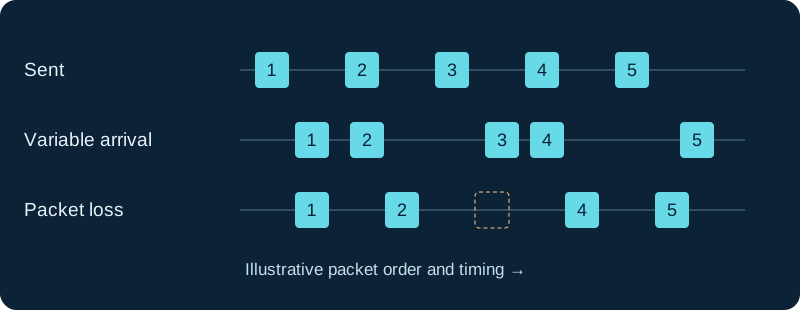
Illustration, not measured data. A jitter buffer trades playback delay against late-packet loss; it cannot recreate every missing packet.
Identify the exact RTP stream after every change
Use the accepted SDP, observed source and destination addresses and ports, payload type and SSRC to select the relevant receiver-bound stream. Repeat that mapping after hold, transfer, direct-media change, ICE selection or network handover because the media endpoint, payload mapping or source can change. A capture tool's heuristic stream label is evidence to verify, not the session contract.
RTP sequence numbers and timestamps belong to a source stream. An SSRC restart, collision handling, translator, mixer or capture beginning mid-call can create an apparent discontinuity. Preserve signaling and both sides of the transition before counting every gap as network loss.
Separate loss, reordering, variation and capture failure
Compare expected sequence progression with received packets and note duplicates, reordering depth, gaps and bursts. Then compare RTP timestamp progression with packet arrival time. RFC 3550 interarrival jitter is a smoothed statistical estimate derived from transit-time variation; it is not mouth-to-ear delay, a late-discard count or a listening-quality score.
A missing packet in one capture can reflect network loss, receiver discard, capture loss, an offloaded interface path or limited visibility. Retain capture-drop counters, interface counters and a paired observation point where authorized. Do not infer decoded silence or packet-loss concealment merely from a sequence gap.
Read receiver reports from the reporting receiver
RTCP reception reports can carry fraction lost for a reporting interval, cumulative loss, the extended highest sequence number and interarrival jitter. Bind every report block to its reporter and the source SSRC it describes. The fraction is interval-specific, cumulative loss can include earlier conditions and neither value proves what a different receiver heard.
When an implementation emits RFC 3611 extended reports, retain the exact block and interval. Loss or discard runs, burst or gap measures, round-trip information and voice metrics remain different observations. A missing XR block is not a zero value, and a reported metric is not proof that an endpoint rendered intelligible audio.
Localize the first point where evidence worsens
Compare synchronized intervals at sender, PBX or SBC and receiver where authorized. Correlate sequence gaps, arrival variation and discard counters with interface errors, wireless retransmissions, roaming, uplink queues, VPN changes, CPU scheduling, transcoding, mixing, recording and endpoint load. The first observation point where the impairment appears narrows ownership; the loudest dashboard alarm does not.
A clean ping to a nearby router does not test the RTP route, codec, packet cadence or receiver playout. A speed test outside the incident window can also miss a short saturated queue. Keep packet averages from hiding a damaging burst by preserving the complaint interval and direction.
Change one owner and re-test under representative load
Move one authorized endpoint to a known-good wired path, remove one evidenced contention source, correct one controlled queue or address one demonstrated host bottleneck. Apply classification and scheduling only at the queue you control. Document codec, packetization and jitter-buffer changes: a larger playout buffer may accept more variation while adding delay, and a smaller buffer may discard more late packets.
Repeat the affected direction under representative busy-period load and repeat hold or transfer if it changes media. Acceptance combines user-confirmed intelligibility, packet and discard evidence, queue or interface evidence and absence of a new latency problem. No endpoint, PBX, stream, packet path, queue, codec, buffer, call or audible result was inspected or tested for this guide.
Use PBX RTCP values as one bounded observation
When Asterisk statistics are absent or disagree with choppy audio, use the focused RTCP diagnostic to prove channel, direction, report source and actual media topology.
Trace an Asterisk jitter buffer that is wrong or ineffective
Use the Asterisk-specific diagnostic to prove direction, media ownership, live buffer policy, loss, delay and endpoint effects before tuning.
Do not tune a silence interval before proving frame continuity
The silence and noise diagnostic separates packet and frame continuity from the required continuous classification interval.
Sources & applicability
Primary references for the technical details above. Operational examples and planning checklists are VoIP.info editorial guidance.
- IETF RFC 3550 — RTP and RTCP ↗
- IETF RFC 3611 — RTP Control Protocol Extended Reports ↗
- IETF RFC 5481 — packet-delay variation applicability ↗
- Wireshark User’s Guide — RTP streams and analysis ↗
- Asterisk 22 CHANNEL function ↗
- Asterisk Media Experience Score ↗
- Asterisk MES implementation ↗
- Asterisk bridge media paths ↗
- Asterisk PJSIP troubleshooting: direct media ↗
- Asterisk 23 JITTERBUFFER dialplan function ↗
- Asterisk 23 CHANNEL dialplan function and RTP QoS fields ↗
- Asterisk ConfBridge configuration ↗
- Asterisk IP Quality of Service ↗
- Asterisk packet-loss concealment overview ↗
- Asterisk 23 WaitForSilence application ↗
- Asterisk 23 WaitForNoise application ↗
- Asterisk 22 WaitForSilence application ↗
- Asterisk 22 WaitForNoise application ↗
- Asterisk 23 BackgroundDetect application ↗
Examples require adaptation to your topology. No live PBX or hardware testing is claimed.