Quality policy needs a location
QoS classifies and handles traffic differently when resources contend. Its value depends on the equipment and link where the policy operates. Marking packets at a phone does not force an unrelated internet provider to preserve the same treatment.
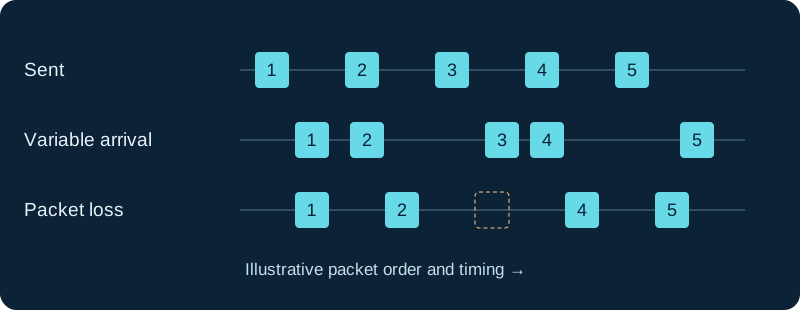
Illustration, not measured data. A jitter buffer trades playback delay against late-packet loss; it cannot recreate every missing packet.
Separate media and signaling
Real-time audio and call-control messages have different traffic patterns. Build classes appropriate to your network design and use the vendor's supported queueing guidance. Do not place all traffic from a workstation into the voice class merely because it also runs a softphone.
Set a trust boundary
Decide which devices may supply markings and where untrusted markings are rewritten. Otherwise a device can label bulk traffic as high priority and undermine the intended policy. Check counters to confirm that actual phone traffic reaches the intended class.
Test under contention
Compare calls with and without a controlled competing workload at the bottleneck. Observe delay, loss and the effect on other essential traffic. QoS cannot create capacity that the link lacks, so combine policy with realistic bandwidth planning and queue management.
Observe the IP Telecom media path behind the quality claim
IP Telecom describes QoS-aware routing and customer-side QoS and VLAN practices while its terms make voice quality dependent on the customer Internet connection. The provider record keeps those statements separate from measured loss, jitter, negotiation and decoded audio.
Verify Redcentric QoS across the actual access path
Historical Redcentric material describes quality of service on its managed network. The provider record does not extend that guarantee to a current or third-party circuit without the present order, demarcation, markings and path evidence.
Keep QoS marking separate from dejittering
The Asterisk jitter-buffer diagnostic distinguishes packet classification, network queue behavior, receive-side buffering and audible outcome.
Use CommPeak monitoring as evidence, not a guarantee
CommPeak publishes monitoring, SIP and call error logs, alerts and network tools. The provider record combines those signals with packet-path, QoS, loss, jitter, SDP, RTP and decoded-audio evidence for the selected call.
Keep Voximplant scenario success separate from media-path quality
The Voximplant provider record combines application events with SDP, RTP endpoints, packetization, loss, jitter and decoded media on each PBX, platform and destination leg.
Scope Intermedia portal QoS to the recorded call leg
The Intermedia diagnostic preserves query scope, retention and route summary before correlating jitter, delay and loss with packet and endpoint evidence.
Managed QoS is not Comcast call-route proof
The Comcast Business guide keeps access treatment, session capacity, provider group selection, PBX routing and media results separate.
A Lumen service state is not packet treatment or call proof
The Lumen provider guide keeps portal status, route selection, session capacity, access behavior and media evidence separate.
AT&T Class of Service is not one call's quality proof
The AT&T provider guide keeps access design, Class of Service, route selection, packet capture and decoded media separate.
Verizon QoS configuration is not call-quality proof
The Verizon guide keeps ordered access and markings separate from packet loss, jitter, SDP, RTP and decoded audio.
Treat Bell mean opinion score as correlated reporting
The Bell guide does not turn a provider-derived mean opinion score into proof of packet delivery, SDP agreement or decoded audio.
A Rogers private path is not decoded-audio proof
The Rogers guide preserves access, SDP, RTP delivery, PBX resources and decoded audio as separate evidence.
Keep Orange DSCP templates separate from observed treatment
The Orange Business Talk guide treats a guide DSCP value as configuration evidence, not proof of marking, queueing, preservation or call quality.
Keep access design separate from observed Vodafone treatment
The Vodafone Evolved Voice guide treats BYOA, traffic marking, queueing, preservation and call quality as separate evidence.
Bind Swisscom Class of Service to the ordered access
The Swisscom Enterprise SIP guide keeps MPLS access, existing-IP variants, marking, queueing, preservation and observed call quality separate.
Bind Sunrise prioritization to the ordered access
The Sunrise Business Voice SIP guide keeps Premium voice prioritization, VPN, marking, queueing and observed quality separate.
Do not transfer Multi Converged QoS to every flavour
The Proximus Business Trunking guide keeps managed voice capacity, markings, queues and observed quality separate.
Keep 9821 WLAN airtime and media direction evidence distinct
The 9821 diagnostic checks utilization, packet loss, jitter and each media direction before assigning a QoS fault.
Correlate RingCentral quality evidence by call leg
The RingCentral diagnostic keeps app bars, Quality of Service Analytics, packet metrics, decoding and audible result attached to the same call.
Bound IAXnetstats to one active-channel snapshot
The IAX2 AMI evidence guide preserves raw fields and units instead of claiming historical or guaranteed quality.
Treat Telstra bandwidth values as design inputs
The Telstra SIP Connect guide distinguishes the published 100 Kbit/s recommendation from measured loss, delay, throughput and media quality.
Measure the selected Optus access path
The Optus Evolve Voice diagnostic separates service descriptions from observed loss, delay, jitter, throughput and audibility.
Measure the selected One NZ access path
The One NZ SIP diagnostic separates service language from observed delay, jitter, loss, bandwidth and audibility.
Measure the 2degrees voice path
The 2degrees SIP diagnostic turns conditional QoS guidance into measured delay, jitter, loss, packet and audibility evidence.
Measure the Vocus voice path
The Vocus SIP Voice diagnostic separates access, negotiated media, packet behavior, decoding and audibility.
Separate Superloop design claims from measurements
The Superloop diagnostic preserves LAN, router, QoS, packet, codec and audibility evidence.
Correlate Zoom Phone statistics to one call and leg
The Zoom Workplace client guide treats packet rate, bandwidth, codec and warning markers as bounded observations rather than proof of audible quality.
Measure the Enreach media path
The Enreach diagnostic separates route, SDP, packets, decoding and audibility.
Keep a NextivaONE rating separate from measured call evidence
The NextivaONE guide treats periodic call feedback as user input, not packet loss, jitter, media or diagnosis.
Keep Teams telemetry and perceived quality distinct
The Teams Phone client guide treats delayed telemetry, issue markers and classifiers as investigation evidence rather than a complete user outcome.
Keep Dialpad System Test, QoS metrics and perceived quality distinct
The Dialpad app guide treats scores, server-side and client-side aggregates and recommendations as bounded investigation evidence.
Bound MetTel priority to controlled segments
The MetTel SIP Trunking guide records ordered access, measured bottleneck, markings and queue treatment without assuming end-to-end QoS.
Preserve the NUSO access demarcation
The NUSO guide separates public Internet, private-network and partner-carrier handoffs from measured path and media evidence.
Preserve the ordered Telesystem access type
The Telesystem guide separates public or private routing, dynamic or dedicated bandwidth, VLAN state and measured call evidence.
Preserve the ordered TPx access and bandwidth design
The TPx guide separates private IP, existing bandwidth, managed SD-WAN, dynamic allocation claims and observed packet treatment.
Preserve Lingo access and bandwidth evidence
The Lingo guide separates customer bandwidth, route, QoS, gateway, dynamic-allocation claims and observed packets.
Preserve Voyant broadband and observed path evidence
The Voyant guide separates broadband ownership, capacity claims, QoS and observed packets.
Keep 8x8 utility thresholds and perceived quality distinct
The 8x8 Work app guide separates utility metrics, in-call indicators, packets, decoding and what each party heard.
Keep VBC network policy and measured media distinct
The VBC app guide separates QoS guidance, quality-tool metrics, live packets and perceived audio.
Separate Windstream QoS contract and packet evidence
The Windstream guide keeps ordered class, markings, edge treatment, measured network behavior and listener outcome independent.
Keep Aircall bitrate, diagnostics and call media distinct
The Aircall Workspace guide separates configured bitrate, quality metrics, packets and perceived audio.
Measure the Granite media path
The Granite diagnostic keeps access, markings, packets, decoding and listener results independently observable.
Measure the selected FirstLight media path
The FirstLight diagnostic keeps access, markings, packets, decoding and listener results independently observable.
Correlate GAC2570 QoS with the active media owner
Before interpreting markings or quality, identify whether the GAC2570, a GVC device or an external host owns the affected signaling and media flows.
Sources & applicability
Primary references for the technical details above. Operational examples and planning checklists are VoIP.info editorial guidance.
- IETF RFC 4594 — service-class guidance ↗
- IP Telecom SIP Trunks ↗
- IP Telecom terms and SIP Trunking product schedule ↗
- IP Telecom Fair Use Policy ↗
- IP Telecom Ireland copper switch-off guidance ↗
- IP Telecom contact and support ↗
- Redcentric voice modernisation ↗
- Redcentric communications services ↗
- Redcentric customer support ↗
- Redcentric service status ↗
- Redcentric SIP Trunking Service Description SD032 v2.1 (legacy public PDF) ↗
- Redcentric Hays telephony customer case study ↗
- Asterisk 23 JITTERBUFFER dialplan function ↗
- Asterisk 23 CHANNEL dialplan function and RTP QoS fields ↗
- Asterisk ConfBridge configuration ↗
- Asterisk IP Quality of Service ↗
- Asterisk packet-loss concealment overview ↗
- Asterisk media-experience score implementation ↗
- CommPeak SIP trunking ↗
- CommPeak documentation and developer hub ↗
- CommPeak SIP account configuration ↗
- CommPeak FreePBX SIP trunk guide ↗
- CommPeak Asterisk PBX SIP trunk guide ↗
- CommPeak pricing overview ↗
- CommPeak service status ↗
- Voximplant SIP trunking solution ↗
- Voximplant SIP trunk connection FAQ ↗
- Voximplant SIP phone registration FAQ ↗
- Voximplant processing calls in scenarios ↗
- Voximplant CallSIP parameters ↗
- Voximplant telephony and SIP capabilities FAQ ↗
- Voximplant pricing ↗
- Voximplant service status ↗
- Intermedia SIP Trunking product page ↗
- Intermedia SIP Trunking overview ↗
- Intermedia SIP Trunking HostPilot overview ↗
- Intermedia SIP Trunking failover routing ↗
- Intermedia PBX configuration guides ↗
- Intermedia service and configuration port information ↗
- Intermedia certified PBX list ↗
- Intermedia emergency 911 policy and information ↗
- Comcast Business SIP Trunks ↗
- Comcast Business Enterprise SIP Trunks ↗
- Comcast Business Trunks features ↗
- View Comcast Business SIP Trunks numbers ↗
- View Comcast Business Trunks utilization reports ↗
- Comcast Enterprise Trunk Service product-specific attachment ↗
- Lumen SIP Trunking support ↗
- Lumen communication-services end-of-sale FAQ ↗
- Update a Lumen SIP Trunking route plan ↗
- Assign Lumen SIP Trunking numbers and manage 911 information ↗
- Lumen 933 emergency testing FAQ ↗
- AT&T IP Flexible Reach product page ↗
- AT&T IP Flexible Reach Group Administrator Guide ↗
- AT&T: What is IP Flexible Reach? ↗
- AT&T IP Flexible Reach implementation centre ↗
- AT&T cloud-based versus premises phone systems ↗
- Verizon VoIP Services welcome kit ↗
- Verizon Business IP Trunking Services ↗
- Verizon Voice over IP online service document ↗
- Verizon Voice Over IP rates and charges ↗
- Bell voice solutions and SIP Trunking ↗
- Bell SIP Trunking client administration portal guide ↗
- Bell SIP Trunking end user portal guide ↗
- Bell SIP Trunking performance and service reporting user guide ↗
- Bell SIP Trunking support guide ↗
- Bell SIP Trunking emergency-service limitations ↗
- Rogers Business Fixed Network Terms — SIP Services schedule (April 2021) ↗
- Rogers Business SIP Trunking information sheet ↗
- Rogers Business SIP trunking overview ↗
- Rogers SIP Trunking Pizza Pizza case study ↗
- Orange Business — Business Talk and Contact Center Access service documents ↗
- Orange Business assistance — Manage Business Talk IP sites ↗
- Orange Business — Business Talk and BTIP Patton SmartNode eSBC configuration guide ↗
- Orange Business — Business Talk Microsoft Teams Direct Routing guide ↗
- Orange Business — Business Talk Cisco CUCM and Webex Calling guide ↗
- Orange Business — Why cloud is the way forward for enterprise voice ↗
- Vodafone UK — SIP trunking ↗
- Vodafone — Converged Hybrid/Evolved Voice Service Specific Terms v1.4 ↗
- Vodafone — Converged Hybrid Voice data sheet ↗
- Vodafone — Tiered Support Services brochure ↗
- Vodafone storm Service Specific Terms v2.3 ↗
- Swisscom — Enterprise SIP for your private branch exchange ↗
- Swisscom — Enterprise SIP factsheet ↗
- Swisscom — Enterprise SIP compatibility list, July 2026 ↗
- Swisscom — Enterprise Connect getting started ↗
- Swisscom — Enterprise Connect order company services ↗
- Swisscom — Enterprise Connect own-gateway configuration ↗
- Sunrise — Business Voice SIP ↗
- Sunrise — On-premises and hybrid PBX portfolio ↗
- Sunrise — SIP Trunk technical flyer, August 2018 ↗
- Sunrise — Business voice direct flyer, March 2017 ↗
- Sunrise — Business Voice for Microsoft Teams factsheet, June 2021 ↗
- Sunrise — Business support contact ↗
- Proximus — Business Trunking product overview ↗
- Proximus — Business Trunking contractual service description, 15 January 2024 ↗
- Proximus — Professional-customer legal documents ↗
- Proximus — Customer service for large organisations ↗
- Cisco Wireless Phone 9821 data sheet ↗
- Cisco Wireless Phone support index ↗
- Cisco Wireless Phone 9821 WLAN deployment guide ↗
- Cisco Wireless Phone 9821 abbreviated WLAN deployment guide ↗
- Cisco Wireless Phone 9821 quick reference guide ↗
- Cisco Wireless Phone 9821 user help ↗
- Cisco Wireless Phone 9821 regulatory and safety information ↗
- Cisco Wireless Phone 9821 headset compatibility guide ↗
- Cisco Wireless Phone end-user documentation index ↗
- RingCentral — app system requirements ↗
- RingCentral — app downloads and current package records ↗
- RingCentral — desktop app release notes ↗
- RingCentral — RingCentral Phone app end-of-life and end-of-support ↗
- RingCentral — sign-in troubleshooting ↗
- RingCentral — app issue troubleshooting and diagnostic capture ↗
- RingCentral — RingEX network requirements ↗
- RingCentral — making and answering calls in the app ↗
- RingCentral — app microphone, speaker and audio settings ↗
- RingCentral — desktop and web network-quality indicators ↗
- RingCentral — Calls table in Quality of Service Analytics ↗
- RingCentral — updating an emergency response location ↗
- Asterisk current IAXpeers AMI action ↗
- Asterisk current IAXpeerlist AMI action ↗
- Asterisk current IAXregistry AMI action ↗
- Asterisk current IAXnetstats AMI action ↗
- Asterisk 22 IAXpeers AMI action ↗
- Asterisk 22 IAXpeerlist AMI action ↗
- Asterisk 22 IAXregistry AMI action ↗
- Asterisk 22 IAXnetstats AMI action ↗
- Asterisk IAX2 security guidance ↗
- Asterisk iax.conf sample ↗
- Asterisk chan_iax2 implementation source ↗
- Asterisk AMI v2 specification ↗
- Telstra Enterprise — SIP Connect ↗
- Telstra — Our Customer Terms, SIP Connect section, changed 3 June 2024 ↗
- Telstra — SIP Connect Customer Integration Guide ↗
- Telstra Enterprise — SIP Connect support and accredited CPE ↗
- Telstra Enterprise — Business Resumption Service + ↗
- Telstra — Business SIP Critical Information Summary ↗
- Optus Wholesale — Evolve Voice SIP trunking ↗
- Optus — Evolve Service Description, 1 November 2025 ↗
- Optus Business — Standard Form of Agreement, Evolve ↗
- Optus Business — Standard Form of Agreement ↗
- Optus — Evolve Voice factsheet (historical 2017 context) ↗
- Optus — SIP Trunking technical paper (historical context) ↗
- One NZ — SIP Advanced ↗
- One NZ — SIP Advanced Service Description ↗
- One NZ — Smart SIP ↗
- One NZ — Smart SIP Service Description ↗
- One NZ — Terms, conditions and service descriptions ↗
- One NZ — Metro Access Service Description ↗
- One NZ — About Emergency Services on 111 ↗
- 2degrees Business — SIP Trunks ↗
- 2degrees — Terms and conditions index ↗
- 2degrees — What happens in a power cut ↗
- 2degrees — Vulnerable consumers and calling 111 during a power outage ↗
- 2degrees — Privacy policy ↗
- Vocus — SIP Voice ↗
- Vocus — SIP Trunks data sheet ↗
- Vocus — SIP Voice Connect Service Schedule, 27 April 2026 ↗
- Vocus — Unified Communications Service Schedule, Australia Direct, 27 April 2026 ↗
- Vocus Support — call forwarding and diversions in BroadSoft ↗
- Vocus — Service Level Agreement ↗
- Superloop — Business VoIP and SIP ↗
- Superloop — Voice specifications data sheet ↗
- Superloop — Business Voice Service Schedule, 10 March 2026 ↗
- Superloop — business support contact ↗
- Superloop — outages and service updates ↗
- Zoom — getting started with Zoom Phone for users ↗
- Zoom — phone settings in Zoom Workplace and Zoom Web App ↗
- Zoom — Workplace desktop system requirements ↗
- Zoom — Workplace mobile system requirements ↗
- Zoom — Workplace app release notes ↗
- Zoom — Zoom Phone frequently asked questions ↗
- Zoom — meeting and phone statistics ↗
- Zoom — sending a Zoom Phone problem report ↗
- Zoom — network firewall and proxy settings ↗
- Zoom — Network Connectivity Tool ↗
- Zoom — troubleshooting sign-in issues ↗
- Zoom — testing device audio for Zoom Phone ↗
- Enreach — SIP Trunks for businesses ↗
- Enreach — SIP Trunks for resellers ↗
- Enreach — PBX Trunks platform for service providers ↗
- Enreach Service Center — Enreach Trunk (DE), updated 9 April 2026 ↗
- Enreach Swyx 15 — creating a SIP trunk group ↗
- Enreach Swyx 15 — creating a SIP trunk ↗
- Enreach Control Center 15 — forwarding and number substitution ↗
- Enreach Swyx 15 — emergency call detection ↗
- Enreach Service Center — Enreach Trunk FAQ and nomadic-use boundary ↗
- Nextiva — NextivaONE support landing page ↗
- Nextiva — NextivaONE getting started and system requirements ↗
- Nextiva — NextivaONE troubleshooting tips ↗
- Nextiva — managing calls in NextivaONE ↗
- Nextiva — NextivaONE Mobile FAQs ↗
- Nextiva — setting the default NextivaONE audio device ↗
- Nextiva — gathering NextivaONE log files ↗
- Nextiva — NextivaONE call feedback ↗
- Nextiva — NextivaONE unable to log in ↗
- Nextiva — updating the NextivaONE desktop application ↗
- Nextiva — networking guidelines and NextivaONE ports ↗
- Nextiva — NEXT release notes ↗
- Nextiva — signing in to the NEXT desktop app ↗
- Microsoft Learn — Microsoft Teams client ↗
- Microsoft Learn — Teams client system requirements ↗
- Microsoft Learn — set up Teams Phone ↗
- Microsoft Learn — Teams dial pad configuration ↗
- Microsoft Support — manage Teams call settings ↗
- Microsoft Support — troubleshoot Teams mobile notifications ↗
- Microsoft Learn — configure Teams calling policies ↗
- Microsoft Learn — Teams client health dashboard ↗
- Microsoft Learn — diagnostic logs for Teams Client ↗
- Microsoft Learn — collect Teams client diagnostic logs ↗
- Microsoft Learn — monitor and troubleshoot Teams meetings and calls ↗
- Microsoft Learn — manage emergency calling policies in Teams ↗
- Microsoft Learn — Teams user location consent ↗
- Dialpad — app requirements ↗
- Dialpad — download Dialpad ↗
- Dialpad — use the Dialpad web app ↗
- Dialpad — app updates ↗
- Dialpad — your Dialpad profile ↗
- Dialpad — make a call ↗
- Dialpad — receive a call ↗
- Dialpad — check your in-app audio settings ↗
- Dialpad — network setup recommendations ↗
- Dialpad — System Test ↗
- Dialpad — app troubleshooting ↗
- Dialpad — troubleshooting outbound calls ↗
- Dialpad — Quality of Service Dashboard ↗
- Dialpad — E911 Emergency Services ↗
- Dialpad — Dynamic E911 ↗
- MetTel — SIP Trunking datasheet, © 2025 ↗
- MetTel — VoIP and SIP Trunking terms, including 911 and traffic-policy boundaries ↗
- MetTel — support, activation, ticket and advanced-services contacts ↗
- MetTel — General Terms applicable to MetTel products ↗
- MetTel — Tariffs and product guides ↗
- NUSO — SIP Trunking product page ↗
- NUSO — Platform Services ↗
- NUSO — HIPAA compliance and SIP Trunking security responsibilities ↗
- NUSO — customer support contacts ↗
- NUSO — technical support and network-status path ↗
- NUSO — policies, programme documents and customer-service contact ↗
- Telesystem — SIP Trunks product page ↗
- Telesystem — SIP Trunk Administration for Tenant Admins ↗
- Telesystem — SIP Trunk DID Forwarding quick reference ↗
- Telesystem — E911 compliance guidance ↗
- Telesystem — network status and support paths ↗
- Telesystem — account support and escalation contacts ↗
- TPx — UCx SmartVoice SIP Trunking product page ↗
- TPx — UCx SmartVoice SIP Trunking brochure ↗
- TPx — SmartVoice PRI, CAS and SIP DID Features Guide ↗
- TPx — Introduction to Direct Trunk Overflow ↗
- TPx — 911 for SmartVoice and iPBX SIP Trunking Addendum ↗
- TPx — customer support and escalation paths ↗
- TPx — systems performance status ↗
- Lingo — Cloud SIP and PRI solutions ↗
- Lingo Knowledge Base — Cloud PRI and SIP Trunking ↗
- Lingo — Partner Product Guide 2024 ↗
- Lingo — E911 and California E911 Notice ↗
- Lingo — support resources ↗
- Lingo — service status ↗
- Voyant — communications products and SIP Trunking ↗
- Voyant — Master Services Agreement ↗
- Voyant — SIP Trunking terms and conditions ↗
- Voyant — VoIP 911 information ↗
- Voyant — Canadian 9-1-1 service notification ↗
- Sinch Community — SIP Trunk E911 bulk import in CAP, August 2024 ↗
- Sinch Community — Voyant/ANPI SIP Trunking STIR/SHAKEN caller-ID changes ↗
- Voyant — support contacts ↗
- Voyant — service status ↗
- 8x8 — download 8x8 Work for Desktop and system requirements ↗
- 8x8 — Work for Desktop version end-of-life policy ↗
- 8x8 — get started as an XF Workspace user ↗
- 8x8 Work for Desktop — site map and capability visibility ↗
- 8x8 Work for Desktop — set your presence status ↗
- 8x8 Work for Desktop — notification and incoming-call settings ↗
- 8x8 Work for Desktop — manage call quality ↗
- 8x8 Work for Desktop — microphone noise suppression and AGC ↗
- 8x8 — use the Network Utility tool ↗
- 8x8 Network Utility — troubleshooting ↗
- 8x8 Admin Console — set up emergency address for users ↗
- 8x8 — Nomadic 911 FAQ ↗
- 8x8 — product feedback versus support cases ↗
- 8x8 — use service during an Internet or power outage ↗
- Vonage Business — Vonage Desktop App ↗
- Vonage Business — Vonage Mobile App ↗
- Vonage Business — VBC Applications Compatibility ↗
- Vonage Business — Manage Emergency Services ↗
- Vonage Business — Network Requirements and Best Practices ↗
- Vonage Business — Troubleshoot Desktop App Issues ↗
- Vonage Business — Vonage Desktop App MSI Installation ↗
- Vonage Business — Apply Extension Settings ↗
- Vonage Business — Call Continuity Service ↗
- Vonage Business — Network Quality Tool ↗
- Vonage Business — Perform Echo Test for Voice Calls ↗
- Windstream Enterprise — SIP Trunking with Dynamic IP ↗
- Windstream Enterprise — Voice & Communications ↗
- Windstream Enterprise — Direct Trunk Overflow fact sheet ↗
- Windstream — Standard Agreement for Service Terms and Conditions ↗
- Windstream Enterprise — Dynamic IP Standard Terms and Conditions ↗
- Windstream Enterprise — Customer Responsibilities Guide ↗
- Windstream Enterprise — Data Products SLA and QoS classes ↗
- Windstream Enterprise / Uniti Solutions — U Connect portal and support ↗
- Aircall — Workspace downloads ↗
- Aircall — What is Aircall Workspace? ↗
- Aircall — Access Workspace and make calls ↗
- Aircall — Mobile device requirements for Workspace ↗
- Aircall — Device and headset recommendations ↗
- Aircall — Keeping Workspace up to date ↗
- Aircall — Workspace audio settings ↗
- Aircall — Audio quality troubleshooting guide ↗
- Aircall — Workspace network diagnostics ↗
- Aircall — Emergency address setup for US and Canada numbers ↗
- Aircall — Workspace inbound calls ↗
- Aircall — Contacting Aircall Support ↗
- Granite — VoIP & Cloud Phone Systems ↗
- Granite — SIP Trunking brief (legacy, date-scoped) ↗
- Granite — Legal & Policy ↗
- Granite — General Terms of Service (May 2026) ↗
- Granite — VoIP Services Additional Terms and Conditions of Service ↗
- Granite — VoIP Services Service Level Agreement ↗
- Granite — Canadian VoIP 911 English ↗
- Granite — Resources and customer portals ↗
- FirstLight — Voice and SIP Trunking ↗
- FirstLight — SIP Trunk info sheet ↗
- FirstLight — Service Schedule A, Voice Services, version 4 (August 21, 2026) ↗
- FirstLight — Standard Terms and Conditions, version 5 (June 16, 2025) ↗
- FirstLight — E911 Acknowledgement, version January 14, 2019 ↗
- FirstLight — Legal, Regulatory, Terms and Conditions ↗
- FirstLight — Customer Support ↗
- FirstLight — Prevent Long Distance Fraud and PBX Hacking ↗
- Grandstream GAC2570 product page ↗
- Grandstream GAC2570 datasheet ↗
- Grandstream product firmware directory ↗
- Grandstream GAC2570 1.0.3.33 release notes ↗
- Grandstream security bulletins ↗
- Grandstream Helpdesk ↗