Capture where the question is observable
A normal switch port does not show all other ports' unicast traffic. Use an authorized endpoint capture, switch mirror, network TAP or supported virtual capture path. For a border or relaying-PBX problem, paired observations on the relevant sides can reveal where addresses change or packets disappear. Record which direction each point can see; inside, outside, PBX and phone are locations, not media directions.
Confirm mirror direction and capacity. An overloaded mirror destination can drop copies even when production packets arrive successfully, and host offload can create checksum or segmentation artifacts not present on the wire. A capture gap is evidence about the capture until corroborated by another vantage point, interface counter or endpoint statistic.
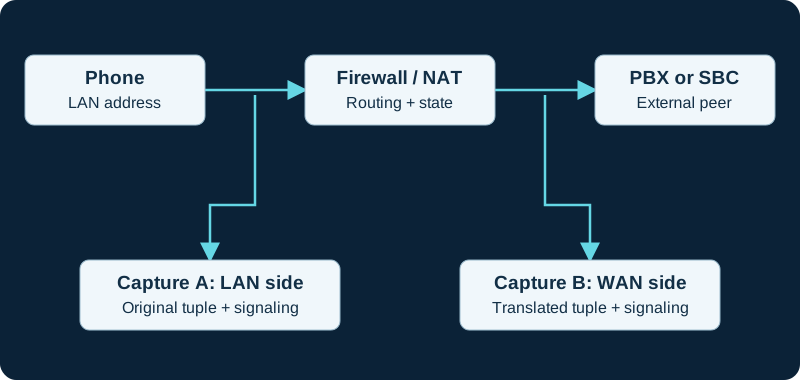
Paired observations help locate a change or loss. Account for clock offset, NAT and capture drops before attributing a difference to the network.
Set scope before starting
Record the authorized test endpoints, incident window, expected signaling transport and likely topology before starting. A SIP-port-only capture filter can omit RTP, SRTP and signaling on another port. A host-only filter can miss direct media between endpoints. Begin broad enough to retain the complete call, then use display filters after collection; a display filter does not recover packets excluded at capture time.
Use synchronized clocks, a bounded duration and a rotating or size-limited output. Leave enough packet data for the intended decoder; truncated packets can prevent SDP or RTP interpretation. Record the interface, filter, snap length, file format, tool version and capture-drop counters with the file. Wireshark's pcapng format may be required when collecting multiple interfaces.
Correlate signaling and media
Preserve one exact dialog and match packets by Call-ID, tags, branches and content while allowing for NAT and back-to-back user agent transformations. Read the final SDP offer and answer on every call leg, then compare advertised receive addresses with observed packet sources and destinations. For RTP, separate streams by address, port, SSRC and payload mapping; inspect sequence progression and timestamps rather than treating a packet count as audio proof. Wireshark's VoIP Calls, RTP Streams and Stream Analysis views organize captured evidence but do not validate the endpoint's playout or microphone.
Keep encryption and absence claims bounded
SRTP is designed to add confidentiality, authentication and replay protection. A capture without the applicable keying context can still show useful network and timing metadata, but payload playback or decryption is not an expected acceptance step. Do not weaken the production security policy just to make a trace readable.
If an expected stream is absent, state not observed at this capture point rather than not sent until the interface, mirror direction, filter, dropped-packet counters and actual direct-media or relay path have been checked at a second point.
Protect and close the evidence
Stop the capture after the controlled test, record the incident time range and secure the original. SIP headers, SDP, numbers, addresses, credentials and media can be sensitive even when some transport is encrypted. Share only an access-controlled, minimally sufficient redacted extract, preserving an integrity hash or immutable original when the incident process requires it. Document what each vantage point could not see before using the capture to justify a configuration change.
Validate a dialplan header against one bounded response
The PJSIP response-header diagnostic correlates the function result with one sanitized 200 response by Call-ID and CSeq before changing dialplan ownership.
Correlate stored contact evidence with one signaling exchange
The PJSIP AoR/contact diagnostic compares the stored URI and lifecycle with bounded REGISTER, OPTIONS or INVITE evidence while keeping each transaction distinct.
Correlate endpoint policy with the exact SIP session
The PJSIP endpoint diagnostic compares loaded fields with bounded identification, SIP and SDP evidence on the same channel and Call-ID.
Distinguish RFC 4733, SIP INFO and in-band evidence
Use the PJSIP DTMF override diagnostic to compare the runtime mode with the exact SDP, RTP event, INFO request or audio observation on the same leg.
Keep SIP transfer signaling beside ARI and bridge evidence
Use the Asterisk transfer diagnostic to align REFER, 202, NOTIFY and new-dialog messages with the matching ChannelTransfer event and bridge actions.
Compare From placement at Asterisk and the next hop
Use the PJSIP_HEADER_PARAM diagnostic to distinguish dialplan output from SBC or provider rewriting.
Use one bounded capture for the NOTIFY transaction
Follow the Asterisk PJSIP NOTIFY diagnostic to preserve request URI, Event, content type, body boundary and response before moving to device evidence.
Capture both phases of a forced re-registration
Use the Asterisk registration-control diagnostic to preserve any unregister exchange and the later registration attempt instead of sampling only one packet.
Do not use an encrypted payload as peer-identity proof
For a Linphone security symptom, preserve sanitized SDP and transport evidence but keep it separate from ZRTP SAS verification. The Linphone encryption diagnostic treats capture visibility, negotiated media protection and authenticated peer identity as different states and warns against exposing SDES key material.
Compare Asterisk output with intermediary header policy
Use the PJSIP inheritable-header diagnostic to distinguish source-channel inheritance, duplicate dialplan stores and later SBC or carrier rewriting.
Capture the complete in-dialog offer-answer exchange
Use the Asterisk session-refresh diagnostic to compare request and response SDP with both RTP directions before and after the transaction.
Validate one inventory against the bounded INVITE
The PJSIP header-list diagnostic correlates Asterisk output with one sanitized request by Call-ID, CSeq and channel before interpreting missing names.
Capture one bounded hold and resume exchange
The PJSIP hold diagnostic correlates channel state, re-INVITE, offer-answer direction, RTP owner and audible result without treating one packet as the whole call.
Correlate Linphone ICE state with the captured media tuple
For a Linphone traversal failure, preserve sanitized candidate types, checklist state and the selected pair, then compare them with packet source and destination and media counters. The focused diagnostic warns against exposing ICE passwords, TURN credentials or unnecessary payloads.
Capture both sides when a PJSIP rejection appears rewritten
The PJSIPHangup diagnostic keeps the Asterisk-side final response, intermediary behavior and caller-side result distinct; a translated cause alone cannot prove the wire code.
Match PJSIP channel context to the same wire leg
The focused diagnostic compares Call-ID, tags, URI meaning, transport security and socket direction with the corresponding SIP exchange.
Choose a capture point from the active media topology
The PJSIP RTP context workflow explains why an Asterisk-host capture may not see endpoint-to-endpoint packets during remote native bridging.
Do not expect a phone-side SIP capture to contain the push hop
A Linphone background-call investigation needs adjacent proxy, platform, device and SIP evidence. The focused diagnostic uses timestamps and bounded identifiers to correlate them without exposing a full push token, credential or unnecessary payload.
Capture Request-URI, headers and body boundaries for MESSAGE
The Asterisk MessageSend diagnostic compares final routing and identity fields, full request size and response without publishing message content unnecessarily.
Correlate DIDWW packets with provider attempt records
A local capture can show which endpoint received an INVITE and what it returned, but DIDWW records each routing attempt separately. The DIDWW diagnostic joins packet evidence to routing_attempt, is_last_cdr, destination and disconnect fields.
Do not substitute internal frames for wire packets
Use the FRAME_TRACE diagnostic to correlate channel-internal frames with the exact signaling or media capture point without collapsing those evidence layers.
Join SessionTalk SIP evidence to the out-of-band push stages
A phone-side packet capture cannot by itself prove APNs or FCM delivery. The SessionTalk diagnostic correlates PBX, push-server, platform, device and direct-media evidence by timestamp without exposing full tokens or credentials.
Correlate one SIPStation attempt across signaling and media
The SIPStation inbound workflow uses one timestamped capture to distinguish absent delivery, rejected signaling, DID mismatch and RTP failure while keeping payload and customer data protected.
Choose the observation point before collecting SIP
The PJSIP History guide distinguishes messages retained inside the Asterisk PJSIP stack from packets observed on one network interface.
Capture only the VoIPstudio failure interval
The VoIPstudio Desktop diagnostic narrows evidence to one application session, endpoint record, call identifier, offer and answer, and RTP interval. Credentials, customer numbers and audio remain sensitive, and product encryption claims are not represented as end-to-end capture results.
Capture one VoIP Much registration and failed call interval
The VoIP Much workflow correlates one REGISTER exchange, INVITE, response, SDP and RTP interval while keeping credentials and personal numbers redacted.
Capture one VoIPline transaction without exposing identity data
The VoIPline workflow correlates registration or diversion, INVITE, response, SDP and RTP while redacting credentials and personal numbers.
Protect Webex diagnostics and trace exports
The Webex App workflow correlates a narrow call interval with local and administrator evidence while treating exported diagnostic ZIPs as confidential network data.
Capture the exact Voip Unlimited inbound attempt
The Voip Unlimited workflow correlates the provider log, edge packet, Request-URI, endpoint identity, response, route and media while protecting credentials and caller data.
Correlate the SignalWire log with one bounded SIP and media trace
The SignalWire workflow preserves provider resource IDs, edge receipt, SIP result, SDP and both media directions while redacting secrets and personal data.
Correlate a Telnyx route with the observed provider edge
Capture the selected region, current DNS or voice.json evidence, packet source, request, response and next attempt. The Telnyx diagnostic preserves the current first-party Canada-address disagreement instead of silently choosing one list.
Correlate each Bandwidth route attempt with the packet evidence
Capture the number, route priority, endpoint target, provider source, request, response or timeout and any later attempt. The Bandwidth diagnostic avoids inventing undocumented failover triggers.
Correlate the Voipfone attempt with number and divert state
Pair packet evidence with the dialed number, effective portal route, enabled divert, provider call identifier and first PBX match. The Voipfone diagnostic supplies the bounded sequence.
Correlate a VoIP.ms capture with DID and POP state
Pair packet evidence with the dialed DID, primary route, POP hostname, registration target, delivered number form and failover state. The VoIP.ms diagnostic supplies the sequence.
Correlate each Twilio origination attempt across the edge
Pair the capture with the number, Trunk SID, OriginationUrl SID, priority, weight, selected edge, response and any next attempt using the Twilio diagnostic.
Join Plivo and customer captures by call identity
Use the call UUID, SIP Call-ID, timestamps, trunk ID, URI and hangup evidence to align provider and customer views with the Plivo inbound diagnostic.
Join Vonage and customer evidence by call identity
Use timestamps, SIP Call-ID, selected URI, transport and PBX result to align provider and customer views with the Vonage inbound diagnostic.
Correlate packets and security events without collapsing clocks
Use exact host, interface and timezone evidence when comparing a packet capture with the Asterisk security-event pipeline.
Correlate each Voxtelesys destination attempt
Pair packet evidence with the DID, route profile, destination priority, registration Contact or Customer IP, provider result and any later Transfer. The Voxtelesys diagnostic provides the sequence.
Correlate Amazon Chime routing with the customer-edge trace
Pair AWS call and connector identifiers with the selected origination host, edge receipt, Request-URI, PBX match and media. The diagnostic supplies the evidence sequence.
Correlate the didlogic number destination with the captured INVITE
Use the didlogic diagnostic to connect the purchased-number target, provider attempt, edge packet, Asterisk match, answer and RTP.
A missing Callcentric INVITE may be provider-side precedence
Pair a bounded capture with the DID Forward and Call Treatment export. The Callcentric diagnostic distinguishes provider forwarding from customer-edge loss.
Capture Anveo Direct signaling and direct RTP separately
Pair the DID and URI export with bounded SIP and RTP evidence. The Anveo Direct diagnostic preserves primary and backup attempts, SDP and observed carrier-media endpoints.
Correlate CarrierX object state with packet evidence
Export the effective group and trunks, then pair each provider attempt with bounded edge capture. The diagnostic preserves responses, OPTIONS probes, PBX handling and RTP separately.
Correlate AVOXI portal and edge evidence
Retain the number rule, URI, data center and terminal list, then pair each provider attempt with a bounded edge capture. The diagnostic separates response, PBX and media results.
Pair Easybell portal state with edge evidence
Retain the selected mode, stored address order or FQDN and provider attempt, then pair it with a bounded edge capture. The diagnostic separates PBX and media results.
Correlate SIP.US control state with one call
Capture the provider gateway, selected trunk, customer-edge packet, PBX result and media only after preserving Forward, Backup and identity mode. The diagnostic provides the evidence order.
Pair Flowroute signaling with the negotiated Direct Media ports
Use one Call-ID to join provider edge, route result, SDP, SSRC and packet direction. The Flowroute diagnostic keeps signaling success separate from audio.
Correlate one Bulk Solutions provider attempt with the PBX result
Use the Bulk Solutions diagnostic to join portal assignment, DNS, customer-edge packet, PJSIP match, response, SDP and RTP.
Correlate one Yay.com attempt across signaling and media
Use the Yay.com diagnostic to join number assignment, DNS, customer-edge request, PBX result, SDP and both media directions.
Correlate one ClearlyIP attempt from Location to destination
Use the ClearlyIP diagnostic to join number routing, registration, provider attempt, edge receipt, PBX response and media.
Correlate one Simwood inbound attempt end to end
Use the Simwood diagnostic to join provider evidence, edge receipt, PBX response, answer and media.
Correlate Sinch with call ID and UTC time
The Sinch diagnostic joins callback or CDR evidence to edge receipt, PBX response and media.
Capture one SIPTRUNK attempt from REGISTER through RTP
Use the SIPTRUNK diagnostic to correlate provider evidence, SIP results, SDP and both media directions.
Capture one bounded Blink REGISTER transaction
The Blink registration diagnostic joins client logs, DNS, packet direction, response class and retry timing.
Capture the response that controls Commio advancement
The Commio route diagnostic retains code, responding component, elapsed time and the next provider attempt.
Capture each 8x8 trust boundary separately
The 8x8 X Series diagnostic keeps public source identity, challenge response, TLS, SIP result and media distinct.
Capture the Nextiva binding, route and media separately
The Nextiva diagnostic correlates REGISTER, provider attempt, PBX match, response, SDP and media without flattening them.
Correlate Intermedia portal and packet evidence
The Intermedia diagnostic aligns the provider attempt, edge receipt, PBX match, SIP response, SDP and media without treating any one record as end-to-end proof.
Correlate Infobip call legs with the customer-edge trace
The Infobip route diagnostic aligns correlation ID, dialog ID, SIP Call-ID, route timing, SDP and RTP without treating one record as end-to-end proof.
Correlate IntelePeer CDR and customer-edge evidence
The IntelePeer route diagnostic aligns unique CDR ID, package, trunk name and translated number with SIP Call-ID, PBX handling and RTP.
Capture the BCM One Request-URI and first response
The BCM One route diagnostic aligns the per-number route, translation, edge INVITE, PBX match and recovery transition.
Capture Cox pilot and DID evidence separately
The Cox inbound diagnostic aligns REGISTER with the later DID INVITE, first response, PBX route and any alternate leg.
Correlate Comcast provider records with the edge trace
The Comcast diagnostic aligns number inventory, provider selection, the matching INVITE, PBX route and alternate leg.
Correlate Lumen plan selection with the matching edge trace
The Lumen diagnostic aligns service ID, number assignment, hunt result, matching INVITE, PBX route and media.
Match the AT&T provider leg to the edge trace
The AT&T diagnostic aligns scheme, group trunk group, provider identifier, matching INVITE, PBX route and media.
Correlate the Verizon cutover with an edge trace
The Verizon diagnostic aligns provider number state, call identity, matching INVITE, PBX route and media.
Correlate a Bell call with edge evidence
The Bell diagnostic aligns the number, timestamp, trunk group, provider row, matching INVITE, PBX route and media.
Correlate a Rogers call with the selected peer
The Rogers diagnostic aligns DID, timestamp, peer state, CDR, matching request, PBX route and media.
Correlate a ThinkTel binding with one call
The ThinkTel diagnostic aligns pilot, DID, binding, OPTIONS, response code, CDR, edge trace and PBX route.
Correlate an Iristel CDR with one edge trace
The Iristel diagnostic aligns DID, time, provider record, INVITE, identity, SDP and PBX route.
Correlate a TELUS provider attempt with one edge trace
The TELUS diagnostic aligns time, trunk group, target, INVITE, identity, SDP and PBX route.
Correlate a SaskTel provider attempt with one edge trace
The SaskTel diagnostic aligns time, RTM state, selected destination, INVITE, identity, SDP and PBX route.
Correlate a Cogeco provider record with one edge trace
The Cogeco diagnostic aligns time, selected trunk, INVITE, identity, SDP, responses and PBX route without exposing secrets.
Correlate Flowroute relationship, edge and PBX evidence
The Flowroute diagnostic joins one DID relationship and provider attempt to the matching INVITE, response, SDP and PBX route.
Correlate AireSpring route evidence to one SIP transaction
The AireSpring diagnostic joins DID and DTO state to the matching provider attempt, PBX route and media.
Capture the OnSIP provider-leg digits and route
The OnSIP diagnostic joins the 000 transformation or inbound number state to the matching transaction and media.
Capture DIDforSale source, DID format and first response together
The DIDforSale diagnostic joins portal state, packet source, Request-URI, route and media.
Capture Zadarma model, identity and number destination together
The Zadarma diagnostic joins source authorization or registration, SIP URI, Request-URI, identity headers, route and media.
Capture Voxbeam source, prefix, DID destination and route together
The Voxbeam diagnostic joins portal state, SIP identity, loaded PBX objects and media without collapsing them.
Correlate GoTrunk CDR and trace with edge and PBX evidence
The GoTrunk diagnostic joins provider identifiers, SIP signaling, loaded routes and both RTP directions.
Correlate JsSIP events with sanitized network evidence
The JsSIP diagnostic aligns WSS, SIP, ICE and RTP without publishing credentials or ICE secrets.
Capture ARI transport without disclosing authorization
The FreePBX ARI diagnostic retains TCP, TLS, HTTP and WebSocket timing while redacting credentials and calling data.
Correlate DIDWW Call-ID, CDR attempt and edge capture
The DIDWW diagnostic joins provider, edge, PBX and media evidence without treating a CDR as route or audio proof.
Correlate Exotel API request, Call SID, SIP and media evidence
The Exotel diagnostic joins management state, signaling, PBX decisions and both media directions without treating one artifact as proof of all layers.
Align Voximplant call events with each captured leg
The Voximplant diagnostic distinguishes AudioStarted, answer, first packet, statistics and RTP stop evidence.
Use SIP capture only after the AMI snapshot boundary is known
The AMI list diagnostic joins one authorized REGISTER exchange to the exact registration object and event timeline.
Capture the first failed Colt call and recovery probes
The Colt failover diagnostic aligns INVITE, TCP, OPTIONS, SDP and media timestamps.
Capture the Gamma provider attempt and PBX result
The Gamma routing diagnostic aligns portal rule, SIP identity, response, SDP and media timestamps.
Capture the Bandwidth challenge and retried request
The Bandwidth realm diagnostic retains responder, realm, username form, response, SDP and media without exposing secrets.
Capture Commio provider attempts and direct carrier media
The Commio diagnostic correlates Call-ID, ordered destinations, SDP and both RTP directions.
Capture LES.NET provider attempts without exposing credentials
The LES.NET diagnostic correlates Call-ID, response, SDP, channel symptom and both media directions.
Correlate Wavix SIP and CDR evidence safely
The Wavix diagnostic joins one Call-ID, response, SDP and media path without exposing credentials or API keys.
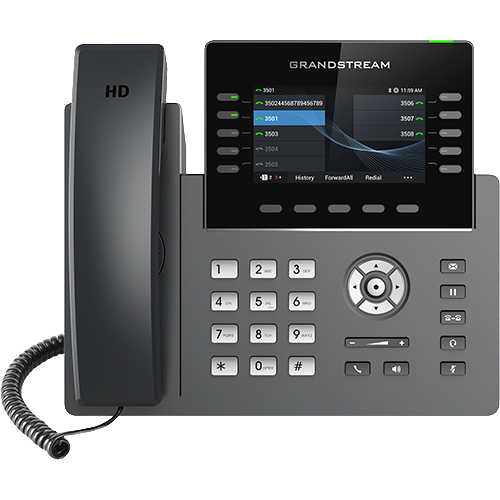
Capture one bounded GRP provisioning and call sequence
The GRP2613/GRP2615 diagnostic limits evidence to one boot, configuration fetch, registration and authorized workflow while redacting credentials and personal data.
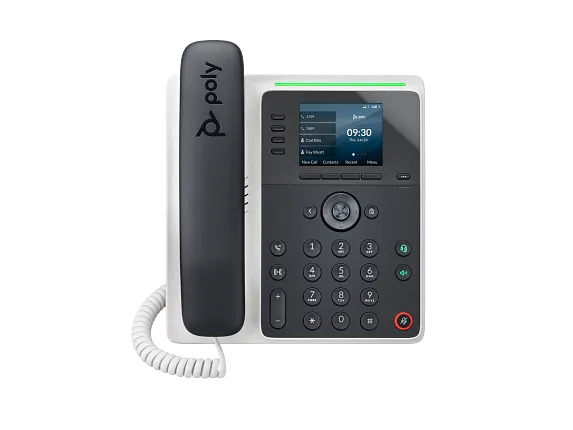
Capture one bounded Edge E boot and call sequence
The E100/E220 diagnostic limits evidence to one authorized boot, configuration fetch, registration and call while redacting credentials and personal data.
Capture one bounded Jitsi Desktop registration and call
The Jitsi Desktop workflow limits evidence to one authorized REGISTER and INVITE sequence, with credentials and personal data redacted.
Capture one bounded ATA call or fax attempt
The HT812/HT814 V2 diagnostic limits evidence to one authorized registration, call or fax negotiation and separates SIP, SDP, RTP and T.38.
Capture one bounded Grandstream V2 provisioning and call sequence
The HT802/HT818 V2 diagnostic separates configuration fetch, registration, signaling and media while redacting credentials.
Trace one HT8x1 PSTN call across signaling and media
Use the HT841/HT881 diagnostic to bind the capture to one FXO port, SIP mapping and PBX route while redacting sensitive data.
Bind an HT813 capture to one call direction
Use the HT813 diagnostic to label FXS or FXO profile, peer or registration mode, PSTN stage and media while redacting sensitive data.
Capture phone time traffic without exposing keys
The wrong-time diagnostic records request, response, server, timing and later endpoint state while keeping authentication material out of evidence.
Mark the DNS privacy boundary before tracing Sipnetic SIP
For the Sipnetic diagnostic, record DNS-over-TLS connection metadata and authorized resolver evidence, then correlate the selected SIP target with transport, REGISTER, INVITE and RTP without claiming encrypted DNS payload visibility.
Correlate Allstream portal and provider evidence with one trace
The Allstream diagnostic aligns portal scope, provider selection, INVITE identity, SDP, response and the first loaded PBX route.
Correlate Cloudli portal, NAT and PBX evidence
The Cloudli diagnostic aligns the current portal object, REGISTER flow, translated tuples, provider INVITE, PBX route and media.
Correlate both sides of the Orange eSBC demarcation
The Orange Business Talk diagnostic aligns DNS, TLS, carrier-facing SIP, PBX-facing routing and each media direction.
Correlate Vodafone provider, edge and PBX evidence
The Vodafone Evolved Voice diagnostic aligns one attempt across the provider record, public edge, firewall, PBX and each media direction.
Correlate Swisscom provider, SBC and PBX evidence
The Swisscom Enterprise SIP diagnostic aligns one attempt across access, SBC, PBX, identity and each media direction.
Correlate Sunrise provider, SBC and PBX evidence
The Sunrise Business Voice SIP diagnostic aligns one attempt across access, SBC, PBX, identity and each media direction.
Correlate Proximus access, SBC and PBX evidence
The Proximus Business Trunking diagnostic aligns one attempt across network edge, customer edge, identity, SDP and both media directions.
Correlate Crazytel portal, signaling and media evidence
The Crazytel SIP trunk diagnostic aligns one Call-ID with registration or IP trust, SDP and both RTP directions.
Correlate MaxoTel registration and call evidence
The MaxoTel SIP trunk diagnostic aligns portal state, UDP transactions, Call-ID, SDP and RTP without exposing secrets.
Capture media only after control-plane evidence diverges
The AMI fax-session diagnostic uses session inventory, progress and terminal results before escalating to authorized packet evidence.
Keep PRI signaling debug separate from IP capture
The AMI PRI guide treats D-channel debug, AMI transport capture and RTP or SIP packet capture as different evidence sources.
Correlate Aussie Broadband handoff and call evidence
The Aussie Broadband SIP trunk diagnostic aligns access, signaling, Call-ID, SDP and RTP while redacting credentials.
Correlate Wave signaling and media to one call
The Grandstream Wave diagnostic aligns client, UCM and network evidence without treating a connected badge as packet proof.
Correlate a RingCentral call without collapsing cloud and local evidence
The RingCentral diagnostic aligns API, signaling, push, call handling, packet directions and analytics to one timestamped call.
Pair IAXnetstats with the same active-channel packet timeline
The IAX2 AMI diagnostic does not turn manager output into proof of decoded or audible media.
Correlate Symbio signaling and media evidence
The Symbio Enterprise SIP trunk diagnostic aligns access, TLS, SIP, Call-ID, SDP and RTP while redacting credentials.
Correlate Telstra access, signaling and media
The Telstra SIP Connect diagnostic keeps the same Call-ID, SDP, packet directions, decoding and audible result aligned.
Correlate the Optus handoff, signaling and media
The Optus Evolve Voice diagnostic aligns the same Call-ID, responses, SDP, packet directions, decoding and result.
Correlate the One NZ access, signaling and media path
The One NZ SIP diagnostic aligns the same Call-ID, responses, SDP, packet directions, decoding and call result.
Correlate 2degrees signaling and media
The 2degrees SIP diagnostic aligns the same Call-ID, responses, SDP, packet directions, decoding and call result.
Do not convert bridge selection into packet or audio proof
The AMI bridge-technology guide requires media-path and endpoint evidence beyond a reported technology.
Do not substitute log rotation for packet evidence
The AMI LoggerRotate guide treats a reopened file and packet capture as different evidence channels.
Correlate Vocus signaling and media
The Vocus SIP Voice diagnostic aligns Call-ID, responses, SDP, packets, decoding and call result.
Correlate Superloop signaling and media
The Superloop diagnostic aligns Call-ID, response, SDP, packets, decoding and result.
Correlate Zoom Phone app statistics with packet evidence carefully
The Zoom Workplace diagnostic aligns Register ID, server, local and remote addresses, packets, codec, decoding and audible result to one call.
Correlate Enreach signaling and media
The Enreach diagnostic aligns Call-ID, responses, SDP, packets, decoding and result.
Correlate NextivaONE logs, packets and audibility carefully
The NextivaONE diagnostic aligns one call timestamp without treating HAR, app logs or call feedback as packet proof.
Correlate Teams telemetry without replacing packet evidence
The Teams Phone diagnostic aligns one call while keeping logs, telemetry, packet directions, decoding and audibility distinct.
Correlate Dialpad quality rows without replacing packet evidence
The Dialpad app diagnostic aligns one call while keeping tests, metrics, packet directions, decoding and audibility distinct.
Correlate MetTel call evidence without inventing topology
The MetTel SIP trunk diagnostic aligns authorized order, signaling, SDP and RTP observations while recording each capture point.
Correlate NUSO TLS, SIP and media evidence
The NUSO diagnostic aligns authorized order, peer, signaling, SDP, SRTP and RTP observations by capture point.
Align packet time with the selected crash incident
The incomplete-backtrace diagnostic treats packets, logs and stack frames as complementary rather than interchangeable proof.
Correlate Telesystem portal, signaling and media
The Telesystem diagnostic aligns the exact site, trunk, access, SIP exchange, SDP, packets and listener result.
Correlate TPx access, SIP and media for one call
The TPx diagnostic aligns the selected network path, SIP exchange, SDP, packets and listener result.
Correlate Lingo access, SIP and media
The Lingo diagnostic aligns the selected path, SIP exchange, SDP, packet directions, decoding and listener result.
Do not substitute packets for allocation evidence
The memory-growth diagnostic uses packets only when the call-flow interval requires them and keeps memory ownership separate.
Correlate Voyant SIP, identity and media
The Voyant diagnostic aligns the selected path, signaling, identity headers, SDP, packet directions and listener result.
Correlate 8x8 utility output without replacing call evidence
The 8x8 Work diagnostic aligns one call while keeping utility tests, packets, decoding and audibility distinct.
Keep packets separate from thread and lock evidence
The deadlock diagnostic uses packet evidence only when the bounded call symptom requires it and does not substitute packets for an all-thread stack.
Correlate VBC app and quality evidence without replacing packets
The VBC diagnostic aligns one call while keeping tests, signaling, packets, decoding and audibility distinct.
Correlate Windstream SIP, SDP and both media directions
The Windstream diagnostic aligns order, access, signaling, QoS, packet directions, decoding and listener results.
Correlate Aircall diagnostics with call-specific packets
The Aircall diagnostic aligns call ID and time while keeping simulated metrics, signaling, packets, decoding and audibility distinct.
Correlate Granite SIP, SDP and both media directions
The Granite diagnostic aligns handoff, signaling, packets, decoding and listener results.
Correlate FirstLight SIP, SDP and media directions
The FirstLight diagnostic aligns handoff, signaling, packets, decoding and listener results.
Watch the explanation
Explains how the problem determines where to capture, including switch mirroring and paired client/server observations. A useful first step before collecting a VoIP trace.
Read applicability and editorial notes →Watch this video here
Recorded in 2021; capture-placement principles remain useful. Exact operating-system and switch controls vary. Review used the available transcript and primary references; audio and screen readability remain unverified.

The player loads only when you choose Watch here. Playback uses YouTube’s privacy-enhanced embed; YouTube processes playback data.
Demonstrates selecting an interface, writing captures to disk and rotating a ring buffer. Helpful when a GUI capture is impractical or an intermittent fault needs a longer observation window.
Read applicability and editorial notes →Watch this video here
The capture concepts still apply; Windows and macOS path examples are from 2021. Review used the available transcript and primary references; audio and screen readability remain unverified.

The player loads only when you choose Watch here. Playback uses YouTube’s privacy-enhanced embed; YouTube processes playback data.
Sources & applicability
Primary references for the technical details above. Operational examples and planning checklists are VoIP.info editorial guidance.
- Wireshark: capture filters ↗
- Wireshark: capture options ↗
- Wireshark: VoIP Calls window ↗
- Wireshark: playing and analysing VoIP calls ↗
- IETF RFC 3264 — SDP offer/answer model ↗
- IETF RFC 3550 — RTP and RTCP ↗
- IETF RFC 3711 — Secure RTP ↗
- Asterisk PJSIP_RESPONSE_HEADER dialplan function ↗
- Asterisk PJSIP_RESPONSE_HEADERS dialplan function ↗
- Asterisk pre-bridge handlers ↗
- Asterisk 22 Dial application ↗
- Asterisk res_pjsip header-function source ↗
- RFC 3261: SIP Session Initiation Protocol ↗
- Asterisk PJSIP_AOR dialplan function ↗
- Asterisk PJSIP_CONTACT dialplan function ↗
- Asterisk PJSIP_DIAL_CONTACTS dialplan function ↗
- Asterisk PJSIP configuration sections and relationships ↗
- Asterisk PJSIP troubleshooting guide ↗
- Asterisk PJSIP_ENDPOINT dialplan function ↗
- Asterisk CHANNEL dialplan function ↗
- Asterisk res_pjsip endpoint configuration reference ↗
- Asterisk PJSIP_DTMF_MODE dialplan function ↗
- Asterisk Dial application and pre-dial handler guidance ↗
- Asterisk AMI DTMFBegin event ↗
- Asterisk AMI DTMFEnd event ↗
- Asterisk PJSIP_TRANSFER_HANDLING dialplan function ↗
- Asterisk ARI transfer handling guide ↗
- Asterisk REST data models including ChannelTransfer ↗
- Asterisk res_pjsip remote attended transfers ↗
- Asterisk PJSIP_HEADER_PARAM dialplan function ↗
- Asterisk PJSIP_HEADER dialplan function ↗
- Asterisk pre-dial handlers ↗
- Asterisk Dial application ↗
- Asterisk PJSIP_PARSE_URI_FROM dialplan function ↗
- RFC 3261: SIP ↗
- Asterisk PJSIPNotify dialplan application ↗
- Asterisk PJSIPNotify AMI action ↗
- Asterisk res_pjsip_notify configuration reference ↗
- Asterisk PJSIPNotify application introduction ↗
- RFC 6665: SIP-Specific Event Notification ↗
- Asterisk PJSIPRegister AMI action ↗
- Asterisk PJSIPUnregister AMI action ↗
- Asterisk PJSIPShowRegistrationsOutbound AMI action ↗
- Asterisk OutboundRegistrationDetail AMI event ↗
- Asterisk Registry AMI event ↗
- Asterisk res_pjsip_outbound_registration configuration reference ↗
- Asterisk outbound-registration configuration guide ↗
- Linphone softphone security architecture ↗
- Liblinphone 5.5 media parameters ↗
- Liblinphone 5.5 call control ↗
- Liblinphone provisioning configuration keys ↗
- RFC 3711 Secure RTP ↗
- RFC 6189 ZRTP ↗
- Asterisk PJSIP_INHERITABLE_HEADER dialplan function ↗
- Asterisk 20 PJSIP_INHERITABLE_HEADER reference ↗
- Asterisk 22 PJSIP_INHERITABLE_HEADER reference ↗
- Asterisk 23 PJSIP_INHERITABLE_HEADER reference ↗
- Asterisk PJSIP_SEND_SESSION_REFRESH dialplan function ↗
- Asterisk 22 PJSIP_SEND_SESSION_REFRESH reference ↗
- Asterisk PJSIP_MEDIA_OFFER dialplan function ↗
- RFC 3311: SIP UPDATE method ↗
- RFC 3264: SDP offer/answer model ↗
- Asterisk PJSIP_HEADERS dialplan function ↗
- Asterisk PJSIP_MOH_PASSTHROUGH dialplan function ↗
- Asterisk pjsip.conf sample ↗
- RFC 6337: SIP usage of the offer-answer model ↗
- Liblinphone latest NatPolicy API ↗
- Liblinphone 5.5 network parameters ↗
- Linphone ICE feature guide ↗
- RFC 8445: Interactive Connectivity Establishment ↗
- RFC 8489: Session Traversal Utilities for NAT ↗
- RFC 8656: Traversal Using Relays around NAT ↗
- RFC 8839: SDP offer-answer procedures for ICE ↗
- Asterisk PJSIPHangup dialplan application ↗
- Asterisk Hangup dialplan application ↗
- Asterisk hangup-cause inspection guide ↗
- Asterisk hangup-cause mappings ↗
- Asterisk PJSIP_PARSE_URI dialplan function ↗
- Asterisk bridge media paths ↗
- RFC 3711: Secure RTP ↗
- Linphone supported platforms and downloads ↗
- Linphone SIP account and interoperability FAQ ↗
- Linphone Flexisip push-notification specification ↗
- Liblinphone 5.4 AccountParams push controls ↗
- Liblinphone 5.4 PushNotificationConfig ↗
- Liblinphone 5.4 Core push processing ↗
- RFC 8599: Push Notification with SIP ↗
- Asterisk MessageSend dialplan application ↗
- Asterisk MESSAGE dialplan function ↗
- Asterisk MESSAGE_DATA dialplan function ↗
- Asterisk 22 PJSIP_ENDPOINT reference ↗
- RFC 3428: SIP MESSAGE method ↗
- DIDWW service failover and load balancing ↗
- DIDWW inbound trunk groups ↗
- DIDWW inbound SIP trunk configuration ↗
- DIDWW SIP response codes in call logs ↗
- DIDWW Voice IN CDR streaming attributes ↗
- Asterisk FRAME_TRACE dialplan function ↗
- Asterisk FRAME_DROP dialplan function ↗
- Asterisk logging overview ↗
- Asterisk collecting debug information ↗
- SessionTalk push notifications overview ↗
- SessionTalk push registration modes ↗
- SessionTalk multiple-registrations push mode ↗
- SessionTalk synchronous push registration ↗
- SessionTalk single-register push mode ↗
- SessionTalk incoming push-call sequence ↗
- SessionTalk incoming push-call troubleshooting ↗
- SessionCloud SIP and push settings ↗
- Sangoma: Troubleshooting SIPStation ↗
- Sangoma: Failover of inbound SIPStation DIDs ↗
- Sangoma: SIPStation notifications and access restrictions ↗
- Sangoma: FreePBX SIPStation module ↗
- Sangoma: SIPStation PJSIP trunk setup ↗
- Sangoma: FreePBX inbound-route user guide ↗
- Sangoma: Configuring a PBX or device with SIPStation ↗
- Asterisk PJSIP History how-to ↗
- Asterisk res_pjsip_history source and CLI definitions ↗
- VoIPstudio desktop and mobile downloads ↗
- VoIPstudio Desktop Softphone manual ↗
- VoIPstudio user-manual introduction and platform requirements ↗
- VoIPstudio user, endpoint, SIP Test and MTR administration ↗
- VoIPstudio network, media, encryption and SIP ALG guidance ↗
- VoIP Much SIP Trunks ↗
- VoIP Much 3CX Phone System guide ↗
- VoIP Much FreePBX trunk guide ↗
- VoIP Much UniFi Talk guide ↗
- VoIP Much IP blocking guidance ↗
- VoIP Much SIP ALG guidance ↗
- VoIP Much supported audio codecs ↗
- VoIP Much quality suggestions ↗
- VoIP Much network status ↗
- VoIP Much service agreement ↗
- VoIPline Telecom SIP trunking ↗
- VoIPline Telecom pricing and rates ↗
- VoIPline Telecom legal documents ↗
- VoIPline Voice and SMS (IP) service schedule ↗
- VoIPline SIP trunks critical information summary ↗
- VoIPline Telecom network ↗
- VoIPline Telecom number porting ↗
- VoIPline Telecom service status ↗
- Supported calling options in Webex App ↗
- Webex App: find out what calling service you have ↗
- Webex App system requirements and support policy ↗
- Download the Webex desktop and mobile apps ↗
- Webex App: change your audio settings ↗
- Webex App: test your connection with the Health Checker ↗
- Webex App: troubleshoot connection issues with the Diagnostics tool ↗
- Webex App: error messages for Calling ↗
- Advanced diagnostics and troubleshooting in Control Hub ↗
- Voip Unlimited SIP Trunks ↗
- Voip Unlimited voice portfolio ↗
- Voip Unlimited partner operations and support tools ↗
- Voip Unlimited legal and regulatory documents ↗
- Voip Unlimited Master Services Agreement V3.0 ↗
- RFC 3263: Locating SIP Servers ↗
- RFC 2782: DNS SRV resource records ↗
- RFC 3403: DDDS DNS database and NAPTR records ↗
- SignalWire SIP trunking ↗
- SignalWire SIP credentials ↗
- SignalWire Get SIP credential API ↗
- SignalWire Update SIP profile API ↗
- SignalWire FreePBX integration ↗
- SignalWire caller ID and CNAM ↗
- SignalWire rate limits ↗
- SignalWire E911 ↗
- SignalWire rates ↗
- Telnyx SIP trunking service objects ↗
- Telnyx authentication methods ↗
- Telnyx failover and retries ↗
- Telnyx SIP response codes ↗
- Telnyx Outbound Voice Profiles ↗
- Telnyx round-robin routing ↗
- Telnyx current SIP network information ↗
- Telnyx machine-readable voice network data ↗
- Telnyx configuration-guide boundary ↗
- Bandwidth Build SIP trunking setup ↗
- Bandwidth number feature and Final Destination URI management ↗
- Voipfone FreePBX configuration guide ↗
- Voipfone inbound routing control ↗
- Voipfone phone-number routing controls ↗
- Voipfone PBX call-divert and PSTN-failover controls ↗
- Voipfone number porting ↗
- VoIP.ms DID routing, failover, POP and inbound format ↗
- VoIP.ms subaccount authentication and registration ↗
- VoIP.ms server and DID POP selection ↗
- VoIP.ms DID troubleshooting ↗
- VoIP.ms incoming-call troubleshooting ↗
- VoIP.ms registration troubleshooting ↗
- Twilio Elastic SIP Trunking configuration ↗
- Twilio OriginationUrl resource ↗
- Twilio Programmable Voice failover best practices ↗
- Twilio Elastic SIP Trunking IP addresses ↗
- Twilio Elastic SIP Trunking troubleshooting ↗
- Twilio Trunk resource ↗
- Plivo Zentrunk quickstart ↗
- Plivo Zentrunk technical specifications ↗
- Plivo SIP Trunking account limits ↗
- Plivo Zentrunk hangup codes ↗
- Plivo Zentrunk debug logs ↗
- Vonage SIP technical details ↗
- Vonage SIP Dashboard guide ↗
- Vonage Asterisk PJSIP configuration ↗
- Vonage FreePBX configuration ↗
- Vonage Voice Logs guide ↗
- Asterisk: Security Event Logger ↗
- Asterisk: Security Event Generation ↗
- Asterisk: Security Framework Overview ↗
- Asterisk: Logging Configuration ↗
- Asterisk: Basic Logging Commands ↗
- Asterisk: Main Configuration File ↗
- Asterisk source: res_security_log ↗
- Asterisk source: logger.conf sample ↗
- Voxtelesys DID and number routing ↗
- Voxtelesys SIP Trunk Registrar ↗
- Voxtelesys portal IP-address routing ↗
- Voxtelesys registration ACL ↗
- Voxtelesys failover transfer ↗
- Voxtelesys call records ↗
- AWS: Managing Amazon Chime SDK Voice Connectors ↗
- AWS: Editing Voice Connector settings ↗
- AWS: Creating a Voice Connector and encryption scope ↗
- AWS: Managing Voice Connector groups ↗
- AWS: Amazon Chime SDK endpoints and quotas ↗
- AWS: Voice Connector network and bandwidth requirements ↗
- didlogic SIP credentials ↗
- didlogic outbound calling and regional gateways ↗
- didlogic inbound setup and destination routing ↗
- didlogic SIP trunking and PBX setup ↗
- didlogic Asterisk configuration and troubleshooting ↗
- didlogic direct interconnection requirements ↗
- Callcentric SIP trunking ↗
- Callcentric registration credentials ↗
- Callcentric DID forwarding ↗
- Callcentric DID-forward precedence ↗
- Callcentric network-down forward ↗
- Callcentric forwarded-call billing ↗
- Anveo Direct FAQ ↗
- Anveo Direct inbound DID service ↗
- Anveo Direct call termination ↗
- Anveo Direct network ↗
- Anveo Direct services ↗
- CarrierX trunk-group object ↗
- CarrierX trunk object ↗
- CarrierX SIP trunk quick start ↗
- CarrierX receive and place calls ↗
- CarrierX phone-number model ↗
- AVOXI outbound SIP trunk configuration ↗
- AVOXI inbound SIP URI forwarding ↗
- AVOXI outbound SIP trunk diagnostic ↗
- AVOXI SIP forwarding and trunking overview ↗
- Easybell general VoIP configuration ↗
- Easybell Trusted IP authentication ↗
- Easybell SIP-trunk authentication by trusted FQDN ↗
- Easybell automatic fallback routing ↗
- SIP.US IP authentication guide ↗
- SIP.US registration status guide ↗
- SIP.US current gateways and interconnection requirements ↗
- SIP.US call failover options ↗
- SIP.US inbound call troubleshooting ↗
- SIP.US channel-limit guidance ↗
- SIP.US E911 information ↗
- Flowroute current PoP interconnection requirements ↗
- Flowroute direct-media firewall requirements ↗
- Flowroute current PoP and DNS guidance ↗
- Flowroute inbound route and number-assignment guide ↗
- Flowroute preferred inbound PoP behavior ↗
- Flowroute TLS signaling scope ↗
- Flowroute inbound SRV routing example ↗
- Flowroute connection options ↗
- Bulk Solutions service overview ↗
- Bulk Solutions inbound IP-authenticated setup ↗
- Bulk Solutions outbound IP-authenticated setup ↗
- Bulk Solutions current IP-authentication workflow ↗
- Bulk Solutions current registration workflow ↗
- Bulk Solutions direction-split Retell integration ↗
- Bulk Solutions legacy FreePBX 14 IP-authentication template ↗
- Bulk Solutions E911 FAQ ↗
- Yay.com SIP Trunks for business phone systems ↗
- Yay.com create a SIP trunk ↗
- Yay.com SIP trunks and how to use them ↗
- Yay.com call encryption, TLS and SRTP ↗
- Yay.com firewall guide ↗
- Yay.com legacy FreePBX configuration example ↗
- Yay.com trunk-authentication API ↗
- ClearlyIP current SIP trunking product page ↗
- ClearlyIP current documentation destination ↗
- ClearlyIP legacy configuration-guide scope and freshness notice ↗
- ClearlyIP legacy trunk details and regional registrars ↗
- ClearlyIP legacy Location, number routing and failover reference ↗
- ClearlyIP legacy FreePBX automated-module reference ↗
- ClearlyIP legacy FreePBX PJSIP setup reference ↗
- ClearlyIP legacy common SIP issues reference ↗
- Simwood Hosted SIP Trunks ↗
- Simwood hosted trunks interop ↗
- Simwood hosted trunk overview ↗
- Simwood Asterisk 16 hosted trunk example ↗
- Simwood hosted TLS/SRTP settings ↗
- Simwood Partner and Direct IP addresses and whitelisting ↗
- Simwood portal overview ↗
- Simwood Carrier Services API v3 ↗
- Sinch Voice API SIP Trunking reference ↗
- Sinch Voice API callback reference ↗
- Sinch Voice API authentication reference ↗
- Sinch Voice API call headers ↗
- Sinch Voice API call detail records ↗
- Sinch Voice API release notes ↗
- Sinch Elastic SIP Trunking product overview ↗
- Sinch BYOC SIP Trunking overview ↗
- SIPTRUNK general SIP device configuration ↗
- SIPTRUNK registration connection troubleshooting ↗
- SIPTRUNK inbound-call troubleshooting ↗
- SIPTRUNK IP authentication ↗
- SIPTRUNK call failover options ↗
- SIPTRUNK registration-status reference ↗
- SIPTRUNK interconnection and network requirements ↗
- SIPTRUNK direct-media delivery and missing audio ↗
- Blink product overview ↗
- Blink Help Center ↗
- Blink SIP account setup and registration status ↗
- Blink problem solving on Linux and Windows ↗
- Blink problem solving on Mac ↗
- Blink platform downloads ↗
- Blink platform-specific changelog index ↗
- RFC 5626 registration flow recovery and Retry-After ↗
- Commio inbound routing profiles ↗
- Commio outbound trunks ↗
- Commio Technical FAQs ↗
- Commio SIP INVITE examples ↗
- Commio outbound routing profiles ↗
- Commio E911 portal workflow ↗
- Commio E911 service overview ↗
- Commio support ticket and escalation guide ↗
- 8x8 SIP trunking interface specification ↗
- 8x8 X Series SIP Trunk FAQ ↗
- 8x8 Network Best Practices ↗
- 8x8 X Series upgrade impact ↗
- 8x8 Admin Console phone-number claiming ↗
- 8x8 Admin Console service and emergency addresses ↗
- Nextiva SIP Trunking product page ↗
- Set Up your Nextiva Trunking Account ↗
- Nextiva Trunking FAQs ↗
- Nextiva Networking Guidelines ↗
- Nextiva Inbound Call Failure ↗
- Nextiva Outbound Call Failure ↗
- Nextiva Avaya PBX SIP Trunking Setup Guide (legacy reference configuration) ↗
- Intermedia SIP Trunking product page ↗
- Intermedia SIP Trunking overview ↗
- Intermedia SIP Trunking HostPilot overview ↗
- Intermedia SIP Trunking failover routing ↗
- Intermedia PBX configuration guides ↗
- Intermedia service and configuration port information ↗
- Intermedia certified PBX list ↗
- Intermedia emergency 911 policy and information ↗
- Infobip SIP trunking ↗
- Infobip SIP trunk setup ↗
- Infobip Call Routing overview ↗
- Infobip Call Routing route creation ↗
- Infobip inbound route selection ↗
- Infobip route execution and troubleshooting ↗
- Infobip SIP Trunks API ↗
- Infobip Voice reports ↗
- IntelePeer Customer Portal quick-start guide ↗
- IntelePeer Customer Portal FAQs ↗
- IntelePeer call-detail record reference ↗
- IntelePeer number forwarding and failover ↗
- IntelePeer Phone Number DID Management API ↗
- IntelePeer Dynamic 911 integration testing ↗
- BCM One SIP Trunking and Implementation Guide, September 2024 ↗
- BCM One customer portals ↗
- BCM One legal and service documents ↗
- BCM One SIP Service Level Agreement ↗
- BCM One SIP Service E-911 and Service Addendum ↗
- BCM One SIP HyperNetwork Service Level Agreement ↗
- Cox Business Voice Trunking ↗
- Cox Business Asterisk 1.8.7 configuration guide ↗
- Cox Business Avaya IP Office 6.0 configuration guide ↗
- Cox Business Interactive Intelligence CIC configuration guide ↗
- Comcast Business SIP Trunks ↗
- Comcast Business Enterprise SIP Trunks ↗
- Comcast Business Trunks features ↗
- View Comcast Business SIP Trunks numbers ↗
- View Comcast Business Trunks utilization reports ↗
- Comcast Enterprise Trunk Service product-specific attachment ↗
- Lumen SIP Trunking support ↗
- Lumen communication-services end-of-sale FAQ ↗
- Update a Lumen SIP Trunking route plan ↗
- Assign Lumen SIP Trunking numbers and manage 911 information ↗
- Lumen 933 emergency testing FAQ ↗
- AT&T IP Flexible Reach product page ↗
- AT&T IP Flexible Reach Group Administrator Guide ↗
- AT&T: What is IP Flexible Reach? ↗
- AT&T IP Flexible Reach implementation centre ↗
- AT&T cloud-based versus premises phone systems ↗
- Verizon VoIP Services welcome kit ↗
- Verizon Business IP Trunking Services ↗
- Verizon Voice over IP online service document ↗
- Verizon Voice Over IP rates and charges ↗
- Bell voice solutions and SIP Trunking ↗
- Bell SIP Trunking client administration portal guide ↗
- Bell SIP Trunking end user portal guide ↗
- Bell SIP Trunking performance and service reporting user guide ↗
- Bell SIP Trunking support guide ↗
- Bell SIP Trunking emergency-service limitations ↗
- Rogers Business Fixed Network Terms — SIP Services schedule (April 2021) ↗
- Rogers Business SIP Trunking information sheet ↗
- Rogers Business SIP trunking overview ↗
- Rogers SIP Trunking Pizza Pizza case study ↗
- ThinkTel SIP trunk service overview ↗
- ThinkTel SIP authentication ↗
- ThinkTel SIP failover ↗
- ThinkTel SureCall response-code triggers ↗
- ThinkTel SIP trunk IP-binding limit ↗
- ThinkTel CDR download ↗
- ThinkTel 911 testing procedure ↗
- Iristel business SIP Trunking ↗
- Iristel wholesale SIP Trunking ↗
- Iristel SIP trunk failover and redundancy ↗
- Iristel account and Espresso DID portals ↗
- Iristel wholesale E-911 services ↗
- Iristel Reasonable Use Policy ↗
- TELUS Business SIP Trunking ↗
- TELUS SIP Trunking Service R4 eContract service terms ↗
- TELUS Universal Call Blocking support ↗
- TELUS Partner Solutions support ↗
- SaskTel IP Trunking ↗
- SaskTel CRTC 21412 Item 500.23 — IP Trunking Service ↗
- SaskTel index for all tariffs — effective June 17, 2026 ↗
- SaskTel Emergency Voice Local Network Access Redirection — Item 1000.03 ↗
- Cogeco Business SIP Trunking ↗
- Cogeco specific terms — Business Phone, SIP Trunking and Hosted PBX ↗
- Cogeco PBX security guidelines for SIP Trunking customers ↗
- Cogeco Business 911 emergency-service limitations ↗
- Cogeco MLTS 9-1-1 best practices for HPBX and SIP/PRI customers ↗
- Flowroute preferred inbound PoP configuration ↗
- Flowroute host-based routing and DID assignment ↗
- Flowroute connected PoP review ↗
- Flowroute edge proxy and PoP configuration changes ↗
- Flowroute IP-based outbound authentication ↗
- Flowroute TLS requirements ↗
- Flowroute service guide technical specifications ↗
- AireSpring SIP Trunking ↗
- AireSpring SIP Trunking data sheet, revision May 12, 2023 ↗
- AireSpring Master Service Agreement ↗
- AireSpring Long-Distance SIP Trunking ↗
- AireSpring data-sheet index ↗
- AireSpring Top 10 Reasons for SIP Trunking infographic, revision July 5, 2022 ↗
- OnSIP Trunking ↗
- Enabling OnSIP Trunking ↗
- OnSIP Trunking Inbound Call Preferences ↗
- Enable E911 ↗
- Asterisk Configuration for OnSIP Trunking ↗
- Asterisk documentation: Configuring chan_sip ↗
- DIDforSale IP interconnection configuration ↗
- DIDforSale SIP account creation ↗
- DIDforSale FreePBX PJSIP IP-based example ↗
- DIDforSale FreePBX PJSIP SIP-account example ↗
- DIDforSale SIP trunk service ↗
- DIDforSale customer service agreement ↗
- Zadarma SIP trunk connection methods ↗
- Zadarma IP-authorized SIP trunk FAQ ↗
- Zadarma FreePBX PJSIP setup ↗
- Zadarma server delivery by SIP URI ↗
- Zadarma Asterisk IP-authorized trunk setup ↗
- Zadarma P-Asserted-Identity caller-ID guidance ↗
- Zadarma echo-test guidance ↗
- Voxbeam getting-started and outbound routing help ↗
- Voxbeam service and DID FAQ ↗
- Voxbeam DID service and capacity packages ↗
- Voxbeam wholesale voice services ↗
- Voxbeam network overview ↗
- Voxbeam VoIP glossary and codec summary ↗
- Voxbeam Asterisk chan_sip example ↗
- GoTrunk SIP Endpoints ↗
- GoTrunk FreePBX configuration guide ↗
- GoTrunk Asterisk configuration guide ↗
- GoTrunk Quick Start ↗
- GoTrunk Locations and emergency calling ↗
- GoTrunk call-detail records and traces ↗
- GoTrunk Call Rates ↗
- GoTrunk support-ticket workflow ↗
- Asterisk migration from chan_sip to res_pjsip ↗
- FreePBX 17 chan_sip-to-PJSIP conversion guidance ↗
- JsSIP project site ↗
- JsSIP architecture overview ↗
- JsSIP documentation index ↗
- JsSIP current UA API ↗
- JsSIP current RTCSession API ↗
- JsSIP failure and end causes ↗
- JsSIP 3.10 getting-started guide ↗
- JsSIP 3.10 UA configuration parameters ↗
- JsSIP project repository ↗
- JsSIP repository changelog ↗
- Published JsSIP npm package ↗
- Sangoma Asterisk REST Interface Users module guide ↗
- Sangoma Asterisk REST Interface Users module overview ↗
- FreePBX arimanager repository ↗
- FreePBX arimanager release/17.0 metadata ↗
- FreePBX arimanager release/17.0 implementation ↗
- Asterisk REST Interface overview and recommended practices ↗
- Asterisk configuration for ARI ↗
- Asterisk res_ari configuration reference ↗
- Asterisk built-in mini-HTTP server ↗
- Asterisk Getting Started with ARI ↗
- Asterisk ARI channels and Stasis lifecycle ↗
- DIDWW inbound SIP routing methods ↗
- DIDWW create an inbound SIP trunk ↗
- DIDWW inbound SIP connectivity ↗
- DIDWW SIP connectivity reference ↗
- DIDWW registration history ↗
- DIDWW inbound registration credentials ↗
- DIDWW outbound trunks ↗
- DIDWW outbound authentication and security ↗
- DIDWW outbound SIP information ↗
- DIDWW Caller ID and CNAM OUT ↗
- DIDWW service failover and load balancing ↗
- DIDWW inbound call logs ↗
- DIDWW emergency calling on outbound trunks ↗
- Exotel SIP Trunking overview ↗
- Exotel SIP Trunking quickstart ↗
- Exotel call directions and routing modes ↗
- Exotel Dynamic SIP Trunking API ↗
- Exotel developer network and firewall guidance ↗
- Exotel SIP errors and troubleshooting ↗
- Exotel Connect Applet setup for inbound SIP ↗
- Exotel Dynamic SIP Trunking overview ↗
- Exotel SIP Trunking TCP India ↗
- Exotel SIP Trunking TLS India ↗
- Exotel Network and Firewall Configuration ↗
- Exotel view and manage a trunk ↗
- Voximplant SIP calls and registrations ↗
- Voximplant routing rules ↗
- Voximplant applications ↗
- Voximplant processing calls in scenarios ↗
- Voximplant CallEvents reference ↗
- Voximplant AppEvents reference ↗
- Voximplant SIPRegistration Management API ↗
- Voximplant VoxEngine limits ↗
- Asterisk 23 AuthDetail event ↗
- Asterisk AMI v2 specification ↗
- Asterisk Manager TCP/IP API ↗
- Colt SIP Trunking data sheet ↗
- Colt SIP Trunking External Technical Guide, version 2.1 ↗
- Colt: how to access your voice applications ↗
- Colt SIP Trunking support catalogue ↗
- Colt Voice Product News ↗
- Colt CLI Presentation archive ↗
- Colt SIP Trunking product page ↗
- Colt Companion service assurance ↗
- Gamma SIP Trunks and Call Management ↗
- Gamma SIP Trunking user support and training ↗
- Gamma help and support ↗
- Gamma service status ↗
- Gamma codes of practice ↗
- Gamma Business Communications Code of Practice ↗
- Gamma disaster-recovery planning article ↗
- Gamma Inbound Call Routing user support and training ↗
- Bandwidth SIP Registrar setup ↗
- Bandwidth Vapi SIP integration ↗
- Bandwidth telephone-number options and features ↗
- Bandwidth voice and E911 IP whitelist ↗
- Bandwidth moving phone numbers ↗
- Bandwidth global SIP trunking ↗
- Commio originating ANI and jurisdiction ↗
- Commio number configuration ↗
- Commio porting guide and best practices ↗
- Commio elastic SIP trunking ↗
- LES.NET voice and SIP trunking ↗
- LES.NET customer portal and public service details ↗
- LES.NET service catalogue ↗
- LES.NET local DID service ↗
- LES.NET outbound SIP termination ↗
- LES.NET outbound rate directory ↗
- LES.NET company and currency information ↗
- LES.NET contact and support ↗
- Wavix business SIP trunk ↗
- Wavix SIP trunk FAQ ↗
- Wavix create-a-SIP-trunk guide ↗
- Wavix SIP Trunks API overview ↗
- Wavix 3CX configuration guide ↗
- Wavix Numbers API overview ↗
- Wavix phone-number record reference ↗
- Wavix call-detail-record guide ↗
- Grandstream GRP2613(W) product page ↗
- Grandstream GRP2615 product page ↗
- Grandstream GRP2615 datasheet ↗
- Grandstream GRP261x series user guide ↗
- Grandstream GRP261x series administration guide ↗
- Grandstream GRP26xx virtual multi-purpose keys guide ↗
- Grandstream firmware directory ↗
- HP Poly Edge E Series product family ↗
- HP Poly Edge E Series Administrator Guide, PVOS 8.2.1 ↗
- HP Poly Edge E Series User Guide, PVOS 8.2.1 ↗
- HP Poly Voice Software 8.6.1 release notes ↗
- HP Poly Edge E Series flexible line key assignments ↗
- HP Poly Edge E Series PVOS 8.0.0 release notes ↗
- HP Poly Edge E Series safety and regulatory notices ↗
- HP Poly Edge E100 and E220 specification sheet ↗
- Jitsi Desktop project repository ↗
- Jitsi Desktop release archive ↗
- Jitsi Desktop legacy download page ↗
- Jitsi Desktop legacy product site ↗
- Jitsi Desktop Windows setup guide ↗
- Jitsi security clarification: The Mossos confusion ↗
- Jitsi Meet Electron project repository ↗
- Jitsi Desktop jit.si account setup notice ↗
- Grandstream HT812 v2 product page ↗
- Grandstream HT814 v2 product page ↗
- Grandstream HT812 v2 datasheet ↗
- Grandstream HT814 v2 datasheet ↗
- Grandstream HT81x V2 Administration Guide ↗
- Grandstream HT81x V2 User Guide ↗
- Grandstream HT8xx V2 firmware 1.0.15.3 release notes ↗
- Grandstream Firmware Upgrade Guide ↗
- Grandstream HT802 v2 product page ↗
- Grandstream HT802 V2 datasheet ↗
- Grandstream HT80x V2 Administration Guide ↗
- Grandstream HT80x V2 User Guide ↗
- Grandstream HT818 v2 product page ↗
- Grandstream HT818 V2 datasheet ↗
- Grandstream HT841 and HT881 product page ↗
- Grandstream HT841 and HT881 datasheet ↗
- Grandstream HT841 and HT881 user manual ↗
- Grandstream HT841 and HT881 user manual PDF ↗
- Grandstream HT841 and HT881 FAQ ↗
- Grandstream HT8x1 firmware 1.0.11.8 release notes ↗
- Grandstream UCM6xxx with HT841 and HT881 FXO gateway guide ↗
- Grandstream HT841 and HT881 quick installation guide ↗
- Grandstream SIP device provisioning guide ↗
- Grandstream HT813 product page ↗
- Grandstream HT813 datasheet ↗
- Grandstream HT813 user guide ↗
- Grandstream HT813 administration guide ↗
- Grandstream HT813 FAQ ↗
- Grandstream HT813 firmware 1.0.19.6 release notes ↗
- Grandstream peering HT8xx with HT813 guide ↗
- Grandstream HT813 quick installation guide ↗
- RFC 5905: Network Time Protocol Version 4 ↗
- RFC 8633: Network Time Protocol Best Current Practices ↗
- RFC 2132: DHCP Options and BOOTP Vendor Extensions ↗
- RFC 8915: Network Time Security for the Network Time Protocol ↗
- Yealink W90 Time and Date guide ↗
- Grandstream WP816, WP826 and WP836 administration guide ↗
- Cisco 7800 Multiplatform Phones administration guide: time and date ↗
- Cisco 8800 administration guide: phone time and certificate authentication ↗
- ↗
- ↗
- ↗
- ↗
- ↗
- ↗
- ↗
- Allstream SIP Trunking Quick Start Guide ↗
- Allstream SIP Portal Overview — Native SIP and PRI-SIP ↗
- Allstream SIP Portal Overview — SIP Extreme and SIP Gateway ↗
- Allstream advisory for 911 access using VoIP services in Canada ↗
- babyTEL rebrands as Cloudli Communications ↗
- Cloudli Support — How do I get my IP-PBX or SIP device registered? ↗
- Cloudli Support — Firewall Considerations ↗
- Cloudli Support — Set up a backup number for an outage ↗
- Cloudli 911 Service Information ↗
- Orange Business — Business Talk and Contact Center Access service documents ↗
- Orange Business assistance — Manage Business Talk IP sites ↗
- Orange Business — Business Talk and BTIP Patton SmartNode eSBC configuration guide ↗
- Orange Business — Business Talk Microsoft Teams Direct Routing guide ↗
- Orange Business — Business Talk Cisco CUCM and Webex Calling guide ↗
- Orange Business — Why cloud is the way forward for enterprise voice ↗
- Vodafone UK — SIP trunking ↗
- Vodafone — Converged Hybrid/Evolved Voice Service Specific Terms v1.4 ↗
- Vodafone — Converged Hybrid Voice data sheet ↗
- Vodafone — Tiered Support Services brochure ↗
- Vodafone storm Service Specific Terms v2.3 ↗
- Swisscom — Enterprise SIP for your private branch exchange ↗
- Swisscom — Enterprise SIP factsheet ↗
- Swisscom — Enterprise SIP compatibility list, July 2026 ↗
- Swisscom — Enterprise Connect getting started ↗
- Swisscom — Enterprise Connect order company services ↗
- Swisscom — Enterprise Connect own-gateway configuration ↗
- Sunrise — Business Voice SIP ↗
- Sunrise — On-premises and hybrid PBX portfolio ↗
- Sunrise — SIP Trunk technical flyer, August 2018 ↗
- Sunrise — Business voice direct flyer, March 2017 ↗
- Sunrise — Business Voice for Microsoft Teams factsheet, June 2021 ↗
- Sunrise — Business support contact ↗
- Proximus — Business Trunking product overview ↗
- Proximus — Business Trunking contractual service description, 15 January 2024 ↗
- Proximus — Professional-customer legal documents ↗
- Proximus — Customer service for large organisations ↗
- Crazytel — Creating a Register Based SIP Trunk, updated 26 October 2026 ↗
- Crazytel — CGNAT setup recommendations, updated 26 October 2026 ↗
- Crazytel — SRTP compatibility, updated 26 October 2026 ↗
- Crazytel — Custom outbound proxy settings, updated 26 October 2026 ↗
- Crazytel — No sound on calls, 30 December 2025 ↗
- Crazytel — Real-time network status ↗
- MaxoTel — 3CX SIP Trunking, last modified 24 May 2023 ↗
- MaxoTel — Portal Guide: PBX Extensions and SIP Trunks, last modified 11 August 2023 ↗
- MaxoTel — 3CX Suddenly Loses SIP Trunk Registration, last modified 21 April 2020 ↗
- MaxoTel — SIP ALG, last modified 19 June 2019 ↗
- MaxoTel — NAT Issues, last modified 20 April 2021 ↗
- MaxoTel — Which codecs are supported?, last modified 19 April 2021 ↗
- MaxoTel — What VoIP Protocols are supported? ↗
- MaxoTel — Outage Communications Policy ↗
- Asterisk FAXSession AMI action ↗
- Asterisk FAXSessions AMI action ↗
- Asterisk FAXStats AMI action ↗
- Asterisk FAXSession AMI event ↗
- Asterisk FAXSessionsEntry AMI event ↗
- Asterisk FAXSessionsComplete AMI event ↗
- Asterisk FAXStats AMI event ↗
- Asterisk FAXStatus AMI event ↗
- Asterisk ReceiveFAX dialplan application ↗
- Asterisk SendFAX dialplan application ↗
- Asterisk FAXOPT dialplan function ↗
- Asterisk network security guidance ↗
- Asterisk PRIShowSpans AMI action ↗
- Asterisk PRIDebugSet AMI action ↗
- Asterisk PRIDebugFileSet AMI action ↗
- Asterisk PRIDebugFileUnset AMI action ↗
- Asterisk SpanAlarm AMI event ↗
- Asterisk SpanAlarmClear AMI event ↗
- Asterisk AMI event filtering ↗
- Aussie Broadband — SIP Trunks ↗
- Aussie Broadband — SIP trunks Critical Information Summary, 1 July 2026 ↗
- Aussie Broadband — BYO VoIP settings, updated 14 September 2026 ↗
- Aussie Broadband — Integrated Public Number Database and emergency-service address, updated 26 August 2025 ↗
- Aussie Broadband — phone-number port timing, updated 5 May 2023 ↗
- Aussie Broadband — port forwarding and CGNAT, updated 13 August 2023 ↗
- Aussie Broadband — current, upcoming and past outages ↗
- Aussie Broadband — report a fault in MyAussie, updated 26 February 2024 ↗
- Aussie Broadband — business support and service-delivery contacts ↗
- Grandstream — Wave product page ↗
- Grandstream — Wave release tracks ↗
- Grandstream — Wave Desktop user guide ↗
- Grandstream — Wave Mobile application user guide ↗
- Grandstream — Wave Web user guide ↗
- Grandstream — Wave application FAQ ↗
- Grandstream — UCM RemoteConnect user guide ↗
- Grandstream — UCM RemoteConnect FAQ ↗
- Grandstream — Wave Android 1.0.35.7 and iOS 1.35.7 release notes, 21 September 2026 ↗
- RingCentral — app system requirements ↗
- RingCentral — app downloads and current package records ↗
- RingCentral — desktop app release notes ↗
- RingCentral — RingCentral Phone app end-of-life and end-of-support ↗
- RingCentral — sign-in troubleshooting ↗
- RingCentral — app issue troubleshooting and diagnostic capture ↗
- RingCentral — RingEX network requirements ↗
- RingCentral — making and answering calls in the app ↗
- RingCentral — app microphone, speaker and audio settings ↗
- RingCentral — desktop and web network-quality indicators ↗
- RingCentral — Calls table in Quality of Service Analytics ↗
- RingCentral — updating an emergency response location ↗
- Asterisk current IAXpeers AMI action ↗
- Asterisk current IAXpeerlist AMI action ↗
- Asterisk current IAXregistry AMI action ↗
- Asterisk current IAXnetstats AMI action ↗
- Asterisk 22 IAXpeers AMI action ↗
- Asterisk 22 IAXpeerlist AMI action ↗
- Asterisk 22 IAXregistry AMI action ↗
- Asterisk 22 IAXnetstats AMI action ↗
- Asterisk IAX2 security guidance ↗
- Asterisk iax.conf sample ↗
- Asterisk chan_iax2 implementation source ↗
- Symbio — Enterprise SIP Trunking ↗
- Symbio — Australia voice network and carrier services ↗
- Symbio — phone numbers and porting ↗
- Symbio — SIP TLS and SRTP announcement, 24 January 2024 ↗
- Symbio — dual-carrier voice redundancy, 11 November 2025 ↗
- Symbio — security and trust ↗
- Symbio — Major Outage Register ↗
- Symbio — 24x7 Global Service Assurance, 19 December 2023 ↗
- Telstra Enterprise — SIP Connect ↗
- Telstra — Our Customer Terms, SIP Connect section, changed 3 June 2024 ↗
- Telstra — SIP Connect Customer Integration Guide ↗
- Telstra Enterprise — SIP Connect support and accredited CPE ↗
- Telstra Enterprise — Business Resumption Service + ↗
- Telstra — Business SIP Critical Information Summary ↗
- Optus Wholesale — Evolve Voice SIP trunking ↗
- Optus — Evolve Service Description, 1 November 2025 ↗
- Optus Business — Standard Form of Agreement, Evolve ↗
- Optus Business — Standard Form of Agreement ↗
- Optus — Evolve Voice factsheet (historical 2017 context) ↗
- Optus — SIP Trunking technical paper (historical context) ↗
- One NZ — SIP Advanced ↗
- One NZ — SIP Advanced Service Description ↗
- One NZ — Smart SIP ↗
- One NZ — Smart SIP Service Description ↗
- One NZ — Terms, conditions and service descriptions ↗
- One NZ — Metro Access Service Description ↗
- One NZ — About Emergency Services on 111 ↗
- 2degrees Business — SIP Trunks ↗
- 2degrees — Terms and conditions index ↗
- 2degrees — What happens in a power cut ↗
- 2degrees — Vulnerable consumers and calling 111 during a power outage ↗
- 2degrees — Privacy policy ↗
- Asterisk current BridgeTechnologyList AMI action ↗
- Asterisk current BridgeTechnologySuspend AMI action ↗
- Asterisk current BridgeTechnologyUnsuspend AMI action ↗
- Asterisk 22 BridgeTechnologyList AMI action ↗
- Asterisk 22 BridgeTechnologySuspend AMI action ↗
- Asterisk 22 BridgeTechnologyUnsuspend AMI action ↗
- Asterisk bridge-core AMI implementation ↗
- Asterisk BridgeList AMI action ↗
- Asterisk BridgeInfo AMI action ↗
- Asterisk current LoggerRotate AMI action ↗
- Asterisk 22 LoggerRotate AMI action ↗
- Asterisk current AMI actions index ↗
- Asterisk current ARI logging API ↗
- Asterisk current logger implementation ↗
- Asterisk initialization and logrotate installation ↗
- Vocus — SIP Voice ↗
- Vocus — SIP Trunks data sheet ↗
- Vocus — SIP Voice Connect Service Schedule, 27 April 2026 ↗
- Vocus — Unified Communications Service Schedule, Australia Direct, 27 April 2026 ↗
- Vocus Support — call forwarding and diversions in BroadSoft ↗
- Vocus — Service Level Agreement ↗
- Superloop — Business VoIP and SIP ↗
- Superloop — Voice specifications data sheet ↗
- Superloop — Business Voice Service Schedule, 10 March 2026 ↗
- Superloop — business support contact ↗
- Superloop — outages and service updates ↗
- Zoom — getting started with Zoom Phone for users ↗
- Zoom — phone settings in Zoom Workplace and Zoom Web App ↗
- Zoom — Workplace desktop system requirements ↗
- Zoom — Workplace mobile system requirements ↗
- Zoom — Workplace app release notes ↗
- Zoom — Zoom Phone frequently asked questions ↗
- Zoom — meeting and phone statistics ↗
- Zoom — sending a Zoom Phone problem report ↗
- Zoom — network firewall and proxy settings ↗
- Zoom — Network Connectivity Tool ↗
- Zoom — troubleshooting sign-in issues ↗
- Zoom — testing device audio for Zoom Phone ↗
- Enreach — SIP Trunks for businesses ↗
- Enreach — SIP Trunks for resellers ↗
- Enreach — PBX Trunks platform for service providers ↗
- Enreach Service Center — Enreach Trunk (DE), updated 9 April 2026 ↗
- Enreach Swyx 15 — creating a SIP trunk group ↗
- Enreach Swyx 15 — creating a SIP trunk ↗
- Enreach Control Center 15 — forwarding and number substitution ↗
- Enreach Swyx 15 — emergency call detection ↗
- Enreach Service Center — Enreach Trunk FAQ and nomadic-use boundary ↗
- Nextiva — NextivaONE support landing page ↗
- Nextiva — NextivaONE getting started and system requirements ↗
- Nextiva — NextivaONE troubleshooting tips ↗
- Nextiva — managing calls in NextivaONE ↗
- Nextiva — NextivaONE Mobile FAQs ↗
- Nextiva — setting the default NextivaONE audio device ↗
- Nextiva — gathering NextivaONE log files ↗
- Nextiva — NextivaONE call feedback ↗
- Nextiva — NextivaONE unable to log in ↗
- Nextiva — updating the NextivaONE desktop application ↗
- Nextiva — networking guidelines and NextivaONE ports ↗
- Nextiva — NEXT release notes ↗
- Nextiva — signing in to the NEXT desktop app ↗
- Microsoft Learn — Microsoft Teams client ↗
- Microsoft Learn — Teams client system requirements ↗
- Microsoft Learn — set up Teams Phone ↗
- Microsoft Learn — Teams dial pad configuration ↗
- Microsoft Support — manage Teams call settings ↗
- Microsoft Support — troubleshoot Teams mobile notifications ↗
- Microsoft Learn — configure Teams calling policies ↗
- Microsoft Learn — Teams client health dashboard ↗
- Microsoft Learn — diagnostic logs for Teams Client ↗
- Microsoft Learn — collect Teams client diagnostic logs ↗
- Microsoft Learn — monitor and troubleshoot Teams meetings and calls ↗
- Microsoft Learn — manage emergency calling policies in Teams ↗
- Microsoft Learn — Teams user location consent ↗
- Dialpad — app requirements ↗
- Dialpad — download Dialpad ↗
- Dialpad — use the Dialpad web app ↗
- Dialpad — app updates ↗
- Dialpad — your Dialpad profile ↗
- Dialpad — make a call ↗
- Dialpad — receive a call ↗
- Dialpad — check your in-app audio settings ↗
- Dialpad — network setup recommendations ↗
- Dialpad — System Test ↗
- Dialpad — app troubleshooting ↗
- Dialpad — troubleshooting outbound calls ↗
- Dialpad — Quality of Service Dashboard ↗
- Dialpad — E911 Emergency Services ↗
- Dialpad — Dynamic E911 ↗
- MetTel — SIP Trunking datasheet, © 2025 ↗
- MetTel — VoIP and SIP Trunking terms, including 911 and traffic-policy boundaries ↗
- MetTel — support, activation, ticket and advanced-services contacts ↗
- MetTel — General Terms applicable to MetTel products ↗
- MetTel — Tariffs and product guides ↗
- NUSO — SIP Trunking product page ↗
- NUSO — Platform Services ↗
- NUSO — HIPAA compliance and SIP Trunking security responsibilities ↗
- NUSO — customer support contacts ↗
- NUSO — technical support and network-status path ↗
- NUSO — policies, programme documents and customer-service contact ↗
- Asterisk getting a backtrace ↗
- Asterisk issue guidelines ↗
- Asterisk CLI commands useful for debugging ↗
- Asterisk Menuselect options ↗
- Asterisk debugging overview ↗
- Telesystem — SIP Trunks product page ↗
- Telesystem — SIP Trunk Administration for Tenant Admins ↗
- Telesystem — SIP Trunk DID Forwarding quick reference ↗
- Telesystem — E911 compliance guidance ↗
- Telesystem — network status and support paths ↗
- Telesystem — account support and escalation contacts ↗
- TPx — UCx SmartVoice SIP Trunking product page ↗
- TPx — UCx SmartVoice SIP Trunking brochure ↗
- TPx — SmartVoice PRI, CAS and SIP DID Features Guide ↗
- TPx — Introduction to Direct Trunk Overflow ↗
- TPx — 911 for SmartVoice and iPBX SIP Trunking Addendum ↗
- TPx — customer support and escalation paths ↗
- TPx — systems performance status ↗
- Lingo — Cloud SIP and PRI solutions ↗
- Lingo Knowledge Base — Cloud PRI and SIP Trunking ↗
- Lingo — Partner Product Guide 2024 ↗
- Lingo — E911 and California E911 Notice ↗
- Lingo — support resources ↗
- Lingo — service status ↗
- Asterisk memory leak debugging ↗
- Asterisk MALLOC_DEBUG compiler flag ↗
- Asterisk reference count debugging ↗
- Asterisk log security ↗
- Voyant — communications products and SIP Trunking ↗
- Voyant — Master Services Agreement ↗
- Voyant — SIP Trunking terms and conditions ↗
- Voyant — VoIP 911 information ↗
- Voyant — Canadian 9-1-1 service notification ↗
- Sinch Community — SIP Trunk E911 bulk import in CAP, August 2024 ↗
- Sinch Community — Voyant/ANPI SIP Trunking STIR/SHAKEN caller-ID changes ↗
- Voyant — support contacts ↗
- Voyant — service status ↗
- 8x8 — download 8x8 Work for Desktop and system requirements ↗
- 8x8 — Work for Desktop version end-of-life policy ↗
- 8x8 — get started as an XF Workspace user ↗
- 8x8 Work for Desktop — site map and capability visibility ↗
- 8x8 Work for Desktop — set your presence status ↗
- 8x8 Work for Desktop — notification and incoming-call settings ↗
- 8x8 Work for Desktop — manage call quality ↗
- 8x8 Work for Desktop — microphone noise suppression and AGC ↗
- 8x8 — use the Network Utility tool ↗
- 8x8 Network Utility — troubleshooting ↗
- 8x8 Admin Console — set up emergency address for users ↗
- 8x8 — Nomadic 911 FAQ ↗
- 8x8 — product feedback versus support cases ↗
- 8x8 — use service during an Internet or power outage ↗
- Asterisk legacy backtrace and deadlock workflow ↗
- Vonage Business — Vonage Desktop App ↗
- Vonage Business — Vonage Mobile App ↗
- Vonage Business — VBC Applications Compatibility ↗
- Vonage Business — Manage Emergency Services ↗
- Vonage Business — Network Requirements and Best Practices ↗
- Vonage Business — Troubleshoot Desktop App Issues ↗
- Vonage Business — Vonage Desktop App MSI Installation ↗
- Vonage Business — Apply Extension Settings ↗
- Vonage Business — Call Continuity Service ↗
- Vonage Business — Network Quality Tool ↗
- Vonage Business — Perform Echo Test for Voice Calls ↗
- Windstream Enterprise — SIP Trunking with Dynamic IP ↗
- Windstream Enterprise — Voice & Communications ↗
- Windstream Enterprise — Direct Trunk Overflow fact sheet ↗
- Windstream — Standard Agreement for Service Terms and Conditions ↗
- Windstream Enterprise — Dynamic IP Standard Terms and Conditions ↗
- Windstream Enterprise — Customer Responsibilities Guide ↗
- Windstream Enterprise — Data Products SLA and QoS classes ↗
- Windstream Enterprise / Uniti Solutions — U Connect portal and support ↗
- Aircall — Workspace downloads ↗
- Aircall — What is Aircall Workspace? ↗
- Aircall — Access Workspace and make calls ↗
- Aircall — Mobile device requirements for Workspace ↗
- Aircall — Device and headset recommendations ↗
- Aircall — Keeping Workspace up to date ↗
- Aircall — Workspace audio settings ↗
- Aircall — Audio quality troubleshooting guide ↗
- Aircall — Workspace network diagnostics ↗
- Aircall — Emergency address setup for US and Canada numbers ↗
- Aircall — Workspace inbound calls ↗
- Aircall — Contacting Aircall Support ↗
- Granite — VoIP & Cloud Phone Systems ↗
- Granite — SIP Trunking brief (legacy, date-scoped) ↗
- Granite — Legal & Policy ↗
- Granite — General Terms of Service (May 2026) ↗
- Granite — VoIP Services Additional Terms and Conditions of Service ↗
- Granite — VoIP Services Service Level Agreement ↗
- Granite — Canadian VoIP 911 English ↗
- Granite — Resources and customer portals ↗
- FirstLight — Voice and SIP Trunking ↗
- FirstLight — SIP Trunk info sheet ↗
- FirstLight — Service Schedule A, Voice Services, version 4 (August 21, 2026) ↗
- FirstLight — Standard Terms and Conditions, version 5 (June 16, 2025) ↗
- FirstLight — E911 Acknowledgement, version January 14, 2019 ↗
- FirstLight — Legal, Regulatory, Terms and Conditions ↗
- FirstLight — Customer Support ↗
- FirstLight — Prevent Long Distance Fraud and PBX Hacking ↗
Examples require adaptation to your topology. No live PBX or hardware testing is claimed.