Use a controlled incoming call
Call the extension internally first, then call its public route if it has one. Record the time, source, destination and exact outcome. If internal delivery fails, the carrier is not the first suspect. Use the PBX log and SIP trace to prove whether the running dialplan selected the extension and whether Asterisk attempted an outbound INVITE to a device contact.
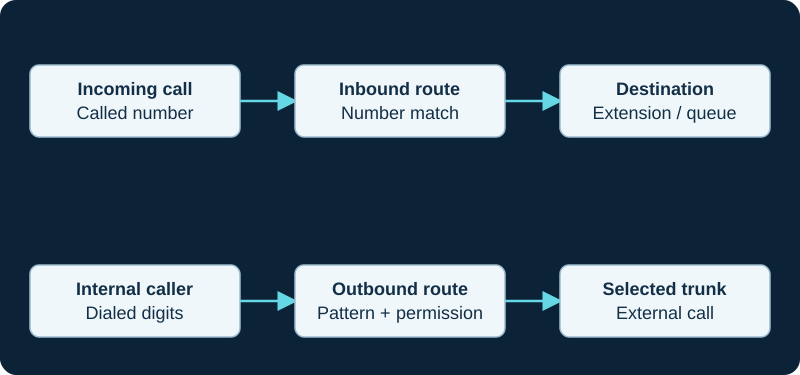
A working outbound call does not prove inbound number routing. Diagnose the direction and the matching rule independently.
Separate endpoint, AoR and contact evidence
In Asterisk PJSIP, the endpoint supplies the calling profile, an associated Address of Record tells Asterisk where that endpoint can be contacted, and one or more Contact URIs provide the actual destinations. Use pjsip show endpoint <name> to confirm the loaded AoR association, then pjsip show aor <name> to inspect its contacts. An endpoint with no AoR or an AoR with no contact cannot be reached merely because outbound calls worked earlier.
A contact may be created by an accepted REGISTER or configured as a static SIP URI. Keep registration acceptance, stored contact, qualification status and successful call delivery separate. Do not add a static contact to conceal a broken dynamic-registration design.
Check contact ownership and network reachability
Confirm that each stored contact belongs to the intended device and reflects its current network path. A phone can send an outbound request through NAT while an old or unroutable contact sends inbound requests elsewhere. Check for duplicate account use, unexpected contacts and the configured maximum-contact policy; another device registered to the same identity can change which contacts receive a call.
If Asterisk sends the INVITE but receives no usable response, inspect the selected contact, transport, firewall state and NAT mapping. If Asterisk never creates the attempt, return to destination logic and AoR/contact resolution before troubleshooting media.
Inspect handset behavior
If the INVITE reaches the phone, check do-not-disturb, local forwarding, account activation and the SIP response it sends. A 180 or 183 response, audible local ringing, user answer, 200 response, established dialog and usable media are separate outcomes. A silent ringtone or headset setting can make an alerting call appear undelivered; compare the phone's call history with the PBX record.
Confirm persistence
Repeat delivery after a handset restart and after enough time to exercise registration renewal and contact expiry. Test through the public number as well as the direct extension, and confirm that the stored contact and selected device remain expected. Do not solve stale contacts by allowing unlimited registrations or disabling qualification without understanding the account design and security boundary.
Check SureVoIP’s first destination before blaming the backup
Use the SureVoIP multi-destination workflow when an inbound call does not reach a later destination; the documented policy advances on timeout, not every response.
Separate a removed Magrathea pool member from a PBX rejection
The Magrathea provider-specific diagnostic distinguishes provider pool state, probe handling, call selection and failure after SIP delivery.
Prove NFON endpoint selection before changing the backup PBX
The NFON provider-specific workflow keeps number routing, high-availability mode, endpoint readiness, INVITE delivery and PBX acceptance separate.
Determine whether Infobip skipped the trunk or the PBX rejected it
The Infobip route diagnostic preserves route choice, destination state, INVITE timing and the first local response.
Determine whether IntelePeer selected another path
The IntelePeer route diagnostic distinguishes a wrong package, profile selection, number translation and PBX rejection.
Determine whether BCM One selected another target
The BCM One route diagnostic distinguishes stale registration, wrong static routing, Request-URI mismatch and disaster-recovery delivery.
A registered Cox trunk can still miss one DID route
The Cox inbound diagnostic starts with number assignment and the actual delivered identity rather than resetting the whole trunk.
A listed Comcast number can still miss the intended route
The Comcast diagnostic treats number inventory, group selection, packet arrival and PBX routing as different evidence.
A listed Lumen number can still use the wrong plan
The Lumen diagnostic treats inventory, route-plan relationship, trunk selection, packet arrival and PBX routing as different evidence.
A visible AT&T number can still use another route
The AT&T diagnostic treats inventory, scheme selection, forwarding, packet arrival and PBX routing as different evidence.
A successful Verizon activation does not prove the ported DID
The Verizon diagnostic keeps native or test DID success separate from later number cutover and PBX handling.
A forwarded Bell call does not prove trunk failure
The Bell diagnostic requires portal, provider, edge and PBX evidence before assigning the fault.
An alternate Rogers answer does not prove primary failure
The Rogers diagnostic requires provider, access, edge and PBX evidence before assigning the fault.
A ThinkTel SureCall answer is not primary-path proof
The ThinkTel diagnostic requires binding, response, edge and PBX evidence before assigning the fault.
An Iristel CDR is not edge-delivery proof
The Iristel diagnostic requires a matching edge trace before changing the PBX.
TELUS reachability is not delivery proof
The TELUS diagnostic requires a matching edge request before changing the PBX.
SaskTel monitoring is not delivery proof
The SaskTel diagnostic requires a matching provider attempt and edge request before changing the PBX.
Cogeco access health is not INVITE proof
The Cogeco diagnostic requires a matching provider record and eSBC request before changing the PBX.
Allstream OPTIONS or IP match is not delivery proof
The Allstream diagnostic requires a matching provider attempt and edge request before changing the PBX.
Cloudli registration is not inbound-delivery proof
The Cloudli diagnostic requires a matching provider attempt and expected edge receipt before PBX route changes.
Orange OPTIONS success is not inbound-call proof
The Orange Business Talk diagnostic keeps probing, number routing, edge receipt, PBX selection and answer separate.
Vodafone edge reachability is not delivery proof
The Vodafone Evolved Voice diagnostic keeps endpoint health, provider selection, number routing, INVITE receipt and answer separate.
A healthy Swisscom access path is not delivery proof
The Swisscom Enterprise SIP diagnostic keeps access, SBC state, provider selection, number routing, INVITE receipt and answer separate.
A healthy Sunrise access path is not delivery proof
The Sunrise Business Voice SIP diagnostic keeps access, peer state, number routing, INVITE receipt and answer separate.
A healthy Proximus access path is not delivery proof
The Proximus Business Trunking diagnostic keeps access, SBC state, number routing, INVITE receipt and answer separate.
Sources & applicability
Primary references for the technical details above. Operational examples and planning checklists are VoIP.info editorial guidance.
- IETF RFC 3261 — SIP, including linked updates ↗
- Asterisk PJSIP troubleshooting guide ↗
- Asterisk PJSIP configuration objects and relationships ↗
- SureVoIP number destinations ↗
- SureVoIP SIP traces ↗
- SureVoIP terms and conditions ↗
- Magrathea SIP resilience ↗
- Magrathea Numbering in the UK & Ireland ↗
- Magrathea Voice Connectivity ↗
- NFON SIP Trunk Flexx product page ↗
- NFON SIP Trunk Flexx technical manual v3.1 (DE) ↗
- NFON SIP Trunk Flexx SLA v1 (EN) ↗
- NFON service status ↗
- Infobip SIP trunking ↗
- Infobip SIP trunk setup ↗
- Infobip Call Routing overview ↗
- Infobip Call Routing route creation ↗
- Infobip inbound route selection ↗
- Infobip route execution and troubleshooting ↗
- Infobip SIP Trunks API ↗
- Infobip Voice reports ↗
- IntelePeer Customer Portal quick-start guide ↗
- IntelePeer Customer Portal FAQs ↗
- IntelePeer call-detail record reference ↗
- IntelePeer number forwarding and failover ↗
- IntelePeer Phone Number DID Management API ↗
- IntelePeer Dynamic 911 integration testing ↗
- BCM One SIP Trunking and Implementation Guide, September 2024 ↗
- BCM One customer portals ↗
- BCM One legal and service documents ↗
- BCM One SIP Service Level Agreement ↗
- BCM One SIP Service E-911 and Service Addendum ↗
- BCM One SIP HyperNetwork Service Level Agreement ↗
- Cox Business Voice Trunking ↗
- Cox Business Asterisk 1.8.7 configuration guide ↗
- Cox Business Avaya IP Office 6.0 configuration guide ↗
- Cox Business Interactive Intelligence CIC configuration guide ↗
- Comcast Business SIP Trunks ↗
- Comcast Business Enterprise SIP Trunks ↗
- Comcast Business Trunks features ↗
- View Comcast Business SIP Trunks numbers ↗
- View Comcast Business Trunks utilization reports ↗
- Comcast Enterprise Trunk Service product-specific attachment ↗
- Lumen SIP Trunking support ↗
- Lumen communication-services end-of-sale FAQ ↗
- Update a Lumen SIP Trunking route plan ↗
- Assign Lumen SIP Trunking numbers and manage 911 information ↗
- Lumen 933 emergency testing FAQ ↗
- AT&T IP Flexible Reach product page ↗
- AT&T IP Flexible Reach Group Administrator Guide ↗
- AT&T: What is IP Flexible Reach? ↗
- AT&T IP Flexible Reach implementation centre ↗
- AT&T cloud-based versus premises phone systems ↗
- Verizon VoIP Services welcome kit ↗
- Verizon Business IP Trunking Services ↗
- Verizon Voice over IP online service document ↗
- Verizon Voice Over IP rates and charges ↗
- Bell voice solutions and SIP Trunking ↗
- Bell SIP Trunking client administration portal guide ↗
- Bell SIP Trunking end user portal guide ↗
- Bell SIP Trunking performance and service reporting user guide ↗
- Bell SIP Trunking support guide ↗
- Bell SIP Trunking emergency-service limitations ↗
- Rogers Business Fixed Network Terms — SIP Services schedule (April 2021) ↗
- Rogers Business SIP Trunking information sheet ↗
- Rogers Business SIP trunking overview ↗
- Rogers SIP Trunking Pizza Pizza case study ↗
- ThinkTel SIP trunk service overview ↗
- ThinkTel SIP authentication ↗
- ThinkTel SIP failover ↗
- ThinkTel SureCall response-code triggers ↗
- ThinkTel SIP trunk IP-binding limit ↗
- ThinkTel CDR download ↗
- ThinkTel 911 testing procedure ↗
- Iristel business SIP Trunking ↗
- Iristel wholesale SIP Trunking ↗
- Iristel SIP trunk failover and redundancy ↗
- Iristel account and Espresso DID portals ↗
- Iristel wholesale E-911 services ↗
- Iristel Reasonable Use Policy ↗
- TELUS Business SIP Trunking ↗
- TELUS SIP Trunking Service R4 eContract service terms ↗
- TELUS Universal Call Blocking support ↗
- TELUS Partner Solutions support ↗
- SaskTel IP Trunking ↗
- SaskTel CRTC 21412 Item 500.23 — IP Trunking Service ↗
- SaskTel index for all tariffs — effective June 17, 2026 ↗
- SaskTel Emergency Voice Local Network Access Redirection — Item 1000.03 ↗
- Cogeco Business SIP Trunking ↗
- Cogeco specific terms — Business Phone, SIP Trunking and Hosted PBX ↗
- Cogeco PBX security guidelines for SIP Trunking customers ↗
- Cogeco Business 911 emergency-service limitations ↗
- Cogeco MLTS 9-1-1 best practices for HPBX and SIP/PRI customers ↗
- Allstream SIP Trunking Quick Start Guide ↗
- Allstream SIP Portal Overview — Native SIP and PRI-SIP ↗
- Allstream SIP Portal Overview — SIP Extreme and SIP Gateway ↗
- Allstream advisory for 911 access using VoIP services in Canada ↗
- babyTEL rebrands as Cloudli Communications ↗
- Cloudli Support — How do I get my IP-PBX or SIP device registered? ↗
- Cloudli Support — Firewall Considerations ↗
- Cloudli Support — Set up a backup number for an outage ↗
- Cloudli 911 Service Information ↗
- Orange Business — Business Talk and Contact Center Access service documents ↗
- Orange Business assistance — Manage Business Talk IP sites ↗
- Orange Business — Business Talk and BTIP Patton SmartNode eSBC configuration guide ↗
- Orange Business — Business Talk Microsoft Teams Direct Routing guide ↗
- Orange Business — Business Talk Cisco CUCM and Webex Calling guide ↗
- Orange Business — Why cloud is the way forward for enterprise voice ↗
- Vodafone UK — SIP trunking ↗
- Vodafone — Converged Hybrid/Evolved Voice Service Specific Terms v1.4 ↗
- Vodafone — Converged Hybrid Voice data sheet ↗
- Vodafone — Tiered Support Services brochure ↗
- Vodafone storm Service Specific Terms v2.3 ↗
- Swisscom — Enterprise SIP for your private branch exchange ↗
- Swisscom — Enterprise SIP factsheet ↗
- Swisscom — Enterprise SIP compatibility list, July 2026 ↗
- Swisscom — Enterprise Connect getting started ↗
- Swisscom — Enterprise Connect order company services ↗
- Swisscom — Enterprise Connect own-gateway configuration ↗
- Sunrise — Business Voice SIP ↗
- Sunrise — On-premises and hybrid PBX portfolio ↗
- Sunrise — SIP Trunk technical flyer, August 2018 ↗
- Sunrise — Business voice direct flyer, March 2017 ↗
- Sunrise — Business Voice for Microsoft Teams factsheet, June 2021 ↗
- Sunrise — Business support contact ↗
- Proximus — Business Trunking product overview ↗
- Proximus — Business Trunking contractual service description, 15 January 2024 ↗
- Proximus — Professional-customer legal documents ↗
- Proximus — Customer service for large organisations ↗
Examples require adaptation to your topology. No live PBX or hardware testing is claimed.