Prove which transfer mechanism ran
Bind the complaint to one timestamp, transferor, transferee, target and original call. Record whether the user selected blind, attended or semi-attended transfer and whether the action came from a phone button, SIP REFER, a PBX feature code, an application or an API. Asterisk documents native chan_pjsip transfer handling as independent from its channel-agnostic core feature-code transfer path. Do not diagnose a missing REFER when no REFER was expected.
Preserve the original dialog identifiers, the consultation dialog for attended transfer, the target digits or URI, endpoint names and what every participant heard. Keep a working internal destination and a controlled busy or unanswered target as comparisons. Original hold, initiator release, target attempt and final caller experience are separate timeline events.
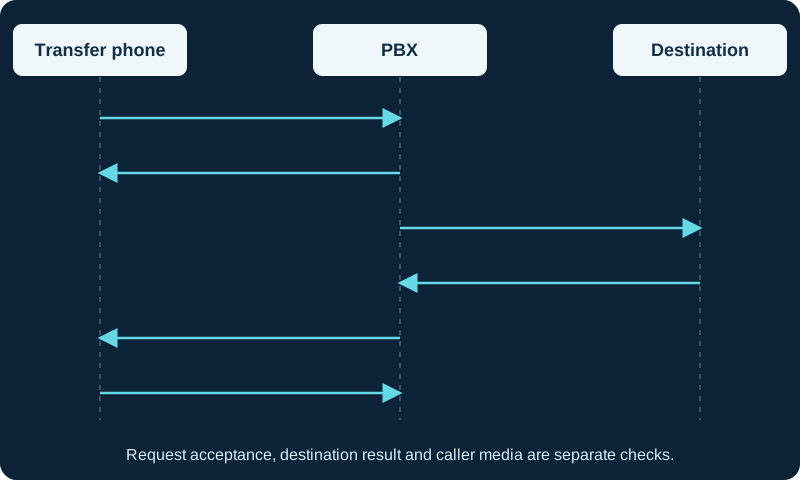
Illustrative REFER event workflow. NOTIFY can arrive before the REFER response; actual order and call legs vary.
Read REFER acceptance and result notification separately
RFC 3515 requires exactly one Refer-To value. A 2xx response, commonly 202 Accepted, accepts the request and creates an implicit subscription; it does not report that the target answered or that a bridge exists. Follow the matching NOTIFY exchange. Each NOTIFY uses a message/sipfrag body whose status line reports progress or the final referred-action result.
Correlate the REFER transaction, Event: refer identifier, subscription state and every NOTIFY response. Multiple REFER requests in one dialog require the event id to distinguish their notifications. Rejecting or ending the notification subscription does not itself withdraw the referred request. Treat a missing NOTIFY, a failed NOTIFY transaction and a negative final sipfrag as different failures.
Follow the Refer-To target into its own call leg
If REFER is rejected, inspect authentication, endpoint identity, authorization and destination policy. Asterisk's current res_pjsip reference defines allow_transfer as the endpoint control for SIP REFER transfers. Core Dial or Queue transfer flags govern the distinct feature-code mechanism and must not be treated as a universal REFER permission.
If REFER is accepted, decode the Refer-To URI and prove the resulting route. RFC 3515 says a SIP target is contacted using a new INVITE under normal SIP rules. That attempt can have another Call-ID, transformed digits, another endpoint, a different caller identity and its own final response. No target attempt points to URI interpretation, policy, routing or transfer handling; an attempted but rejected leg belongs to that response and owner.
Keep attended-dialog replacement intact
For attended transfer, preserve the original dialog, consultation dialog and the Replaces relationship carried through Refer-To. RFC 5589 shows the referred INVITE using Replaces to identify the consultation dialog. A malformed, unknown or unroutable dialog reference can therefore fail after REFER was accepted. Do not strip Call-ID and tag relationships from a support trace so aggressively that the dialogs can no longer be correlated.
Asterisk's PJSIP_TRANSFER_HANDLING() is versioned: current documentation lists it from 20.13.0, 21.8.0 and 22.3.0, with core handling as the default and ari-only producing ARI events for incoming REFER. Prove the installed branch, loaded function value and application owner before applying ARI-specific advice.
Separate call control, bridge completion and media
A successful target response is not the final user outcome. Prove which channels remain, which bridge contains the transferee and target, when the transferor leaves, whether a callback or fallback path runs, and whether bidirectional media follows the final SDP. Asterisk's core attended-transfer controls include no-answer timeout, callback, retry, drop-call, abort, complete, three-way and swap behavior; those controls belong to the core feature-code path and loaded configuration.
Keep the September 16, 2026 Asterisk issue #2166 narrowly scoped. It reports one rare res_pjsip_refer attended-transfer deadlock on Asterisk 22.10.1 with ari-only handling, no reliable reproducer and no published resolution at review. It is relevant only after evidence matches that version, mode and process-wide stall; it is not an explanation for ordinary rejection, routing, Replaces, bridge or media failures.
Retest outcomes without abandoning the caller
Make the smallest correction supported by the failed state: transfer permission, URI construction, route, target policy, Replaces correlation, notification delivery, application handling, core transfer option, bridge or media. Retest blind and attended transfer to an answered internal target, then a controlled busy and unanswered target. Verify the initiator's prompts, original caller treatment, target identity, final NOTIFY, final bridge and usable two-way audio separately.
Keep a documented abort or return-to-caller procedure so a failed transfer does not strand or disconnect the customer. Remove bounded SIP, ARI or bridge diagnostics after collection and retain only authorized redacted evidence. No phone, endpoint, PBX, dialplan, ARI application, REFER subscription, target call, bridge, media stream, transfer outcome or live call was inspected or tested for this guide.
Watch the explanation
Covers the T54W controls and everyday calling tasks, including attended versus blind transfer, conference management, Wi-Fi and Bluetooth. Useful for onboarding phone users.
Read applicability and editorial notes →Watch this video here
T54W demonstration on UD Voice in 2022. The video title and narration identify T54W; its description contains copied references to other models. Review used the available transcript and primary references; audio and screen readability remain unverified.

The player loads only when you choose Watch here. Playback uses YouTube’s privacy-enhanced embed; YouTube processes playback data.
See how a preconfigured busy-lamp-field key can hand off an active call in one press. The short example is useful for reception staff who already have named extension keys and want to understand what happens when they select a colleague during a call.
Read applicability and editorial notes →Watch this video here
Accelerate Networks GRP2615 key configuration. BLF subscriptions, transfer mode and lamp behavior depend on the phone template and PBX. Review used the available transcript and primary references; audio and screen readability remain unverified.

The player loads only when you choose Watch here. Playback uses YouTube’s privacy-enhanced embed; YouTube processes playback data.
Sources & applicability
Primary references for the technical details above. Operational examples and planning checklists are VoIP.info editorial guidance.
- IETF RFC 3515: REFER result notifications ↗
- IETF RFC 5589: SIP call-control transfer ↗
- Asterisk current res_pjsip endpoint REFER permission ↗
- Asterisk feature-code call transfers ↗
- Asterisk PJSIP_TRANSFER_HANDLING function ↗
- Asterisk issue 2166: open 22.10.1 ari-only attended-transfer report ↗
Examples require adaptation to your topology. No live PBX or hardware testing is claimed.