Distinguish the lot from its slots
Call parking holds a call in a PBX-managed slot so another phone can retrieve it. The parking-lot access extension and the individual occupied slot are different numbers. The standard module documents one shared lot; Park Pro adds multiple lots and other controls. Older official GUI examples must be checked against the installed module.
Choose parking when the recipient is moving between desks and can retrieve a shared call. If a known extension should simply ring, an ordinary transfer or ring group may be easier for staff to understand.
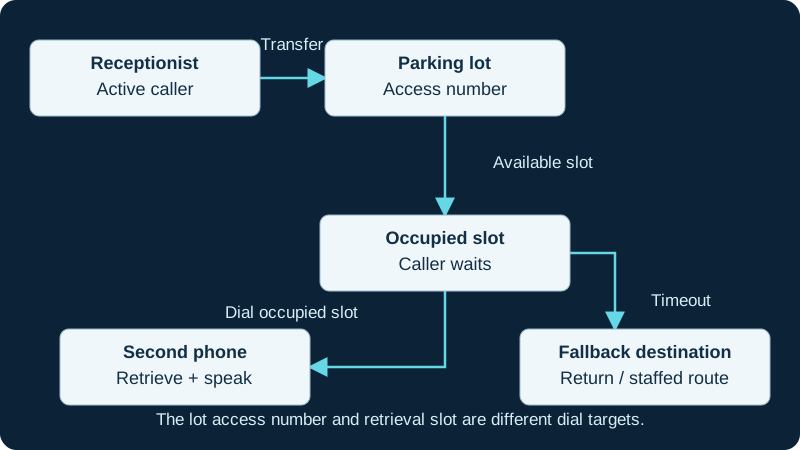
Test retrieval and timeout independently. Use the numbers configured on your own PBX.
Reserve the numbers and fallback
Record the lot access number, starting slot, slot count, timeout and timeout destination in the dial plan. Check for conflicts with existing extensions and feature codes. Do not assume the defaults shown in a tutorial remain available on your PBX.
Name an owner for calls nobody retrieves. A return to the person who parked the call is useful only while that person remains available. For a reception team, test an appropriate staffed fallback and its own no-answer path.
Prove the manual handoff first
Use two registered test phones and a third caller. Answer at the first phone, transfer using the installed system’s supported parking procedure and note the announced slot. Retrieve from the second phone by dialing that slot. Verify two-way audio after retrieval. If a call is visibly parked but retrieval fails, use the focused parked-call retrieval investigation to prove the live lot, slot, generated context and exact retrieval method.
Repeat while a second call already occupies a slot. Ask a staff member to perform the handoff from the written instructions. If they confuse the lot number with the retrieval slot, change the instructions and phone labels before deploying more buttons.
Add buttons without hiding the numbers
BLF keys can show parking-slot state, and supported phone applications can offer a visual parked-call list. Provision the exact model and firmware according to its documentation. A lamp that changes color establishes an indication, not successful retrieval.
Test the key during an active call and again while the phone is idle: those contexts may invoke different actions. If dialing the slot works but the key fails, inspect button type, account and provisioning ownership before changing PBX routing.
Exercise unanswered and full-lot cases
Let a parked test call time out and confirm the actual destination, caller audio and ability to answer. Fill only an isolated test lot or use a coordinated test window to check what happens when capacity is exhausted. Do not discover this behavior during a live reception rush.
Park and Announce is an additional workflow requiring the documented commercial components. Keep that licensing and paging dependency separate from basic parking. Save the successful retrieval, timeout and occupied-slot observations in the operating runbook.
Reconcile FreePBX lots with external AMI control
The AMI parking diagnostic compares generated lot and timeout routing with the exact channel, assigned slot and terminal event.
Do not treat parking bridges as a technology health test
The AMI bridge-technology guide keeps parking lifecycle, registered implementations and media outcomes independently observable.
Watch the explanation
A practical operator introduction to hold, shared parking, transfer, conference controls and DND on the CP965. It helps explain why an apparently working phone may not ring.
Read applicability and editorial notes →Watch this video here
Yealink CP965 on ComTech’s service in 2022. The service configuration is part of what is demonstrated. Review used the available transcript and primary references; audio and screen readability remain unverified.
The player loads only when you choose Watch here. Playback uses YouTube’s privacy-enhanced embed; YouTube processes playback data.
The demonstration shows a call being assigned a parking slot, then explains retrieving it by the displayed number or the parked-calls list. It is useful for teams that need to move a conversation to another extension without transferring directly to a particular colleague.
Read applicability and editorial notes →Watch this video here
P-series workflow associated with the P320/P325/P330 family. Application availability and exact controls vary across Sangoma platforms and firmware. Review used the available transcript and primary references; audio and screen readability remain unverified.

The player loads only when you choose Watch here. Playback uses YouTube’s privacy-enhanced embed; YouTube processes playback data.
Sources & applicability
Primary references for the technical details above. Operational examples and planning checklists are VoIP.info editorial guidance.
- Sangoma: Parking module ↗
- Sangoma: Park Pro scope and dependencies ↗
- Asterisk call parking overview ↗
- Asterisk res_parking configuration reference ↗
- ↗
- ↗
- ↗
- ↗
- ↗
- ↗
- ↗
- ↗
- ↗
- ↗
- ↗
- ↗
- ↗
- Asterisk current BridgeTechnologyList AMI action ↗
- Asterisk current BridgeTechnologySuspend AMI action ↗
- Asterisk current BridgeTechnologyUnsuspend AMI action ↗
- Asterisk 22 BridgeTechnologyList AMI action ↗
- Asterisk 22 BridgeTechnologySuspend AMI action ↗
- Asterisk 22 BridgeTechnologyUnsuspend AMI action ↗
- Asterisk bridge-core AMI implementation ↗
- Asterisk BridgeList AMI action ↗
- Asterisk BridgeInfo AMI action ↗
- Asterisk bridge concepts ↗
- Asterisk network security guidance ↗
Examples require adaptation to your topology. No live PBX or hardware testing is claimed.