Define recovery success before importing the archive
Record the source FreePBX, Asterisk, Backup & Restore, Filestore and relevant module versions; archive identity and checksum; target platform; recovery-point objective; recovery-time objective; and the business call paths that must return. Inventory extensions, trunks, DIDs, outbound routes, IVRs, schedules, prompts, voicemail, recordings, certificates, custom files, provisioning and external integrations. A completed import is not the recovery result.
Name the operator who controls carrier registration, IP authorization, DNS, firewall, phone provisioning and production cutover. Keep the production PBX serving calls during the rehearsal. Preserve its state and a separate rollback plan rather than treating the recovery target as an in-place experiment.
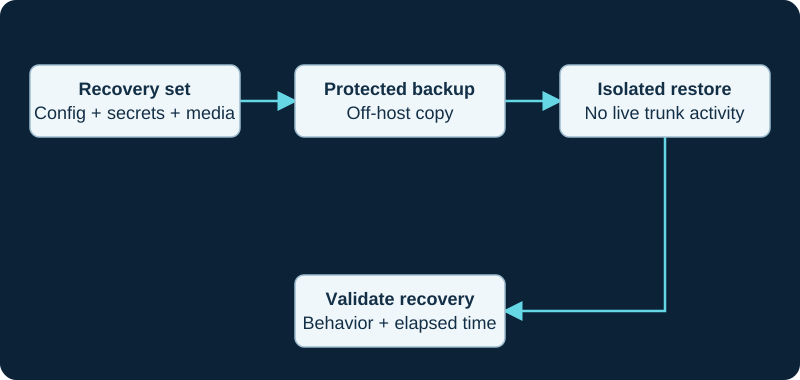
Keep production trunk identities from registering during a restore exercise. Include the dependencies needed to decrypt and use the backup.
Isolate identity and egress before restore
Place the target in a recovery segment whose outbound signaling and media paths are denied by default. Prevent it from reaching production carrier edges, phone VLANs, public DNS names, provisioning services and automated destinations until each path is deliberately admitted. Use a different host identity and management address, and record any source IP that a carrier authorizes. NAT isolation alone is not evidence when both systems can still emerge through the same public address.
Protect copied credentials, private keys and tokens as production secrets. Do not weaken the firewall, expose the target to the internet or enable a production trunk to make a dashboard look healthy. Confirm the isolation controls before importing data because module restore hooks and service restarts can activate restored state.
Version the restore owners and preserve target controls
Sangoma documents GUI and fwconsole backup --restore workflows for FreePBX 15 and later, including options that preserve target bind ports, DNS and remote NAT values. Use only the installed version's documented workflow and record every selected preservation option; these switches change target state and are not general safety controls. A large-archive CLI restore avoids a browser timeout, but it does not make an unsupported version direction or unsafe network safe.
The release/17.0 metadata listed Backup & Restore 17.0.14 and Core 17.0.18.54 on October 11, 2026. The Core changelog includes an outbound-routing restore fix at 17.0.18.46, while the Backup & Restore changelog contains security-relevant restore corrections. Capture installed versions, repository channel, signatures and dependencies before attributing behavior to the archive or copying a repository version into production.
Restore once and reconcile the inventory
Restore the preserved archive through the supported owner and retain the complete log, warnings, elapsed time and manual actions. Compare the result with the source inventory: modules and activation, extensions, trunks, routes and their order, DIDs, destinations, schedules and timezone, recordings, voicemail, certificates, firewall state, provisioning ownership and custom files. Treat every skip, conversion and missing handler as an explicit exception.
For a FreePBX 17 migration, separate chan_sip-to-PJSIP conversion from ordinary restore success. Sangoma says converted trunks require thorough testing because provider configuration varies and does not support treating a FreePBX 17 backup as a routine restore to 16. Keep the original system intact instead of using a reverse restore as rollback.
Prove the target remains dark
Before admitting any carrier path, inspect loaded state and network observations. Asterisk documents pjsip show registrations for outbound registration status and pjsip show endpoint <name> for endpoint and contact evidence. Map each result back to the FreePBX trunk, transport, registration, endpoint, auth, AOR and identify objects; an outbound registration is not intrinsically tied to an endpoint.
Confirm that no copied production credential is registering, no IP-authenticated carrier sees the recovery source, no production phone has moved, and no restored scheduled job can email, upload, page or place a call. A stopped registration does not prove that an IP-authenticated inbound route, static contact, DNS target or automation is inert. Correct persistent state in the FreePBX owner and reapply through the supported path rather than editing generated Asterisk files.
Run a bounded recovery call matrix
Begin with two isolated test endpoints and internal calls. Add voicemail deposit and retrieval, DTMF, transfer, hold, IVR, time conditions, queue or ring-group overflow, prompts, recording policy, caller identity, two-way audio and hangup according to the recovery inventory. Restore a sample authorized voicemail or recording and verify that retained media and access controls match the plan.
Admit external service only through a provider-approved test identity, test number or separately authorized path. Record signaling and media evidence for controlled inbound and outbound calls, including behavior after registration renewal. Do not place an emergency call as a generic test; use the carrier's approved procedure after location, callback number and routing ownership are confirmed.
Measure, remediate and rehearse cutover separately
Record target build time, import time, exception remediation, service admission and call-matrix completion. Compare the observed result with the recovery objectives and list every credential, license, certificate, network rule, carrier action and manual file that was not recovered. Update the runbook and repeat the failed stage after a controlled correction.
A production cutover is a separate change: assign registration and IP-auth ownership, number routing, DNS, firewall, phone reconnection, monitoring and rollback checkpoints. Preserve the old host but keep it from competing after handoff. This procedure is documentation-derived; it does not claim that an archive, PBX, provider or call path was tested.
Authenticate the archive before the isolated restore
Preserve the archive's creation hash, job identity, source module inventory and custody record before upload. The 2026 FreePBX restore advisories make archive authenticity, current Backup & Restore code, restricted administrator access and a post-restore authentication check part of the recovery boundary—not optional housekeeping after the test.
Reconcile missing content before opening network paths
If the restore reports success but an object is absent, keep the target isolated and use the missing settings or files diagnostic. A completed job is not the point to admit a carrier path when module handlers, generated state or files remain unresolved.
Retrieve an identified Filestore artifact before the rehearsal
The Filestore destination guide requires a named archive, custody record and hash before isolated restore testing. A fresh download is not accepted until it matches the intended recovery point.
Watch the explanation
Separates File Store destinations from backup jobs, then covers included data, retention and archive checks. Repeatedly explains why a copy on the PBX’s own disk is insufficient.
Read applicability and editorial notes →Watch this video here
FreePBX 15 interface from 2021. Check current module and migration documentation before restoring to FreePBX 17. Review used the available transcript and primary references; audio and screen readability remain unverified.

The player loads only when you choose Watch here. Playback uses YouTube’s privacy-enhanced embed; YouTube processes playback data.
Sources & applicability
Primary references for the technical details above. Operational examples and planning checklists are VoIP.info editorial guidance.
- Sangoma Backup and Restore for FreePBX 15 and later ↗
- FreePBX Backup & Restore release/17.0 metadata ↗
- FreePBX Core release/17.0 metadata ↗
- Sangoma FreePBX 17 FAQ ↗
- Asterisk configuring outbound registrations ↗
- Asterisk PJSIP troubleshooting guide ↗
- Asterisk PJSIP objects and relationships ↗
- FreePBX Backup & Restore repository ↗
- FreePBX Backup & Restore job implementation — release/17.0 ↗
- FreePBX Backup & Restore restore implementation — release/17.0 ↗
- FreePBX security advisory GHSA-5v7h-49gr-jcwr ↗
- FreePBX security advisory GHSA-f6hc-rqxg-ch86 ↗
- Sangoma Filestore module ↗
- Sangoma fwconsole commands for FreePBX 15 and later ↗
- Sangoma Backup Information ↗
- Sangoma upgrading to FreePBX 17 ↗
- FreePBX module restore base — release/17.0 ↗
- FreePBX Filestore release/17.0 source ↗
- FreePBX Filestore release/17.0 module metadata ↗
Examples require adaptation to your topology. No live PBX or hardware testing is claimed.