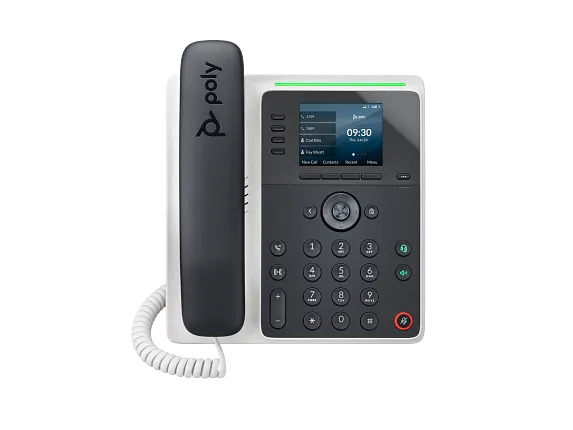
Documented specifications
HP Poly · HP maintains a live Edge E family page, model-specific manuals and a current PVOS 8.6.1 release record. Those records do not establish local stock, remaining support period, provider approval or the build installed on a particular phone.
| Specification | Documented value |
|---|---|
| Exact identity | Administrator guide model EdgeE100; software model 3111-86980-001 Source ↗ |
| Line controls | 2 physical line keys and 8 configurable assignments across four pages; assignments are not SIP registrations or simultaneous calls Source ↗ |
| Display | 2.8-inch colour IPS display Source ↗ |
| Network and power | Two-port Gigabit Ethernet switch and PoE-enabled operation; Wi-Fi is not supported on E100 Source ↗ |
| Headset boundary | Wired headset controls are documented; E100 does not support Bluetooth Source ↗ |
| Audio codecs | G.711, G.729AB, G.722, G.722.1, iLBC and Opus are listed; a codec list does not prove negotiated media Source ↗ |
| Firmware evidence | HP support lists PVOS 8.6.1 released August 2026; confirm the approved model and provider path before changing an installed build Source ↗ |
| Provisioning | Administrator guide documents server and local configuration methods; fetch, apply and effective state require separate proof Source ↗ |
Unlisted fields remain unverified. Platform compatibility and remaining support life require confirmation for the exact ordered model.
Start with the E100 identity, not the family headline
The current family page groups several Edge E models and says model choices can include Bluetooth, Wi-Fi and NFC. The E100-specific user and release records do not assign Bluetooth or Wi-Fi to E100. Record EdgeE100, software model 3111-86980-001, part number, region, hardware label and installed PVOS build instead of inheriting a radio from the family page.
The live family page and PVOS 8.6.1 support record show current documentation, not local availability, a remaining support term, provider certification or the software on an individual unit.
Separate two buttons from eight assignments and SIP identities
The E100 has two physical line keys and supports eight configurable assignments across four pages. Flexible assignments can be Any, Unassigned, Line, BLF, enhanced feature key, speed dial or presence, and a reassignment can override a default or custom mapping.
A paginated assignment is not another physical button, SIP registration, monitored subscription or simultaneous call. Map each required role, page, category, line, value and label, then observe the intended PBX state.
Treat Ethernet, VLAN, provisioning and registration as gates
PoE capability and two Gigabit Ethernet ports describe interfaces. Verify power budget, LAN versus PC-port cabling, link, LLDP or DHCP discovery, voice VLAN, address, gateway, DNS, NTP and certificate time. The E100 does not gain Wi-Fi because another Edge E model offers it.
Then preserve the authoritative Poly Lens, provider, server or local configuration owner; requested file; response; apply or restart event; effective values; SIP registration; and completed call as separate outcomes.
Qualify the wired headset path without borrowing Bluetooth
E100 hardware controls include a headset key, and current exact-model records describe wired or EHS headset paths. It does not support Bluetooth. Confirm the approved cable or EHS adapter, phone port, headset power, audio routing, answer, mute, volume and hang-up with the intended accessory and service.
A detected USB device, lit headset key or audible dial tone does not prove remote call control, two-way media or recovery after reboot.
Bind firmware changes to an approved model path
HP support lists PVOS 8.6.1 with an August 2026 release date. That is version evidence, not proof that every provider has approved it, that an E100 is eligible for an arbitrary jump or downgrade, or that a remote update succeeded.
Before change, preserve model, current and target builds, source, release notes, configuration backup, certificates, provisioning ownership, pilot, rollback trigger and recovery method. After change, verify effective version, configuration, keys, registration and calls independently.
Accept the role and preserve emergency limitations
Pilot cold boot, PoE recovery, provisioning, every required key page, inbound and outbound identity, two-way audio, DTMF, voicemail indication, hold, blind and attended transfer, headset controls and restart on the intended platform. The safety notice warns that emergency caller location may not be identified automatically from the phone IP address; validate the organization's emergency-location process separately.
Record exact model, build, template, network, PBX and results together. No phone, network, headset, firmware, emergency workflow, call, price, availability, compatibility or support response was tested for this guide.
Sources & applicability
Primary references for the technical details above. Operational examples and planning checklists are VoIP.info editorial guidance.
- HP Poly Edge E Series product family ↗
- HP Poly Edge E Series Administrator Guide, PVOS 8.2.1 ↗
- HP Poly Edge E Series User Guide, PVOS 8.2.1 ↗
- HP Poly Voice Software 8.6.1 release notes ↗
- HP Poly Edge E Series flexible line key assignments ↗
- HP Poly Edge E Series PVOS 8.0.0 release notes ↗
- HP Poly Edge E Series safety and regulatory notices ↗
- HP Poly Edge E100 and E220 specification sheet ↗
Examples require adaptation to your topology. No live PBX or hardware testing is claimed.