Name the exact transition, direction and leg
Start with the event immediately before sound disappears: hold, resume, attended or blind transfer, a measured idle interval, a network change or a particular route. Record who can still hear whom before and after that event. “Intermittent audio” is too broad to select a useful capture or assign an owner.
Collect one short successful example and one failing example with the same endpoints where possible. Preserve timestamps, timezone, calling and called identities, route, Call-ID and the PBX channel or bridge identifiers that correlate its separate SIP legs. Keep codec, access network and trunk constant so the comparison answers one question.
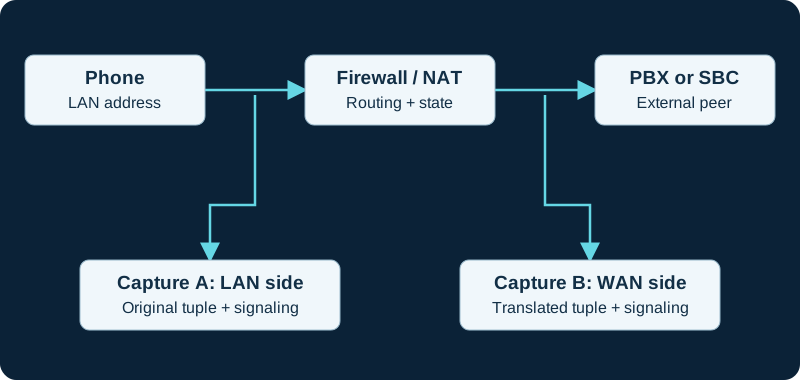
Paired observations help locate a change or loss. Account for clock offset, NAT and capture drops before attributing a difference to the network.
Read offer and answer on each side of hold
Inspect the complete offer/answer exchange around the transition. RFC 3264 defines sendonly, recvonly and inactive stream directions and requires a direction change to be negotiated through offer and answer. It also says RTCP continues for sendonly, recvonly and inactive streams. A hold indicator is therefore evidence to interpret, not permission to ignore the rest of the negotiated session.
For each PBX leg, compare connection address, audio port, payload types, direction and the offer-answer pairing before hold, on hold and after resume. A zero address and a zero port have different RFC meanings. The destination advertised to the phone can differ from the one advertised to the carrier; match every RTP stream to the SDP for its own leg.
Establish whether Asterisk stayed in the media path
Current res_pjsip documentation says direct_media allows media to flow directly between endpoints and defaults to yes; it also documents glare mitigation, a direct-media refresh method and disable_direct_media_on_nat. Inspect the loaded endpoint objects and the actual re-INVITE or UPDATE exchange rather than assuming the PBX anchored the stream. A setting name or GUI selection does not prove which path one call negotiated.
Use authorized captures on both sides of the first suspected boundary. Confirm whether the sender adopted the post-transition destination and whether packets reached the next receiver. If direct media is intentionally negotiated, a PBX-side capture can legitimately stop seeing RTP; if it is not, that absence is evidence at a different boundary. Preserve the management layer that owns generated Asterisk configuration.
Keep RTP timeout and keepalive claims narrow
Asterisk defines rtp_timeout as the maximum seconds without received RTP while a channel is off hold and rtp_timeout_hold as the corresponding on-hold interval; zero disables each check by default. A reached threshold hangs up the underlying channel. That can explain a repeatable disconnect, but increasing it does not restore one-way sound or repair a wrong post-resume destination.
rtp_keepalive sends comfort-noise keepalives from Asterisk. Outbound keepalives do not prove that Asterisk received the peer's RTP, that a firewall permits the reverse direction or that an endpoint decoded audio. Correlate the first timeout log with the last relevant received packet and the loaded endpoint value before changing any threshold.
Find the first boundary that loses usable media
Use paired, authorized captures at the sender and receiver sides of the suspected boundary. Compare SSRC, sequence, timestamp, payload type, source, destination and time around the transition. Wireshark can identify and analyze RTP streams, but stream classification and packet arrival at a capture point do not prove decryption, decoding, stream selection, audio-device routing or what a person heard.
If packets arrive at the correct endpoint but sound is absent, retain negotiated codec and media protection, selected stream and endpoint audio state. If audio fails only after a measured idle interval, align that time with firewall state, NAT binding behavior, RTP timeout and session signaling rather than assuming a codec changed without evidence.
Correct one owner and retest the transition
Correct only the demonstrated sender, negotiated address or port, direct-media policy, NAT behavior, timeout setting, firewall rule or endpoint handling. On FreePBX and other managed systems, use the control that owns generated PJSIP configuration. Preserve the previous value, rollback trigger and evidence that justified the change.
Repeat the exact hold/resume or transfer sequence, verify both media directions before and after it, and run beyond the former idle interval where relevant. Also verify ordinary calls, normal hangup and the expected clearing of abandoned sessions. A fresh call immediately after restart is not acceptance for a delayed failure. No PBX, endpoint, trunk, packet stream, transition, setting or call was tested for this guide.
Preserve the hold-control path before changing RTP policy
When audio changes after hold, the HOLD_INTERCEPT diagnostic identifies the channel event, consumer action, SIP hold exchange and music source before media repair.
Retain each media segment and direction
The Asterisk RTCP diagnostic follows channel and SSRC changes across hold, transfer and direct-media transitions instead of overwriting one leg with a call-wide summary.
Include failed resume after PJSIP hold
When audio fails after hold, the PJSIP hold diagnostic compares the hold and resume transactions, final SDP and both RTP directions before changing NAT or codecs.
Reconstruct the Linphone pair after each path change
For Linphone, preserve the selected ICE pair and actual RTP tuple before and after hold, transfer or a network change. The Linphone traversal diagnostic treats every path transition as a new evidence interval instead of assuming the initial candidate remains active.
Check retained or misdirected MuteAudio state
The MuteAudio diagnostic correlates control timing with transfer, hold and bridge changes.
Watch the explanation
Explains how the problem determines where to capture, including switch mirroring and paired client/server observations. A useful first step before collecting a VoIP trace.
Read applicability and editorial notes →Watch this video here
Recorded in 2021; capture-placement principles remain useful. Exact operating-system and switch controls vary. Review used the available transcript and primary references; audio and screen readability remain unverified.

The player loads only when you choose Watch here. Playback uses YouTube’s privacy-enhanced embed; YouTube processes playback data.
Compares an intact RTP capture with a copy containing deliberately removed packets. The stream list and detailed analysis show how gaps become loss indicators and how burst patterns differ from scattered loss.
Read applicability and editorial notes →Watch this video here
A 2024 Wireshark demonstration; menu placement can change. The second capture is a teaching fixture with simulated loss. Review used the available transcript and primary references; audio and screen readability remain unverified.

The player loads only when you choose Watch here. Playback uses YouTube’s privacy-enhanced embed; YouTube processes playback data.
Sources & applicability
Primary references for the technical details above. Operational examples and planning checklists are VoIP.info editorial guidance.
- IETF RFC 3264: modifying the negotiated session ↗
- Wireshark: RTP stream identification and analysis ↗
- Asterisk current res_pjsip media option reference ↗
- Asterisk HOLD_INTERCEPT function ↗
- Asterisk AMI Hold event ↗
- Asterisk AMI Unhold event ↗
- Asterisk REST data models: ChannelHold and ChannelUnhold ↗
- Asterisk ARI Channels REST API ↗
- Asterisk PJSIP_MOH_PASSTHROUGH function ↗
- Asterisk 22 CHANNEL function ↗
- Asterisk Media Experience Score ↗
- Asterisk MES implementation ↗
- Asterisk bridge media paths ↗
- Asterisk PJSIP troubleshooting: direct media ↗
- Asterisk PJSIP_ENDPOINT dialplan function ↗
- Asterisk pjsip.conf sample ↗
- RFC 6337: SIP usage of the offer-answer model ↗
- Liblinphone latest NatPolicy API ↗
- Liblinphone 5.5 network parameters ↗
- Linphone ICE feature guide ↗
- RFC 8445: Interactive Connectivity Establishment ↗
- RFC 8489: Session Traversal Utilities for NAT ↗
- RFC 8656: Traversal Using Relays around NAT ↗
- RFC 8839: SDP offer-answer procedures for ICE ↗
- Asterisk 23 MuteAudio action ↗
- Asterisk 22 MuteAudio action ↗
- Certified Asterisk 22.8 MuteAudio action ↗
- Asterisk 23 MUTEAUDIO dialplan function ↗
- Asterisk 23 MixMonitorMute action ↗
- Asterisk 23 ConfbridgeMute action ↗
- Asterisk 23 CoreShowChannel event ↗
- Asterisk Manager TCP/IP API ↗
- Asterisk AMI v2 specification ↗
Examples require adaptation to your topology. No live PBX or hardware testing is claimed.