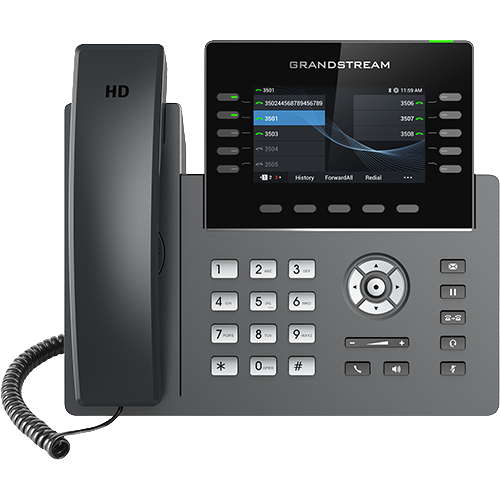
Documented specifications
Grandstream · Grandstream maintains a live combined product page and current family documentation. The current guide labels revision-1 hardware as legacy and not eligible for 1.0.15.x, while its currently supported list omits GRP2613 and GRP2613W. Confirm the exact suffix, part number, hardware revision, regional status and supported firmware with Grandstream or an authorized channel before purchase or change.
| Specification | Documented value |
|---|---|
| Exact variants | Base GRP2613 is wired; GRP2613W adds integrated dual-band Wi-Fi 6 and Bluetooth on the live combined product page Source ↗ |
| Accounts and line keys | Live page: 4 SIP accounts on GRP2613 and 6 on GRP2613W, with 6 physical multipurpose line keys; effective capacity remains hardware- and firmware-sensitive Source ↗ |
| Virtual keys | 6 fixed plus 18 dynamic VPKs, 24 total across up to four screens; dynamic VPKs do not provide LINE or shared-line modes Source ↗ |
| Display | 2.8-inch 320 x 240 colour LCD Source ↗ |
| Ethernet and power | Dual autosensing Gigabit Ethernet ports with integrated PoE Source ↗ |
| Firmware boundary | 1.0.15.x is not applicable to legacy hardware; newer firmware splits GRP2613 and GRP2613W across different image families Source ↗ |
| Provisioning | GDMS plus documented local and server provisioning paths; enrollment, fetch, apply and effective state are separate checkpoints Source ↗ |
Unlisted fields remain unverified. Platform compatibility and remaining support life require confirmation for the exact ordered model.
Read the exact suffix and product label first
The live Grandstream page combines GRP2613 and GRP2613W, but only the W model is described with integrated dual-band Wi-Fi 6 and Bluetooth. Record the printed model, part number, hardware version, installed software and radio state. Do not infer W capabilities from a front-panel photo or a GRP2613 inventory label.
Grandstream's October 12 guide calls hardware versions beginning with 1 legacy and says 1.0.15.x is not applicable to them. The guide's currently supported hardware list omits both names even though the combined product page remains live. Treat this as mixed lifecycle evidence and obtain current, region-specific support and availability before a purchase or fleet change.
Keep accounts, line keys and VPK pages separate
The live page lists four SIP accounts for GRP2613 and six for GRP2613W, with six multipurpose line keys. The VPK guide documents six fixed and eighteen dynamic VPKs, twenty-four total across up to four screens. Those figures are different resources: accounts do not equal simultaneous calls, a VPK page does not add a physical button, and a BLF label does not prove subscription state.
The firmware changelog says GRP2613 account capacity increased to four in 1.0.11.15 except on legacy hardware. Preserve the exact running version and loaded account count instead of copying the highest product-page figure to every unit.
Bind each key to an account, mode and observed state
Grandstream documents fixed keys as eligible for LINE and other functions, while dynamic VPKs exclude LINE and shared-line modes. For every required BLF, speed dial, park or transfer control, record the page, fixed or dynamic position, selected account, mode, value and label.
Then test idle, ringing, active, hold and failure states with the intended PBX. Configuration present in the web UI is not proof that the phone subscribed successfully, that the monitored extension is correct or that a transfer completed.
Separate network admission from provisioning and registration
The phone's dual Gigabit ports and PoE describe interfaces, not an accepted deployment. Verify switch power, wall-to-LAN and PC-port cabling, LLDP or DHCP discovery, voice VLAN, address, DNS, time and certificate trust before moving to provisioning. For GRP2613W, validate the approved WLAN independently and remove the factory bootstrap association after authorized setup.
A GDMS assignment, configuration download, successful apply, SIP registration and completed two-way call are distinct outcomes. Record which system owns each layer and keep local edits from silently competing with the authoritative template.
Choose firmware from label, branch and transition evidence
The current guide splits 1.0.15.x images so GRP2613 and GRP2613W use different image families, excludes legacy hardware from that branch and requires transition firmware before an eligible device moves from 1.0.13.127 or earlier to 1.0.15.1 or later. It also warns that certificates or CAs can be lost and recommends a firmware-specific backup.
Recheck the live firmware directory and release notes at change time. Preserve the approved image, checksum where supplied, backup, trust material, staged pilot, rollback trigger and recovery path. Dual-image support is not permission to cross-load variants or assume an arbitrary downgrade is safe.
Accept the exact phone and preserve limitations
Pilot cold boot, PoE recovery, authoritative provisioning, every required account and VPK page, inbound and outbound identity, two-way audio, DTMF, voicemail indication, hold, blind and attended transfer, BLF updates, restart and PC-port behavior. Add the approved WLAN and Bluetooth accessory only for GRP2613W.
Record model suffix, part number, hardware version, firmware, configuration source, PBX build and results together. No phone, network, provisioning result, registration, key state, accessory, call, media path, price, availability, compatibility or support response was tested for this guide.
Sources & applicability
Primary references for the technical details above. Operational examples and planning checklists are VoIP.info editorial guidance.
- Grandstream GRP2613(W) product page ↗
- Grandstream GRP2615 product page ↗
- Grandstream GRP2615 datasheet ↗
- Grandstream GRP261x series user guide ↗
- Grandstream GRP261x series administration guide ↗
- Grandstream GRP26xx virtual multi-purpose keys guide ↗
- Grandstream firmware directory ↗
Examples require adaptation to your topology. No live PBX or hardware testing is claimed.