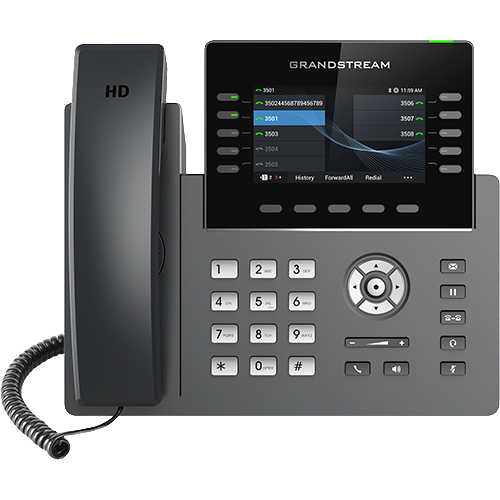
Freeze the exact device and first wrong state
Photograph or transcribe the rear model, suffix, part number and hardware version; record installed firmware, MAC address, serial inventory, power source, switch port, Ethernet or WLAN path, discovered provisioning URL, management tenant or server, template revision, account and key page. Redact credentials, personal numbers, certificates and packet payloads before sharing.
Classify the first divergence: wrong variant, legacy hardware on the wrong branch, unsupported image, stale assignment, wrong discovery method, failed fetch, unapplied template, local override, wrong VLAN, unregistered account, wrong key mapping or PBX subscription failure.
Reconcile model, hardware revision and firmware family first
Confirm GRP2613 versus GRP2613W before diagnosing radios. Check whether the hardware version is legacy, then map the model to the documented firmware image family and transition requirement. Preserve current and target versions, release note, image source, backup and certificate state.
If model or branch is wrong, stop the rollout and use the supported recovery path. Do not flash a W image onto a base model, force 1.0.15.x onto legacy hardware or treat dual-image support as proof that any downgrade is safe.
Trace discovery, fetch, apply and effective state separately
Record how the phone learned its provisioning authority: GDMS association, DHCP or LLDP, redirection, local URL or manual configuration. Preserve the requested URL or tenant assignment, response status, configuration revision, apply or reboot event and effective account, network and key values.
A reachable server or downloaded file does not prove that the selected template matched the exact model, won precedence or survived reboot. Resolve competing local, cloud and server owners before repeatedly resetting the phone.
Verify VLAN, address, time and registration in order
Start at PoE and link on the intended switch port, then confirm LAN versus PC cabling, voice VLAN source, tagged or untagged state, address, gateway, DNS, NTP and certificate time. For an approved GRP2613W or GRP2615 WLAN, preserve SSID, security mode, radio capability and actual association independently.
Only then inspect SIP account selection, server, transport, credentials, Contact, response and expiry. Network reachability, configuration delivery and registration are separate gates; none proves an accepted call.
Compare every VPK with the intended PBX object
For each wrong control, capture fixed or dynamic position, page, mode, selected account, value, label and observed icon or LED state. Remember that dynamic VPKs do not provide LINE or shared-line modes. Compare the phone value with the intended PBX extension, BLF hint, park slot, speed dial or transfer target.
A visible label or green registration icon is not proof that a SUBSCRIBE was accepted, presence updated, a park slot belongs to the same system or a transfer completed. Use one authorized target and one state change to identify the first mismatch.
Correct one owner and retest the original workflow
Change only the proven model template, firmware branch, discovery source, tenant assignment, VLAN, account, VPK mapping or PBX feature. Preserve old and new values, approval, effective time and rollback, then repeat the same cold boot, fetch, apply, registration and user action.
Verify two-way audio, DTMF, voicemail, hold, transfer, BLF, park, pickup and restart only where the role requires them. One recovered key or call does not establish fleet compatibility, remaining support, availability, quality or price. No device or live workflow was tested for this diagnostic.
Sources & applicability
Primary references for the technical details above. Operational examples and planning checklists are VoIP.info editorial guidance.
- Grandstream GRP2613(W) product page ↗
- Grandstream GRP2615 product page ↗
- Grandstream GRP2615 datasheet ↗
- Grandstream GRP261x series user guide ↗
- Grandstream GRP261x series administration guide ↗
- Grandstream GRP26xx virtual multi-purpose keys guide ↗
- Grandstream firmware directory ↗
Examples require adaptation to your topology. No live PBX or hardware testing is claimed.