Build a small hierarchy
Keep shared service settings, model-specific keys and per-device identities distinguishable. A common template might define time service and SIP transport; a model layer can define supported line keys; an individual assignment supplies the intended user's account. The phone's actual merge order controls which value wins. For example, Grandstream documents layered custom configuration support on specified GRP firmware, with later files overriding earlier ones. Do not extend that rule to every manufacturer or older release without checking its documentation.
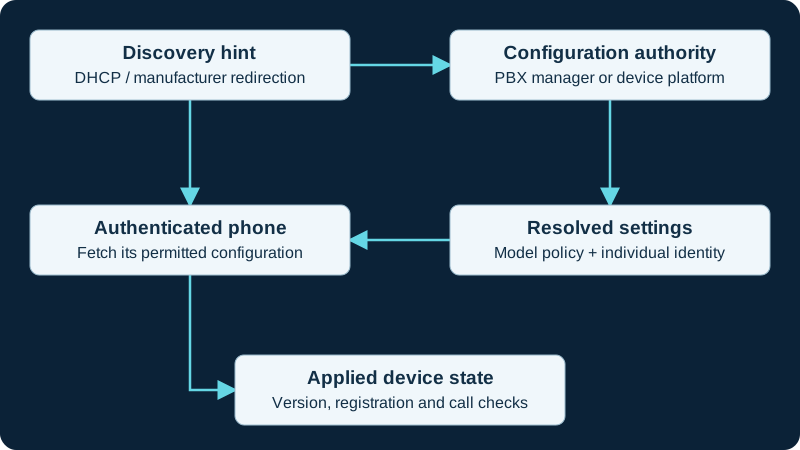
Choose one configuration owner. A discovery hint or MAC-based filename is not authentication; verify both file access and the resulting device behavior.
Review the generated result
Validate syntax and escaping, then inspect the fully resolved configuration for a pilot device. A template can be syntactically valid while assigning the wrong account, trunk permissions or display label. Keep secrets out of ordinary source-control history and review artifacts. Record a template revision and a change reason. Compare the intended result with the phone's applied settings after provisioning. Define which local user changes are permitted and whether the next management cycle preserves or overwrites them.
Detect drift without creating a fight
If a setting repeatedly changes back, inspect all management sources before editing it again. Cloud management, PBX templates and manual configuration can each be involved. Choose the authoritative owner and remove the unintended competing assignment. Roll out changes by hardware and firmware cohort. Verify a representative phone from each group, then expand. Retain the previous known-good template and the procedure to deliver it to a phone that can no longer reach the usual server. A rollback file is of little use if the failed change removed its delivery path.
Bind a Grandstream template to exact model and revision
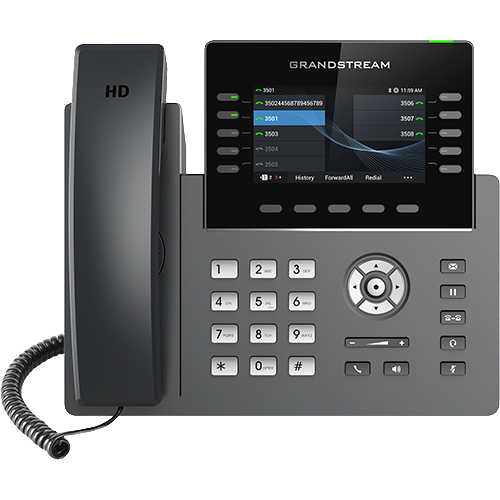
A GRP2613, GRP2613W and GRP2615 can require different model, radio, account and firmware assumptions. The device diagnostic checks the matched template before overwriting local state.
Bind Poly Edge E templates to exact software models
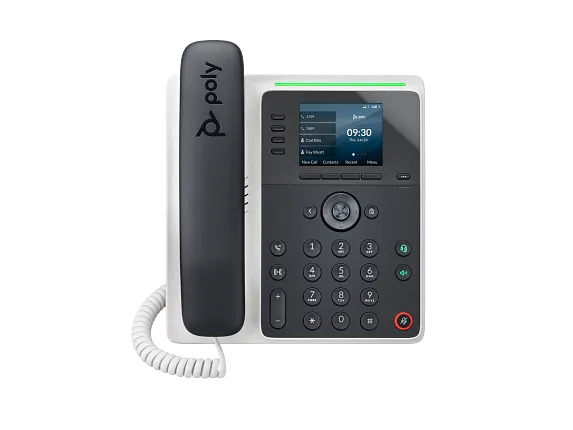
Use EdgeE100 with 3111-86980-001 and EdgeE220 with 3111-86990-001 as exact matching evidence. The paired diagnostic checks precedence and flexible-key overrides.
Split HT80x V2 and HT81x V2 templates deliberately
HT802 V2 and HT818 V2 differ in port count, network topology and firmware binary family. Use the paired diagnostic before applying a family template.
Watch the explanation
Shows the difference between claiming a device, changing one endpoint and applying a model or site template. Useful for understanding configuration scope before a fleet rollout.
Read applicability and editorial notes →Watch this video here
Grandstream’s 2023 GDMS interface. Verify the current console, supported models and firmware before following clicks. Review used the available transcript and primary references; audio and screen readability remain unverified.

The player loads only when you choose Watch here. Playback uses YouTube’s privacy-enhanced embed; YouTube processes playback data.
Follow the discovery of a GRP phone, model-package preparation and assignment of a PBX extension. The example connects the PBX’s provisioning action with the phone’s registration result, making it a useful companion to understanding what automatic provisioning actually delivers.
Read applicability and editorial notes →Watch this video here
Local UCM630x Zero Config workflow with a GRP2615. This is distinct from GDMS cloud provisioning, and menu locations vary by UCM release. Review used the available transcript and primary references; audio and screen readability remain unverified.
The player loads only when you choose Watch here. Playback uses YouTube’s privacy-enhanced embed; YouTube processes playback data.
Sources & applicability
Primary references for the technical details above. Operational examples and planning checklists are VoIP.info editorial guidance.
- Grandstream: configuration layering and XML ↗
- FreePBX Endpoint Manager ↗
- Grandstream GRP2613(W) product page ↗
- Grandstream GRP2615 product page ↗
- Grandstream GRP2615 datasheet ↗
- Grandstream GRP261x series user guide ↗
- Grandstream GRP261x series administration guide ↗
- Grandstream GRP26xx virtual multi-purpose keys guide ↗
- Grandstream firmware directory ↗
- HP Poly Edge E Series product family ↗
- HP Poly Edge E Series Administrator Guide, PVOS 8.2.1 ↗
- HP Poly Edge E Series User Guide, PVOS 8.2.1 ↗
- HP Poly Voice Software 8.6.1 release notes ↗
- HP Poly Edge E Series flexible line key assignments ↗
- HP Poly Edge E Series PVOS 8.0.0 release notes ↗
- HP Poly Edge E Series safety and regulatory notices ↗
- HP Poly Edge E100 and E220 specification sheet ↗
- Grandstream HT802 v2 product page ↗
- Grandstream HT802 V2 datasheet ↗
- Grandstream HT80x V2 Administration Guide ↗
- Grandstream HT80x V2 User Guide ↗
- Grandstream HT818 v2 product page ↗
- Grandstream HT818 V2 datasheet ↗
- Grandstream HT81x V2 Administration Guide ↗
- Grandstream HT81x V2 User Guide ↗
- Grandstream HT8xx V2 firmware 1.0.15.3 release notes ↗
Examples require adaptation to your topology. No live PBX or hardware testing is claimed.