Classify the repeating exchange before changing it
Capture enough time to include the initial REGISTER, any challenge, the authenticated retry, final response, granted expiration and the next repetition. Record the endpoint or outbound-registration name, registrar, resolved address, transport, source address and port, Contact, Call-ID, CSeq, requested and granted expiry, phone or PBX uptime and exact timestamps. One REGISTER, one 401 or one status icon cannot establish a loop.
Classify the pattern: authentication never reaches success; success is followed by a normal refresh; the binding disappears before its granted expiry; competing Contacts replace one another; the client or transport restarts; or an Asterisk outbound registration retries after failure. Those patterns have different state owners. Start with the registration exchange if the message sequence is unfamiliar.
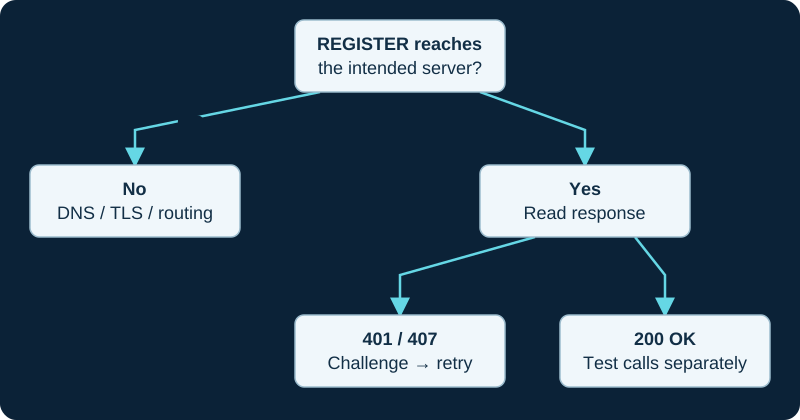
A first 401 challenge can be normal. Read the response to the authenticated retry before changing credentials.
Trace a phone registration through AoR and Contact state
For a phone or softphone registering to Asterisk, confirm the request is matched to the intended endpoint and AoR, then compare the final response with the dynamic Contact stored for that AoR. Asterisk documents the AoR as the object that carries Contacts; max_contacts, remove_existing, remove_unavailable, minimum expiration and maximum expiration control different parts of binding policy.
Do not increase max_contacts merely because two devices appear in a trace. Inventory the authorized devices, Contact URIs, source addresses, user agents and last state transitions. A new Contact can be legitimate, created by NAT rewriting or evidence of duplicated credentials. Registration acceptance, Contact storage, qualification and successful inbound delivery remain separate results.
Treat authentication challenges as a transaction path
A 401 or 407 challenge is expected when authentication is required. Compare the challenge realm and algorithm with the authenticated retry, then preserve the final response. Repeated challenges can reflect a wrong auth username, password, realm, digest algorithm, stale provisioning or a request reaching a different registrar; they do not by themselves prove a server fault.
Check one endpoint against the authoritative provisioning record. Do not change the phone secret, trunk credential and server authentication policy together. Keep Authorization values, nonces and credential material out of public incident records. For Asterisk, use the focused PJSIP authentication-loop diagnostic before rotating a secret.
Read expiration negotiation, not just frequency
RFC 3261 lets a Contact request an expiry and lets the registrar grant a shorter interval. A successful client normally refreshes the binding before that granted expiry, so periodic REGISTER traffic is not automatically a defect. Compare request time, final response, Contact-specific expiry, stored Contact expiration and the next refresh.
A 423 response means the requested interval is below the registrar's allowed minimum and must include Min-Expires; follow the 423 interval investigation. If the binding disappears early, look for explicit unregister, restarted state, replacement policy, registrar failover or clock and transport evidence before lowering the refresh interval.
Keep Asterisk outbound registration retries separate
Asterisk outbound registration is its own PJSIP object, separate from endpoint, AoR, identify and dialplan objects. Record server_uri, client_uri, outbound auth, transport, loaded status and the exact response. Registration success tells the remote registrar where to reach this client URI; it does not prove an inbound call will match an endpoint or reach the intended context.
Asterisk documents separate normal retry, forbidden-response retry, fatal-response retry, maximum-retry and authentication-rejection behavior. A stopped retry can therefore be configured behavior after a permanent response or exhausted attempts, while a rapid retry can be a timer policy rather than a network loop. Do not set every failure to retry indefinitely or reload configuration until the response class and current policy are preserved.
Prove stability and reachability across the next cycle
After one matched correction, observe at least two complete refresh periods without changing another variable. For a registering endpoint, place an authorized inbound call before expiry, near the next refresh and after idle time; confirm the PBX selects the expected current Contact, the INVITE arrives, the endpoint alerts, answer occurs and two-way media is usable. For outbound registration, verify the status and only the provider-approved inbound path.
A successful registration, an OPTIONS response, a ringing endpoint and usable conversation are distinct observations. Preserve one failed and one accepted sequence, then remove temporary verbose logging. No endpoint, PBX, registrar, credential, AoR, Contact, binding, transport, network path, expiry policy, retry behavior, call or media stream was inspected or tested for this guide.
A provider-local 429 can expose an over-frequent loop
If REGISTER receives 429 Too Many Requests, the 429 diagnostic identifies the provider-specific count boundary, duplicate registrars and loaded retry state. The IANA SIP registry assigns 429 a different meaning, so retain the method, phrase and responder rather than diagnosing from the number alone.
Keep provider offline detection separate from the refresh loop
For a peoplefone trunk whose new-call fallback does not activate, continue with the provider-specific fallback diagnostic. The PBX registration timeline, peoplefone line state and forwarding rule are recorded as separate evidence.
Separate a stale provider registration from the intended direct target
If an A&A number rings an old registered device and the PBX, follow the provider-specific target diagnostic to correlate registrations, direct server delivery, inherited DDI policy and the winning answer.
Keep M400 base movement separate from a generic registration loop
For M400 dual-cell roaming, continue with the model-specific diagnostic. It correlates the serving-base change and synchronization evidence with de-REGISTER, replacement REGISTER, PBX Contact selection and the affected call.
Do not collapse B4 roaming into a registration symptom
For a Rove B4 failure during movement, use the model-specific roaming diagnostic before treating registration as the root cause. Radio loss, synchronization change, established-dialog failure and a later inbound Contact selection are separate states.
Check Localphone SIP identity and registrar as one issued set
Localphone separates the SIP ID and SIP password from the main account sign-in. Use the Localphone service record to compare the dashboard-issued registrar, authentication username, Contact, expiry, challenge and loaded PBX state before changing timers.
Confirm a SIPTRUNK trunk is actually in registration mode
Before tuning expiry or rotating credentials, use the SIPTRUNK mode-mismatch diagnostic to establish whether the portal expects REGISTER or authenticates one stored public address. Then preserve the challenge, authenticated retry, final result, Contact and source address from one attempt.
Check SIP.US gateway names and authentication mode before changing timers
A legacy-only gateway target or a REGISTER sent from an address assigned to IP authentication can look like a registration fault. Use the SIP.US failover diagnostic to establish the current target, mode, challenge, Contact and portal state first.
Scope Flowroute registration work to SIP-REG routes
A Flowroute PSTN-number, host or URI destination is not diagnosed by SIP registration state. Use the Flowroute failover diagnostic to establish the assigned route type before changing expiry, credentials or Contact.
Stop rotating SignalWire credentials after a current binding is proved
The SignalWire diagnostic reconciles profile, credential and loaded PBX state before moving to number assignment or call handling.
Check the Telnyx Connection type before registration work
Registration evidence applies to a credential Connection, not every IP or FQDN route. The Telnyx diagnostic records the configured method, binding and number assignment before credential changes.
Easybell registration may not own inbound delivery
If Easybell inbound Trusted IP or FQDN is selected, repairing REGISTER cannot prove inbound routing. The diagnostic starts with the effective directional mode.
Sources & applicability
Primary references for the technical details above. Operational examples and planning checklists are VoIP.info editorial guidance.
- IETF RFC 3261: registration bindings, refresh and errors ↗
- Asterisk PJSIP authentication ↗
- Asterisk res_pjsip endpoint, AoR and Contact configuration ↗
- Asterisk res_pjsip outbound registration configuration ↗
- Asterisk configuring outbound registrations ↗
- Asterisk PJSIP troubleshooting guide ↗
- IANA SIP response-code registry ↗
- IETF RFC 3892: SIP Referred-By and 429 Provide Referrer Identity ↗
- IETF RFC 6585: HTTP 429 Too Many Requests ↗
- Skyetel SIP Registration limitations ↗
- Asterisk debug-information collection guide ↗
- peoplefone: SIP-TRUNK setup, registration and forwarding ↗
- peoplefone: registration and network troubleshooting ↗
- peoplefone: firewall, NAT keep-alive and service ranges ↗
- A&A: VoIP SIP Trunks ↗
- A&A: multiple inbound targets and Also Ring ↗
- A&A: VoIP technical information ↗
- A&A: VoIP security controls and registration visibility ↗
- Snom M400 Admin and Installation Guide ↗
- Snom M400 current datasheet ↗
- Snom dropped SIP registrations while roaming ↗
- Snom dropped connections and failed handset handovers ↗
- HP Poly Rove B4 North American product and specifications ↗
- HP support: Rove B4 guides and current release documentation ↗
- HP Poly Rove DECT IP Phone Administrator Guide 8.0.11 ↗
- HP Poly Rove site planning and deployment guide ↗
- HP Poly Rove DECT IP Phones release notes ↗
- Localphone Internet Phone support ↗
- Localphone Asterisk configuration ↗
- Localphone Incoming Numbers support ↗
- Localphone Bria configuration ↗
- Localphone Linksys PAP2 configuration ↗
- Localphone Linksys SPA2102 configuration ↗
- Localphone Help Centre ↗
- SIPTRUNK IP authentication setup ↗
- SIPTRUNK registration connection issues ↗
- SIPTRUNK inbound-call troubleshooting ↗
- SIPTRUNK registration status ↗
- SIPTRUNK call failover options ↗
- SIPTRUNK interconnection and gateway addresses ↗
- SIPTRUNK general SIP device configuration ↗
- SIP.US current gateways and interconnection requirements ↗
- SIP.US general device configuration ↗
- SIP.US registration status guide ↗
- SIP.US call failover options ↗
- SIP.US SIP glossary and routing model ↗
- SIP.US IP authentication guide ↗
- SIP.US Asterisk registration guide ↗
- Flowroute inbound route and failover assignment guide ↗
- Flowroute current PoP and DNS guidance ↗
- Flowroute interconnection options ↗
- SignalWire SIP trunking ↗
- SignalWire SIP credentials ↗
- SignalWire Get SIP credential API ↗
- SignalWire Update SIP profile API ↗
- SignalWire FreePBX integration ↗
- SignalWire caller ID and CNAM ↗
- SignalWire rate limits ↗
- SignalWire E911 ↗
- SignalWire rates ↗
- Telnyx SIP trunking service objects ↗
- Telnyx authentication methods ↗
- Telnyx failover and retries ↗
- Telnyx SIP response codes ↗
- Telnyx Outbound Voice Profiles ↗
- Telnyx round-robin routing ↗
- Telnyx current SIP network information ↗
- Telnyx machine-readable voice network data ↗
- Telnyx configuration-guide boundary ↗
- Easybell general VoIP configuration ↗
- Easybell Trusted IP authentication ↗
- Easybell SIP-trunk authentication by trusted FQDN ↗
- Easybell automatic fallback routing ↗
Examples require adaptation to your topology. No live PBX or hardware testing is claimed.