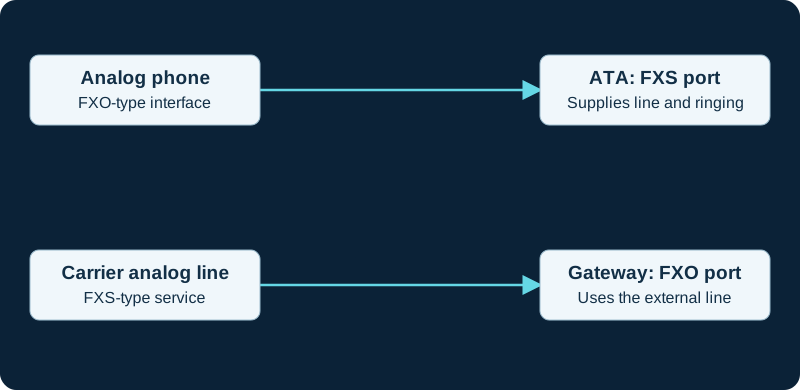
Start with the interface role
An analog telephone adapter can connect a conventional analog phone or fax machine to an IP service. A gateway can provide multiple analog ports or connect existing analog lines to a PBX. The crucial distinction is FXS versus FXO: the side supplying a telephone line interface is different from the side consuming it. A phone plug fitting a socket does not establish electrical or service compatibility. Identify the exact equipment and port role before connecting anything.
Separate voice from data applications
A working voice call is a useful first test for an ATA, but does not establish reliable fax, alarm or modem operation. Fax may use T.38 relay or G.711 passthrough, with support required along the actual path. Other legacy applications can depend on signaling and timing that an ordinary VoIP service does not preserve. Use analog-phone connection planning for a handset, analog-line gateways for a retained line and the fax troubleshooting workflow for failed documents.
Migrate by service outcome
Inventory each circuit's purpose, owner, calling destinations, power dependency and failure behavior. Pilot representative devices before moving a whole site. Test loss of mains power and network access under the equipment owner's approved procedure. For safety-related or monitored equipment, require the responsible vendor or service operator to validate the replacement path. Do not infer approval from an ATA's codec list. Keep the old service until the new arrangement has met its actual acceptance criteria and the migration owner has a recovery option.
Map a high-density FXS gateway before migration
The GXW4200 v2 family guide keeps analog pairs, SIP identities and call distribution separate.
Use current V2 ATAs to separate the analog and SIP sides
The HT812 V2 and HT814 V2 show why FXS port state, SIP profile, registration, analog signaling and media require separate evidence.
Keep ATA density separate from profile count
The HT802 V2 provides two FXS ports and the HT818 V2 eight, but both document two SIP profiles; port, profile and call capacity remain different.
Separate FXO circuit count from FXS device count
The HT841 has four FXO ports and the HT881 eight; each has one separate FXS port.
Trace both sides of the HT813 hybrid boundary
The HT813 connects one analog device through FXS and one analog line through FXO, with distinct SIP and PSTN flows.
Add a DAHDI evidence boundary
The AMI DAHDI guide separates Asterisk span and channel observations from physical-line and carrier evidence.
Sources & applicability
Primary references for the technical details above. Operational examples and planning checklists are VoIP.info editorial guidance.
- Grandstream HT813 administration and analog interfaces ↗
- ITU-T T.38: real-time Group 3 fax over IP ↗
- ↗
- ↗
- ↗
- ↗
- ↗
- ↗
- ↗
- ↗
- ↗
- ↗
- ↗
- Grandstream HT812 v2 product page ↗
- Grandstream HT814 v2 product page ↗
- Grandstream HT812 v2 datasheet ↗
- Grandstream HT814 v2 datasheet ↗
- Grandstream HT81x V2 Administration Guide ↗
- Grandstream HT81x V2 User Guide ↗
- Grandstream HT8xx V2 firmware 1.0.15.3 release notes ↗
- Grandstream Firmware Upgrade Guide ↗
- Grandstream HT802 v2 product page ↗
- Grandstream HT802 V2 datasheet ↗
- Grandstream HT80x V2 Administration Guide ↗
- Grandstream HT80x V2 User Guide ↗
- Grandstream HT818 v2 product page ↗
- Grandstream HT818 V2 datasheet ↗
- Grandstream HT841 and HT881 product page ↗
- Grandstream HT841 and HT881 datasheet ↗
- Grandstream HT841 and HT881 user manual ↗
- Grandstream HT841 and HT881 user manual PDF ↗
- Grandstream HT841 and HT881 FAQ ↗
- Grandstream HT8x1 firmware 1.0.11.8 release notes ↗
- Grandstream UCM6xxx with HT841 and HT881 FXO gateway guide ↗
- Grandstream HT841 and HT881 quick installation guide ↗
- Grandstream HT813 product page ↗
- Grandstream HT813 datasheet ↗
- Grandstream HT813 user guide ↗
- Grandstream HT813 FAQ ↗
- Grandstream HT813 firmware 1.0.19.6 release notes ↗
- Grandstream peering HT8xx with HT813 guide ↗
- Grandstream HT813 quick installation guide ↗
- Asterisk DAHDIShowStatus AMI action ↗
- Asterisk DAHDIShowChannels AMI action ↗
- Asterisk DAHDIChannel AMI event ↗
- Asterisk SpanAlarm AMI event ↗
- Asterisk SpanAlarmClear AMI event ↗
- Asterisk channel fundamentals ↗
- Asterisk AMI v2 specification ↗
- Asterisk Manager TCP/IP API ↗
- Asterisk AMI event filtering ↗
- Asterisk network security guidance ↗
Examples require adaptation to your topology. No live PBX or hardware testing is claimed.