Documented specifications
HP Poly · HP maintains a live Edge E family page, exact-model data sheet, setup hub and current PVOS release documentation. Those records do not establish local inventory, remaining support period, provider approval, compatibility or the build installed on a particular phone.
| Specification | Documented value |
|---|---|
| Exact identity | Edge E450; current HP data sheet c08701839. Confirm product number, region and label on the actual unit Source ↗ |
| Displays and controls | 3.5-inch primary display plus secondary display; 8 primary and 6 secondary physical line keys Source ↗ |
| Pagination boundary | Primary keys can map 32 positions across four pages; secondary keys can map 12 positions across two pages Source ↗ |
| Radio boundary | Bluetooth 5.0, NFC and dual-band 802.11a/b/g/n Wi-Fi are documented for E450 Source ↗ |
| Expansion support | One Poly Edge E Expansion Module is supported; one module provides up to 66 additional assignments across three pages Source ↗ |
| Network and USB | Two Gigabit Ethernet ports and one USB-C port are documented; wired and wireless paths remain distinct deployments Source ↗ |
| Current release record | HP lists PVOS 8.6.1 released August 2026; installed and approved state require local evidence Source ↗ |
| Operator boundary | Keys and module positions can hold lines or features; they do not establish SIP identities, monitored users or call capacity Source ↗ |
Unlisted fields remain unverified. Platform compatibility and remaining support life require confirmation for the exact ordered model.
Identify the E450 and both display surfaces
The E450 has eight primary and six secondary physical keys. PVOS can paginate the main positions across four pages and secondary positions across two. Record the exact product label, installed PVOS and loaded pages rather than relying on a family photograph.
Physical keys, assignments, SIP identities, BLF targets and concurrent calls remain separate.
Design Ethernet, Wi-Fi and Bluetooth as distinct paths
E450 includes Bluetooth 5.0, NFC and Wi-Fi. Ethernet or Wi-Fi can carry the phone network path; Bluetooth is an accessory and mobile-call path. Record interface, SSID or VLAN, authentication, addressing, DNS, time, provisioning and registration without merging them.
Association, pairing and SIP registration are different outcomes.
Reconcile one expansion module with paginated keys
E450 supports one Poly Edge E Expansion Module with 22 physical keys across three pages, up to 66 assignments. Preserve the host primary and secondary pages, module pages, configuration source and observed state.
A module position can be a line or feature and is not proof of another registration, monitored user or simultaneous call.
Budget power and every connected accessory
Inventory the PoE or approved local power, USB-C load, expansion module and headset path. Verify stable operation across boot, module enumeration, automatic firmware handling and page changes.
A powered phone, paired headset or visible module does not prove a loaded operator layout or completed calls.
Stage PVOS and wireless changes independently
HP lists PVOS 8.6.1 released August 2026. Preserve current and target build, provider approval, configuration backup, certificates, Wi-Fi profile ownership, Bluetooth pairings, module template, pilot and rollback.
After change, prove effective build, network interface, radio state, keys, module, registration and calls independently.
Pilot the complete E450 operator desk
Test wired and Wi-Fi recovery where authorized; Bluetooth and wired headset routing; every primary, secondary and module page; BLF or presence; transfer; hold; directory access; DTMF; two-way media; restart persistence and the emergency workflow.
No E450 phone, radio, module, accessory, firmware, platform, registration or call was tested for this reference.
Watch the explanation
Get oriented to the Edge E450’s daily call controls, from answering and transferring to voicemail and Do Not Disturb. The provider demonstration also explains how configured shared park keys let a colleague retrieve a waiting caller, a useful starting point for staff using a desk phone with many monitored destinations.
Read applicability and editorial notes →Watch this video here
Paul Bunyan Communications configuration on the Poly Edge E450. Softkey labels, lamps, voicemail prompts and parking destinations follow the service template. Review used the available transcript and primary references; audio and screen readability remain unverified.
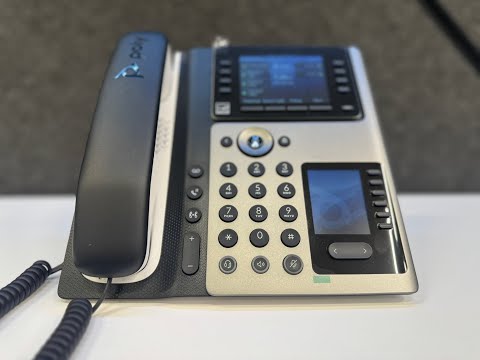
The player loads only when you choose Watch here. Playback uses YouTube’s privacy-enhanced embed; YouTube processes playback data.
Sources & applicability
Primary references for the technical details above. Operational examples and planning checklists are VoIP.info editorial guidance.
- HP Poly Edge E Series product family ↗
- HP Poly Edge E Series Administrator Guide, PVOS 8.5.0 ↗
- HP Poly Edge E Series User Guide, PVOS 8.6.0 ↗
- HP Poly Voice Software 8.6.x release notes ↗
- HP Poly Edge E phones Bluetooth and Wi-Fi support matrix ↗
- HP Poly Edge E400 and E450 setup and user guides ↗
- HP Poly Edge E400 Series Quick Start Guide ↗
- HP Poly Edge E450 product data sheet ↗
Examples require adaptation to your topology. No live PBX or hardware testing is claimed.