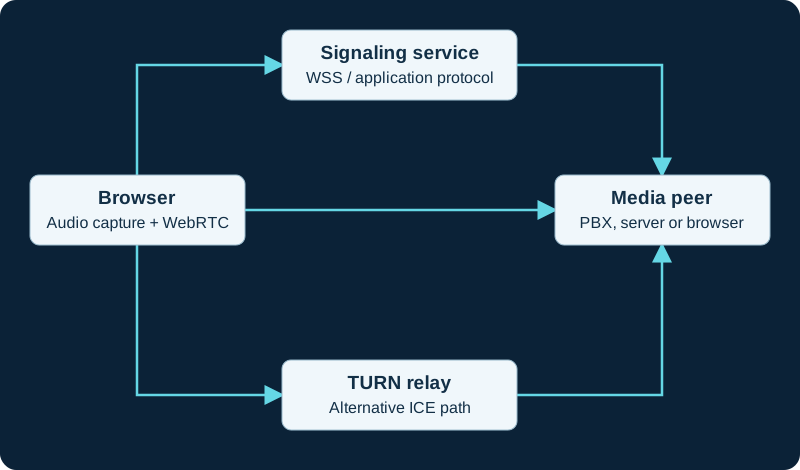
Start with the three connections
A browser calling application needs a way to exchange session information, a usable media path and permission to capture or play sound. WebRTC supplies browser APIs and a real-time protocol suite; it does not define one mandatory application signaling service. A SIP application can use SIP over WebSocket, while another application can use its own signaling protocol. Draw the browser-to-application connection separately from the browser-to-media-peer path. The media peer may be another browser, a conference server or a PBX. A successful website login proves little about whether that second path is usable.
Follow the learning path
Begin with WebRTC versus SIP, then SIP over WebSocket if the application connects to a SIP platform. Study ICE before deciding whether a STUN server is sufficient or a TURN relay is needed. For deployment, read DTLS-SRTP and the Asterisk integration guide. Browser audio problems have their own microphone and device workflow; changing a trunk is rarely the first step when the browser never captures sound.
Define a realistic acceptance test
Test an internal network and a genuinely restrictive external network. Include call setup, two-way audio, device changes, hold, reconnect and loss of a network interface. Record browser, operating system, application and server versions. A browser can conceal some local addresses for privacy and can change background-tab or device behavior between versions. Keep observations specific to the environment you measured. Use this cluster to identify the failing stage, then use the linked standards and project documentation for implementation details.
Trace an E60 USB camera through the host
The E60 diagnostic follows USB enumeration and selected input through local preview to meeting transmit and far-end receipt.
Watch the explanation
Uses the timing of candidate discovery to explain why trickling candidates can shorten connection setup. A short alternative to the longer ICE API walkthrough.
Read applicability and editorial notes →Watch this video here
Conceptual explanation from 2022; the parallel-gathering principle remains applicable. Review used the available transcript and primary references; audio and screen readability remain unverified.

The player loads only when you choose Watch here. Playback uses YouTube’s privacy-enhanced embed; YouTube processes playback data.
Sources & applicability
Primary references for the technical details above. Operational examples and planning checklists are VoIP.info editorial guidance.
- IETF RFC 8825 ↗
- HP Poly Studio E60 product page ↗
- HP Poly Studio E60 data sheet ↗
- HP Poly Studio E60 User Guide ↗
- HP Poly Studio E60 System Web Interface User Guide ↗
- HP Poly Video Mode Administrator Guide 4.7.0 ↗
- HP Poly VideoOS Software Release Notes 4.X ↗
- HP Poly Video Room Preparation Guide ↗
- HP Poly Studio E60 product specifications ↗
- HP Poly Video Mode User Guide 4.5.0 ↗
- HP Poly Studio G62 User Guide ↗
Examples require adaptation to your topology. No live PBX or hardware testing is claimed.