Address translation affects multiple layers
NAT changes network addressing, while SIP and SDP can also carry addresses inside signaling. A translated packet source does not automatically correct every application-level address. This is why call setup can work while incoming delivery or audio fails.
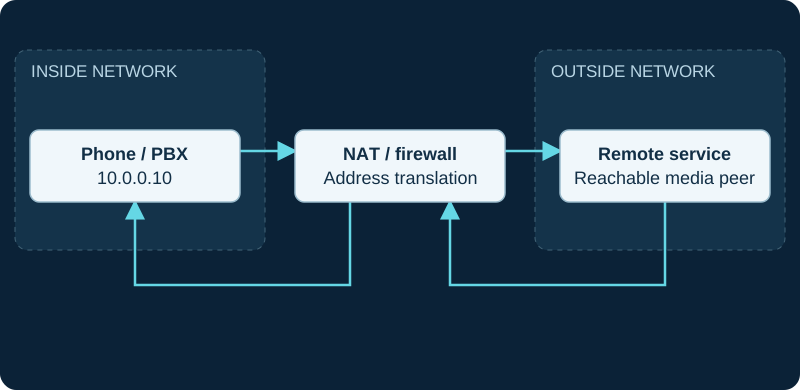
10.0.0.10 is an illustrative private address. Both directions traverse the NAT/firewall; signaling success does not validate SDP media reachability.
Draw both participants
Identify whether the PBX, phone or both are behind NAT. Record which side initiates communication and whether media is relayed. A solution for an office PBX behind a router may not suit a public VPS with remote phones.
Inspect the failed direction
For registration or incoming calls, review contact and response routing. For missing sound, inspect SDP and actual media destinations. Use the PBX's topology-specific settings and carrier guidance, then review the matching firewall policy.
Avoid universal fixes
Broad port forwarding, indiscriminate SIP ALG changes and copying every NAT option can introduce new problems. Make one evidence-supported change and re-test internal, outside and transferred calls. A VPN changes the reachable topology and should trigger a fresh review of earlier NAT workarounds.
Use Linphone NatPolicy without flattening traversal methods
Liblinphone exposes ICE, STUN, TURN and UPnP as distinct controls with different precedence and evidence. The Linphone traversal guide maps those controls to candidates and the selected path rather than presenting one universal NAT switch.
Trace Flowroute Direct Media through the public RTP range
The Flowroute diagnostic compares SDP, translation, negotiated ports and observed packet direction after signaling reaches the intended route.
Keep Jitsi Desktop registration and media traversal separate
The Jitsi Desktop diagnostic compares REGISTER Contact, INVITE signaling, SDP addresses and observed RTP independently.
Avoid stacking HT81x V2 routing without topology evidence
The HT812 V2 and HT814 V2 include configurable NET1/NET2 and NAT-router roles; record the chosen topology before diagnosing SIP or RTP.
Branch HT802 V2 and HT818 V2 topology correctly
The HT802 V2 has one 10/100 interface, while the HT818 V2 documents dual-Gigabit integrated routing.
Verify bridge or router mode on HT841 and HT881
The HT841/HT881 diagnostic records effective topology and preserves Grandstream’s conflicting Ethernet-speed publications.
Place HT813 WAN and LAN on the actual diagram
The HT813 diagnostic distinguishes upstream WAN reachability from devices behind its LAN router and DHCP boundary.
Identify the ordered Allstream NAT pattern first
The Allstream guide separates public no-NAT, NAT with ALG, NAT without ALG and private-VPN patterns and keeps the order’s public and private addresses authoritative.
Correlate Cloudli registration across the NAT boundary
The Cloudli diagnostic tracks consecutive local, translated and remote tuples instead of inferring stable registration from one response.
Treat Crazytel CGNAT settings as mitigations
The Crazytel SIP Trunking guide keeps NAT Helper, expiry, keepalive, public address and media reachability separate.
Separate MaxoTel SIP ALG and NAT evidence
The MaxoTel SIP trunk diagnostic tests signaling rewriting, source-port reuse and mapping lifetime independently.
Do not equate general CGNAT guidance with a trunk requirement
The Aussie Broadband SIP trunk diagnostic proves the ordered SIP handoff before opting out of CGNAT or adding forwarding.
Keep Wave RemoteConnect and direct public access distinct
The Grandstream Wave diagnostic preserves the configured service address, UCM association and observed media path rather than guessing NAT rules.
Keep IAX2 registration address and media observations distinct
The IAX2 AMI evidence guide does not convert a registry row into end-to-end reachability or audio proof.
Do not assume a Symbio access topology
The Symbio Enterprise SIP trunk diagnostic starts with the delivered Internet, private-interconnect, SBC or managed-edge boundary.
Do not copy Business SIP router rules into SIP Connect
The Telstra SIP Connect guide binds NAT and routing to the ordered access and confidential design.
Bind Optus NAT behavior to the delivered design
The Optus Evolve Voice guide leaves public addresses, translation and SIP ALG unassigned until the application and OM.37683 prove them.
Bind One NZ NAT behavior to the ordered design
The One NZ SIP guide leaves public addressing, translation and SIP ALG unassigned until the implementation evidence proves them.
Bind 2degrees NAT behavior to implementation evidence
The 2degrees SIP guide leaves addressing, source trust and translation unassigned until the current order proves them.
Bind Vocus translation to the ordered access
The Vocus SIP Voice guide separates UC Access from over-the-top internet delivery before assigning NAT behavior.
Bind Superloop NAT behavior to actual access
The Superloop SIP guide does not infer one translation model from a product diagram.
Keep Zoom client local and remote address evidence bounded
The Zoom Workplace diagnostic retains local and remote IP and port for the exact call without converting those statistics into a universal media policy.
Keep Enreach addressing product-specific
The Enreach SIP Trunks guide does not transfer service-provider platform or another-country addressing to one account.
Sources & applicability
Primary references for the technical details above. Operational examples and planning checklists are VoIP.info editorial guidance.
- Asterisk — PJSIP through NAT ↗
- Liblinphone latest NatPolicy API ↗
- Liblinphone 5.5 network parameters ↗
- Linphone ICE feature guide ↗
- RFC 8445: Interactive Connectivity Establishment ↗
- RFC 8489: Session Traversal Utilities for NAT ↗
- RFC 8656: Traversal Using Relays around NAT ↗
- RFC 8839: SDP offer-answer procedures for ICE ↗
- Flowroute inbound routes and number assignment ↗
- Flowroute preferred inbound PoP configuration ↗
- Flowroute host-based routing and DID assignment ↗
- Flowroute connected PoP review ↗
- Flowroute PoP interconnection requirements ↗
- Flowroute edge proxy and PoP configuration changes ↗
- Flowroute Direct Media firewall requirements ↗
- Flowroute IP-based outbound authentication ↗
- Flowroute TLS requirements ↗
- Flowroute service guide technical specifications ↗
- Jitsi Desktop project repository ↗
- Jitsi Desktop release archive ↗
- Jitsi Desktop legacy download page ↗
- Jitsi Desktop legacy product site ↗
- Jitsi Desktop Windows setup guide ↗
- Jitsi security clarification: The Mossos confusion ↗
- Jitsi Meet Electron project repository ↗
- Jitsi Desktop jit.si account setup notice ↗
- Grandstream HT812 v2 product page ↗
- Grandstream HT814 v2 product page ↗
- Grandstream HT812 v2 datasheet ↗
- Grandstream HT814 v2 datasheet ↗
- Grandstream HT81x V2 Administration Guide ↗
- Grandstream HT81x V2 User Guide ↗
- Grandstream HT8xx V2 firmware 1.0.15.3 release notes ↗
- Grandstream Firmware Upgrade Guide ↗
- Grandstream HT802 v2 product page ↗
- Grandstream HT802 V2 datasheet ↗
- Grandstream HT80x V2 Administration Guide ↗
- Grandstream HT80x V2 User Guide ↗
- Grandstream HT818 v2 product page ↗
- Grandstream HT818 V2 datasheet ↗
- Grandstream HT841 and HT881 product page ↗
- Grandstream HT841 and HT881 datasheet ↗
- Grandstream HT841 and HT881 user manual ↗
- Grandstream HT841 and HT881 user manual PDF ↗
- Grandstream HT841 and HT881 FAQ ↗
- Grandstream HT8x1 firmware 1.0.11.8 release notes ↗
- Grandstream UCM6xxx with HT841 and HT881 FXO gateway guide ↗
- Grandstream HT841 and HT881 quick installation guide ↗
- Grandstream SIP device provisioning guide ↗
- Grandstream HT813 product page ↗
- Grandstream HT813 datasheet ↗
- Grandstream HT813 user guide ↗
- Grandstream HT813 administration guide ↗
- Grandstream HT813 FAQ ↗
- Grandstream HT813 firmware 1.0.19.6 release notes ↗
- Grandstream peering HT8xx with HT813 guide ↗
- Grandstream HT813 quick installation guide ↗
- Allstream SIP Trunking Quick Start Guide ↗
- Allstream SIP Portal Overview — Native SIP and PRI-SIP ↗
- Allstream SIP Portal Overview — SIP Extreme and SIP Gateway ↗
- Allstream advisory for 911 access using VoIP services in Canada ↗
- babyTEL rebrands as Cloudli Communications ↗
- Cloudli Support — How do I get my IP-PBX or SIP device registered? ↗
- Cloudli Support — Firewall Considerations ↗
- Cloudli Support — Set up a backup number for an outage ↗
- Cloudli 911 Service Information ↗
- Crazytel — Creating a Register Based SIP Trunk, updated 26 October 2026 ↗
- Crazytel — CGNAT setup recommendations, updated 26 October 2026 ↗
- Crazytel — SRTP compatibility, updated 26 October 2026 ↗
- Crazytel — Custom outbound proxy settings, updated 26 October 2026 ↗
- Crazytel — No sound on calls, 30 December 2025 ↗
- Crazytel — Real-time network status ↗
- MaxoTel — 3CX SIP Trunking, last modified 24 May 2023 ↗
- MaxoTel — Portal Guide: PBX Extensions and SIP Trunks, last modified 11 August 2023 ↗
- MaxoTel — 3CX Suddenly Loses SIP Trunk Registration, last modified 21 April 2020 ↗
- MaxoTel — SIP ALG, last modified 19 June 2019 ↗
- MaxoTel — NAT Issues, last modified 20 April 2021 ↗
- MaxoTel — Which codecs are supported?, last modified 19 April 2021 ↗
- MaxoTel — What VoIP Protocols are supported? ↗
- MaxoTel — Outage Communications Policy ↗
- Aussie Broadband — SIP Trunks ↗
- Aussie Broadband — SIP trunks Critical Information Summary, 1 July 2026 ↗
- Aussie Broadband — BYO VoIP settings, updated 14 September 2026 ↗
- Aussie Broadband — Integrated Public Number Database and emergency-service address, updated 26 August 2025 ↗
- Aussie Broadband — phone-number port timing, updated 5 May 2023 ↗
- Aussie Broadband — port forwarding and CGNAT, updated 13 August 2023 ↗
- Aussie Broadband — current, upcoming and past outages ↗
- Aussie Broadband — report a fault in MyAussie, updated 26 February 2024 ↗
- Aussie Broadband — business support and service-delivery contacts ↗
- Grandstream — Wave product page ↗
- Grandstream — Wave release tracks ↗
- Grandstream — Wave Desktop user guide ↗
- Grandstream — Wave Mobile application user guide ↗
- Grandstream — Wave Web user guide ↗
- Grandstream — Wave application FAQ ↗
- Grandstream — UCM RemoteConnect user guide ↗
- Grandstream — UCM RemoteConnect FAQ ↗
- Grandstream — Wave Android 1.0.35.7 and iOS 1.35.7 release notes, 21 September 2026 ↗
- Asterisk current IAXpeers AMI action ↗
- Asterisk current IAXpeerlist AMI action ↗
- Asterisk current IAXregistry AMI action ↗
- Asterisk current IAXnetstats AMI action ↗
- Asterisk 22 IAXpeers AMI action ↗
- Asterisk 22 IAXpeerlist AMI action ↗
- Asterisk 22 IAXregistry AMI action ↗
- Asterisk 22 IAXnetstats AMI action ↗
- Asterisk IAX2 security guidance ↗
- Asterisk iax.conf sample ↗
- Asterisk chan_iax2 implementation source ↗
- Asterisk AMI v2 specification ↗
- Symbio — Enterprise SIP Trunking ↗
- Symbio — Australia voice network and carrier services ↗
- Symbio — phone numbers and porting ↗
- Symbio — SIP TLS and SRTP announcement, 24 January 2024 ↗
- Symbio — dual-carrier voice redundancy, 11 November 2025 ↗
- Symbio — security and trust ↗
- Symbio — Major Outage Register ↗
- Symbio — 24x7 Global Service Assurance, 19 December 2023 ↗
- Telstra Enterprise — SIP Connect ↗
- Telstra — Our Customer Terms, SIP Connect section, changed 3 June 2024 ↗
- Telstra — SIP Connect Customer Integration Guide ↗
- Telstra Enterprise — SIP Connect support and accredited CPE ↗
- Telstra Enterprise — Business Resumption Service + ↗
- Telstra — Business SIP Critical Information Summary ↗
- Optus Wholesale — Evolve Voice SIP trunking ↗
- Optus — Evolve Service Description, 1 November 2025 ↗
- Optus Business — Standard Form of Agreement, Evolve ↗
- Optus Business — Standard Form of Agreement ↗
- Optus — Evolve Voice factsheet (historical 2017 context) ↗
- Optus — SIP Trunking technical paper (historical context) ↗
- One NZ — SIP Advanced ↗
- One NZ — SIP Advanced Service Description ↗
- One NZ — Smart SIP ↗
- One NZ — Smart SIP Service Description ↗
- One NZ — Terms, conditions and service descriptions ↗
- One NZ — Metro Access Service Description ↗
- One NZ — About Emergency Services on 111 ↗
- 2degrees Business — SIP Trunks ↗
- 2degrees — Terms and conditions index ↗
- 2degrees — What happens in a power cut ↗
- 2degrees — Vulnerable consumers and calling 111 during a power outage ↗
- 2degrees — Privacy policy ↗
- Vocus — SIP Voice ↗
- Vocus — SIP Trunks data sheet ↗
- Vocus — SIP Voice Connect Service Schedule, 27 April 2026 ↗
- Vocus — Unified Communications Service Schedule, Australia Direct, 27 April 2026 ↗
- Vocus Support — call forwarding and diversions in BroadSoft ↗
- Vocus — Service Level Agreement ↗
- Superloop — Business VoIP and SIP ↗
- Superloop — Voice specifications data sheet ↗
- Superloop — Business Voice Service Schedule, 10 March 2026 ↗
- Superloop — business support contact ↗
- Superloop — outages and service updates ↗
- Zoom — getting started with Zoom Phone for users ↗
- Zoom — phone settings in Zoom Workplace and Zoom Web App ↗
- Zoom — Workplace desktop system requirements ↗
- Zoom — Workplace mobile system requirements ↗
- Zoom — Workplace app release notes ↗
- Zoom — Zoom Phone frequently asked questions ↗
- Zoom — meeting and phone statistics ↗
- Zoom — sending a Zoom Phone problem report ↗
- Zoom — network firewall and proxy settings ↗
- Zoom — Network Connectivity Tool ↗
- Zoom — troubleshooting sign-in issues ↗
- Zoom — testing device audio for Zoom Phone ↗
- Enreach — SIP Trunks for businesses ↗
- Enreach — SIP Trunks for resellers ↗
- Enreach — PBX Trunks platform for service providers ↗
- Enreach Service Center — Enreach Trunk (DE), updated 9 April 2026 ↗
- Enreach Swyx 15 — creating a SIP trunk group ↗
- Enreach Swyx 15 — creating a SIP trunk ↗
- Enreach Control Center 15 — forwarding and number substitution ↗
- Enreach Swyx 15 — emergency call detection ↗
- Enreach Service Center — Enreach Trunk FAQ and nomadic-use boundary ↗