What travels over the socket
RFC 7118 defines the sip WebSocket subprotocol for SIP requests and responses. The client handshake requests sip in Sec-WebSocket-Protocol and the server’s successful 101 response selects it. One SIP message occupies one WebSocket message; SIP can use text or binary frames, so a binary frame alone is not evidence of audio.
This SIP socket does not carry ordinary voice packets. Browser WebRTC media has a separate path. Other WebSocket applications can carry media: Asterisk’s chan_websocket is a separate application-media driver, rather than a SIP endpoint transport. Use the Asterisk integration guide to distinguish SIP, ARI control and application-media sockets.
A successful handshake proves the selected transport and subprotocol, not registration, route authorization, negotiated media or audible conversation.
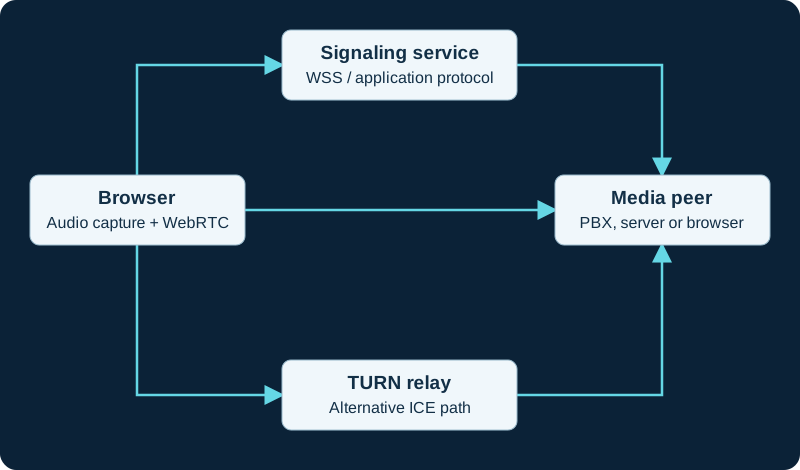
Logical connections, shown in one direction for clarity. Media and signaling are bidirectional. TURN relays encrypted packets; the negotiated media peer terminates DTLS-SRTP.
Check the web boundary
Confirm the expected hostname, path, certificate chain and WebSocket upgrade behavior. A reverse proxy must pass the upgrade correctly and keep long-lived connections usable. Its idle timeout can cause apparently random registration or incoming-call failures even when a short HTTP request works. Avoid embedding a shared administrator or trunk credential in downloaded JavaScript. The application needs an endpoint identity with limited permissions and a deliberate session-expiry strategy. Browser application authentication and SIP digest authentication may be separate exchanges.
Retain the selected subprotocol and response headers alongside the requested URL. A generic WebSocket tester connecting without the intended sip negotiation is not a complete SIP client acceptance test.
Isolate a failed call
- WSS never opens: inspect DNS, certificate validation, upgrade response and proxy policy.
- WSS opens but REGISTER fails: inspect SIP challenge handling and endpoint authorization.
- Registration works but calls fail: inspect INVITE responses, routing and SDP.
- Call answers without sound: inspect ICE, DTLS and media statistics.
- Keep those results in one timeline. Reloading the page may recover a socket while erasing the evidence of why it failed. Capture the state before reconnecting, then verify an incoming call after the connection has been idle for the period that previously triggered the problem.
A SIP WebSocket is not a chan_websocket media pipe
SIP over WSS carries SIP messages with the sip subprotocol. The Asterisk media WebSocket guide covers a different WebSocket/... channel whose binary frames carry application media and whose text frames carry driver control events.
Place the Asterisk HTTP listener before SIP-over-WebSocket evidence
The built-in HTTP service guide keeps HTTPS identity and WebSocket route registration separate from SIP authentication, SDP and media.
Separate JsSIP socket state from registration and calling
The JsSIP diagnostic follows WSS, REGISTER and RTCSession independently.
Watch the explanation
Answers one common question quickly: WebRTC does not choose your application signaling, and browser-based SIP uses a browser-compatible transport such as WebSocket.
Read applicability and editorial notes →Watch this video here
A conceptual explanation published in 2025; pair it with the SIP-over-WebSocket reference. Review used the available transcript and primary references; audio and screen readability remain unverified.

The player loads only when you choose Watch here. Playback uses YouTube’s privacy-enhanced embed; YouTube processes playback data.
Sources & applicability
Primary references for the technical details above. Operational examples and planning checklists are VoIP.info editorial guidance.
- IETF RFC 7118 ↗
- Asterisk WebSocket application-media channel driver ↗
- Asterisk 22 chan_websocket module configuration ↗
- Asterisk WebSocket client configuration ↗
- Asterisk ARI outbound WebSockets ↗
- Asterisk 22 Dial application WebSocket parameters ↗
- Official Asterisk ARI and media WebSocket examples ↗
- Official Asterisk release archive ↗
- Asterisk built-in mini-HTTP server ↗
- Asterisk http.conf sample ↗
- Asterisk configuration for ARI ↗
- Asterisk ari.conf sample ↗
- Asterisk REST Interface recommended practices ↗
- Asterisk manager.conf sample ↗
- Asterisk network security considerations ↗
- JsSIP project site ↗
- JsSIP architecture overview ↗
- JsSIP documentation index ↗
- JsSIP current UA API ↗
- JsSIP current RTCSession API ↗
- JsSIP failure and end causes ↗
- JsSIP 3.10 getting-started guide ↗
- JsSIP 3.10 UA configuration parameters ↗
- JsSIP project repository ↗
- JsSIP repository changelog ↗
- Published JsSIP npm package ↗
Examples require adaptation to your topology. No live PBX or hardware testing is claimed.