Separate service from platform
A trunk supplies a carrier connection; your PBX supplies internal call handling. Number ownership, concurrent capacity, calling permissions and billing should be documented independently. Start with what a SIP trunk is when these distinctions are new.
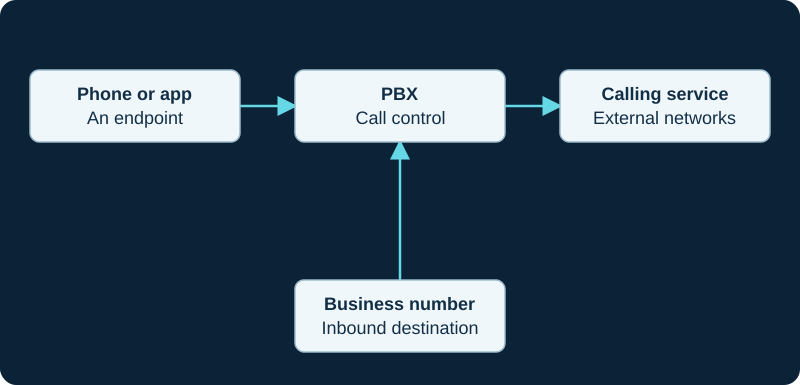
A simplified logical view. A hosted service may combine PBX and carrier functions; actual signaling and media paths can differ.
Choose a supported interconnection
Collect the carrier's current authentication, transport, number-format and media requirements. Follow the Asterisk trunk workflow or FreePBX trunk workflow for your platform. Do not treat another carrier's configuration as a universal template.
Design failure behavior
Verify incoming-number diversion separately from outbound trunk fallback. A second carrier does not remove PBX, power or network dependencies. Test the behavior under the specific failure you expect to survive.
Keep the account governable
Assign ownership for billing, spend alerts, number changes and incident escalation. Restrict expensive destinations and review authorized caller identities. Keep commercial links separate from the technical configuration record; changing an affiliate relationship should never alter factual compatibility guidance.
Separate IP Telecom service scope from its technical handoff
IP Telecom publicly describes an Irish business SIP-trunk service but does not publish one complete registrar, authentication, codec or RTP profile. The provider record requires the issued handoff, loaded PBX state and observed path instead of invented defaults.
Separate Clearfly service features from the SIP handoff
Clearfly publicly describes SIP trunking and portal-managed voice services but does not publish one complete registrar, authentication, codec or RTP profile. The provider record requires the issued handoff, loaded PBX state and observed path.
Separate Redcentric programme scope from the trunk handoff
Redcentric presents SIP trunks within a broader voice-modernisation programme. The provider record requires the current order, handoff, loaded PBX or SBC state and observed path instead of assuming legacy technical details remain current.
Do not collapse CommPeak products into one trunk scope
CommPeak publishes termination, DIDs, messaging, Cloud PBX, Dialer and Softphone products. The provider record requires the signed scope and selected SIP account before treating any adjacent capability as part of the trunk.
Do not collapse Voximplant platform paths into one trunk
Voximplant documents IP-allowlisted PBX ingress, SIP-user registration and scenario-originated SIP calls as different patterns. The provider record requires one selected design and direction before configuration or acceptance.
Do not flatten TelVox provisioning into trunk readiness
A TelVox create response starts at pending and later may become active. The provider record keeps API success, active state, loaded PBX credentials, registration, signaling, media and user outcome as distinct gates.
Keep VoIP Much registration distinct from call acceptance
VoIP Much documents registration-based PBX examples, but a completed REGISTER does not prove number routing, caller identity, channel entitlement, answer or media. The provider profile and focused workflow preserve those gates.
Do not merge VoIPline interconnect modes
VoIPline documents registration, URI diversion and a Teams gateway as separate modes. Use the provider profile to preserve each identity and acceptance boundary.
Do not treat a registered Voip Unlimited trunk as an inbound route
The Voip Unlimited profile distinguishes the binding from DDI assignment, provider delivery, PBX identity, route matching and media.
Do not turn a SignalWire SIP Credential into the whole trunk
SignalWire separates profile defaults, credential registration, inbound resources and outbound handling. The provider guide and failed-call diagnostic preserve each boundary.
Keep Telnyx inbound and outbound control objects distinct
Telnyx uses a SIP Connection and number assignment for inbound delivery, while the Outbound Voice Profile controls outbound associations, destinations, rate and spend policy. The Telnyx diagnostic starts with the inbound objects actually used.
Separate Bandwidth inbound routes from outbound realm credentials
Bandwidth Build assigns inbound routes to a SIP-trunking number and uses a realm plus credentials for outbound calls. The Bandwidth diagnostic starts with the number and actual inbound attempts.
Separate a Voipfone registration from inbound-number ownership
Voipfone’s published PBX examples register an account number, while control-panel routing applies to telephone numbers. The Voipfone diagnostic preserves both identities.
Match each VoIP.ms DID POP to the intended identity
VoIP.ms documents a per-DID POP that must match the registration server or proxy. The VoIP.ms diagnostic preserves both controls.
Inventory Twilio numbers and Origination URLs as separate objects
A Twilio number association, Trunk SID and enabled OriginationUrl resource are different evidence. Follow them through the Twilio origination diagnostic.
Inventory Plivo inbound objects by direction
A Plivo number link, inbound trunk, primary URI and fallback URI are separate from outbound authentication. Follow them through the Plivo inbound diagnostic.
Inventory Vonage inbound objects before troubleshooting
A Vonage number link, trunk type, inbound region, SIP URI, priority and timeout are distinct. Follow them through the Vonage inbound diagnostic.
Do not collapse Voxtelesys registration and DID routing
A Voxtelesys registration supplies a current Contact, while a DID separately selects a route profile and prioritized destination. The diagnostic follows both.
Follow Amazon Chime inbound selection in two stages
Amazon Chime can select a Voice Connector from a group before applying that connector’s origination priorities and weights. The diagnostic preserves both decisions.
An outbound didlogic call does not prove the inbound DID path
The didlogic inbound-DID diagnostic separates egress authentication from number destination, provider delivery, PBX matching and media.
Separate Callcentric registration, number and forwarding rules
A 1777 registration binding, incoming DID, direct DID Forward and Network Down Call Treatment are different objects. The diagnostic follows each one.
Do not add REGISTER to an Anveo Direct trunk
Anveo Direct documents source-IP-authenticated outbound service and SIP-URI inbound delivery without REGISTER. Use the diagnostic for the direction-specific evidence chain.
Map CarrierX objects before copying a trunk template
A CarrierX DID, trunk group, trunk and endpoint are separate objects. Use the diagnostic to prove their current linkage before changing the PBX.
Map the AVOXI number rule before changing the PBX
An AVOXI SIP URI becomes a live inbound path only when an enabled number rule targets it. Use the diagnostic to preserve that mapping and its shared-edit scope.
Map Easybell identity before interpreting registration
A successful REGISTER does not prove inbound delivery when Trusted IP or FQDN owns the path. Use the diagnostic to follow one call.
Do not flatten SIP.US identity and DID treatment
Credential registration, IP authentication, trunk assignment, Forward and Backup can diverge. The SIP.US diagnostic follows one inbound call through those boundaries.
Flowroute has more than one recovery layer
Provider-edge selection, the number's failover relationship and the customer media path are separate. Use the Flowroute guide to preserve each observed attempt.
Do not transfer Bulk Solutions outbound success to inbound DID delivery
The Bulk Solutions diagnostic follows the independently owned DID assignment, destination, PBX match and media path.
Do not transfer Yay.com outbound success to inbound routing
The Yay.com diagnostic starts with the number-to-trunk assignment before PBX or media changes.
Registration does not establish ClearlyIP number routing
The ClearlyIP diagnostic starts with the number owner and routing mode before PBX changes.
Simwood outbound authorization is not an inbound binding
The Simwood diagnostic proves REGISTER and Contact independently of a successful outbound challenge.
Sinch uses different controls for each direction
The Sinch diagnostic keeps termination credentials separate from origination application assignment and SIP forwarding.
SIPTRUNK registration is not end-to-end proof
The SIPTRUNK diagnostic follows one DID from the provider destination through PBX routing and RTP.
Map an AireSpring order before choosing a trunk template
The AireSpring guide starts with the exact product, peers, trust method, DIDs, route controls and account capacity.
Map the OnSIP trunking-user contract before building objects
The OnSIP guide starts with account user state, current PBX driver, assigned identity, registration, 000 transformation and inbound number state.
Choose the DIDforSale interconnection model before building trunks
The DIDforSale guide starts with the current portal IP or FQDN record or the activated SIP account, not a generic template.
Choose the Zadarma connection model before building trunks
The Zadarma guide starts with credential registration or confirmed static-IP authorization, not a blended template.
Model Voxbeam outbound and inbound controls independently
The Voxbeam guide separates source-authorized termination from trunk defaults and DID-level inbound overrides.
Model GoTrunk inbound and outbound identity independently
The GoTrunk guide preserves direction-specific static-address or credential controls and the selected inbound destination.
Model DIDWW call directions as separate trunks
The DIDWW guide follows one inbound destination or one outbound authentication decision before interpreting call evidence.
Model Exotel inbound and outbound paths independently
The Exotel guide maps outbound authorization and inbound Flow delivery without treating one direction as proof of the other.
Model Voximplant registrations and call legs independently
The Voximplant guide preserves registration, application binding, rule selection and each created call leg as separate evidence.
Bind Allstream behavior to the ordered service option
The Allstream guide keeps Native SIP, PRI-SIP, SIP Extreme or Gateway portal controls, Internet or private access, country and PBX handoff distinct.
Bind Cloudli behavior to current portal parameters
The Cloudli guide keeps portal-issued identity, authentication, proxy, port, plan capacity, continuity and the loaded PBX distinct.
Bind Orange Business Talk settings to one ordered site
The Orange Business Talk guide follows the selected site, current project documents, eSBC demarcation and effective call evidence.
Bind Vodafone Evolved Voice behavior to the current order
The Vodafone Evolved Voice guide follows the ordered service, public access, endpoint design, number state and observed call evidence.
Bind Swisscom behavior to the ordered SIP variant
The Swisscom Enterprise SIP guide follows the ordered access, service access point, eSBC or SBC, PBX, number and option evidence.
Bind Sunrise behavior to the ordered package
The Sunrise Business Voice SIP guide follows the ordered Basic or Premium package, access, peer, PBX, number and continuity evidence.
Bind Proximus behavior to the ordered flavour
The Proximus Business Trunking guide follows access, CPE, SBC, PBX, number, channel and acceptance evidence.
Bind Crazytel behavior to the selected product
The Crazytel SIP Trunking guide separates portal configuration, authentication, delivery, signaling, media and commercial evidence.
Keep MaxoTel portal, registration and call proof distinct
The MaxoTel SIP Trunking guide follows ordered service, portal-issued identity, UDP exchange, routing and media evidence.
Keep the Aussie Broadband order and PBX handoff distinct
The Aussie Broadband SIP Trunks guide follows supplier, NBN access, equipment, channel, signaling and media evidence.
Keep the Symbio order and handoff distinct
The Symbio Enterprise SIP Trunking guide follows product, access, handoff, number, channel, signaling and media evidence.
Keep the Telstra order and eligible access together
The Telstra SIP Connect guide follows feature pack, access, accredited CPE, numbers, channels, signaling and media.
Keep the Optus application and handoff together
The Optus Evolve Voice guide follows the governing agreement, Evolve IP VPN, router model, service-delivery point, PBX and features.
Identify the exact One NZ SIP service
The One NZ SIP guide follows the selected service, legal description, site, access, demarcation, PBX and options.
Identify the exact 2degrees SIP trunk order
The 2degrees SIP Trunks guide follows the governing agreement, site, access, handoff, PBX and implementation pack.
Identify the exact Vocus voice product
The Vocus SIP Voice guide starts with the named offer, current schedule, order, site and implementation pack.
Start from the Superloop service order
The Superloop SIP guide binds access, PBX, identity, DID and features to the ordered product.
Identify the exact Enreach offer
The Enreach SIP Trunks guide starts with product, country, account, profile, number range and support owner.
Keep MetTel product, order and call proof distinct
The MetTel SIP Trunking guide follows the exact order, site, access, number, policy, signaling and media boundaries.
Keep NUSO order, handoff and call proof distinct
The NUSO SIP Trunking guide follows the exact product, region, order, access, portal, number, signaling and media boundaries.
Keep Telesystem handoff and portal evidence distinct
The Telesystem SIP Trunks guide follows the accepted order through tenant, site, access, trunk, number and call evidence.
Keep TPx UCx SmartVoice product and path evidence distinct
The TPx UCx SmartVoice guide follows one order through handoff, access, DID, forwarding, continuity and completed call.
Keep Lingo Cloud SIP product and path evidence distinct
The Lingo Cloud SIP guide follows one order through platform, access, DIDs, call paths, failover and completed call.
Keep Voyant order and runtime evidence distinct
The Voyant guide follows one service order through access, trunk type, numbers, identity, emergency records and calls.
Keep Windstream order and runtime evidence distinct
The Windstream Dynamic IP guide follows one ordered trunk through access, capacity, DTO, signaling, media and restoration.
Keep Granite order and runtime evidence distinct
The Granite SIP Trunking guide follows one ordered service through handoff, capacity, DTFO, signaling, media and restoration.
Keep FirstLight order and runtime evidence distinct
The FirstLight SIP Trunking guide follows one ordered service through access, signaling, media and restoration.
Sources & applicability
Primary references for the technical details above. Operational examples and planning checklists are VoIP.info editorial guidance.
- Asterisk PJSIP trunk configuration concepts ↗
- IP Telecom SIP Trunks ↗
- IP Telecom terms and SIP Trunking product schedule ↗
- IP Telecom Fair Use Policy ↗
- IP Telecom Ireland copper switch-off guidance ↗
- IP Telecom contact and support ↗
- Clearfly voice services and SIP trunking ↗
- Clearfly service FAQs ↗
- Clearfly partner programme and portal ↗
- Clearfly support contacts ↗
- Clearfly legal and regulatory index ↗
- Clearfly Acceptable Use Policy ↗
- Redcentric voice modernisation ↗
- Redcentric communications services ↗
- Redcentric customer support ↗
- Redcentric service status ↗
- Redcentric SIP Trunking Service Description SD032 v2.1 (legacy public PDF) ↗
- Redcentric Hays telephony customer case study ↗
- CommPeak SIP trunking ↗
- CommPeak documentation and developer hub ↗
- CommPeak SIP account configuration ↗
- CommPeak FreePBX SIP trunk guide ↗
- CommPeak Asterisk PBX SIP trunk guide ↗
- CommPeak pricing overview ↗
- CommPeak service status ↗
- Voximplant SIP trunking solution ↗
- Voximplant SIP trunk connection FAQ ↗
- Voximplant SIP phone registration FAQ ↗
- Voximplant processing calls in scenarios ↗
- Voximplant CallSIP parameters ↗
- Voximplant telephony and SIP capabilities FAQ ↗
- Voximplant pricing ↗
- Voximplant service status ↗
- TelVox Connect SIP trunks API reference ↗
- TelVox Connect authentication and API keys ↗
- TelVox Connect Calls API reference ↗
- TelVox Connect phone numbers reference ↗
- TelVox Connect recordings API reference ↗
- TelVox Connect webhooks API reference ↗
- TelVox Connect pricing ↗
- TelVox security and compliance ↗
- Renav Limited TelVox products ↗
- VoIP Much SIP Trunks ↗
- VoIP Much 3CX Phone System guide ↗
- VoIP Much FreePBX trunk guide ↗
- VoIP Much UniFi Talk guide ↗
- VoIP Much IP blocking guidance ↗
- VoIP Much SIP ALG guidance ↗
- VoIP Much supported audio codecs ↗
- VoIP Much quality suggestions ↗
- VoIP Much network status ↗
- VoIP Much service agreement ↗
- VoIPline Telecom SIP trunking ↗
- VoIPline Telecom pricing and rates ↗
- VoIPline Telecom legal documents ↗
- VoIPline Voice and SMS (IP) service schedule ↗
- VoIPline SIP trunks critical information summary ↗
- VoIPline Telecom network ↗
- VoIPline Telecom number porting ↗
- VoIPline Telecom service status ↗
- Voip Unlimited SIP Trunks ↗
- Voip Unlimited voice portfolio ↗
- Voip Unlimited partner operations and support tools ↗
- Voip Unlimited legal and regulatory documents ↗
- Voip Unlimited Master Services Agreement V3.0 ↗
- RFC 3263: Locating SIP Servers ↗
- RFC 2782: DNS SRV resource records ↗
- RFC 3403: DDDS DNS database and NAPTR records ↗
- SignalWire SIP trunking ↗
- SignalWire SIP credentials ↗
- SignalWire Get SIP credential API ↗
- SignalWire Update SIP profile API ↗
- SignalWire FreePBX integration ↗
- SignalWire caller ID and CNAM ↗
- SignalWire rate limits ↗
- SignalWire E911 ↗
- SignalWire rates ↗
- Telnyx SIP trunking service objects ↗
- Telnyx authentication methods ↗
- Telnyx failover and retries ↗
- Telnyx SIP response codes ↗
- Telnyx Outbound Voice Profiles ↗
- Telnyx round-robin routing ↗
- Telnyx current SIP network information ↗
- Telnyx machine-readable voice network data ↗
- Telnyx configuration-guide boundary ↗
- Bandwidth Build SIP trunking setup ↗
- Bandwidth number feature and Final Destination URI management ↗
- Voipfone FreePBX configuration guide ↗
- Voipfone inbound routing control ↗
- Voipfone phone-number routing controls ↗
- Voipfone PBX call-divert and PSTN-failover controls ↗
- Voipfone number porting ↗
- VoIP.ms DID routing, failover, POP and inbound format ↗
- VoIP.ms subaccount authentication and registration ↗
- VoIP.ms server and DID POP selection ↗
- VoIP.ms DID troubleshooting ↗
- VoIP.ms incoming-call troubleshooting ↗
- VoIP.ms registration troubleshooting ↗
- Twilio Elastic SIP Trunking configuration ↗
- Twilio OriginationUrl resource ↗
- Twilio Programmable Voice failover best practices ↗
- Twilio Elastic SIP Trunking IP addresses ↗
- Twilio Elastic SIP Trunking troubleshooting ↗
- Twilio Trunk resource ↗
- Plivo Zentrunk quickstart ↗
- Plivo Zentrunk technical specifications ↗
- Plivo SIP Trunking account limits ↗
- Plivo Zentrunk hangup codes ↗
- Plivo Zentrunk debug logs ↗
- Vonage SIP technical details ↗
- Vonage SIP Dashboard guide ↗
- Vonage Asterisk PJSIP configuration ↗
- Vonage FreePBX configuration ↗
- Vonage Voice Logs guide ↗
- Voxtelesys DID and number routing ↗
- Voxtelesys SIP Trunk Registrar ↗
- Voxtelesys portal IP-address routing ↗
- Voxtelesys registration ACL ↗
- Voxtelesys failover transfer ↗
- Voxtelesys call records ↗
- AWS: Managing Amazon Chime SDK Voice Connectors ↗
- AWS: Editing Voice Connector settings ↗
- AWS: Creating a Voice Connector and encryption scope ↗
- AWS: Managing Voice Connector groups ↗
- AWS: Amazon Chime SDK endpoints and quotas ↗
- AWS: Voice Connector network and bandwidth requirements ↗
- didlogic SIP credentials ↗
- didlogic outbound calling and regional gateways ↗
- didlogic inbound setup and destination routing ↗
- didlogic SIP trunking and PBX setup ↗
- didlogic Asterisk configuration and troubleshooting ↗
- didlogic direct interconnection requirements ↗
- Callcentric SIP trunking ↗
- Callcentric registration credentials ↗
- Callcentric DID forwarding ↗
- Callcentric DID-forward precedence ↗
- Callcentric network-down forward ↗
- Callcentric forwarded-call billing ↗
- Anveo Direct FAQ ↗
- Anveo Direct inbound DID service ↗
- Anveo Direct call termination ↗
- Anveo Direct network ↗
- Anveo Direct services ↗
- CarrierX trunk-group object ↗
- CarrierX trunk object ↗
- CarrierX SIP trunk quick start ↗
- CarrierX receive and place calls ↗
- CarrierX phone-number model ↗
- AVOXI outbound SIP trunk configuration ↗
- AVOXI inbound SIP URI forwarding ↗
- AVOXI outbound SIP trunk diagnostic ↗
- AVOXI SIP forwarding and trunking overview ↗
- Easybell general VoIP configuration ↗
- Easybell Trusted IP authentication ↗
- Easybell SIP-trunk authentication by trusted FQDN ↗
- Easybell automatic fallback routing ↗
- SIP.US IP authentication guide ↗
- SIP.US registration status guide ↗
- SIP.US current gateways and interconnection requirements ↗
- SIP.US call failover options ↗
- SIP.US inbound call troubleshooting ↗
- SIP.US channel-limit guidance ↗
- SIP.US E911 information ↗
- Flowroute current PoP interconnection requirements ↗
- Flowroute direct-media firewall requirements ↗
- Flowroute current PoP and DNS guidance ↗
- Flowroute inbound route and number-assignment guide ↗
- Flowroute preferred inbound PoP behavior ↗
- Flowroute TLS signaling scope ↗
- Flowroute inbound SRV routing example ↗
- Flowroute connection options ↗
- Bulk Solutions service overview ↗
- Bulk Solutions inbound IP-authenticated setup ↗
- Bulk Solutions outbound IP-authenticated setup ↗
- Bulk Solutions current IP-authentication workflow ↗
- Bulk Solutions current registration workflow ↗
- Bulk Solutions direction-split Retell integration ↗
- Bulk Solutions legacy FreePBX 14 IP-authentication template ↗
- Bulk Solutions E911 FAQ ↗
- Yay.com SIP Trunks for business phone systems ↗
- Yay.com create a SIP trunk ↗
- Yay.com SIP trunks and how to use them ↗
- Yay.com call encryption, TLS and SRTP ↗
- Yay.com firewall guide ↗
- Yay.com legacy FreePBX configuration example ↗
- Yay.com trunk-authentication API ↗
- ClearlyIP current SIP trunking product page ↗
- ClearlyIP current documentation destination ↗
- ClearlyIP legacy configuration-guide scope and freshness notice ↗
- ClearlyIP legacy trunk details and regional registrars ↗
- ClearlyIP legacy Location, number routing and failover reference ↗
- ClearlyIP legacy FreePBX automated-module reference ↗
- ClearlyIP legacy FreePBX PJSIP setup reference ↗
- ClearlyIP legacy common SIP issues reference ↗
- Simwood Hosted SIP Trunks ↗
- Simwood hosted trunks interop ↗
- Simwood hosted trunk overview ↗
- Simwood Asterisk 16 hosted trunk example ↗
- Simwood hosted TLS/SRTP settings ↗
- Simwood Partner and Direct IP addresses and whitelisting ↗
- Simwood portal overview ↗
- Simwood Carrier Services API v3 ↗
- Sinch Voice API SIP Trunking reference ↗
- Sinch Voice API callback reference ↗
- Sinch Voice API authentication reference ↗
- Sinch Voice API call headers ↗
- Sinch Voice API call detail records ↗
- Sinch Voice API release notes ↗
- Sinch Elastic SIP Trunking product overview ↗
- Sinch BYOC SIP Trunking overview ↗
- SIPTRUNK general SIP device configuration ↗
- SIPTRUNK registration connection troubleshooting ↗
- SIPTRUNK inbound-call troubleshooting ↗
- SIPTRUNK IP authentication ↗
- SIPTRUNK call failover options ↗
- SIPTRUNK registration-status reference ↗
- SIPTRUNK interconnection and network requirements ↗
- SIPTRUNK direct-media delivery and missing audio ↗
- AireSpring SIP Trunking ↗
- AireSpring SIP Trunking data sheet, revision May 12, 2023 ↗
- AireSpring Master Service Agreement ↗
- AireSpring Long-Distance SIP Trunking ↗
- AireSpring data-sheet index ↗
- AireSpring Top 10 Reasons for SIP Trunking infographic, revision July 5, 2022 ↗
- OnSIP Trunking ↗
- Enabling OnSIP Trunking ↗
- OnSIP Trunking Inbound Call Preferences ↗
- Enable E911 ↗
- Asterisk Configuration for OnSIP Trunking ↗
- Asterisk documentation: Configuring chan_sip ↗
- DIDforSale IP interconnection configuration ↗
- DIDforSale SIP account creation ↗
- DIDforSale FreePBX PJSIP IP-based example ↗
- DIDforSale FreePBX PJSIP SIP-account example ↗
- DIDforSale SIP trunk service ↗
- DIDforSale customer service agreement ↗
- Zadarma SIP trunk connection methods ↗
- Zadarma IP-authorized SIP trunk FAQ ↗
- Zadarma FreePBX PJSIP setup ↗
- Zadarma server delivery by SIP URI ↗
- Zadarma Asterisk IP-authorized trunk setup ↗
- Zadarma P-Asserted-Identity caller-ID guidance ↗
- Zadarma echo-test guidance ↗
- Voxbeam getting-started and outbound routing help ↗
- Voxbeam service and DID FAQ ↗
- Voxbeam DID service and capacity packages ↗
- Voxbeam wholesale voice services ↗
- Voxbeam network overview ↗
- Voxbeam VoIP glossary and codec summary ↗
- Voxbeam Asterisk chan_sip example ↗
- Asterisk PJSIP endpoint-identification troubleshooting ↗
- GoTrunk SIP Endpoints ↗
- GoTrunk FreePBX configuration guide ↗
- GoTrunk Asterisk configuration guide ↗
- GoTrunk Quick Start ↗
- GoTrunk Locations and emergency calling ↗
- GoTrunk call-detail records and traces ↗
- GoTrunk Call Rates ↗
- GoTrunk support-ticket workflow ↗
- Asterisk migration from chan_sip to res_pjsip ↗
- FreePBX 17 chan_sip-to-PJSIP conversion guidance ↗
- DIDWW inbound SIP routing methods ↗
- DIDWW create an inbound SIP trunk ↗
- DIDWW inbound SIP connectivity ↗
- DIDWW SIP connectivity reference ↗
- DIDWW registration history ↗
- DIDWW inbound registration credentials ↗
- DIDWW outbound trunks ↗
- DIDWW outbound authentication and security ↗
- DIDWW outbound SIP information ↗
- DIDWW Caller ID and CNAM OUT ↗
- DIDWW service failover and load balancing ↗
- DIDWW inbound call logs ↗
- DIDWW emergency calling on outbound trunks ↗
- Exotel SIP Trunking overview ↗
- Exotel SIP Trunking quickstart ↗
- Exotel call directions and routing modes ↗
- Exotel Dynamic SIP Trunking API ↗
- Exotel developer network and firewall guidance ↗
- Exotel SIP errors and troubleshooting ↗
- Exotel Connect Applet setup for inbound SIP ↗
- Exotel Dynamic SIP Trunking overview ↗
- Exotel SIP Trunking TCP India ↗
- Exotel SIP Trunking TLS India ↗
- Exotel Network and Firewall Configuration ↗
- Exotel view and manage a trunk ↗
- Voximplant SIP calls and registrations ↗
- Voximplant routing rules ↗
- Voximplant applications ↗
- Voximplant CallEvents reference ↗
- Voximplant AppEvents reference ↗
- Voximplant SIPRegistration Management API ↗
- Voximplant VoxEngine limits ↗
- Allstream SIP Trunking Quick Start Guide ↗
- Allstream SIP Portal Overview — Native SIP and PRI-SIP ↗
- Allstream SIP Portal Overview — SIP Extreme and SIP Gateway ↗
- Allstream advisory for 911 access using VoIP services in Canada ↗
- babyTEL rebrands as Cloudli Communications ↗
- Cloudli Support — How do I get my IP-PBX or SIP device registered? ↗
- Cloudli Support — Firewall Considerations ↗
- Cloudli Support — Set up a backup number for an outage ↗
- Cloudli 911 Service Information ↗
- Orange Business — Business Talk and Contact Center Access service documents ↗
- Orange Business assistance — Manage Business Talk IP sites ↗
- Orange Business — Business Talk and BTIP Patton SmartNode eSBC configuration guide ↗
- Orange Business — Business Talk Microsoft Teams Direct Routing guide ↗
- Orange Business — Business Talk Cisco CUCM and Webex Calling guide ↗
- Orange Business — Why cloud is the way forward for enterprise voice ↗
- Vodafone UK — SIP trunking ↗
- Vodafone — Converged Hybrid/Evolved Voice Service Specific Terms v1.4 ↗
- Vodafone — Converged Hybrid Voice data sheet ↗
- Vodafone — Tiered Support Services brochure ↗
- Vodafone storm Service Specific Terms v2.3 ↗
- Swisscom — Enterprise SIP for your private branch exchange ↗
- Swisscom — Enterprise SIP factsheet ↗
- Swisscom — Enterprise SIP compatibility list, July 2026 ↗
- Swisscom — Enterprise Connect getting started ↗
- Swisscom — Enterprise Connect order company services ↗
- Swisscom — Enterprise Connect own-gateway configuration ↗
- Sunrise — Business Voice SIP ↗
- Sunrise — On-premises and hybrid PBX portfolio ↗
- Sunrise — SIP Trunk technical flyer, August 2018 ↗
- Sunrise — Business voice direct flyer, March 2017 ↗
- Sunrise — Business Voice for Microsoft Teams factsheet, June 2021 ↗
- Sunrise — Business support contact ↗
- Proximus — Business Trunking product overview ↗
- Proximus — Business Trunking contractual service description, 15 January 2024 ↗
- Proximus — Professional-customer legal documents ↗
- Proximus — Customer service for large organisations ↗
- Crazytel — Creating a Register Based SIP Trunk, updated 26 October 2026 ↗
- Crazytel — CGNAT setup recommendations, updated 26 October 2026 ↗
- Crazytel — SRTP compatibility, updated 26 October 2026 ↗
- Crazytel — Custom outbound proxy settings, updated 26 October 2026 ↗
- Crazytel — No sound on calls, 30 December 2025 ↗
- Crazytel — Real-time network status ↗
- MaxoTel — 3CX SIP Trunking, last modified 24 May 2023 ↗
- MaxoTel — Portal Guide: PBX Extensions and SIP Trunks, last modified 11 August 2023 ↗
- MaxoTel — 3CX Suddenly Loses SIP Trunk Registration, last modified 21 April 2020 ↗
- MaxoTel — SIP ALG, last modified 19 June 2019 ↗
- MaxoTel — NAT Issues, last modified 20 April 2021 ↗
- MaxoTel — Which codecs are supported?, last modified 19 April 2021 ↗
- MaxoTel — What VoIP Protocols are supported? ↗
- MaxoTel — Outage Communications Policy ↗
- Aussie Broadband — SIP Trunks ↗
- Aussie Broadband — SIP trunks Critical Information Summary, 1 July 2026 ↗
- Aussie Broadband — BYO VoIP settings, updated 14 September 2026 ↗
- Aussie Broadband — Integrated Public Number Database and emergency-service address, updated 26 August 2025 ↗
- Aussie Broadband — phone-number port timing, updated 5 May 2023 ↗
- Aussie Broadband — port forwarding and CGNAT, updated 13 August 2023 ↗
- Aussie Broadband — current, upcoming and past outages ↗
- Aussie Broadband — report a fault in MyAussie, updated 26 February 2024 ↗
- Aussie Broadband — business support and service-delivery contacts ↗
- Symbio — Enterprise SIP Trunking ↗
- Symbio — Australia voice network and carrier services ↗
- Symbio — phone numbers and porting ↗
- Symbio — SIP TLS and SRTP announcement, 24 January 2024 ↗
- Symbio — dual-carrier voice redundancy, 11 November 2025 ↗
- Symbio — security and trust ↗
- Symbio — Major Outage Register ↗
- Symbio — 24x7 Global Service Assurance, 19 December 2023 ↗
- Telstra Enterprise — SIP Connect ↗
- Telstra — Our Customer Terms, SIP Connect section, changed 3 June 2024 ↗
- Telstra — SIP Connect Customer Integration Guide ↗
- Telstra Enterprise — SIP Connect support and accredited CPE ↗
- Telstra Enterprise — Business Resumption Service + ↗
- Telstra — Business SIP Critical Information Summary ↗
- Optus Wholesale — Evolve Voice SIP trunking ↗
- Optus — Evolve Service Description, 1 November 2025 ↗
- Optus Business — Standard Form of Agreement, Evolve ↗
- Optus Business — Standard Form of Agreement ↗
- Optus — Evolve Voice factsheet (historical 2017 context) ↗
- Optus — SIP Trunking technical paper (historical context) ↗
- One NZ — SIP Advanced ↗
- One NZ — SIP Advanced Service Description ↗
- One NZ — Smart SIP ↗
- One NZ — Smart SIP Service Description ↗
- One NZ — Terms, conditions and service descriptions ↗
- One NZ — Metro Access Service Description ↗
- One NZ — About Emergency Services on 111 ↗
- 2degrees Business — SIP Trunks ↗
- 2degrees — Terms and conditions index ↗
- 2degrees — What happens in a power cut ↗
- 2degrees — Vulnerable consumers and calling 111 during a power outage ↗
- 2degrees — Privacy policy ↗
- Vocus — SIP Voice ↗
- Vocus — SIP Trunks data sheet ↗
- Vocus — SIP Voice Connect Service Schedule, 27 April 2026 ↗
- Vocus — Unified Communications Service Schedule, Australia Direct, 27 April 2026 ↗
- Vocus Support — call forwarding and diversions in BroadSoft ↗
- Vocus — Service Level Agreement ↗
- Superloop — Business VoIP and SIP ↗
- Superloop — Voice specifications data sheet ↗
- Superloop — Business Voice Service Schedule, 10 March 2026 ↗
- Superloop — business support contact ↗
- Superloop — outages and service updates ↗
- Enreach — SIP Trunks for businesses ↗
- Enreach — SIP Trunks for resellers ↗
- Enreach — PBX Trunks platform for service providers ↗
- Enreach Service Center — Enreach Trunk (DE), updated 9 April 2026 ↗
- Enreach Swyx 15 — creating a SIP trunk group ↗
- Enreach Swyx 15 — creating a SIP trunk ↗
- Enreach Control Center 15 — forwarding and number substitution ↗
- Enreach Swyx 15 — emergency call detection ↗
- Enreach Service Center — Enreach Trunk FAQ and nomadic-use boundary ↗
- MetTel — SIP Trunking datasheet, © 2025 ↗
- MetTel — VoIP and SIP Trunking terms, including 911 and traffic-policy boundaries ↗
- MetTel — support, activation, ticket and advanced-services contacts ↗
- MetTel — General Terms applicable to MetTel products ↗
- MetTel — Tariffs and product guides ↗
- NUSO — SIP Trunking product page ↗
- NUSO — Platform Services ↗
- NUSO — HIPAA compliance and SIP Trunking security responsibilities ↗
- NUSO — customer support contacts ↗
- NUSO — technical support and network-status path ↗
- NUSO — policies, programme documents and customer-service contact ↗
- Telesystem — SIP Trunks product page ↗
- Telesystem — SIP Trunk Administration for Tenant Admins ↗
- Telesystem — SIP Trunk DID Forwarding quick reference ↗
- Telesystem — E911 compliance guidance ↗
- Telesystem — network status and support paths ↗
- Telesystem — account support and escalation contacts ↗
- TPx — UCx SmartVoice SIP Trunking product page ↗
- TPx — UCx SmartVoice SIP Trunking brochure ↗
- TPx — SmartVoice PRI, CAS and SIP DID Features Guide ↗
- TPx — Introduction to Direct Trunk Overflow ↗
- TPx — 911 for SmartVoice and iPBX SIP Trunking Addendum ↗
- TPx — customer support and escalation paths ↗
- TPx — systems performance status ↗
- Lingo — Cloud SIP and PRI solutions ↗
- Lingo Knowledge Base — Cloud PRI and SIP Trunking ↗
- Lingo — Partner Product Guide 2024 ↗
- Lingo — E911 and California E911 Notice ↗
- Lingo — support resources ↗
- Lingo — service status ↗
- Voyant — communications products and SIP Trunking ↗
- Voyant — Master Services Agreement ↗
- Voyant — SIP Trunking terms and conditions ↗
- Voyant — VoIP 911 information ↗
- Voyant — Canadian 9-1-1 service notification ↗
- Sinch Community — SIP Trunk E911 bulk import in CAP, August 2024 ↗
- Sinch Community — Voyant/ANPI SIP Trunking STIR/SHAKEN caller-ID changes ↗
- Voyant — support contacts ↗
- Voyant — service status ↗
- Windstream Enterprise — SIP Trunking with Dynamic IP ↗
- Windstream Enterprise — Voice & Communications ↗
- Windstream Enterprise — Direct Trunk Overflow fact sheet ↗
- Windstream — Standard Agreement for Service Terms and Conditions ↗
- Windstream Enterprise — Dynamic IP Standard Terms and Conditions ↗
- Windstream Enterprise — Customer Responsibilities Guide ↗
- Windstream Enterprise — Data Products SLA and QoS classes ↗
- Windstream Enterprise / Uniti Solutions — U Connect portal and support ↗
- Granite — VoIP & Cloud Phone Systems ↗
- Granite — SIP Trunking brief (legacy, date-scoped) ↗
- Granite — Legal & Policy ↗
- Granite — General Terms of Service (May 2026) ↗
- Granite — VoIP Services Additional Terms and Conditions of Service ↗
- Granite — VoIP Services Service Level Agreement ↗
- Granite — Canadian VoIP 911 English ↗
- Granite — Resources and customer portals ↗
- FirstLight — Voice and SIP Trunking ↗
- FirstLight — SIP Trunk info sheet ↗
- FirstLight — Service Schedule A, Voice Services, version 4 (August 21, 2026) ↗
- FirstLight — Standard Terms and Conditions, version 5 (June 16, 2025) ↗
- FirstLight — E911 Acknowledgement, version January 14, 2019 ↗
- FirstLight — Legal, Regulatory, Terms and Conditions ↗
- FirstLight — Customer Support ↗
- FirstLight — Prevent Long Distance Fraud and PBX Hacking ↗