Get the correct service instructions
Confirm that the account is a SIP trunk intended for a customer PBX. Obtain the carrier's current FreePBX guidance and record its required authentication, signaling hosts, media networks, codec support and number formatting. A hosted seat account may not work as a trunk.
Use a limited test allowance and noncritical number. Keep account credentials private and do not paste complete trunk exports into support forums.
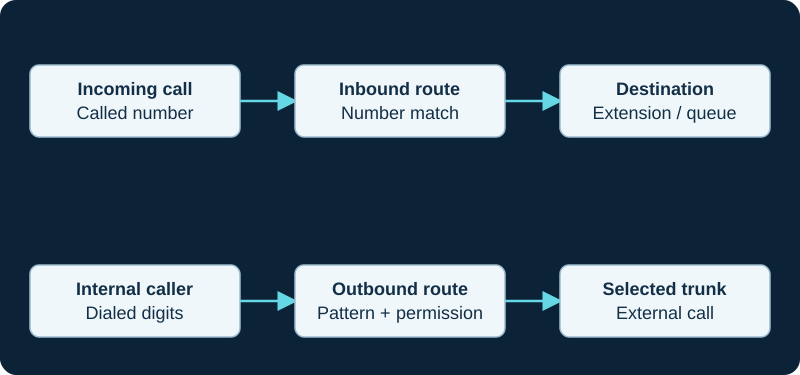
A working outbound call does not prove inbound number routing. Diagnose the direction and the matching rule independently.
Configure the trunk and apply
Create the appropriate PJSIP trunk in the Connectivity area using the supported fields for your installed module. Populate the carrier-provided values and review transport and registration behavior. An IP-authenticated service may have a different setup from a registered service.
Submit and apply configuration. Review trunk state and the underlying engine's loaded endpoint if needed. A green registration indicator verifies only that part of the relationship.
Add explicit routes
Create an inbound route for the number format actually delivered by the carrier and choose its destination. Create an outbound route whose patterns allow the intended test calls and whose trunk sequence selects the new trunk. Review caller-ID policy separately.
Avoid a broad catch-all route as a way to conceal number-format or identification errors. It can make calls appear to work while silently routing unrelated traffic.
Accept the interconnection
Test inbound, outbound, audio, DTMF, hold, transfer and any required forwarding. Confirm emergency-service arrangements directly with the carrier using approved procedures. Record what happens when the trunk is unavailable, including whether incoming failover is a carrier-side feature. Do not assume a second outbound trunk automatically protects the published incoming number.
Sources & applicability
Primary references for the technical details above. Operational examples and planning checklists are VoIP.info editorial guidance.
Examples require adaptation to your topology. No live PBX or hardware testing is claimed.