Redirection is a bootstrap decision
A manufacturer redirection service can direct a newly started phone toward an assigned provisioning system. A device-management platform may then provide ongoing configuration, inventory and update operations. These functions are related but not identical. Zero-touch describes reduced manual setup; it does not eliminate authentication, ownership checks or configuration responsibility. Before buying reused equipment, establish who can release its assignment and whether its firmware is provider-customized.
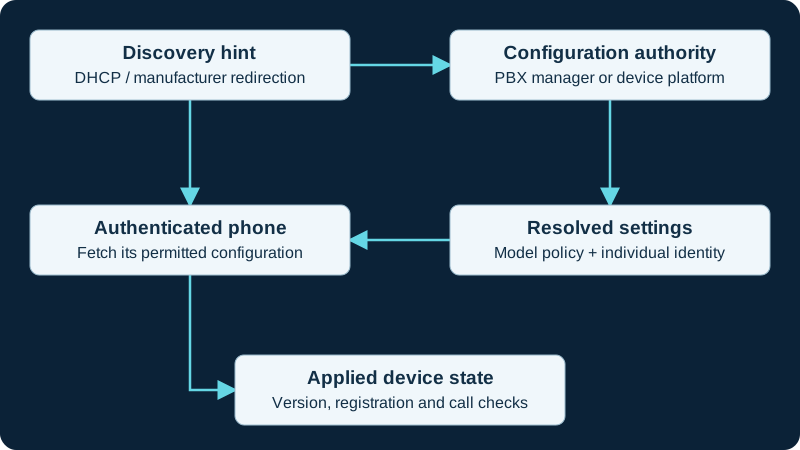
Choose one configuration owner. A discovery hint or MAC-based filename is not authentication; verify both file access and the resulting device behavior.
Compare management choices
Grandstream GDMS provides cloud management with device and account administration, scheduling and monitoring. Yealink offers device-management and redirection capabilities. The exact supported hardware, account permissions and workflow must be verified for the intended model and service. A PBX endpoint manager can be the final configuration owner even when manufacturer redirection supplies its address. Write down that relationship so a future administrator knows where to change settings and where to remove a retired device.
Handle reassignment cleanly
Obtain release through the legitimate provider, distributor or manufacturer process. A factory reset may erase local configuration and then allow the same cloud assignment to provision it again. Do not repeatedly reset a phone expecting that to change cloud ownership. For migration, verify release, assign the new service, provision a pilot and confirm that the previous credentials no longer work. For disposal, remove both the local secrets and the management assignment according to the supported process. Preserve proof of release with inventory records, without publishing serial numbers or enrollment credentials.
Keep 8450 zero-touch and local ownership explicit
The 8450 supports central, model-specific and MAC-specific provisioning alongside local configuration. Select one effective owner, protect configuration and credential material, and verify which settings and files survive reset, restore and later provisioning.
Do not collapse 9821 enrollment and service acceptance
The Wireless Phone 9821 guide separates zero-touch or Control Hub workflow from effective WLAN, registration, calling and application state.
Do not collapse VP59 enrollment and service acceptance
The VP59 diagnostic separates provisioning, identity, entitlement, registration and media.
Watch the explanation
Shows the difference between claiming a device, changing one endpoint and applying a model or site template. Useful for understanding configuration scope before a fleet rollout.
Read applicability and editorial notes →Watch this video here
Grandstream’s 2023 GDMS interface. Verify the current console, supported models and firmware before following clicks. Review used the available transcript and primary references; audio and screen readability remain unverified.

The player loads only when you choose Watch here. Playback uses YouTube’s privacy-enhanced embed; YouTube processes playback data.
This brief demonstration identifies the handset menu and final confirmation used to restore factory settings. It is useful when preparing an authorized device for reprovisioning, provided the recovery plan is ready before the reset is confirmed.
Read applicability and editorial notes →Watch this video here
GRP2615 LCD menu in the recording. Newer firmware may place Factory Reset under System → Operations or require administrator authorization. Review used the available transcript and primary references; audio and screen readability remain unverified.

The player loads only when you choose Watch here. Playback uses YouTube’s privacy-enhanced embed; YouTube processes playback data.
Sources & applicability
Primary references for the technical details above. Operational examples and planning checklists are VoIP.info editorial guidance.
- Grandstream: GDMS user guide ↗
- Yealink: reset and RPS assignment ↗
- Yealink device management ↗
- Algo current product portfolio ↗
- Algo IP console category ↗
- Algo 8450 IP Console product page ↗
- Algo 8450 IP Console product sheet ↗
- Algo 8450 IP Console user guide ↗
- Algo 8450 firmware download page ↗
- Algo firmware 5.7 release announcement ↗
- Algo central provisioning guide ↗
- Cisco Wireless Phone 9821 data sheet ↗
- Cisco Wireless Phone support index ↗
- Cisco Wireless Phone 9821 WLAN deployment guide ↗
- Cisco Wireless Phone 9821 abbreviated WLAN deployment guide ↗
- Cisco Wireless Phone 9821 quick reference guide ↗
- Cisco Wireless Phone 9821 user help ↗
- Cisco Wireless Phone 9821 regulatory and safety information ↗
- Cisco Wireless Phone 9821 headset compatibility guide ↗
- Cisco Wireless Phone end-user documentation index ↗
- Yealink SIP-VP59 datasheet ↗
- Yealink VP59 support index ↗
- Yealink SIP-VP59 V1 quick start guide V86.20 ↗
- Yealink administrator guide for VP59 and SIP-T58/CP96X V86.11 ↗
- Yealink February 25, 2026 SIP firmware release record including VP59 91.87.0.25 ↗
- Yealink VP59 Teams Edition product resources ↗
- Yealink VP59 Teams firmware and release-note record ↗
- Yealink VP59 Zoom Phone Appliance product page ↗
- Yealink VP59 Teams and Zoom version-conversion guidance ↗
- Yealink SIP IP phones auto-provisioning guide V1.5 ↗
- Yealink security certificates guide V1.4 ↗
- Yealink Zoom phone provisioning-server guidance for VP59 ↗
Examples require adaptation to your topology. No live PBX or hardware testing is claimed.