Choose who owns the message
A personal extension mailbox and a shared departmental mailbox need different access arrangements. Identify who checks messages, who can change greetings and who handles absence. Sending a message to an unattended box is not a successful customer-contact outcome.
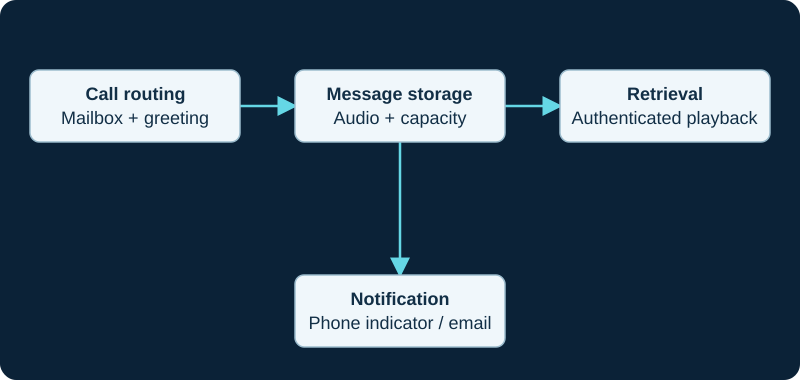
A message-waiting or email fault can occur even when the recording was saved correctly.
Design notification deliberately
Decide whether staff use the handset, an application or email notifications. If audio is attached to email, review where copies will be stored and who can access them. Delivery of a notification does not prove that a person listened or responded.
Test the caller's path
Call during open hours, after hours and when the mailbox owner is unavailable. Check greeting accuracy, recording quality and retrieval permissions. Verify what happens if storage is full or a notification service fails.
Include recovery and departures
Confirm whether mailbox content is in the backup scope and apply a retention policy. On staff departure, review access and transfer business messages appropriately. Do not leave the old user's PIN or forwarding arrangement active simply because the extension display name changed.
Keep the caller deposit and owner retrieval in one acceptance path
For a FreePBX system, use the deposit-and-retrieval diagnostic to prove the route, mailbox, greeting, stored audio and authenticated owner access. Email delivery and a phone lamp remain separate notification outcomes.
Check the endpoint response before changing voicemail policy
A Blink Reject sends 603 and is documented to cancel forwarding or voicemail, while Busy sends 486 and leaves later server decisions available. The Blink inbound-disposition diagnostic separates endpoint intent from voicemail eligibility and final routing.
Do not turn a voicemail count into delivery or playback proof
The Asterisk AMI mailbox guide distinguishes message aggregates, raw waiting state, store freshness and endpoint MWI behavior.
Do not infer message state from a user row
The AMI voicemail-user guide separates user information, backend status, counts, contents and notifications.
Watch the explanation
See the options available while the phone is ringing, including answering, sending to voicemail and redirecting the caller. The short demonstration helps desk users decide what they want to happen to a call before choosing a button.
Read applicability and editorial notes →Watch this video here
P-series workflow associated with the P320/P325/P330 family. Application availability and exact controls vary across Sangoma platforms and firmware. Review used the available transcript and primary references; audio and screen readability remain unverified.

The player loads only when you choose Watch here. Playback uses YouTube’s privacy-enhanced embed; YouTube processes playback data.
Follow the message indicator into a list of individual messages, select a recording and use playback or callback. This helps explain the difference between an integrated visual voicemail application and a simple message-waiting lamp that sends a user to an audio menu.
Read applicability and editorial notes →Watch this video here
P-series workflow associated with the P320/P325/P330 family. Application availability and exact controls vary across Sangoma platforms and firmware. Review used the available transcript and primary references; audio and screen readability remain unverified.

The player loads only when you choose Watch here. Playback uses YouTube’s privacy-enhanced embed; YouTube processes playback data.
Sources & applicability
Primary references for the technical details above. Operational examples and planning checklists are VoIP.info editorial guidance.
- Asterisk voicemail concepts ↗
- Sangoma FreePBX voicemail overview ↗
- Sangoma FreePBX Voicemail Admin ↗
- Sangoma FreePBX voicemail extension settings ↗
- FreePBX Voicemail release/17.0 metadata ↗
- FreePBX Core release/17.0 voicemail destinations ↗
- Asterisk 23 VoiceMail application ↗
- Asterisk 23 VoiceMailMain application ↗
- Blink incoming-call alert choices ↗
- Blink SIP accounts and registration state ↗
- Blink main interface and outbound account selection ↗
- Blink audio-call controls and preferences ↗
- Blink platform-specific changelog ↗
- RFC 3261 SIP response and proxy-branch behavior ↗
- ↗
- ↗
- ↗
- ↗
- ↗
- ↗
- ↗
- ↗
- ↗
- ↗
- ↗
- ↗
- ↗
- ↗