Classify one message before changing mail settings
Leave one authorized, non-confidential test voicemail with a unique spoken identifier and preserve its timestamp and timezone, called extension, full mailbox identity, caller, intended recipient and expected attachment policy. Retrieve it through the normal authenticated mailbox path. If the recording is absent, silent or stored in another mailbox, investigate call routing, media or voicemail storage first; an email change cannot repair a message that was never saved correctly.
Keep the message in local storage while tracing delivery. Separate mailbox deposit, message-waiting indication, notification generation, attachment creation, mail-command execution, local queueing, relay acceptance and inbox delivery. A lit lamp proves none of the email stages, and a generated email does not prove the recipient received or could play the recording.
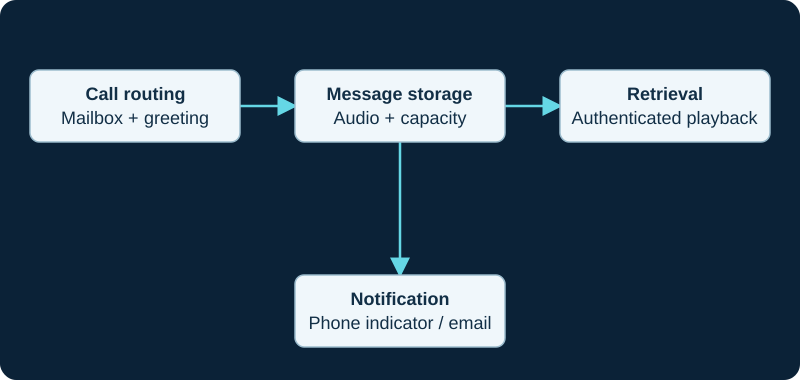
A message-waiting or email fault can occur even when the recording was saved correctly.
Read the effective mailbox policy and protect retention
Record the exact mailbox email address, pager address if used, attachment flag, delete-after-email flag, context and any mailbox-specific options. FreePBX's current voicemail API metadata treats email, attach and delete as separate fields, while Sangoma's UCP settings likewise presents Email Address, Email Attachment and Delete Voicemail as distinct controls. Its warning is consequential: delete enabled without an attachment can remove messages without sending the recording. Compare the managed extension, Voicemail Admin and UCP values without assuming every user is authorized to override administrator policy.
Keep deletion disabled during diagnosis through the supported managed control and with the system owner's approval. Do not edit generated voicemail configuration to force a test. If another module such as VM Notify or a transcription service consumes the file, identify its ownership before changing retention: Sangoma documents a VM Notify race when email deletion removes the recording before that module can copy it.
Follow Asterisk into the actual mail command
Confirm the running Asterisk and voicemail module versions, then inspect the effective voicemail configuration through the deployment's supported views. Asterisk's current sample defines mailcmd as the command invoked for outbound email and shows /usr/sbin/sendmail -t as the default example. Record the effective command, executable ownership and one bounded execution result without exposing message content, recipient data or credentials. A configured path is not proof that the process started or returned success.
Treat a custom mail command as a separate integration. Current Sangoma Scribe documentation, for example, says its transcription workflow configures the voicemail mail command when voicemail-to-email transcription is enabled. Establish which component owns the setting before replacing it. Preserve the prior value and rollback trigger; do not point Asterisk at an ad hoc script or run a production message manually as root.
Identify the installed transport and relay boundary
Determine what receives the mail command's standard input and which local transport, queue or relay path is authoritative. Sangoma documents SMTP-server settings for voicemail-to-email through System Admin Email Setup when that module and feature set are installed; that does not prove every FreePBX 17 system has the same module, edition or interface. Preserve the effective hostname, sender identity, relay destination, transport protection and authentication method without copying secrets into the incident record.
Correlate the test timestamp with a local submission or queue identifier and the exact process result. Postfix documents postqueue -p and postqueue -j as queue listings that include the last failure reason for deferred mail. No invocation belongs at notification generation or the mail-command boundary. Invocation with no queued item belongs at the local transport. A deferred item is different from a rejected submission. Capture the affected queue ID and reason before retrying; do not repeatedly flush the whole queue. Use the relay operator's current certificate and authentication requirements; do not disable trust validation, widen relay permissions or substitute a personal account to make one test pass.
postqueue -p
postqueue -j
# After repairing the demonstrated cause, retry only the affected queue ID.
postqueue -i <queue-id>
Prove relay and recipient outcomes separately
Bind the local queue identifier to the relay's message or trace identifier where the service exposes one. Preserve the explicit SMTP outcome: accepted, deferred, rejected or bounced, including the responding system and enhanced status when available. Sangoma's sender-configuration page keeps the voicemail display name, pager display name and server email address as separate inputs; align those values with the relay's permitted envelope and header identities instead of changing all three blindly. Relay acceptance or a local status=sent result transfers responsibility to the next hop; neither is inbox-delivery proof.
Check the intended recipient, quarantine, filtering, mailbox quota and attachment rule without asking the user to weaken organization-wide controls. If notification-only mail arrives but attachment mail does not, compare the generated MIME message, attachment presence, type and size through privacy-approved evidence. Do not change voicemail codecs merely because a gateway rejected a message: first prove that Asterisk produced the expected recording and that the mail path rejected or altered the attachment. A reply or read receipt is also not a general delivery guarantee.
Keep provider recipes within their stated scope
Sangoma's Microsoft 365 page is explicitly community documentation and was updated February 4, 2026. Its example uses a particular IP-authorized Exchange Online relay flow on TCP port 25 and checks /var/log/maillog, postconf -n and a status=sent outcome. Treat that page as evidence for that exact approved architecture, not as a universal Microsoft 365, authenticated-client submission or modern OAuth procedure.
Before following any provider recipe, record the tenant, relay model, permitted source address, connector owner, port, TLS policy, sender domain and current provider requirements. If the organization's mail service requires a different supported flow, use that operator's current procedure. A successful TCP connection proves only reachability, and the example's status=sent still does not prove inbox placement.
Correct one owner and prove the full path
Correct only the demonstrated owner: mailbox address or flags, managed VM Options, conflicting mail-command owner, executable or local transport, relay identity or trust, sender policy, recipient rule or attachment policy. Keep deletion after email disabled until a successful end-to-end result and an approved recovery policy exist. Preserve configuration rollback, queue handling and test-message disposal according to the organization's privacy and retention requirements.
Repeat one external-path voicemail and one known-good control mailbox. Confirm deposit, authenticated local playback, generated notification, expected attachment if enabled, mail-command result, local queue state, relay outcome, correct recipient and readable audio. Then test the intended deletion policy separately and verify that a retained or deleted local copy matches policy. No PBX, mailbox, message, mail command, local transport, relay, recipient, attachment, queue or delivery was tested for this guide.
Sources & applicability
Primary references for the technical details above. Operational examples and planning checklists are VoIP.info editorial guidance.
- Sangoma voicemail overview ↗
- Sangoma UCP voicemail settings ↗
- Sangoma System Admin Email Setup ↗
- Sangoma System Admin module overview ↗
- Sangoma voicemail extension settings ↗
- Sangoma Voicemail Admin ↗
- Sangoma FreePBX voicemail API metadata ↗
- Sangoma VM Notify deletion race ↗
- Sangoma Scribe voicemail-to-email ownership ↗
- Sangoma PBX email sender and destination settings ↗
- Sangoma community: FreePBX with Microsoft 365 Exchange Email ↗
- Asterisk voicemail overview ↗
- Asterisk voicemail configuration sample ↗
- Postfix postqueue command ↗
- Postfix debugging guidance ↗
Examples require adaptation to your topology. No live PBX or hardware testing is claimed.