Map mailbox identity, dialplan context and endpoint separately
Asterisk identifies an app_voicemail mailbox as mailbox@context. The voicemail context is not automatically the dialplan context, PJSIP endpoint name or extension number. Record the intended mailbox, voicemail context, endpoint, owner and unanswered-call destination before connecting them. Omitting the voicemail context makes the application use default; that documented fallback can silently target the wrong namespace.
Use the exact loaded configuration and generated dialplan, not a remembered file path. On a FreePBX-managed host, keep GUI and module ownership intact rather than editing generated voicemail or dialplan files. A mailbox existing in storage does not prove that an unanswered call reaches it, that its owner can retrieve it or that an endpoint watches its message state.
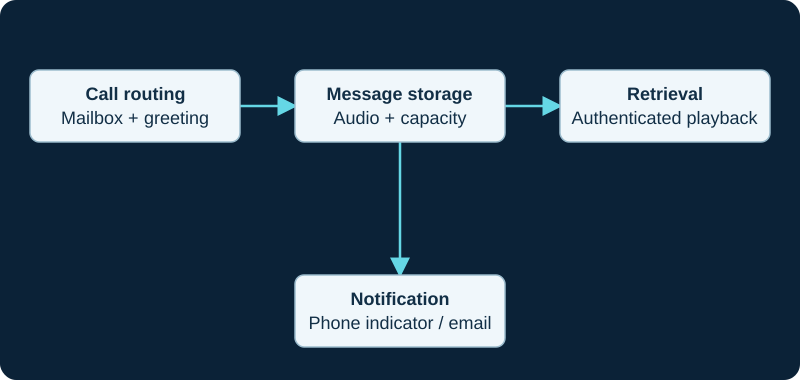
A message-waiting or email fault can occur even when the recording was saved correctly.
Treat deposit routing and greeting selection as call behavior
Asterisk 22 documents VoiceMail() with one or more mailboxes. When several destinations are supplied, the greeting comes from the first mailbox; this is not a shared-mailbox policy or proof that every recipient received an independently usable copy. Preserve the original called extension, Dial result, branch into voicemail, mailbox list, greeting selected and final application status.
Busy and unavailable greetings are selected with different options. The e option presents greetings as early media and answers only before accepting a recording, so provisional media, answer, recording start and billable-event interpretation remain separate. DTMF 0 or * can leave the application for dialplan extensions o or a; expose those exits only where the surrounding context authorizes them.
Use VMSTATUS and stored evidence without overstating either
After VoiceMail() completes, Asterisk exposes VMSTATUS values including SUCCESS, USEREXIT and FAILED. Preserve that value with the channel identifiers and timestamp, but do not treat SUCCESS as proof of intelligible audio, correct recipient ownership, notification delivery, retention or later playback.
A controlled acceptance follows one call from the unanswered branch through the expected greeting, beep, recording, hangup and stored message. Verify the actual mailbox and playable audio using an authorized retrieval path. A nonexistent mailbox stops dialplan execution according to the application documentation; handle that state deliberately rather than sending every failure into a generic success announcement.
exten => 7201,1,VoiceMail(2001@office,u)
 same => n,NoOp(VoiceMail status: ${VMSTATUS})
 same => n,Hangup()
Protect retrieval as a separate authorization surface
VoiceMailMain() provides mailbox-owner retrieval and settings such as greetings and the PIN. Asterisk warns that its s option skips the PIN prompt and requires extreme caution because anyone who can reach that extension may retrieve messages. Treat dialplan reachability, caller identity and mailbox authentication as different controls; do not use caller ID alone as a mailbox secret.
Test the intended internal and remote retrieval routes, failed credentials, lockout or rate controls supplied by the surrounding system, greeting changes and exit destinations. Use unique mailbox credentials and a controlled reset process. A successful telephone login does not authorize copying voicemail audio, metadata or credentials into a support ticket.
Keep storage, email and MWI as independent delivery paths
Stored audio, email notification or attachment, and SIP message-waiting indication are separate outcomes. First prove that the voicemail application committed a playable message to the active storage backend. Then verify any mail command or relay result and the PJSIP mailbox mapping independently. Email creates another copy with its own access, retention and deletion policy.
For a stale lamp, the focused Asterisk PJSIP MWI investigation follows authoritative counts, solicited or unsolicited ownership, NOTIFY content and endpoint rendering. A correct new-message count is not proof that a NOTIFY was sent, while a 200 response to NOTIFY is not proof that a phone changed its lamp.
Operate capacity, retention and recovery as mailbox policy
Set message length, mailbox capacity, retention, greeting ownership and archive rules against the active storage backend and organization policy. Exercise the full-mailbox path and confirm what the caller hears, what VMSTATUS records, whether an operator or alternate destination remains available and how an administrator resolves the condition without deleting unrelated messages.
Back up configuration, greetings, messages, keys and the relevant database or storage state consistently, then restore into isolation before reconnecting live routes or notifications. No PBX, dialplan, mailbox, greeting, PIN, stored message, storage backend, email path, MWI exchange, capacity limit, recovery point or live call was inspected or tested for this guide.
Apply the application contract to a FreePBX-managed mailbox
The FreePBX voicemail diagnostic binds VoiceMail() and VoiceMailMain() evidence to the GUI-owned extension, busy or unavailable destination, generated dialplan and loaded route. VMSTATUS, stored audio and successful owner retrieval remain separate acceptance stages.
Choose mailbox evidence that matches the question
Use the AMI mailbox-query guide for count and waiting snapshots while keeping detailed contents, folders, storage and MWI delivery separate.
Keep configured users separate from contents
Use the AMI voicemail-user guide for list and IMAP-status boundaries, then use counts, summaries and MWI evidence for their own questions.
Bound external mailbox refresh
The AMI MWI control guide records the backend-specific refresh scope and keeps accepted control separate from stored messages and phone indication.
Preserve message identity across mailbox operations
The AMI voicemail message operations guide binds summary, forward, move and remove to context, mailbox, folder and message ID.
Sources & applicability
Primary references for the technical details above. Operational examples and planning checklists are VoIP.info editorial guidance.
- Asterisk 22 VoiceMail application ↗
- Asterisk 22 VoiceMailMain application ↗
- Asterisk voicemail configuration ↗
- Asterisk message waiting indication ↗
- Asterisk 22 res_pjsip MWI configuration ↗
- Sangoma FreePBX voicemail overview ↗
- Sangoma FreePBX Voicemail Admin ↗
- Sangoma FreePBX voicemail extension settings ↗
- FreePBX Voicemail release/17.0 metadata ↗
- FreePBX Core release/17.0 voicemail destinations ↗
- Asterisk 23 VoiceMail application ↗
- Asterisk 23 VoiceMailMain application ↗
- ↗
- ↗
- ↗
- ↗
- ↗
- ↗
- ↗
- ↗
- ↗
- ↗
- ↗
- ↗
- ↗
- ↗
- ↗
- ↗
- ↗
- Asterisk 23 VoicemailBoxSummary action ↗
- Asterisk 23 VoicemailForward action ↗
- Asterisk 23 VoicemailMove action ↗
- Asterisk 23 VoicemailRemove action ↗
Examples require adaptation to your topology. No live PBX or hardware testing is claimed.