Name the configuration owner and every representation
Start with the interface that owns the setting. Standalone Asterisk may read hand-maintained files, templates or includes; FreePBX and other managed platforms can generate Asterisk files from their own database and interface. Preserve the supported source, generated file, include order, loaded module object and observed call behavior as separate evidence. A saved GUI value or edited file is not proof that the running process accepted it.
Record the exact Asterisk build, package owner, active configuration directory, relevant module versions and any external generator before editing. Direct changes to generated files can disappear at the next apply, while a correct source value can still produce an unexpected generated stanza. Back up the authoritative source and the current generated output without copying secrets into a change ticket.
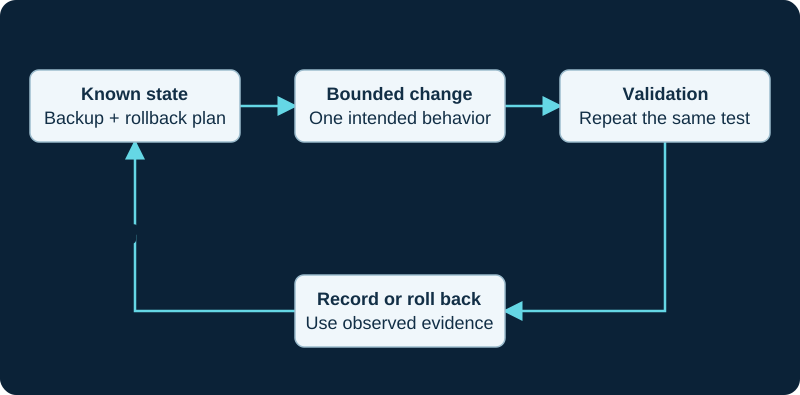
An example operational loop. Follow the supported reload or restart behavior for the affected component.
Define one intended effect and an unaffected control
State the exact endpoint, trunk, route, context, transport or application behavior that should change. Record a known-good neighboring flow that must remain unchanged, the calls that can be interrupted, external dependencies and the rollback trigger. A dialplan edit, endpoint option, TLS file replacement, transport bind change, module update and full software upgrade do not share one activation path.
Inspect the current loaded state before editing. Use the module-specific CLI and exact object names rather than a screenshot or remembered default. Preserve active calls, registrations, contacts, transports, route or dialplan output and relevant log level so the post-change comparison has a real baseline.
Validate source and generated input before activation
Apply the supported generator or edit path, then compare the intended source with the resulting Asterisk input. Check section names, includes, object references, duplicate identifiers, file ownership and permissions without exposing credentials. An apply operation that completes is not proof that every module parsed or accepted its part of the configuration.
Use bounded logs around the activation step and retain warnings, rejected options and object-creation failures. If the generator or parser output is uncertain, stop and restore the known-good input instead of stacking more edits or restarting until the visible symptom changes.
Choose the narrowest supported reload
Asterisk documents dialplan reload for re-reading a file-backed dialplan and dialplan show <context> for checking the loaded result. Other modules expose their own reload handlers through module commands. A module reload invokes that module’s reload behavior; it is not equivalent to unloading and loading the module, and it does not imply that every option is reloadable.
PJSIP transport sections illustrate the boundary. Asterisk documents allow_reload as disabled by default and notes that transport configuration cannot normally be reloaded unless it is enabled. Even then, protocol, bind, TLS and other transport fields have version- and field-specific behavior. Consult the exact installed module help and current reference rather than using a broad reload as a universal apply command.
Treat restart modes as distinct service events
Asterisk documents immediate, graceful and when-convenient stop or restart modes. An immediate restart ends active calls. A graceful restart prevents new calls while existing calls finish, then restarts. A when-convenient restart waits for a period with no active calls but does not prevent new calls from arriving. core abort shutdown can cancel a pending graceful or when-convenient action.
Choose the mode against the real traffic and maintenance plan; the labels are not interchangeable zero-downtime guarantees. A restart also rebuilds registrations, contacts, sockets, timers and application state and can expose carrier, DNS, database or certificate dependencies. Do not restart merely to conceal why a narrower supported reload failed.
Prove loaded state, behavior and rollback separately
After activation, inspect the exact loaded object, context or module state and compare it with the intended change. Then run the bounded affected call flow and the unaffected control. Registration, contact availability, route selection, channel creation, answer, media, feature operation and clean hangup remain separate acceptance stages. A successful CLI command or one completed call does not prove the entire service.
If loaded state or behavior differs, capture the error and restore the authoritative source, generated output and external dependency values through the supported path. Re-activate using the known method and prove the baseline again. Record source change, generated delta, Asterisk version, activation command, active-call handling, observations, rollback and owner. No PBX, managed platform, generator, file, module, transport, endpoint, route, registration, call or media path was inspected or tested for this guide.
Track AstDB outside the text-configuration reload boundary
The AstDB diagnostic verifies persistent local keys, owning modules, restart state and restore order separately from loaded configuration files.
Identify the owner of every ODBC configuration layer
The func_odbc guide maps func_odbc.conf, res_odbc.conf, the system DSN, driver and database schema before any reload or restart.
Review transaction defaults with their DSN owner
The ODBC transaction guide traces forcecommit and isolation from res_odbc.conf through any per-transaction override and loaded dialplan.
Include Realtime schema and cache in the lifecycle
The PJSIP Realtime guide separates module load order, branch-matched schema, mapping order, reload behavior and cache invalidation.
Add file mutation as a separate lifecycle boundary
The AMI configuration-file guide keeps file text, template inheritance, reload and effective runtime independently observable.
Add module-loader policy to the configuration lifecycle
The AMI module-control guide distinguishes runtime load state from durable modules.conf policy and restart behavior.
Keep manager-account changes inside the configuration owner
The AMI missing-action diagnostic records whether a repair changed manager authorization, action registration or only client discovery.
Treat manager accounts as owned configuration
The AMI login diagnostic separates an account or ACL update from listener, client and session changes.
Do not confuse a reported setting with its configuration owner
The AMI core-evidence guide treats CoreSettings as a runtime report that still requires configuration-owner and restart or reload evidence.
Scope app_queue activation and postconditions explicitly
The AMI queue reload and reset guide records exact queue breadth and member, rule and parameter subsections before verifying runtime state.
Include branch and module-build ownership in change evidence
A valid configuration cannot activate a module or option omitted from the installed build. Use the missing-by-version diagnostic before changing generated or owned configuration.
Track AstDB state outside static configuration
The AMI AstDB diagnostic separates configured storage, runtime writers, restart persistence and restore history.
Keep module runtime state separate from startup policy
The AMI module lifecycle guide separates runtime actions from modules.conf and restart behavior.
Trace the configuration preprocessor before reload
The include, tryinclude and exec guide preserves the resolved source graph, generated fragments, effective sections and loaded state separately.
Treat logger reload and rotation as separate lifecycle evidence
The AMI LoggerRotate guide distinguishes logger reload, logger rotate, module reload and file verification.
Treat an Asterisk 24 candidate as a branch transition
The Asterisk 24 diagnostic preserves configuration ownership, generated output, module state and rollback before correction.
Keep reload and restart evidence separate
The stop-and-restart guide records reload status, process replacement, module initialization and call-path acceptance independently.
Sources & applicability
Primary references for the technical details above. Operational examples and planning checklists are VoIP.info editorial guidance.
- Asterisk CLI syntax and help commands ↗
- Asterisk dialplan reload and loaded-context verification ↗
- Asterisk module-loader configuration and reload commands ↗
- Asterisk PJSIP configuration sections and transport reload behavior ↗
- Asterisk 22 res_pjsip configuration reference ↗
- Asterisk stopping and restarting from the CLI ↗
- Asterisk internal database overview ↗
- Asterisk DB dialplan function ↗
- Asterisk DB_EXISTS dialplan function ↗
- Asterisk DB_DELETE dialplan function ↗
- Asterisk DB_KEYS dialplan function ↗
- Asterisk Configuring res_odbc ↗
- Asterisk func_odbc.conf sample ↗
- Asterisk res_odbc.conf sample ↗
- Asterisk 23 ODBC_FETCH function ↗
- Asterisk 23 SQL_ESC function ↗
- Asterisk 23 SQL_ESC_BACKSLASHES function ↗
- Asterisk security advisory AST-2022-003 ↗
- Asterisk database transactions ↗
- Asterisk latest ODBC transaction function ↗
- Asterisk latest ODBC_Commit application ↗
- Asterisk latest ODBC_Rollback application ↗
- Asterisk Realtime database configuration ↗
- Asterisk setting up PJSIP Realtime ↗
- Asterisk Sorcery overview and mapping ↗
- Asterisk Sorcery caching ↗
- Asterisk Realtime schema management with Alembic ↗
- Asterisk PJSIP troubleshooting guide ↗
- Asterisk extconfig.conf sample ↗
- Asterisk sorcery.conf sample ↗
- ↗
- ↗
- ↗
- ↗
- ↗
- ↗
- ↗
- ↗
- ↗
- ↗
- ↗
- ↗
- ↗
- ↗
- ↗
- ↗
- ↗
- ↗
- ↗
- ↗
- ↗
- ↗
- ↗
- ↗
- ↗
- ↗
- ↗
- ↗
- ↗
- ↗
- ↗
- ↗
- ↗
- ↗
- ↗
- ↗
- ↗
- ↗
- ↗
- ↗
- ↗
- ↗
- ↗
- ↗
- ↗
- ↗
- ↗
- ↗
- ↗
- Asterisk: Versions and support status ↗
- Asterisk: Software Configuration Management Policies ↗
- Asterisk: What to Download ↗
- Asterisk: Supported Platforms ↗
- Asterisk: Updating or Upgrading Asterisk ↗
- Asterisk 23 Documentation ↗
- Asterisk: Troubleshooting Module Loading ↗
- Asterisk 23 AMI DBGet action ↗
- Asterisk 23 AMI DBGetTree action ↗
- Asterisk 23 AMI DBPut action ↗
- Asterisk 23 AMI DBDel action ↗
- Asterisk 23 AMI DBDelTree action ↗
- Asterisk SQLite3 AstDB back end ↗
- ↗
- ↗
- ↗
- ↗
- Asterisk main configuration file ↗
- Asterisk directory and file structure ↗
- Asterisk configuration sections and settings ↗
- Asterisk adding to an existing section ↗
- Asterisk 24 GetConfig AMI action ↗
- Sangoma FreePBX Configuration File Editor ↗
- Asterisk current LoggerRotate AMI action ↗
- Asterisk 22 LoggerRotate AMI action ↗
- Asterisk current AMI actions index ↗
- Asterisk basic logging commands ↗
- Asterisk logging configuration ↗
- Asterisk bounded debug collection ↗
- Asterisk current ARI logging API ↗
- Asterisk current logger implementation ↗
- Asterisk current logger.conf sample ↗
- Asterisk initialization and logrotate installation ↗
- Asterisk 24 branch documentation ↗
- Asterisk — upgrading to Asterisk 24 ↗
- Asterisk — what is new in Asterisk 24 ↗
- Asterisk Development Team — Asterisk 24.0.0-rc3 release announcement, 22 October 2026 ↗
- Asterisk — 24.0.0-rc3 change log ↗
- Asterisk — release artifact index ↗
- Asterisk — current download artifact index ↗
- Asterisk — release management and change-log artifacts ↗
- Asterisk running from the command line and as a service ↗
- Asterisk AMI FullyBooted event ↗
- Asterisk AMI Shutdown event ↗
- Asterisk Development Team — Asterisk 24.0.0-rc4 release announcement, 29 October 2026 ↗
- Asterisk — 24.0.0-rc4 change log ↗
Examples require adaptation to your topology. No live PBX or hardware testing is claimed.