A domain supplies context
A multi-tenant PBX can reuse extension numbers across domains, so extension 100 alone is not always a complete identity. Record the tenant domain with the user and device assignment. Administrative users and SIP extensions are distinct records with different responsibilities. Before adding an extension, select the intended domain and verify its routing and permission defaults. A correct password used with the wrong domain can fail authentication or target the wrong resource.
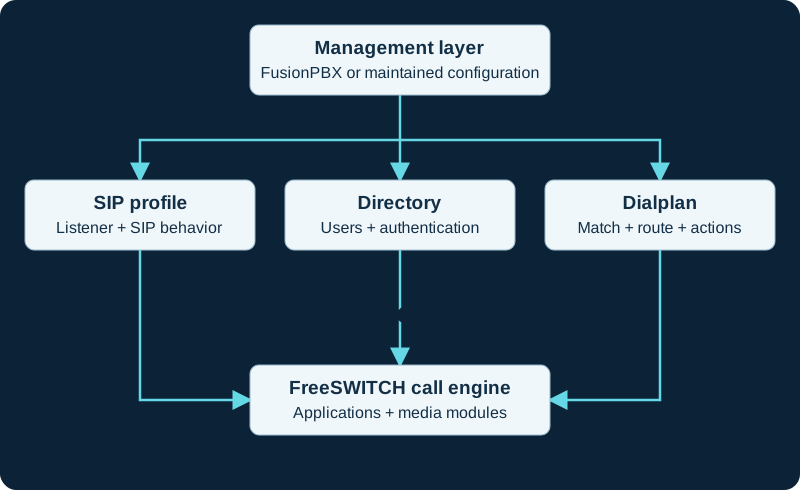
Conceptual responsibilities, not a file-loading sequence. FusionPBX is an administration layer; edits to generated configuration can be replaced by its management workflow.
Provision the intended identity
Create a limited test extension, assign its device and verify the resolved provisioning settings. Check authentication identity, SIP server/domain, display identity and calling permissions separately. Confirm the phone registers to the expected runtime service and receives calls routed to that tenant. Test voicemail, ring groups or IVR destinations within the same domain. A shared gateway or global destination needs deliberate policy; convenience should not silently grant every tenant the same outbound authority or access to another tenant's calls.
Test isolation as a behavior
Use two test tenants with overlapping extension numbers. Verify each receives its own calls and cannot inspect the other's recordings, device credentials or administrative data through ordinary permissions. Test an unauthorized destination as well as a successful local call. Record any intentional cross-domain service and who may use it. If a problem appears, correlate the web application's domain selection, generated routing and FreeSWITCH channel evidence before changing shared global defaults.
Sources & applicability
Primary references for the technical details above. Operational examples and planning checklists are VoIP.info editorial guidance.
Examples require adaptation to your topology. No live PBX or hardware testing is claimed.