Location independence with a clear support boundary
Start with where calls happen
A remote team needs a repeatable calling experience across networks the organization does not fully control. Map where people answer, whether they share numbers, and who takes responsibility when a caller cannot hear them. Separate an individual employee number from a team number that needs coverage during absence. A successful design keeps the business reachable without making personal mobile numbers the default route.
Features that matter
Evaluate desktop and mobile clients, shared answering, attended transfer, voicemail ownership and availability controls. Test a real handoff from a home worker to an office colleague, including a colleague who is already busy. Define what happens when an app is signed out or a laptop sleeps; a missed notification should lead to a planned destination rather than an unexplained dead end.
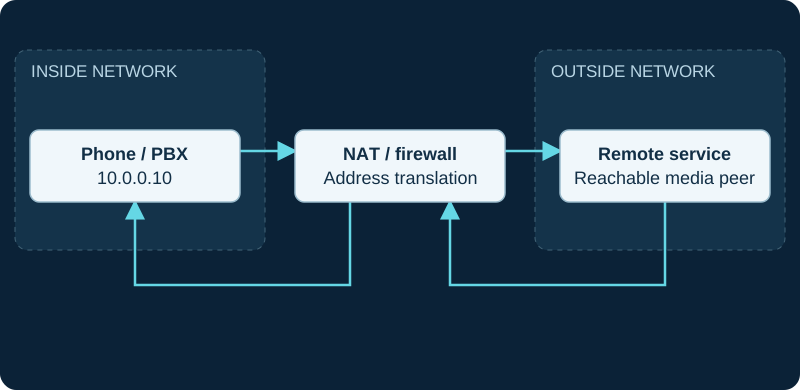
10.0.0.10 is an illustrative private address. Both directions traverse the NAT/firewall; signaling success does not validate SDP media reachability.
Network requirements
Measure the home connection during ordinary household activity, not only while idle. Check upload contention, wireless coverage and any required VPN path. Collect the time, destination and network used when reporting a fault so support can identify the failing call leg. A second internet path helps only if the application can reconnect and the organization has agreed how calls are handled during the interruption.
Choose the endpoint for the workspace
A supported softphone and a well-matched headset can suit a mobile desk. A provisioned desk phone may better serve someone who answers continuously. Pilot audio-device switching, mute, incoming-call alerts and headset controls on the actual operating system. Do not assume a generic SIP phone can register to every hosted service.
Hosted or self-hosted?
Hosted service can reduce central PBX maintenance, but your team still owns identities, client configuration and local connectivity. Self-hosting adds responsibility for secure remote access, certificates, NAT traversal and monitoring. Choose it when those responsibilities have a named operator and a support plan, rather than assuming an exposed extension will work safely from anywhere.
Common mistakes and buyer questions
Avoid testing only on the office LAN or using unconditional personal-number forwarding without checking caller identity and billing. Ask how administrators revoke a lost device, recover a locked-out worker and distinguish a provider incident from a home-network problem. Establish a location-management process for emergency calling using the provider’s documented requirements; do not improvise emergency test calls.
Use these resources next
Phone systems for remote staff →Remote extension works locally but fails away from the office →IP phone headsets and accessories →Check network readiness →Browse researched providers →Carry your required call flow, endpoint list and support responsibilities into provider comparison. A listed provider is a research starting point; verify fit and current terms for your configuration.
Technical sources and further reading
The planning questions are VoIP.info editorial guidance. These references support the underlying technologies; capabilities and versions should be checked for your deployment.