Prepare the lab
Use Asterisk 22 LTS with res_pjsip loaded and a phone on a restricted reachable network. The example assumes a previously configured transport. It adds no public listener, paid trunk or outbound route. Back up existing files and choose unused object names before integrating anything.
The phone's registrar field points to the PBX's reachable address. Its SIP user and authentication ID must match the intended configuration; those fields can have different names in a handset interface. Replace the obvious password placeholder with a unique strong secret locally.
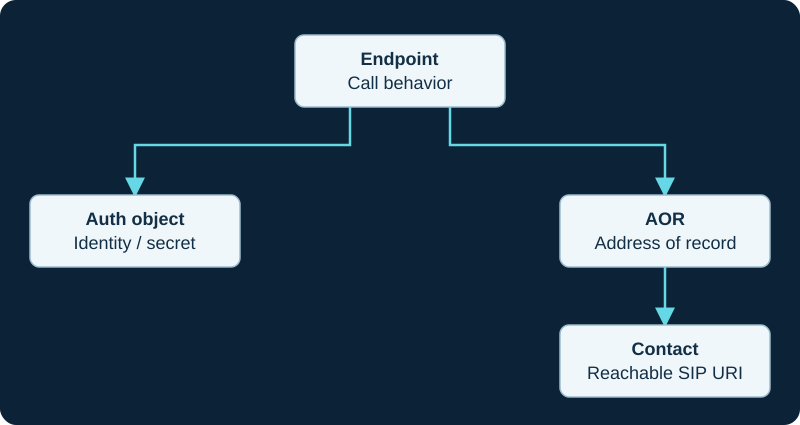
Logical configuration relationships, not a complete pjsip.conf. An outbound trunk can use a separate outbound-auth relationship.
Define the phone objects
The endpoint references an auth object and an AOR. Its incoming context is deliberately limited to internal lab calling. One dynamic contact is allowed for this single-device example. Do not raise contact limits simply to conceal stale or duplicate registrations.
This fragment is documentation based, not a complete PBX configuration. It requires a suitable existing transport and matching dialplan. A device behind NAT can require additional topology-specific settings; start on the same restricted network first.
[2101]
type=endpoint
context=lab-internal
disallow=all
allow=ulaw
auth=auth-2101
aors=2101
direct_media=no

[auth-2101]
type=auth
auth_type=userpass
username=2101
password=REPLACE_WITH_UNIQUE_STRONG_SECRET

[2101]
type=aor
max_contacts=1
Register and inspect
Apply the configuration through the correct standalone Asterisk lifecycle and inspect logs for rejected objects. On the phone, enter the registrar, user, auth ID and secret, then request registration. Inspect pjsip show aor 2101 and pjsip show contacts for the expected device address.
A first authentication challenge can be normal. Repeated challenges without a final success need a comparison of username, realm, secret and supported authentication behavior. Never paste the secret into a public support report.
Prove calls separately
Create a second internal endpoint and use the dialplan guide to permit only the intended internal destinations. Test both directions, sound, hold and hangup. Restart the handset and confirm registration recovers. Do not connect a chargeable trunk until call permissions have been reviewed.
Sources & applicability
Primary references for the technical details above. Operational examples and planning checklists are VoIP.info editorial guidance.
- Asterisk: PJSIP configuration examples ↗
- Asterisk: PJSIP object relationships ↗
- Asterisk: PJSIP troubleshooting ↗
Examples require adaptation to your topology. No live PBX or hardware testing is claimed.